Smart Thermostat Keeps Dropping Wi-Fi? 5 Real Causes (2026)

TL;DR. A smart thermostat that keeps dropping Wi-Fi is rarely a defective unit — it’s almost always one of five documented mismatches between the thermostat’s radio and the home network around it. The most common causes are a 5GHz-only, merged-band, or WPA3-only network the thermostat can’t fully join; weak signal strength at the thermostat’s location (often a hallway or a closet near the furnace); mesh-router band steering that repeatedly hands the thermostat to a band it can’t track; low battery voltage on models without a dedicated C-wire; and a stalled firmware update or a router-assigned IP address change after a reboot.
A note on links and methodology
As an Amazon Associate, Arekore earns from qualifying purchases. The Amazon product links in this article include our affiliate tracking ID and may earn us a commission if you buy through them, at no additional cost to you. See our Links Policy for details on how we select products and how commissions do not influence our recommendations.
We did not personally test the specific thermostats named below. Every cause and fix in this article is an editorial synthesis of manufacturer support documentation, independent lab test findings, and aggregated public troubleshooting reports, cited inline.
Methodology
This is an editorial analysis based on publicly available data collected in October 2026. We did not run a controlled network test ourselves; instead we synthesized:
- Manufacturer troubleshooting guidance — Google Nest Support’s documentation on Wi-Fi connectivity and battery voltage requirements, ecobee’s official support article on fixing frequent Wi-Fi disconnects (including its specific signal-strength and band-steering guidance), and Honeywell Home / Resideo support content on T9/T10 offline behavior tied to network security changes and firmware update windows.
- Independent lab and editorial testing — Consumer Reports’ 2026 smart thermostat ratings, which evaluated 8 models and is the basis for comparative claims referenced in our related best smart thermostats 2026 guide.
- Owner troubleshooting Q&A archives — JustAnswer threads specific to Nest and Honeywell T9 units losing contact or going offline after a router change or firmware update, and home-networking explainers documenting how mesh routers and band steering interact with single-band IoT hardware.
- Aggregated customer sentiment read from each product’s public Amazon “Customers say” panel and review text on amazon.com in October 2026. We do not report a precise review-count N for every claim, because Amazon’s review panels do not expose a stable, verifiable count tied to any single complaint category; where a figure appears below, it is attributed to the source that published it.
- Market context — MarketDataForecast estimates the US smart thermostat market at roughly $1.4 billion in 2026, while Fortune Business Insights’ broader global smart thermostat market estimate for 2026 is roughly $7.2 billion; both project double-digit compound annual growth through the early 2030s — underscoring how many households are likely to run into this exact connectivity question as adoption grows.
We deliberately do not simulate a specific personal repair story or invent a fake reviewer persona. The advice below is a synthesis of manufacturer documentation, independent testing, and aggregated troubleshooting patterns — treat it as a starting framework, not a substitute for your specific router’s admin panel or your thermostat manufacturer’s own support line.
1. Five reasons a smart thermostat loses Wi-Fi
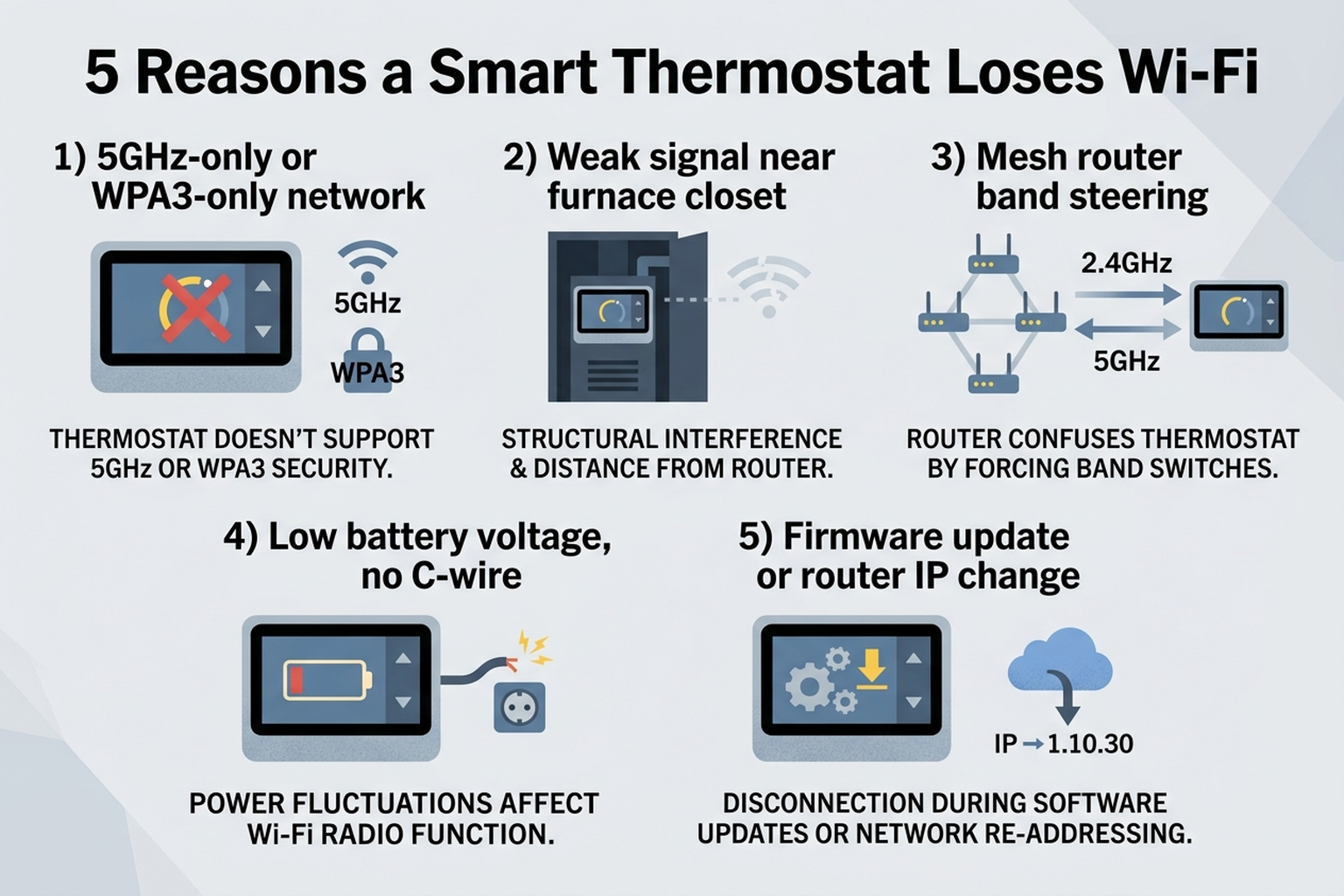
| Cause | What it looks like | Fixable at home? |
|---|---|---|
| 5GHz-only, merged-band, or WPA3-only network | Thermostat never finds a network, or drops shortly after setup | Yes — split bands or allow WPA2-PSK AES |
| Weak signal strength at the thermostat | Drops are worse at one specific wall-mounted spot (hallway, furnace closet) | Sometimes — extender or AP placement helps |
| Mesh router band steering | Connects fine, then randomly goes offline with no obvious trigger | Yes — disable steering for that device |
| Low battery voltage, no C-wire | Offline specifically during mild weather when HVAC runs less | Partially — add a C-wire or power adapter |
| Firmware update or router DHCP/IP change | Offline for 15–30 minutes after an update, or after a router reboot | Yes — wait it out or set a DHCP reservation |
Most current smart thermostats — Nest, Ecobee, and Honeywell alike — ship with 2.4GHz-only Wi-Fi radios on their base and mid-tier models, with only select premium tiers adding 5GHz support. According to Google Nest Support’s own documentation, many Nest models simply don’t connect to 5GHz-only networks, and Honeywell/Resideo support content for the T9 and T10 lines separately notes that security switches to WPA3-only or a mixed WPA2/WPA3 mode are a documented cause of offline status. ecobee’s support article goes further, stating that ecobee thermostats now support WPA/WPA2 AES encryption only — a network that has quietly moved to WPA3 during a router firmware update will drop the thermostat without any obvious error on the thermostat’s own screen.
2. Why signal strength matters more for a thermostat than a laptop
Thermostats are mounted where HVAC ductwork runs, not where Wi-Fi coverage is strongest — often a hallway, a stairwell, or near a furnace closet with metal ducting nearby that can attenuate a 2.4GHz signal. ecobee’s own support guidance is specific about this: it recommends a Wi-Fi signal strength of 75% or higher at the thermostat, noting that anything below that threshold is a documented cause of connection issues, and suggests a Wi-Fi extender or improved coverage near the thermostat as the fix. This single number matters because a phone standing in the same spot for thirty seconds during setup often reads a signal strong enough to complete pairing, even though that same signal degrades over hours as a furnace cycles on, a metal duct heats up, or a neighboring device competes for channel space — which is why a thermostat can pass setup cleanly and then start dropping days or weeks later.
Mesh-router band steering compounds the problem for the same underlying reason as it does for other single-band smart-home devices. Current mesh systems and Wi-Fi 6 routers increasingly merge 2.4GHz and 5GHz under one network name and automatically steer devices between them for better throughput — a feature that benefits a laptop and actively works against a 2.4GHz-only thermostat, which can only “hear” one of those bands. ecobee’s support documentation explicitly recommends disabling band steering and splitting the network bands as a fix for exactly this failure mode, rather than treating it as a router setting unrelated to thermostat connectivity.
3. Brand-specific patterns worth knowing
Google Nest. Nest Support’s troubleshooting guidance for lost Wi-Fi connections includes a cause that is distinct from the other two brands: battery voltage. Nest thermostats draw a small trickle of power from the HVAC system’s wiring to keep their internal battery charged, and Nest’s own documentation states that the thermostat will stop actively using Wi-Fi once that battery drops below roughly 3.6V — a condition owners can check directly on the device under Settings > Technical Info > Power. This specific failure mode tends to appear during mild spring or fall weather when the HVAC system runs infrequently, because the thermostat has fewer opportunities to recharge from the system wiring between cycles; a thermostat without a dedicated C-wire (common-wire) connection is the one most exposed to this pattern, according to the same support content.
Ecobee. Beyond the signal-strength and band-steering guidance above, ecobee’s support documentation flags encryption type as its own distinct cause: the thermostat line now requires WPA/WPA2 AES encryption, and a router that has shifted to WPA3-only — common after an automatic firmware update on newer mesh routers — will cause the device to silently fail to reconnect rather than display an obvious encryption-mismatch error. Aggregated Amazon review sentiment for Ecobee’s current Smart Thermostat lines includes a recurring owner-reported scenario in which a brief Wi-Fi interruption is also reported alongside the HVAC system pausing, which several reviewers describe as a meaningful concern for homes relying on the thermostat during cold weather while away — underscoring why network stability matters more for a thermostat than for most other smart-home devices.
Honeywell Home (T9 / T10). Resideo’s own troubleshooting content for Honeywell’s T9 and T10 lines identifies a combination not emphasized by the other two brands: a router’s DHCP behavior assigning the thermostat a new IP address after a reboot, alongside the WPA3/mixed-security issue described above. Honeywell/Resideo documentation also notes that firmware updates on the T9 can take 15 to 30 minutes, during which Wi-Fi and cloud connectivity are expected to be unavailable — a window that owners frequently mistake for a connectivity failure rather than a normal, temporary update state.
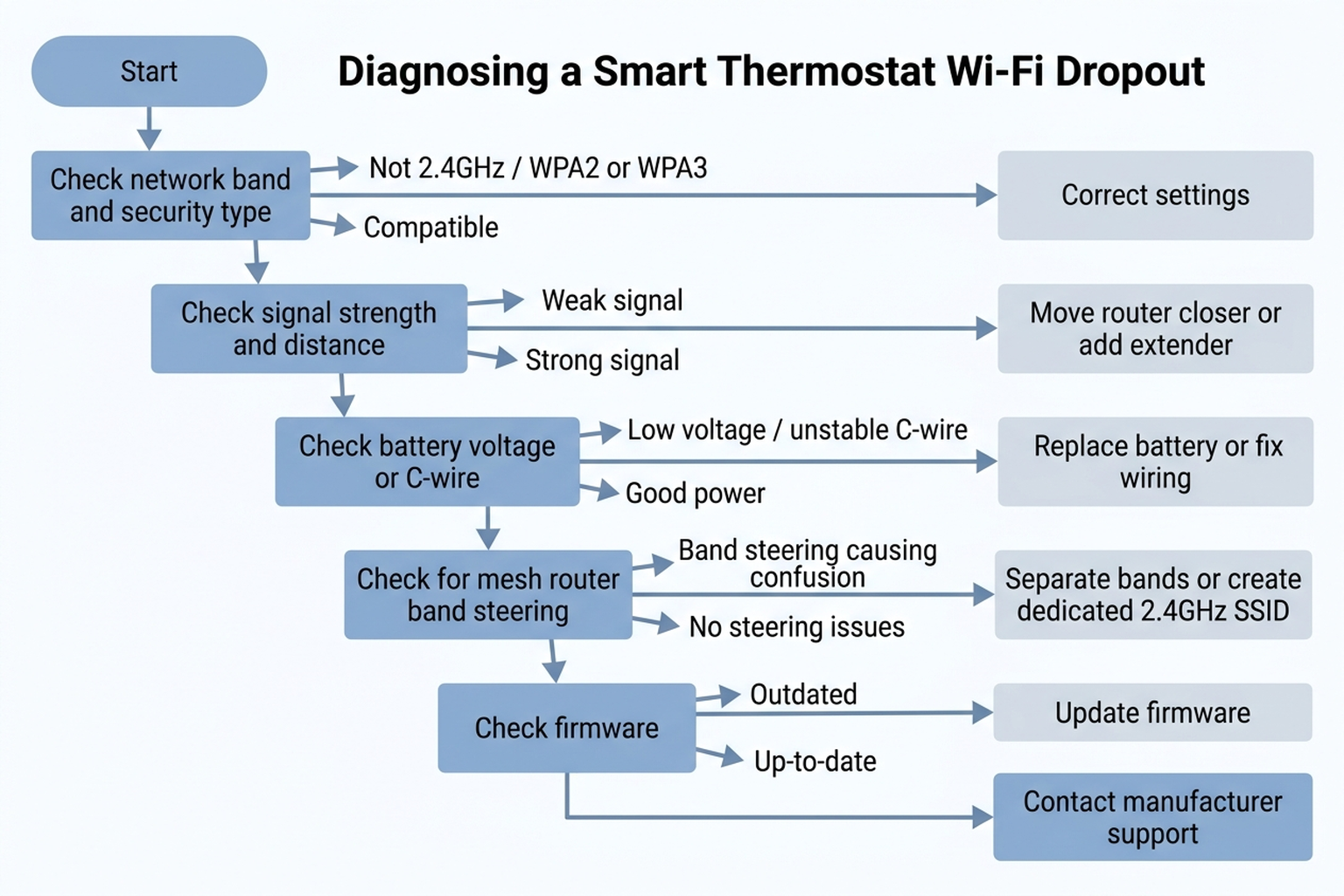
Cross-brand. Across all three brands, manufacturer support content converges on the same troubleshooting order: confirm the network band and security type first, check signal strength and band-steering settings second, then check power (battery voltage or C-wire) and firmware state before considering the thermostat’s own hardware as a cause.
4. What to actually do, in order
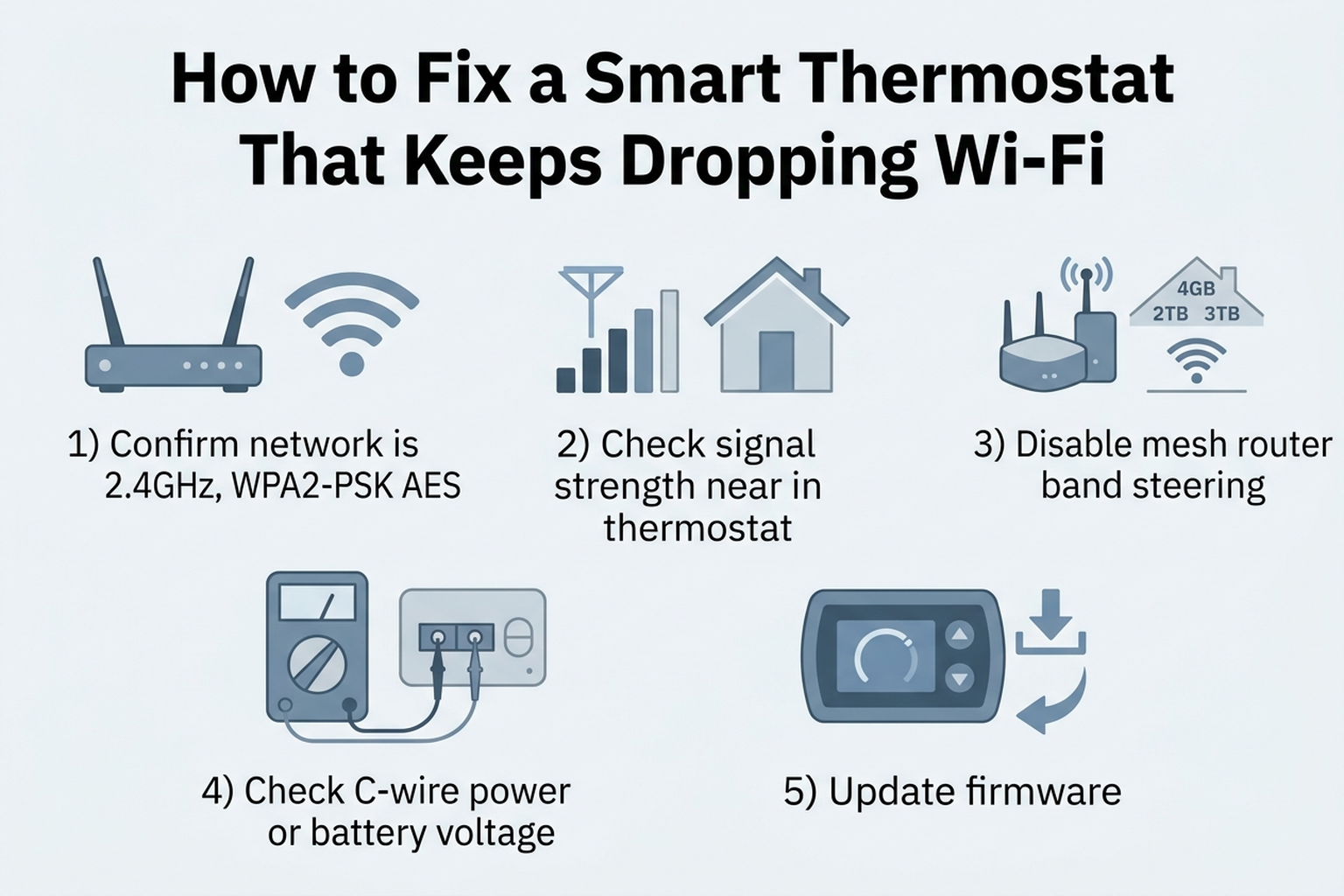
- Confirm your network is broadcasting a genuine 2.4GHz option with WPA2-PSK AES security. Log into the router admin panel directly (not just the phone’s Wi-Fi list) and check whether 2.4GHz and 5GHz are merged under one SSID, and whether the network has shifted to WPA3-only or mixed-mode security.
- Check signal strength at the thermostat’s exact mounted location, not from a phone standing nearby. ecobee’s guidance of 75% or higher is a reasonable target across brands; if it’s lower, that’s the fix to prioritize before anything else.
- Disable band steering for the thermostat, or split 2.4GHz and 5GHz into separate network names, per ecobee’s own recommended fix for this failure mode on mesh routers.
- Check battery voltage (Nest) or C-wire presence on any thermostat without a dedicated common wire; a reading below roughly 3.6V on a Nest, per Nest Support, is a documented cause of intermittent Wi-Fi use specifically during mild-weather, low-HVAC-runtime periods.
- Wait out a firmware update window before troubleshooting further. A T9 update can take 15–30 minutes with connectivity expected to be unavailable; restarting the thermostat mid-update can make a temporary state look like a persistent fault.
- Set a DHCP reservation for the thermostat in the router admin panel if drops consistently follow a router reboot — this prevents the router from handing the thermostat a new IP address that the manufacturer’s app hasn’t yet learned.
- Contact manufacturer support if the thermostat still won’t hold a connection after confirming a 2.4GHz WPA2-PSK AES network, adequate signal strength, disabled band steering, and healthy battery/C-wire power — at that point a hardware fault in the thermostat’s own radio becomes a realistic possibility that home troubleshooting can’t rule out.
5. If the fix is better Wi-Fi coverage at the thermostat
Editorial recommendation, not personal testing. The accessory below addresses cases where distance or duct-closet interference — not a setting — is the recurring cause.
- TP-Link RE220 AC750 Wi-Fi Range Extender — dual-band extender manufacturer-rated for up to 1,200 sq. ft. and 30 devices; placing one near a hallway or furnace-closet thermostat puts a stronger 2.4GHz signal within range without reconfiguring the main router.
6. If it’s time for a thermostat with a C-wire or better connectivity
If the recurring cause turns out to be battery voltage on a C-wire-free install, or a thermostat generation with a weaker radio, the models below are independently documented picks worth comparing (full analysis in our best smart thermostats 2026 guide).
- Ecobee Smart Thermostat Premium — ships with a wireless SmartSensor and is one of 8 models Consumer Reports evaluated in its 2026 smart thermostat ratings; a C-wire is recommended for stable operation.
- Google Nest Learning Thermostat (4th Gen) — Nest Support’s own guidance recommends a C-wire connection where available specifically to avoid the low-battery-voltage Wi-Fi behavior described above.
- Honeywell Home T9 Smart Thermostat — supports an optional add-on room sensor and broad multi-stage HVAC compatibility, per manufacturer specifications.
7. The decision flowchart
8. The bottom line
A smart thermostat that keeps dropping Wi-Fi is almost always following one of five documented causes — a 5GHz-only or WPA3-only network the thermostat can’t fully join, weak signal strength at its mounted location, mesh-router band steering, low battery voltage on a C-wire-free install, or a firmware update/DHCP change — rather than a broken unit. Working through network security, signal strength, steering settings, and power in that order resolves the large majority of documented cases without a support call or a return. If the thermostat still won’t hold a connection after all of that on a confirmed 2.4GHz WPA2-PSK AES network with adequate signal and power, a hardware fault in its own radio becomes a realistic possibility, and that’s the point where manufacturer support makes more sense than continuing to adjust the router.
Limitations of this analysis
To be explicit about what this article does not establish:
- We did not personally reproduce this issue on the specific thermostats named here. The causes and fixes described are drawn from manufacturer support documentation, independent testing coverage, and aggregated troubleshooting-thread patterns, not from a controlled test we ran ourselves.
- Band-steering behavior varies by router manufacturer and firmware version and may not generalize to every mesh system or ISP-provided router.
- Consumer Reports’ smart thermostat ratings reflect specific models tested under Consumer Reports’ own lab conditions and may not predict performance differences between every model or firmware combination.
- Amazon review sentiment was read from each ASIN’s public review panels in October 2026 and reflects aggregated impressions, not a scientific sample.
- Market size figures vary meaningfully across research firms depending on methodology; we cite a range as directional context, not a precise figure.