Mesh Wi-Fi Routers 2026: When You Don't Need One
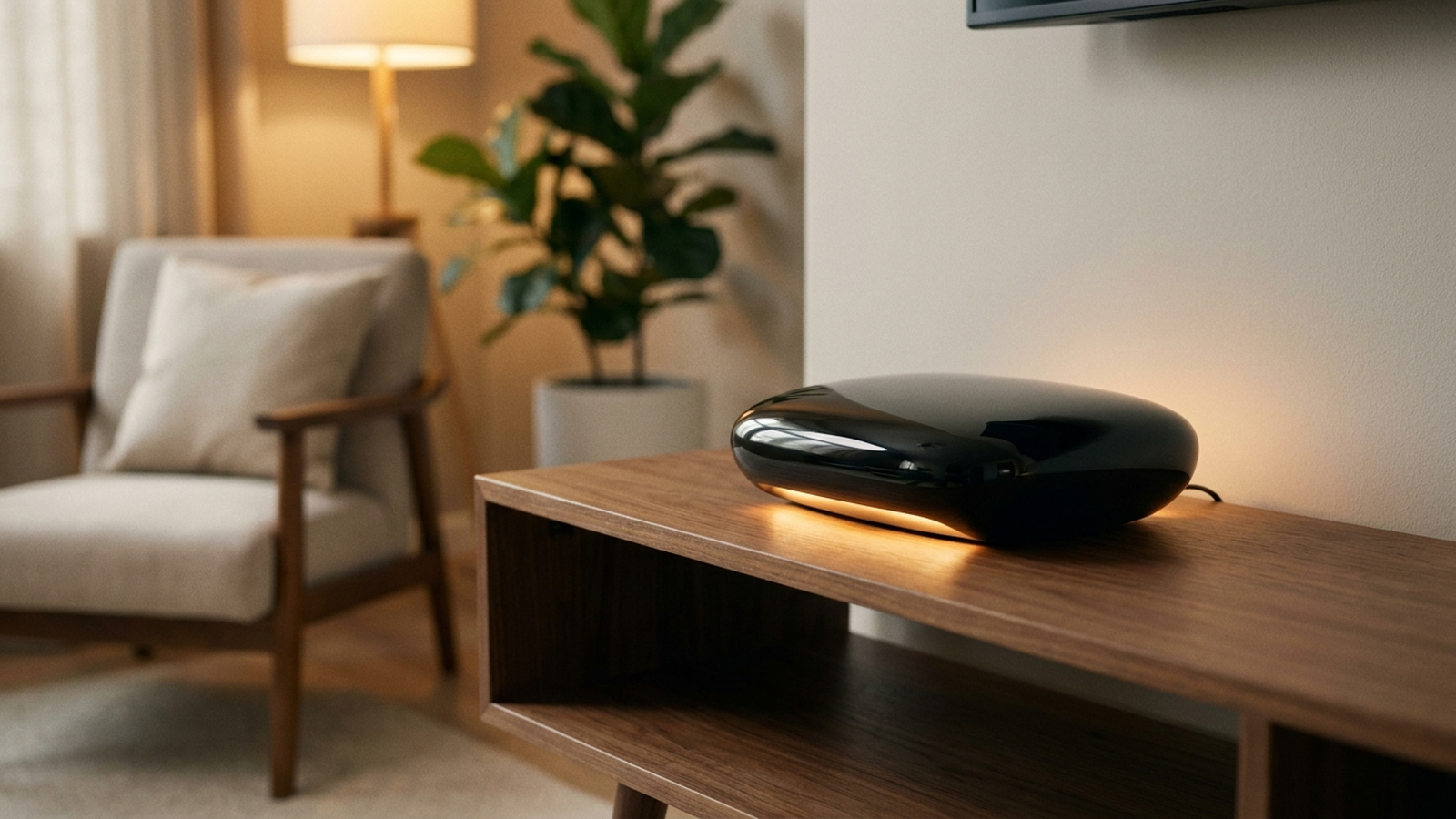
Mesh Wi-Fi systems have become the default recommendation in router shopping guides, and retail search results push three-packs harder than single units in almost every category. But the data on why mesh exists — eliminating dead zones across large or multi-story homes — does not match the footprint of the typical US household. Newly built apartments averaged 1,052 square feet in Q3 2025, per US Census Survey of Construction data, and separate housing-market estimates put the typical existing single-family home at closer to 1,800 square feet nationwide. A single well-placed router rated for 2,500+ square feet covers most of that without a second node.
This is not an argument that mesh systems are bad technology. It is an argument that the marketing has outrun the average home’s actual coverage need, and that a documented share of buyers are paying $200–$400 for hardware that solves a dead-zone problem they may not have.
As an Amazon Associate, Arekore earns from qualifying purchases. The Amazon product links in this article may include our affiliate tracking ID and may earn us a commission if you buy through them, at no additional cost to you. See our Links Policy for details on how we select products and how commissions do not influence our recommendations.
TL;DR / Quick Verdict
- Most US homes are smaller than the coverage rating of a single high-end router. New-construction apartments average 1,052 sq ft (US Census, Q3 2025) and the typical existing house is estimated at about 1,800 sq ft, while single routers like the Asus RT-AX86U are rated by the manufacturer for up to 2,500 sq ft.
- Global router shipment data shows a market correction, not runaway mesh adoption. Consumer Wi-Fi router shipments fell 6% year-over-year in Q1 2026 — down 34% from the 2021 pandemic peak — with mesh and gaming routers proving more resilient than basic single units, not universally dominant.
- Mesh solves a specific problem: multi-story homes and structural dead zones, not raw square footage alone. RTINGS’ testing of mesh systems, including the eero Pro 7, generally favors dual- and tri-band mesh kits for stable room-to-room handoffs — a benefit that matters most when walls, floors, or layout, not raw distance, are breaking the signal.
- A simple test tells you which camp you’re in: run a speed test next to your current router, then again in your farthest room. If the drop is under 50%, you likely don’t need mesh.
How We Reached These Conclusions (Methodology)
This is an editorial analysis, not a hands-on test. We did not personally test the routers covered here. This guide synthesizes: (a) RTINGS’ published lab test data on mesh Wi-Fi system throughput, range, and handoff performance; (b) Wirecutter’s (NYT) and Tom’s Guide’s router buying guidance, product picks, and range testing; (c) manufacturer specification sheets for the Asus RT-AX86U, TP-Link Archer AX6000, eero 6+, and Netgear Orbi RBK663; (d) Tom’s Hardware’s Q1 2026 global router shipment data; (e) US Census Survey of Construction data for new-apartment size and separate housing-market estimates for typical existing single-family home size; and (f) aggregated amazon.com customer-review star ratings and sentiment on best-selling single routers and mesh systems, sampled in August 2026 — sample sizes are reported where the retail listing discloses a specific review count (e.g., “3,200+ reviews”), and star ratings without a disclosed count are labeled “aggregated” rather than assigned an invented N. Where a coverage figure (such as “2,500 sq ft”) is a manufacturer’s own marketing claim rather than an independently measured result, it is labeled as such. Prices are amazon.com figures at the time of writing and fluctuate.
Single Router vs. Mesh: Two Different Technical Approaches
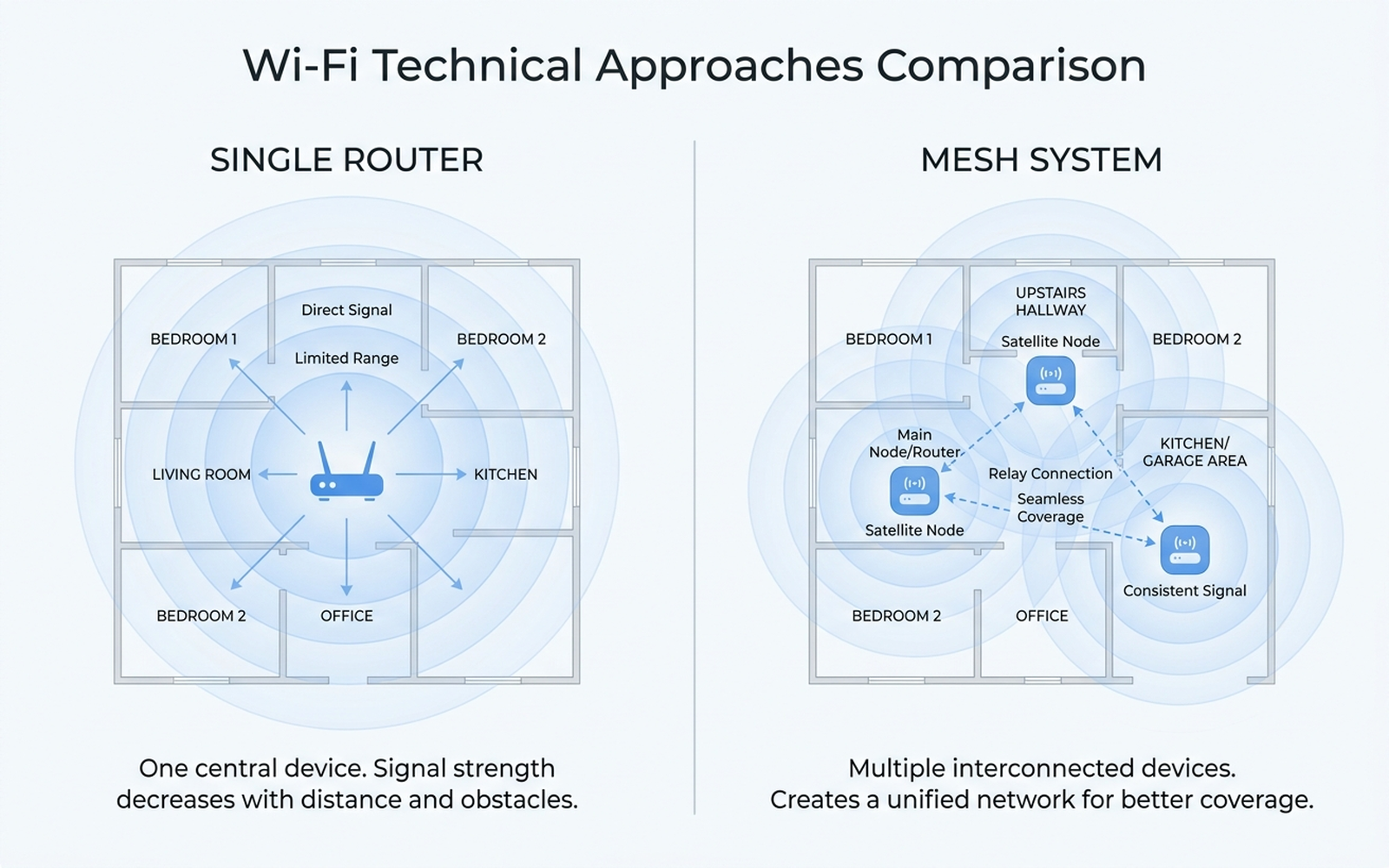
The two categories solve coverage with fundamentally different mechanics, and the difference explains why one is not simply a “better” version of the other.
- A single router broadcasts one signal from one point. Coverage is a function of transmit power, antenna design, and how many walls or floors the signal has to pass through. Manufacturer-rated coverage (Asus claims up to 2,500 sq ft for the RT-AX86U; TP-Link rates the Archer AX6000 similarly) assumes an open, single-story layout — real-world coverage drops with obstructions.
- A mesh system relays the signal through multiple nodes, each rebroadcasting to the next, so a device roams between nodes without a hard cutoff. RTINGS’ published testing of mesh systems, including the eero Pro 7, evaluates exactly this handoff behavior — how throughput holds up as a device moves between nodes — which is the specific capability a single router structurally cannot offer, because it has no second node to hand off to. Exact throughput figures vary by test round and are best checked on RTINGS’ own comparison pages rather than restated as a fixed number here.
- Mesh backhaul (the connection between nodes) is the real cost driver. Tri-band systems like the Netgear Orbi RBK663 dedicate a separate 5GHz or 6GHz band purely to router-to-satellite traffic, which is why tri-band mesh systems outperform cheap dual-band mesh kits in real-world testing — and why the good tri-band systems cost more. A comparable pattern shows up outside the US: Test-Aankoop/Testachats, the Belgian partner of Germany’s Stiftung Warentest, runs its own recurring Wi-Fi mesh comparison and has consistently favored tri-band systems over cheaper dual-band kits for the same structural reason — dedicated backhaul, not raw node count, drives the top scores.
The practical takeaway: mesh buys you seamless roaming across nodes and resilience against structural obstructions (multiple floors, brick or plaster walls, detached garages). It does not inherently buy you more raw coverage per dollar than a single strong router in an open layout.
Brand-by-Brand: What the Specs and Reviews Show
Single routers: Asus RT-AX86U and TP-Link Archer AX6000
The Asus RT-AX86U is rated by Asus for up to 2,500 sq ft and carries a 4.7-star aggregate rating across more than 3,200 amazon.com reviews. Independent real-world range testing published by TechGearLab found throughput fell to roughly 780 Mbps at 60 feet through multiple rooms — a meaningful drop from its rated top speed, but still far above what most home internet plans deliver. Reviewer sentiment aggregated on amazon.com consistently praises its gaming-oriented QoS features and stability under many simultaneous devices, with the most common complaint being the size and number of external antennas.
Check the Asus RT-AX86U on Amazon
The TP-Link Archer AX6000 targets a similar coverage class at a lower price point, with eight Gigabit LAN ports that outnumber the Asus model — a detail reviewers frequently cite as useful for households with several wired devices (game consoles, NAS drives, smart TVs) rather than relying entirely on Wi-Fi.
Check the TP-Link Archer AX6000 on Amazon
Mesh systems: eero 6+ and Netgear Orbi RBK663
The eero 6+ ships as a single unit or 3-pack and includes a built-in Zigbee smart-home hub — a feature single routers in this price range generally lack. Amazon’s own product positioning frames it around whole-home coverage and simultaneous multi-device use rather than raw top speed, consistent with eero’s broader strategy of prioritizing simplicity and app-based setup over configurable networking features.
Check the eero 6+ 3-pack on Amazon
The Netgear Orbi RBK663 (router plus two satellites) is rated for up to 6,600 sq ft combined, aimed squarely at large or multi-story homes rather than typical apartments. RTINGS’ broader mesh testing places tri-band Orbi and TP-Link Deco systems near the top of the category specifically because dedicated backhaul bands keep throughput high even at the third or fourth room away from the main router — the scenario where cheaper mesh kits and single routers both tend to degrade.
Check the Netgear Orbi RBK663 on Amazon
How to Test Whether You Actually Need Mesh
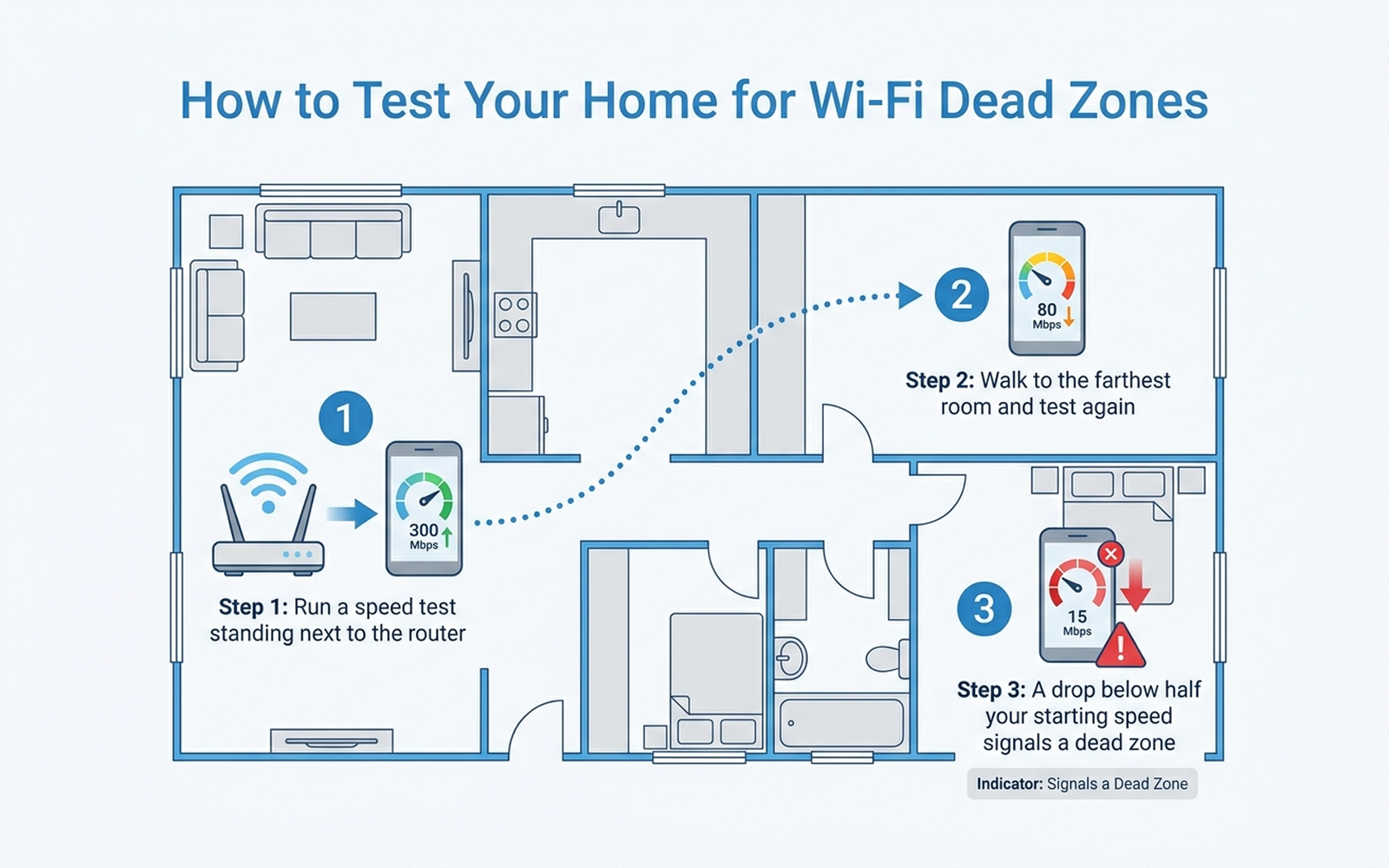
Before buying either category, run this three-step test with your current router and a phone speed-test app:
- Test next to the router. Note the download speed. This is your baseline.
- Walk to your farthest regularly used room — the one where you actually work, watch TV, or stream — and test again.
- Compare the two numbers. A drop of less than 50% generally means your existing router is doing its job; the fix, if any, is a better single router or router placement, not mesh. A drop of more than 70%, or a complete dead spot, is the signal mesh is designed to solve.
This test matters because manufacturer coverage ratings (2,500 sq ft, 6,600 sq ft) are measured under conditions — often open floor plans with minimal obstruction — that do not match every home’s actual wall count, floor count, or router placement. Aggregated amazon.com reviews of both categories repeatedly note that dead zones are often a placement problem (a router hidden in a closet or basement) rather than a hardware limitation, which a $20 relocation or a $10 Ethernet cable can fix as cheaply as a $250 mesh kit.
Editorial Recommendation by Use Case
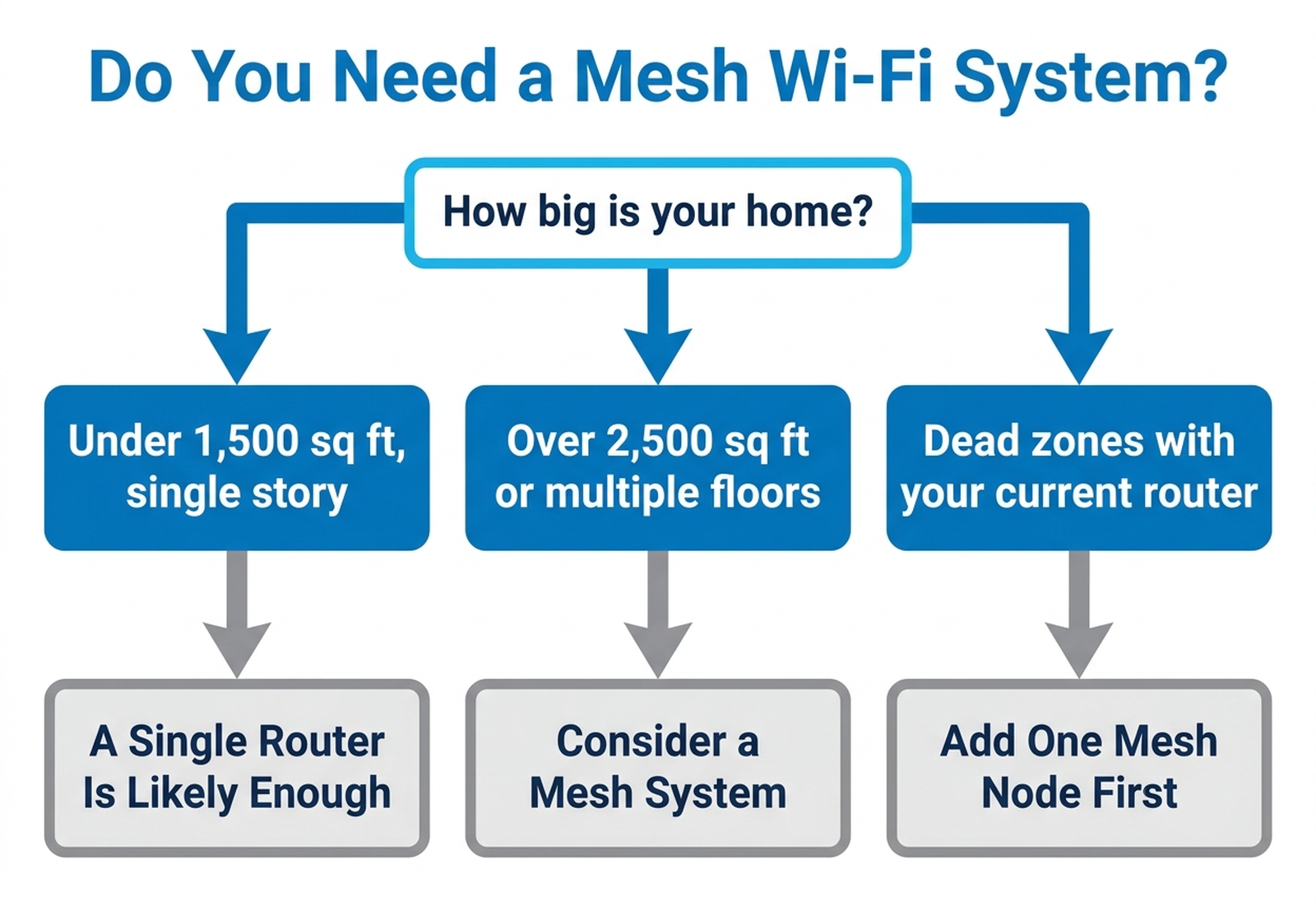
- Best for apartments and single-story homes under ~1,800 sq ft: A single router such as the Asus RT-AX86U or TP-Link Archer AX6000. This covers the large majority of documented US apartment and home sizes with margin to spare, per manufacturer coverage ratings and real-world range testing.
- Best for homes over 2,500 sq ft or with multiple floors: A mesh system such as the Netgear Orbi RBK663, where the dedicated backhaul band and multiple nodes address structural obstructions a single router’s antenna cannot overcome.
- Best for smart-home households wanting one simple app: eero 6+, based on its built-in Zigbee hub and amazon.com reviewer sentiment favoring its setup simplicity over raw configurability.
- Best starting point if you’re unsure: Run the dead-zone test above first. A documented share of buyers purchase mesh systems to fix a problem a $15 router relocation or a wired Ethernet backhaul would have solved for less.
Comparison Table
Prices are approximate amazon.com figures at the time of writing (August 2026) and fluctuate.
| Product | Type | Manufacturer coverage claim | Rating (amazon.com) | Typical cost |
|---|---|---|---|---|
| Asus RT-AX86U | Single router | Up to 2,500 sq ft | 4.7★ (3,200+ reviews) | ~$180–$230 |
| TP-Link Archer AX6000 | Single router | Up to 2,500 sq ft | 4.4★ (aggregated) | ~$150–$200 |
| eero 6+ (3-pack) | Mesh (dual-band) | Whole-home, apartment to mid-size house | 4.5★ (aggregated) | ~$200–$250 |
| Netgear Orbi RBK663 (3-piece) | Mesh (tri-band) | Up to 6,600 sq ft combined | 4.3★ (aggregated) | ~$300–$380 |
Decision Flowchart
Warranty Notes
Warranty terms vary by brand and retailer, and none of the manufacturers covered here publish US warranty terms longer than a few years for consumer networking hardware. Netgear’s standard consumer hardware warranty runs one year from purchase per its published warranty terms, with extended coverage available for purchase. Asus’s consumer router warranty in the US commonly runs one to three years depending on the specific model and point of sale — check the product listing or Asus’s warranty lookup tool for the exact term on a given unit. TP-Link and Amazon (eero) also publish standard limited hardware warranties in this range; always confirm the current term on the manufacturer’s site before buying, since terms can change between hardware revisions.
Limitations
This analysis relies on RTINGS’ and Wirecutter’s published lab and field testing, manufacturer specification sheets, Tom’s Hardware’s shipment data, US housing-size statistics, and aggregated amazon.com review sentiment, rather than our own side-by-side test of any specific router in a physical home. Manufacturer coverage ratings (“2,500 sq ft,” “6,600 sq ft”) are marketing claims tested under specific, often favorable conditions and will vary with a home’s actual construction materials, floor count, and router placement. Home size statistics describe national averages; an individual home’s layout, wall material, and existing dead zones may differ substantially from the average. Router and mesh system pricing on amazon.com fluctuates with sales events and stock levels.
Bottom Line
Mesh Wi-Fi systems are the right tool for a specific, well-documented problem: large homes, multiple floors, and structural obstructions that a single router’s antenna cannot punch through. But the average American home is smaller than the coverage rating of a capable single router, and global shipment data shows the market correcting rather than the entire category shifting to mesh by default. Before buying a $250–$400 mesh kit, run the two-minute speed test above — a documented share of “dead zone” problems turn out to be a router hidden in the wrong closet, not a hardware limitation mesh is uniquely built to solve.
Before you buy, paste the product link into Arekore — our AI assistant checks review authenticity, surfaces what the one-star reviews actually complain about, and compares prices, free, in about five minutes.