TV Won't Turn On? 5 Real Causes (2026)

TL;DR. A TV that won’t turn on almost always fails at one of five specific points, not the whole set at once. In rough order of how often they show up in manufacturer support content and owner troubleshooting reports: a failing power-supply board or capacitor, a botched firmware update that leaves the set half-bricked, an HDMI-CEC handshake issue with a soundbar that looks like a power fault but isn’t, a dead remote or blocked IR sensor mistaken for the TV itself being unresponsive, and a degraded surge protector feeding the set bad or no power. The first step that resolves the most cases with zero tools: plug the TV directly into a wall outlet, bypassing any power strip or surge protector, and see if it powers on.
A note on links and methodology
As an Amazon Associate, Arekore earns from qualifying purchases. The Amazon product links in this article include our affiliate tracking ID and may earn us a commission if you buy through them, at no additional cost to you. See our Links Policy for details on how we select products and how commissions do not influence our recommendations.
We also did not personally reproduce a dead TV on the specific models named below. Every cause and fix in this article is an editorial synthesis of manufacturer support documentation, independent reliability research, and aggregated public troubleshooting reports, cited inline.
Methodology
This is an editorial analysis based on publicly available data collected in October 2026. We did not run a controlled failure test ourselves; instead we synthesized:
- Manufacturer troubleshooting documentation — Samsung’s official support guidance on TV power issues, which explicitly tells owners to bypass surge protectors when diagnosing a no-power set, and TCL’s and LG’s published support pages covering HDMI-CEC and soundbar control failures.
- Independent repair and explainer sourcing — community troubleshooting threads (AVS Forum, iFixit Answers, Physics Forums) documenting specific failure cases, including firmware-update “bricking” incidents on LG WebOS models and capacitor-failure diagnostics, cross-referenced against manufacturer guidance rather than treated as standalone sources.
- Independent lab reliability data — RTINGS’ three-year TV longevity study (2022-2025, 102 TVs run up to 20 hours/day) and Consumer Reports’ member reliability survey, both of which quantify how often and in what way TVs actually fail over years of use.
- Market and warranty data — brand market-share figures reported by Counterpoint Research and BroadbandTVNews for H1 2026, and standard manufacturer warranty terms published by Samsung, LG, TCL, Vizio, and Hisense.
- Repair-economics research — published repair-vs-replace cost guidance (tvpartstoday.com), used only for the general cost bands and the “40% rule” heuristic, not for brand-specific claims.
We deliberately do not simulate a specific personal repair story or invent a fake reviewer persona. The guidance below is a synthesis of manufacturer documentation, independent lab research, and aggregated troubleshooting patterns — treat it as a starting framework, not a substitute for your specific model’s manual.
1. Five reasons a TV won’t turn on
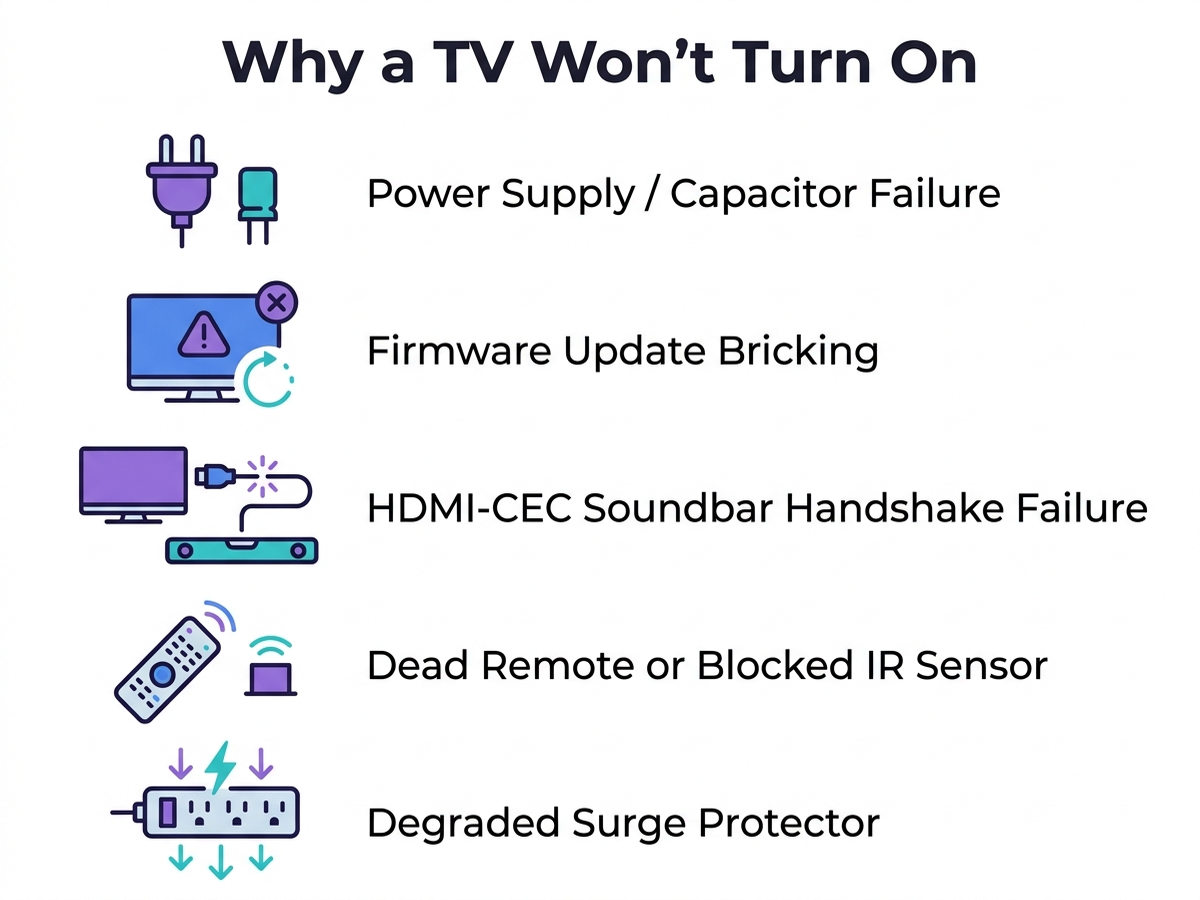
If the screen stays black, the standby light won’t engage, or the set clicks repeatedly without ever displaying a picture, the cause is almost always one of five specific failure points rather than a dead panel.
| Cause | What it looks like | Fixable at home? |
|---|---|---|
| Power-supply board or capacitor failure | No standby light at all; clicking or buzzing when you press power; set powers on then shuts off | Sometimes — DIY cap replacement is possible but requires soldering skills |
| Firmware update “bricking” | Standby light is on but screen stays black or shows corrupted color patterns after an update | Rarely — often needs a USB firmware recovery or authorized service |
| HDMI-CEC / soundbar handshake failure | TV or soundbar won’t respond to the power command, but each works fine powered on manually | Yes — usually a cable, firmware, or settings fix |
| Dead remote or blocked IR sensor | TV appears completely unresponsive, but the physical power button on the set still works | Yes — immediately |
| Degraded surge protector | Intermittent power loss, startup loops, or no power at all despite the outlet being fine | Yes — bypass it and plug directly into the wall |
A power-supply board or capacitor fault is the most commonly documented hardware-level cause: repair guides describe failed electrolytic capacitors venting and sometimes visibly bulging or leaking at the top of the board, though as one repair resource notes, “capacitors do not always show visible signs of failure” — a clean-looking board can still be bad, which is why a multimeter voltage check is the more reliable diagnostic than a visual inspection alone.
2. Why it looks like the whole TV died, but usually isn’t
A TV’s power path runs through several points before a picture ever reaches the screen: the wall outlet, the power strip or surge protector if one is used, the TV’s internal power-supply board, and — for anything routed through a soundbar via HDMI-ARC — a separate CEC command handshake that has nothing to do with the power supply at all. A failure at any one of those points looks identical from the couch: a dark screen and no response.
That overlap is exactly why remote and IR-sensor failures get misdiagnosed as a dead TV. Samsung’s own support documentation separates “TV not powering on” from remote troubleshooting as distinct flows, which implies how often the two get confused in the first place. The standard diagnostic — point the remote at a smartphone camera and press a button, since the IR LED is visible through most phone camera sensors even though it’s invisible to the eye — isolates whether the fault is the remote or the television itself in under a minute, with no tools required.
HDMI-CEC failures behave differently again. CEC runs separate command sets for things like volume control (“System Audio Control”) and power sync (“One Touch Play” and “One Touch Standby”), and it’s common for one protocol to work while the other fails — so a soundbar can respond to volume commands but never power on with the TV, or vice versa. TCL’s own support site has a dedicated troubleshooting page for exactly this scenario, which is a reasonable signal that it’s a frequent support contact, not an edge case.
3. Brand-specific patterns worth knowing
Samsung. Samsung’s official troubleshooting guidance for no-power TVs explicitly tells owners not to rely on a surge protector while diagnosing the issue, noting that surge protectors “may eventually wear out and stop providing the necessary voltage for your TV” — and recommends testing the set on a direct wall outlet first, before assuming a hardware fault. Samsung led global TV shipments by unit volume in H1 2026 at roughly 17% share per Counterpoint Research, and separately, Omdia’s revenue-share tracking has credited Samsung with the top spot for 21 consecutive years running. Consumer Reports’ member reliability survey places Samsung near the top of its brand-reliability rankings alongside LG.
LG. LG WebOS community forum threads document multiple cases where a forced or automatic firmware update left a set with a lit power indicator but a black, frozen, or visually corrupted screen — in at least two reported cases (LG models 47LB670V and 42LB730), owners say the fault escalated to a full digital-video-board replacement due to EEPROM corruption from the botched update, not something a USB firmware re-flash could fix. LG topped Consumer Reports’ predicted-reliability ranking and tied with TCL for the fewest outright failures in RTINGS’ three-year longevity study among the brands tested.
TCL. TCL held roughly 14.1% global unit share in H1 2026 (per Counterpoint Research/BroadbandTVNews), the number-two position behind Samsung, driven in part by its own in-house panel supply. Consumer Reports rates TCL mid-tier on predicted reliability but gives it the highest owner-satisfaction score of any brand tracked — worth noting because owner satisfaction and failure-rate predictions aren’t the same measurement, and a set can score well on one and only middling on the other.
Hisense. Hisense’s standard US warranty is notably more generous than its competitors at larger screen sizes: sets 50 inches and up get two years of parts-and-labor coverage, versus the one-year standard most other brands (including Hisense’s own under-50-inch models) use. Hisense held roughly 13.9% global share in H1 2026 and leads the 100-inch-plus and laser-TV segments specifically.
Vizio. Consumer Reports’ survey places Vizio at the lowest brand-reliability score among the sets it tracks, even though Vizio remains a top North American local brand by volume (roughly 2.7% global share, concentrated in the US market). Vizio’s standard warranty matches the one-year parts-and-labor industry baseline, with no extended-size exception the way Hisense offers.
Cross-brand. Every manufacturer’s own support content converges on the same diagnostic order: rule out the power source and physical connection first, check for a recent firmware update second, and only consider a hardware fault — power-supply board, panel, or otherwise — third.
4. What to actually do, in order
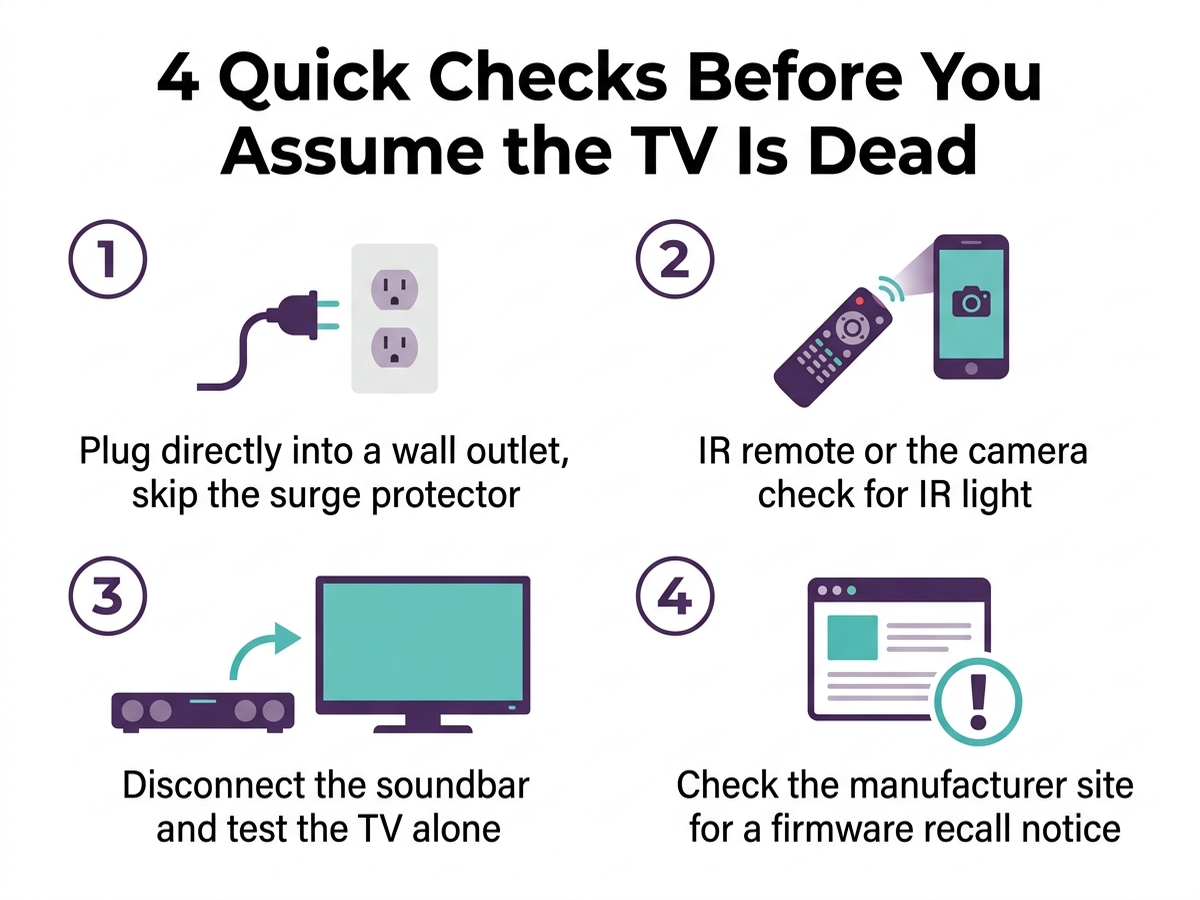
- Plug the TV directly into a wall outlet, bypassing any power strip or surge protector. Samsung’s own support guidance recommends this as the first step, since a degraded surge protector can silently fail to pass adequate power even with its indicator light on.
- Check the remote before assuming the TV is unresponsive. Point it at a smartphone camera and press a button — a visible blinking light on screen confirms the remote works, which narrows the fault to the TV’s physical power button or IR sensor instead.
- Disconnect any soundbar or AVR connected via HDMI-ARC and test the TV with its own remote alone. If the TV powers on normally without the soundbar in the chain, the fault is an HDMI-CEC handshake issue, not a power-supply fault — check the manufacturer’s CEC/soundbar troubleshooting page (TCL publishes one specifically for this).
- Check for a stuck or recent firmware update. A standby light that stays on with a black or corrupted screen after an update, rather than no light at all, points toward a software-side failure rather than a hardware one — LG’s WebOS community documents several such cases.
- Listen for clicking or buzzing when pressing power. Repeated clicking without a picture is one of the more consistent symptoms repair guides associate with a failing power-supply board or capacitor, rather than a simple connection issue.
- Check your warranty status before opening the case. Standard coverage is one year parts-and-labor across Samsung, LG, TCL, and Vizio, and one to two years at Hisense depending on screen size — a set still under warranty should go to the manufacturer rather than being opened for a DIY capacitor swap.
- Weigh repair cost against replacement. A commonly cited repair-economics heuristic: if the repair quote exceeds roughly 40% of a comparable new set’s price (25% for a set over eight years old), replacement is the more practical choice. Power-supply board swaps typically run in the lower cost bands; a cracked panel usually exceeds the threshold immediately.
5. If the fix is a connection or diagnostic step, not a new part
Editorial recommendation, not personal testing. These address the most commonly documented causes above — a failing surge protector and a remote/sensor mix-up — rather than a hardware upgrade.
- Amazon Basics Power Strip Surge Protector, 6 Outlets, 2 USB Ports, 1000 Joule — a straightforward replacement if the current surge protector is more than a few years old, since the MOV components inside degrade with every surge absorbed and give no visible warning when they’re no longer protecting the circuit.
- GE Rechargeable Universal TV Remote Control, Backlit, 4-Device — a low-cost way to rule out a dead original remote as the cause, before assuming the TV itself has failed.
6. If the failure points to real hardware, not a quick fix
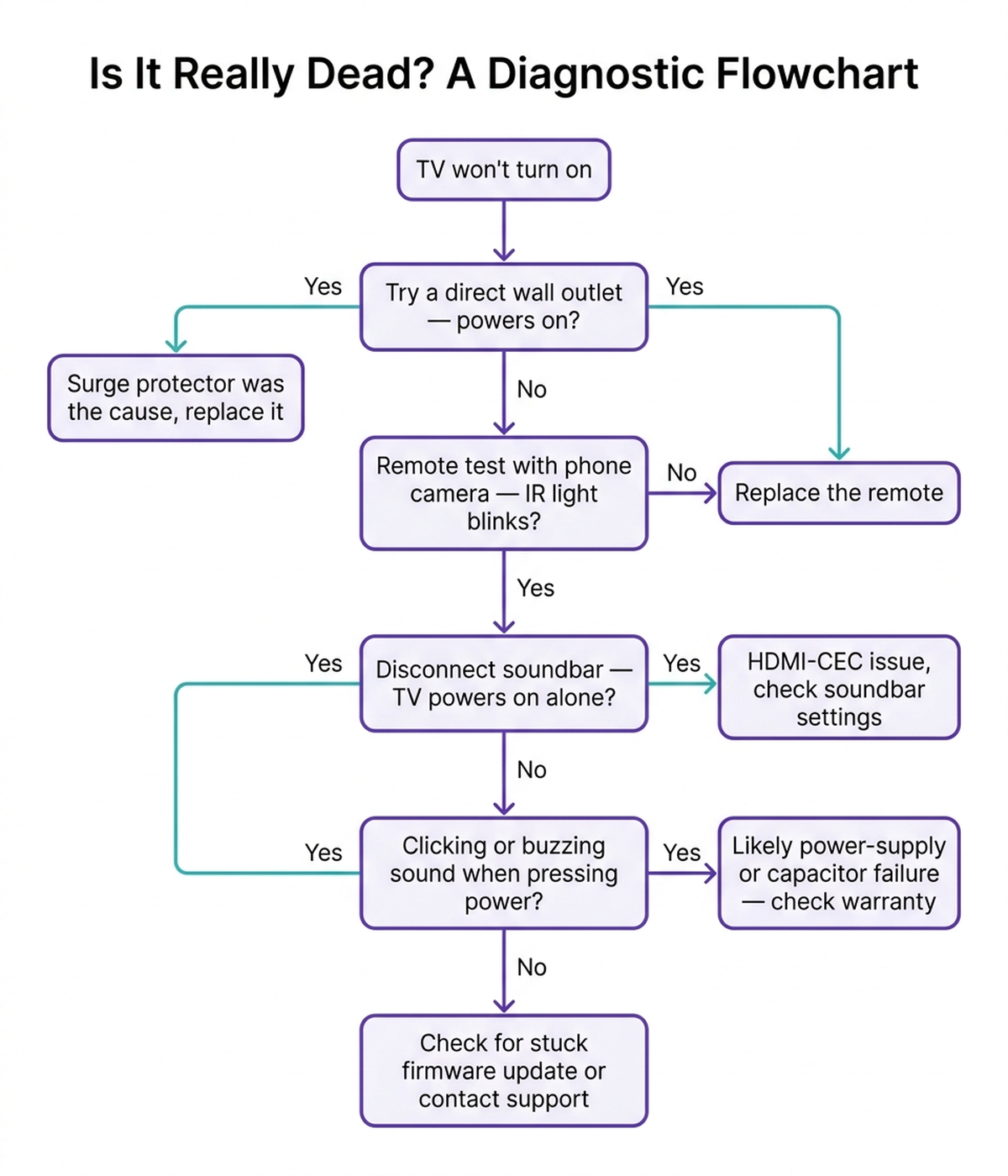
If the TV is plugged directly into the wall, the remote tests fine, the soundbar is disconnected, and there’s no recent firmware update — and the set still won’t power on or shows the clicking/buzzing pattern described above — a genuine hardware fault is the realistic remaining explanation. These are current mid-range sets from the brands discussed, relevant if a warranty repair or a straight replacement turns out to be the more practical path.
- Samsung 65-Inch Class Crystal UHD DU7200 Series 4K Smart TV (UN65DU7200) — a current mid-range Samsung set from the market-share leader, with Samsung’s standard one-year parts-and-labor warranty.
- LG 55-Inch Class UA77 Series LED AI 4K Smart webOS TV (55UA7700PUB, 2025) — a current LG set from the brand that topped Consumer Reports’ reliability ranking in its latest survey.
- TCL 55-Inch QM6K Series QLED Mini-LED 4K Smart Google TV (2025) — a current TCL Mini-LED set; TCL scores highest on Consumer Reports’ owner-satisfaction measure of the brands tracked.
- Hisense 55-Inch U6K Series Mini-LED ULED Google TV — a mid-range Hisense Mini-LED set; at 50 inches and up, Hisense’s standard warranty extends to two years parts-and-labor.
7. The decision flowchart
8. The bottom line
A TV that won’t turn on is rarely the whole set failing at once — it’s almost always one specific point in the power or control path: a degraded surge protector, a dead remote or blocked sensor, an HDMI-CEC handshake with a soundbar, a stuck firmware update, or a genuinely failed power-supply board, in roughly that order of how easy each is to rule out. Testing the TV on a direct wall outlet and checking the remote with a phone camera resolves a meaningful share of cases with no tools and no cost. If the set is still under its one- or two-year manufacturer warranty, a confirmed hardware fault should go to the manufacturer rather than a DIY capacitor swap; past the repair-cost threshold, replacement is usually the more practical call.
Limitations of this analysis
To be explicit about what this article does not establish:
- We did not personally reproduce a power failure on the specific sets named here. The causes and fixes described are drawn from manufacturer support documentation, independent repair-guide and forum sourcing, and lab reliability research, not from a controlled failure test we ran ourselves.
- Firmware-bricking incidents cited for LG WebOS are drawn from individual community-forum reports (AVS Forum, iFixit Answers), not from a manufacturer-published failure-rate statistic, and may not reflect current-generation webOS update reliability.
- RTINGS’ longevity figures come from an accelerated stress test (up to 20 hours/day at maximum brightness over roughly three years, simulating about a decade of typical use), not from normal household usage patterns, and failure rates under normal daily use are expected to be lower.
- Brand reliability and warranty terms can change; the figures cited reflect Consumer Reports’ latest published survey and each manufacturer’s standard published warranty as of October 2026, and may not apply to every model year or region.
- Market-share figures are industry estimates from Counterpoint Research as reported by BroadbandTVNews for H1 2026, and vary somewhat by research firm and measurement method.