10 Back-to-School Questions Answered With Data (2026)

Back-to-school spending hit a record high again this year. The National Retail Federation’s 2026 survey puts K-12 spending at $43.3 billion and college spending at $103.5 billion — both all-time highs — while 78% of shoppers surveyed also expect higher prices this season. That combination, spending more while also expecting to get less for it, is exactly the environment where a wrong purchase (a laptop that can’t survive four years, a backpack that rips in a semester) costs more than the sticker price implies.
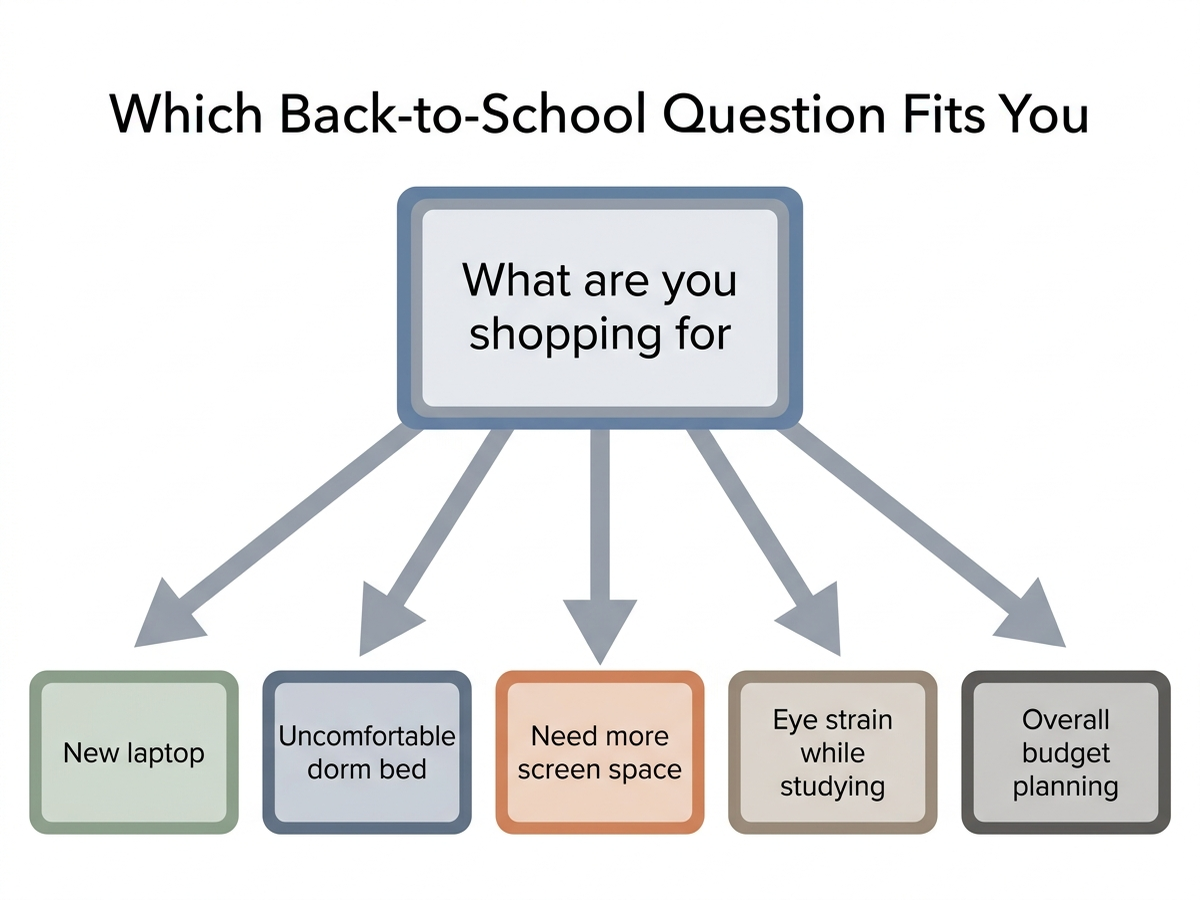
We picked 10 of the most common back-to-school shopping questions — laptops, backpacks, headphones, tablets, and a few purchases people assume they need but might not — and answered each one by pointing to specific lab data, aggregated review patterns, and manufacturer specs, being explicit about which is which.
As an Amazon Associate, Arekore earns from qualifying purchases. The Amazon product links in this article may include our affiliate tracking ID and may earn us a commission if you buy through them, at no additional cost to you. See our Links Policy for details on how we select products and how commissions do not influence our recommendations.
TL;DR / Quick Verdict
- This year’s record back-to-school spending ($103.5B for college, per NRF) makes the case for buying fewer, better-tested items rather than more items — the categories below are where independent data changes the “obvious” pick.
- A sub-$500 laptop with 16GB of RAM now covers most non-STEM coursework — the RAM ceiling matters more than the processor tier for most students.
- Consumer Reports’ top travel-backpack pick wasn’t the biggest or the cheapest bag — it won on the combination of comfort and build quality under repeated loading.
- Blue light glasses have no proven effect on daytime eye strain, per the American Academy of Ophthalmology, though evidence is more favorable for wearing them before bed to protect sleep.
- Extended laptop warranties are situational, not a default yes — the math depends on whether the laptop leaves the dorm room daily.
How We Reached These Answers (Methodology)
This is an editorial analysis, not a hands-on test — we did not personally test the products named below. Each answer synthesizes: (a) independent testing and buying-guide data from Consumer Reports, RTINGS, Sleep Foundation, Tom’s Hardware, and the American Academy of Ophthalmology; (b) manufacturer specifications (battery life, RAM, playtime, port counts), explicitly labeled as manufacturer claims where they haven’t been independently re-verified; (c) aggregated amazon.com customer-review sentiment on the specific listings named, sampled in August 2026; and (d) the National Retail Federation’s 2026 back-to-school spending survey for market-level context. Every ASIN referenced was confirmed as a live amazon.com listing at the time of writing. Prices are approximate figures captured at the time of writing and fluctuate.
The 10 Questions
1. What’s actually enough laptop for a non-STEM college student?
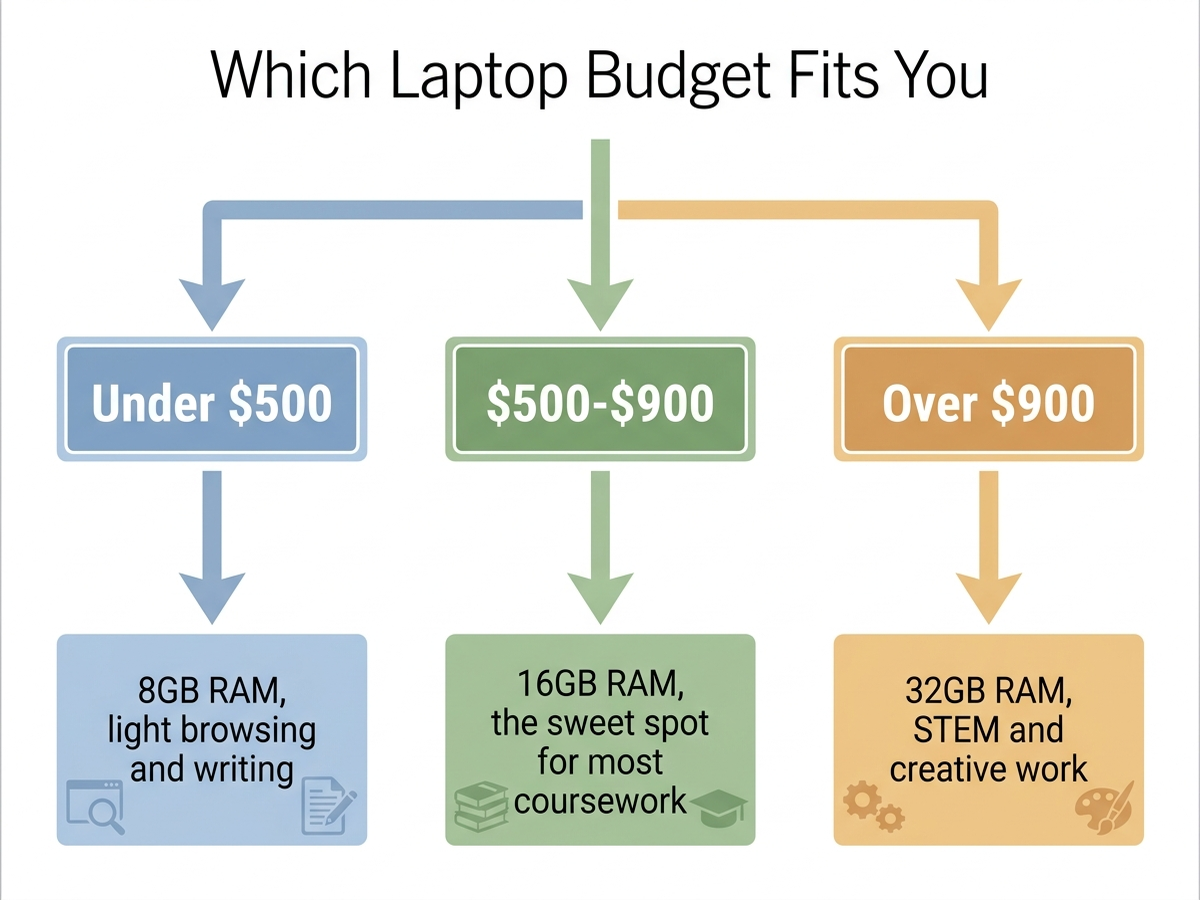
More RAM, not more processor, is the upgrade that keeps a laptop usable for four years. Current buying guides converge on the $500–$900 range as the sweet spot for general coursework — enough for a recent Intel Core Ultra or AMD Ryzen AI chip, 16GB of RAM, a fast NVMe SSD, and 12+ hours of battery life, which covers browser tabs, word processing, video calls, and light photo or video editing without stutter. The ASUS Vivobook Go 15 (AMD Ryzen 5, 16GB RAM, 512GB SSD) is a widely-stocked example that meets that bar directly; cheaper listings in the same Vivobook Go line often ship with only 8GB, which reviewers most consistently flag as the spec worth paying up for, since RAM (unlike storage, in many models) usually can’t be upgraded later.
Check the ASUS Vivobook Go 15 (16GB RAM) on Amazon
2. Is a $170 backpack actually worth it over a $40 one?
For heavy daily use, the data leans toward yes, but not because of price alone. Consumer Reports’ 2026 travel-backpack evaluation named the Patagonia Black Hole Mini MLC its Editor’s Choice pick specifically for the combination of “size, utility, comfort and sturdiness” under repeated loading — the criteria that matter for a bag carried daily for four years, not just a semester. Aggregated Amazon customer feedback on the listing echoes the durability point: reviewers frequently cite years of daily use, including through wet weather, without the seams or zippers failing. A budget bag can be a fine choice for a student who mostly walks a short, dry commute; the premium pick earns its price specifically under the harder conditions (rain, overstuffing, years of use) that campus life eventually produces.
Check the Patagonia Black Hole Mini MLC 30L Backpack on Amazon
3. What noise-cancelling headphones actually work for studying in a shared dorm?
Look specifically for an “indoor” or “office” noise mode, not just the highest advertised noise-cancellation number. RTINGS’ independent headphone review of the Soundcore Life Q30 rates it well for the price, and it’s a commonly cited top pick under $100 across buying guides. It’s built with an Indoor ANC mode tuned for exactly the kind of steady ambient sound — roommates, hallway noise, HVAC hum — that a general “outdoor/transit” ANC mode isn’t optimized for. Manufacturer-claimed battery life is 40–50 hours depending on ANC use, a spec that hasn’t been independently re-tested to the hour but is broadly consistent with RTINGS’ own battery measurements for the model. Premium alternatives like the Sony WH-1000XM6 test better on raw noise isolation, but at roughly 4–5x the price for a use case (a dorm room, not a transatlantic flight) where the cheaper pick already tests well.
Check the Soundcore Life Q30 Headphones on Amazon
4. Is an extended laptop warranty worth it for a college student?
It depends on one factor more than any other: does the laptop leave the dorm room every day? Laptops that travel daily to classes, libraries, and shared spaces face meaningfully higher odds of drops, spills, and theft than a laptop that mostly stays on a desk, which is the scenario extended-warranty providers themselves cite as the strongest justification for coverage. The catch is that standard extended warranties often exclude accidental damage — the actual failure mode students report most — so the coverage that matters is specifically an accidental-damage protection plan, not a generic extended warranty that only extends the manufacturer’s defect coverage. Before buying either, check whether a parent’s homeowner’s or renter’s insurance policy already covers electronics theft or damage, since it sometimes does at a lower effective cost than a laptop-specific plan.
5. iPad or a Windows tablet for note-taking in lectures?
For the specific task of handwritten note-taking, the current consensus among student-focused buying guides is the iPad Air 11” (M4), largely because of app maturity rather than hardware alone — GoodNotes and Notability, the two dominant note-taking apps among college students per multiple 2026 student-tech surveys, are more mature and widely adopted on iPadOS than their Windows or Android equivalents. The M4 chip and Apple Pencil Pro combination is rated for near-zero input latency in current reviews, and the tablet’s roughly 1-pound weight is light enough that reviewers describe it as disappearing into a backpack. Students who need to run full desktop software (a statistics package, CAD tools) for coursework should treat a tablet as a second device, not a laptop replacement — that limitation applies regardless of brand.
Check the iPad Air 11-inch (M4), 128GB on Amazon
6. Do dorm mattress toppers actually help, or is it a placebo?
They address a real, well-documented problem: dorm mattresses see years of continuous heavy use across many residents and commonly develop unevenness or firm spots well before a typical consumer mattress would. Sleep Foundation’s twin XL topper testing specifically calls out college dorm beds as a strong use case for this reason, distinct from adding a topper to an already-good mattress at home. The LUCID 2” Gel Memory Foam Topper is a widely-reviewed, CertiPUR-US certified budget option in Twin XL sizing built for exactly this scenario, with gel infusion aimed at limiting the heat retention that thicker memory foam is otherwise known for. It won’t fix a mattress with a broken support structure underneath it, only a firm or uneven sleeping surface — a distinction worth knowing before buying one to solve a different problem.
Check the LUCID 2” Gel Memory Foam Topper (Twin XL) on Amazon
7. Is a portable second monitor actually worth carrying to class or the library?
For most students, only situationally. Portable USB-C monitors in the 15.6” 1080p tier, like the ARZOPA line, have matured to the point where a single USB-C cable handles power, data, and video with no separate power brick required, which is the feature that makes carrying one to a library or study room realistic rather than a hassle. Reviewers consistently frame the value case around specific tasks — comparing sources side-by-side while writing, running a second reference window during coding — rather than general classroom use, where a single laptop screen is normally sufficient. At roughly 1.5–1.7 lbs, it’s a genuine addition to backpack weight, so the honest answer for most coursework is that it earns its place for research-heavy majors and part-time freelance or coding work, not as a default add-on.
Check the ARZOPA 15.6” Portable Monitor on Amazon
8. Do blue light glasses actually reduce eye strain from studying?
The current evidence says no, at least not for daytime eye strain specifically. The American Academy of Ophthalmology does not recommend blue light–blocking glasses, citing a lack of scientific evidence that screen-emitted blue light damages the eyes or causes strain beyond what any prolonged close-up screen use produces, and a controlled double-blind study found no significant difference in reported eye strain between blue-light lenses and placebo lenses. The one place the evidence is more favorable is sleep: research cited by Harvard Health indicates that blue-light-blocking glasses worn in the hours before bed can help prevent the melatonin suppression that late-night screen use causes, which matters more for students pulling late study sessions than for daytime lecture note-taking. If eye strain during the day is the actual complaint, ophthalmology guidance points to the 20-20-20 rule (every 20 minutes, look at something 20 feet away for 20 seconds) and proper lighting first, with glasses like the Cyxus line as a low-cost option for the evening-use case specifically.
Check Cyxus Blue Light Blocking Glasses on Amazon
9. What’s actually worth buying to expand ports on a modern laptop?
A compact USB-C hub, not a full docking station, for anyone who moves between classes rather than working from one fixed desk. The Anker 555 (8-in-1) is a commonly recommended pick in this category: a compact aluminum body under 5 ounces that adds 4K HDMI output, two USB-A 10 Gbps ports, Gigabit Ethernet, and an SD/microSD card reader to a laptop that has shed most of its built-in ports in favor of USB-C only. Full docking stations in the $150–$300+ range add more simultaneous displays and higher power delivery, but that capability mostly matters for a fixed desk setup with an external monitor already in place — overkill weight and cost for something carried in a backpack pocket between a dorm room and the library.
Check the Anker 555 USB-C Hub (8-in-1) on Amazon
10. Is back-to-school spending actually higher this year, and where’s the room to cut?
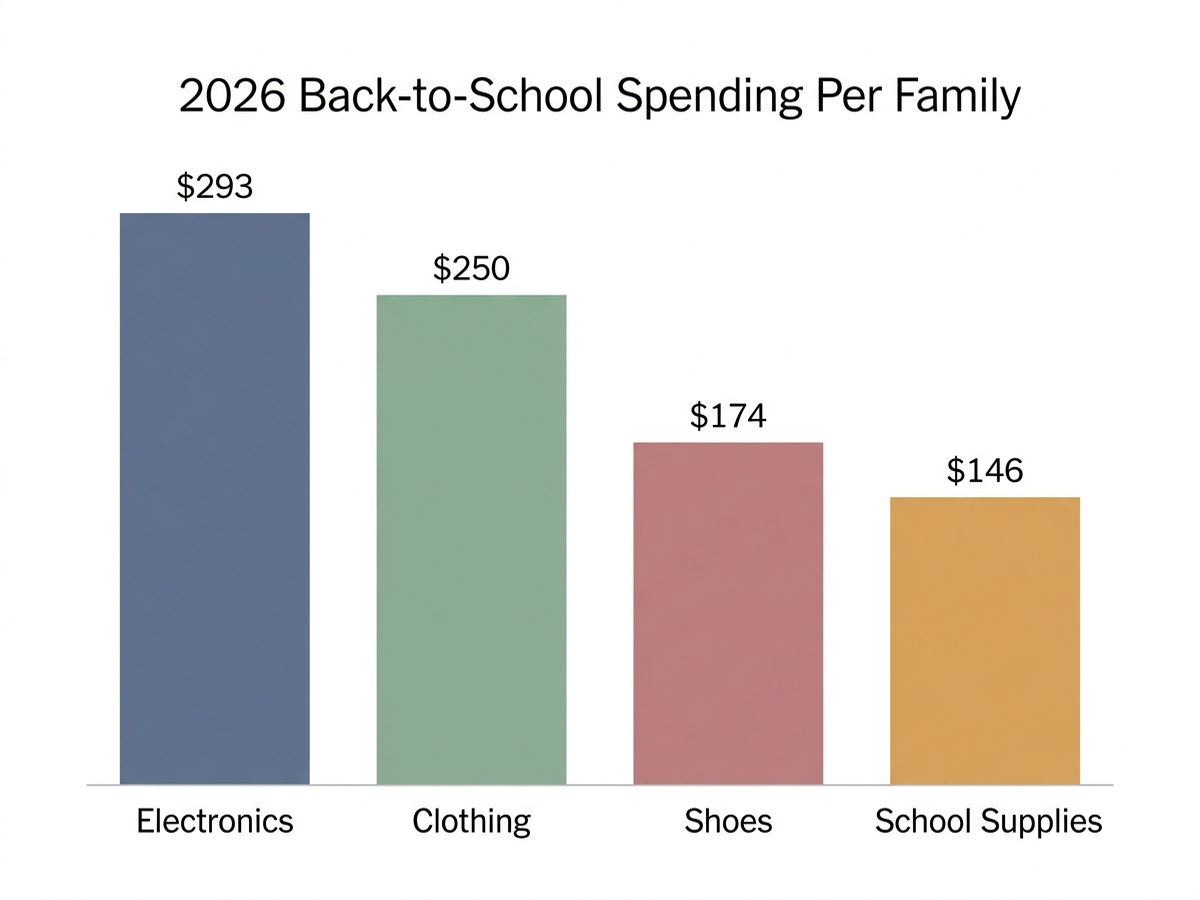
Yes, by a meaningful margin. NRF’s 2026 survey puts total college-related back-to-school spending at $103.5 billion, a new record above the previous high of $94 billion set in 2023, while K-12 families plan to spend an average of $863.86 — electronics alone accounts for $293.11 of that per-family K-12 figure, the single largest category ahead of clothing, shoes, and school supplies. The same survey notes 46% of shoppers plan to wait for deals and 47% plan to buy only essentials now and replenish supplies later in the school year — both are reasonable responses to the specific pattern in this data, since electronics (the biggest line item) also tends to see the deepest and most predictable discounting around Labor Day and back-to-school sale events, unlike clothing and shoes, which discount less predictably by season.
Back-to-School Spending, by Category (NRF 2026)
| Category | Avg. spend per K-12 family | Total (K-12, US) |
|---|---|---|
| Electronics | $293.11 | $14.7 billion |
| Clothing & accessories | $250.29 | $12.5 billion |
| Shoes | $174.01 | $8.7 billion |
| School supplies | $146.45 | $7.3 billion |
Laptop RAM vs. Price: Where the Sweet Spot Actually Is
Which Question Matches Your Situation
Quick-Reference Table
Prices are approximate amazon.com figures at the time of writing (August 2026) and fluctuate.
| Question | Recommended pick | Approx. price | Key data point |
|---|---|---|---|
| Budget laptop for coursework | ASUS Vivobook Go 15 (16GB) | ~$500–$550 | Buying guides: $500–$900 is the sweet spot tier |
| Daily-use backpack | Patagonia Black Hole Mini MLC 30L | ~$169 | CR: Editor’s Choice for comfort + build quality |
| Headphones for dorm studying | Soundcore Life Q30 | $50–$80 | RTINGS: #1 under-$100 over-ear pick |
| Tablet for note-taking | iPad Air 11” (M4), 128GB | Varies by config | GoodNotes/Notability app-ecosystem lead |
| Twin XL mattress topper | LUCID 2” Gel Memory Foam | ~$40–$60 | CertiPUR-US certified, gel-infused |
| Portable second monitor | ARZOPA 15.6” 1080P | ~$90–$130 | Single USB-C cable for power + video |
| Blue light glasses | Cyxus Blue Light Glasses | ~$15–$20 | AAO: no daytime eye-strain benefit; sleep benefit only |
| USB-C hub | Anker 555 (8-in-1) | ~$30–$40 | 4.4 oz, 4K HDMI, Gigabit Ethernet |
Limitations
This analysis relies on independent testing and buying guides (Consumer Reports, RTINGS, Sleep Foundation, Tom’s Hardware, American Academy of Ophthalmology), manufacturer specifications, aggregated amazon.com review sentiment, and the National Retail Federation’s 2026 back-to-school spending survey, rather than our own hands-on testing of every product named. Manufacturer-claimed figures (battery life, weight, port speeds) are labeled as such where they have not been independently re-verified by a third-party lab. NRF spending figures are survey-based averages across many households and will not match any individual family’s actual spending. Prices fluctuate on Amazon and may differ from the ranges listed by the time you read this. Individual experience may vary based on program of study, dorm conditions, and unit-to-unit variance.
Bottom Line
Most back-to-school purchases don’t need more research, they need one specific number checked against a specific need: how much RAM a laptop actually has, whether a warranty covers the failure mode that’s actually likely, whether a $130 price difference on a backpack maps to a documented durability difference or just a logo. Where a specific product is the right answer, we’ve named the ones with independent data behind them, not just a marketing page.
Before you buy anything, paste the product link into Arekore — our AI assistant checks review authenticity, surfaces what the one-star reviews actually complain about, and compares prices, free, in about five minutes.