Standing Desk Wobbling at Full Height? 4 Real Fixes (2026)
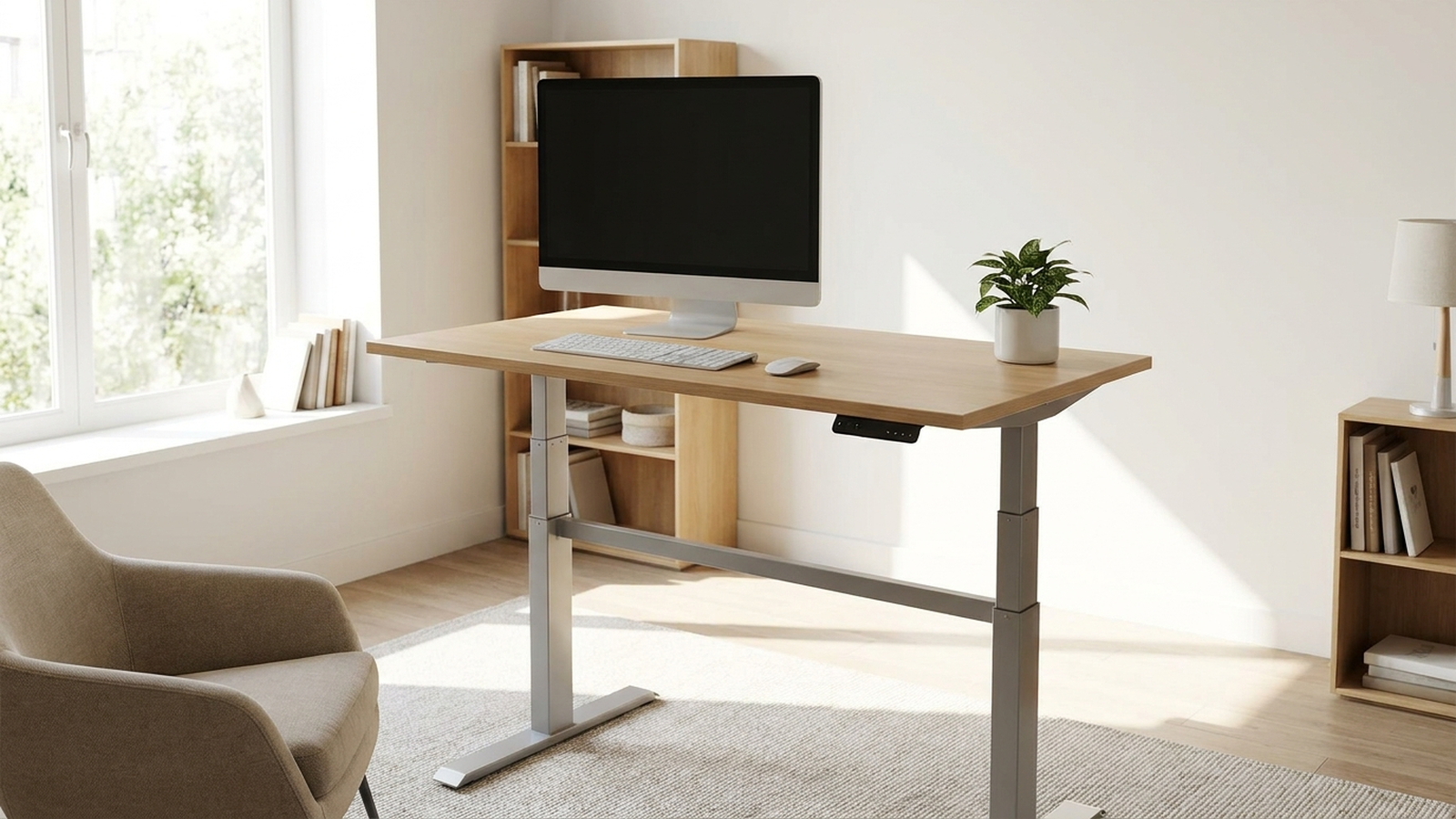
TL;DR. Wobble that shows up only near full height is almost always a lateral-stability problem, not a defect: most desks are rated for vertical load, not side-to-side force, and a two-leg frame with no crossbar loses rigidity the taller it extends. The fix ladder, cheapest first, is: (1) re-torque every leg bolt, (2) level all four feet on the actual floor, (3) add a clamp-on stabilizer bar if the frame has no crossbar, and (4) accept that some budget frames simply won’t get fully solid above roughly 42-44 inches, no matter what you add.
A note on links and methodology
As an Amazon Associate, Arekore earns from qualifying purchases. The Amazon product links in this article include our affiliate tracking ID and may earn us a commission if you buy through them, at no additional cost to you. See our Links Policy for details on how we select products and how commissions do not influence our recommendations.
We also did not personally test the specific units named below in a lab setting. Every diagnostic and product claim here is an editorial synthesis of public data, cited inline.
Methodology
This is an editorial analysis based on publicly available data, collected in August 2026. We synthesized: (a) aggregated amazon.com customer review sentiment for two-leg electric standing desks and aftermarket stabilizer products, read via each product’s public review panels; (b) independent buying-guide testing notes from Wirecutter (The New York Times), which names UPLIFT desks its top pick largely on stability grounds; (c) manufacturer specifications and engineering explanations from FlexiSpot and Eureka Ergonomic on why crossbars and leg geometry affect lateral rigidity, and on the FlexiSpot E7 Pro’s stated weight capacity; and (d) recurring troubleshooting language from Amazon customer reviews and Q&A threads describing bolt-tightening and leveling as effective fixes. We do not report a precise review-count N for any single ASIN because Amazon’s public review panels do not expose a stable, verifiable count; a fabricated number would be misleading. Where we cite a manufacturer weight-capacity or geometry claim, we label it as a manufacturer claim rather than an independently verified test result. Prices are amazon.com figures at the time of writing and fluctuate.
Why standing desks wobble specifically at full height
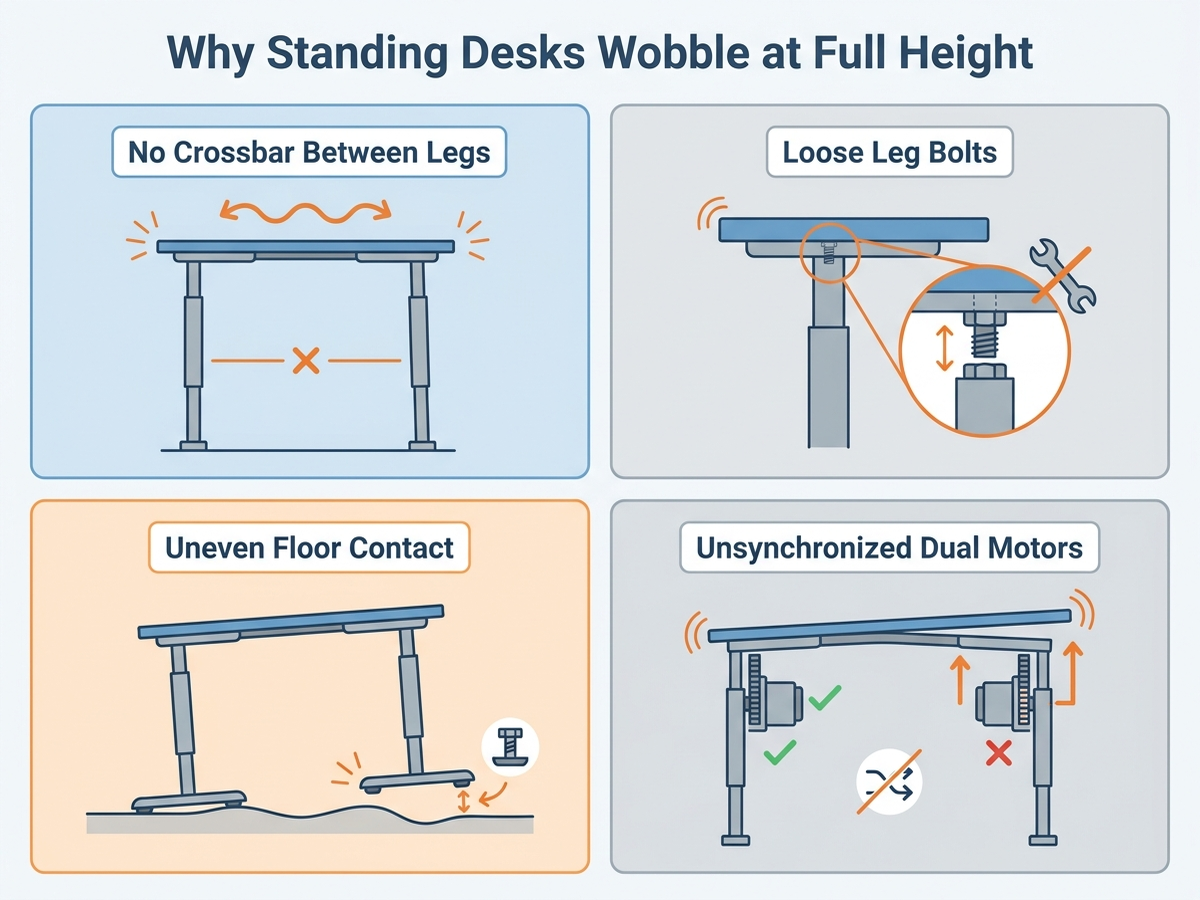
A desk that feels rock-solid at sitting height and starts swaying once it’s raised past roughly 42 inches isn’t malfunctioning — it’s exposing a basic mechanical trade-off. The telescoping columns that let a desk move up and down are very good at carrying vertical load (your monitor, keyboard, and body weight pressing down) and comparatively weak at resisting lateral and torsional force (side-to-side push, or twisting when you lean on one corner). The taller the columns extend, the longer that lever arm gets, and the more any small looseness in the frame turns into visible sway at the desktop.
Aggregated buying-guide and manufacturer sources point to four recurring causes, roughly in order of how often they show up in troubleshooting discussions:
- No crossbar (or an undersized one) connecting the two leg frames. A crossbar’s job isn’t to hold up weight — the legs and columns do that — it’s to tie the two leg assemblies into one rigid unit that resists twisting. Many modern desks skip the crossbar entirely for a cleaner look and more legroom, which trades away stability the manufacturer would otherwise engineer in.
- Loose bolts at the leg-to-foot and leg-to-beam connections. Nearly every documented fix for a “suddenly wobbly” desk that was previously fine starts here: components settle after the first few weeks of use, and a single loose bolt lets the others work loose too.
- Uneven floor contact. If one foot doesn’t fully touch the floor, the desk rocks on the other three like a four-legged table with one short leg — a problem that gets worse, not better, the taller and more top-heavy the setup is.
- Motor desynchronization on dual-motor frames. If the two lifting columns aren’t perfectly level with each other — often after a reset following a power loss — the frame can develop a slight lean that reads as wobble even when every bolt is tight.
Comparison Table: Fixes and What They Actually Solve
Prices are approximate amazon.com figures at the time of writing (August 2026) and fluctuate.
| Fix | ASIN | Approx. price | What it addresses | Doesn’t fix |
|---|---|---|---|---|
| Re-torque all leg/frame bolts | — (tools only) | $0 (or ~$10-$15 for a hex key set) | Loosened fasteners from settling or shipping vibration | A frame with no crossbar by design |
| Adjustable Furniture Leveling Feet, 16-pack | B0C9F238PG | ~$12-$16 | Uneven floor contact, rocking on hard or unlevel flooring | Lateral sway on a tall, crossbar-free frame |
| FlexiSpot Height-Adjustable Desk Leg Casters (locking) | B0732QT98V | ~$25-$35 | Mobility plus a locking brake to stop rolling-induced wobble | Doesn’t add rigidity at full height by itself |
| VIVO Universal Clamp-On Desk Stabilizer Bar | B07NP4WN68 | ~$59.99 | Side-to-side sway on two-leg frames with no built-in crossbar | Front-to-back rocking; not intended to fix that axis |
| FlexiSpot E7 Pro (dual motor, replacement frame, 440 lbs mfr. capacity) | B08B3SNBF8 | ~$400-$500 | Buying a frame engineered for high-load stability from the start | Cost — this is the “stop patching, upgrade” option |
1. Re-torque every bolt — the fix that resolves most “new” wobble
The most frequently repeated fix in aggregated Amazon reviews and Q&A threads for desks that wobbled shortly after assembly, or started wobbling after months of previously being fine, is simply re-tightening every bolt in the frame. One recurring pattern in review language: tightening one foot bolt fully often reveals that the other three have gone slightly loose in the process, because the frame flexes as force is applied — so the fix isn’t “tighten each bolt once,” it’s “go around all four corners repeatedly until none of them can be tightened any further.” This takes about five minutes with the hex key that ships with most desks, or a $10-$15 hex key set if the original tool is missing.
This fix costs nothing beyond a few minutes and should be the first thing anyone tries, regardless of which desk they own — it resolves a meaningful share of complaints that read, at first, like a structural defect.
2. Level the feet on the actual floor you have
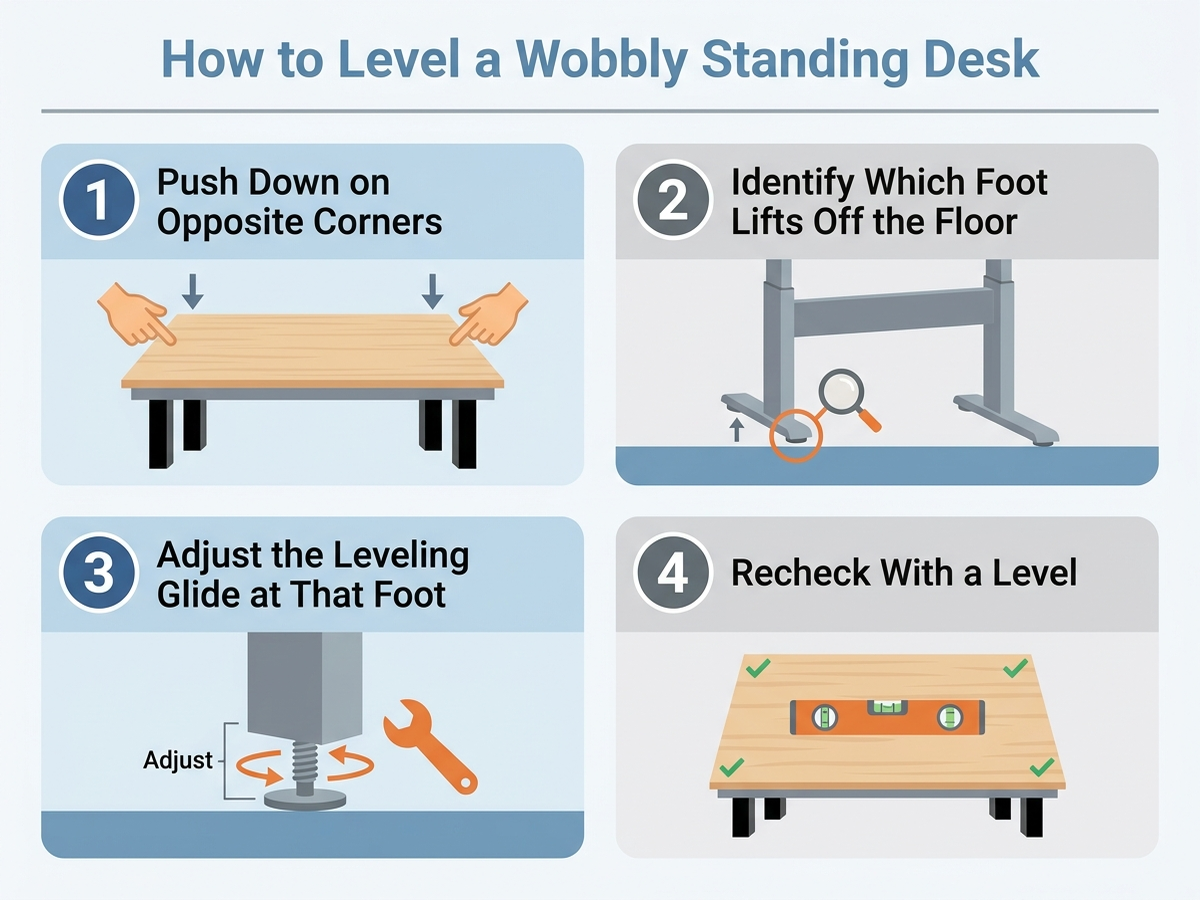
Manufacturer troubleshooting guidance from FlexiSpot and Eureka Ergonomic converges on a simple diagnostic: push down on opposite corners of the desktop one pair at a time. If a foot visibly lifts off the floor, that’s your uneven-contact corner, and the fix is to adjust that foot’s leveling glide (a rotating threaded foot most desks ship with) until all four corners make solid contact. Hardwood, tile, and older subfloors are the most common culprits — a floor that looks flat to the eye is often out of level by enough to matter once a desk is extended to its tallest setting.
If your desk’s built-in feet don’t have enough adjustment range for a particularly uneven floor, or lack leveling glides entirely (common on older or lower-cost frames), aftermarket Adjustable Furniture Leveling Feet kits — ASIN B0C9F238PG, a 16-pack of 1/4-inch threaded levelers — screw into standard furniture-leg threading and give substantially more range than a desk’s stock glides. This is a floor-contact fix, not a rigidity fix: it stops rocking on an uneven surface, but it will not by itself solve lateral sway that shows up even on a perfectly flat floor.
Check Adjustable Furniture Leveling Feet, 16-Pack, on Amazon
3. Add a clamp-on stabilizer bar if your frame has no crossbar
For side-to-side sway that persists after bolts are tight and feet are level — the classic symptom of a two-leg frame with no crossbar — the most commonly recommended aftermarket fix in both manufacturer troubleshooting content and independent stability guides is a clamp-on stabilizer bar. The VIVO Universal Clamp-On Desk Stabilizer Bar (ASIN B07NP4WN68) is the most frequently cited example: an all-steel bar with heavy-duty C-clamps that mounts between the two leg frames, adjustable from 36 to 61.6 inches to fit most two-leg desks, priced at roughly $59.99 on VIVO’s own site. Aggregated customer feedback describes it as noticeably improving stability — some reviewers offer unverified personal estimates in the range of “80-90% less wobble,” a figure we cannot independently confirm — without eliminating sway entirely, and manufacturer product information is explicit that it addresses side-to-side motion specifically, not front-to-back rocking.
This is the highest-value fix on this list for anyone whose desk wobbles specifically at full height on an otherwise flat, level floor, because it directly counters the lever-arm problem described above by tying the two leg assemblies together the way a built-in crossbar would.
Check the VIVO Universal Clamp-On Desk Stabilizer Bar on Amazon
4. Add locking casters if the issue is actually desk creep, not sway
Some desks marketed as “wobbly” are actually rolling slightly under typing pressure or being bumped, which reads as wobble but is really unwanted movement. FlexiSpot’s Height-Adjustable Desk Leg Casters (ASIN B0732QT98V) add mobility with a locking brake on two of the four wheels, so the desk can be rolled for cleaning but locked in place during use. This doesn’t add lateral rigidity by itself — a desk that already sways at full height will still sway on casters — but it removes a second, easily confused symptom (the whole desk shifting position) that some owners misattribute to frame wobble.
Check FlexiSpot Height-Adjustable Desk Leg Casters on Amazon
When to stop patching and consider a different frame
If bolts are tight, feet are level, and a stabilizer bar still leaves noticeable sway at your working height, the honest answer from independent testing is that some budget frames are simply not engineered for full-height rigidity. Wirecutter’s standing-desk testing names UPLIFT desks its top pick largely on stability grounds, describing minimal wobble even at taller settings. The FlexiSpot E7 Pro (ASIN B08B3SNBF8) is a comparable dual-motor alternative: FlexiSpot’s own manufacturer specifications state a weight capacity up to 440 pounds without wobble at maximum height — both frames use a dual-motor design and a more substantial leg geometry than entry-level single-motor desks. If your current desk is a budget single-motor frame and the fixes above haven’t gotten it fully solid, replacing the frame — rather than continuing to add aftermarket parts — is the more reliable long-term fix, especially if you regularly work at a taller-than-average standing height.
Decision Flowchart: Which Fix Do You Actually Need?
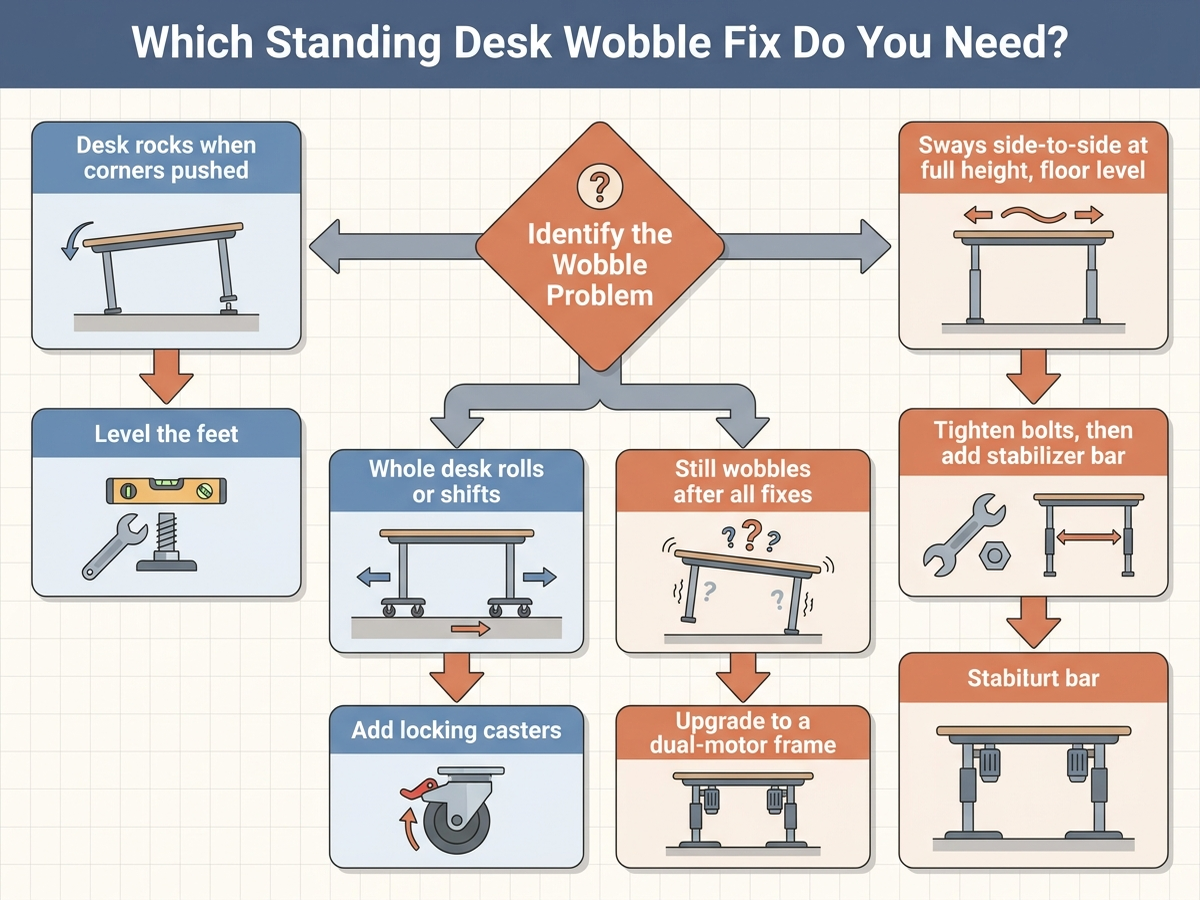
- Desk rocks when you push opposite corners: uneven floor contact — start with leveling feet (built-in glides, or the aftermarket 16-pack above).
- Desk sways side-to-side specifically near full height, floor is level: lateral rigidity issue — re-torque bolts first, then add a clamp-on stabilizer bar if the frame has no crossbar.
- Whole desk shifts or rolls, rather than swaying in place: likely a caster or floor-friction issue, not frame wobble — locking casters solve unwanted movement, not sway.
- Still wobbling after all three fixes, on a budget single-motor frame: the frame itself is undersized for your working height — a dual-motor frame with a stated high weight capacity (e.g., FlexiSpot E7 Pro) is the more durable fix than continuing to add parts.
Editorial Recommendations by Situation
- Cheapest fix to try first, always: re-torque every bolt. It’s free, takes five minutes, and resolves a meaningful share of “new desk wobbles out of the box” complaints in aggregated reviews.
- Best fix for an uneven or hardwood floor: the Adjustable Furniture Leveling Feet 16-pack (B0C9F238PG), for more adjustment range than most desks’ stock glides.
- Best fix for side-to-side sway on a crossbar-free frame: the VIVO Universal Clamp-On Desk Stabilizer Bar (B07NP4WN68) — the single most consistently recommended aftermarket fix for this specific symptom.
- Best fix for desk creep rather than true wobble: FlexiSpot locking casters (B0732QT98V).
- Best long-term fix if patches don’t fully work: replace a budget single-motor frame with a dual-motor design rated for high weight capacity without wobble, such as the FlexiSpot E7 Pro (B08B3SNBF8) or an equivalent UPLIFT model.
Limitations of this analysis
To be explicit about what this article does not establish:
- We did not run controlled wobble measurements ourselves on any of the frames or stabilizer products named here. Sway severity, the “80-90% improvement” figures cited for the stabilizer bar, and manufacturer weight-capacity claims are drawn from aggregated customer review language and manufacturer specifications, not an independent lab test.
- The four-cause breakdown is a synthesis of recurring troubleshooting patterns, not an exhaustive engineering diagnosis. A desk with a genuine manufacturing defect (bent column, stripped bolt threading) may not respond to any of these fixes and should go through the manufacturer’s warranty process instead.
- Prices fluctuate and are approximate amazon.com figures captured at the time of writing; confirm current pricing on the linked listing before buying.
- Floor type, desktop material, and monitor-arm setup all affect perceived wobble independently of the frame itself; results will vary by setup.
The Bottom Line
Standing desk wobble at full height is almost always a lateral-stability shortfall, not a broken unit — and it has a clear, cheapest-first fix order: tighten every bolt, level the feet, then add a stabilizer bar if the frame has no crossbar. Only if all three fail to solve it does the problem point to the frame itself being undersized for your working height.