Soundbar Audio Out of Sync With the TV? 5 Real Causes

TL;DR. Dialogue lagging behind lip movement is almost never a defective soundbar — it’s a delay introduced somewhere in the signal chain between the TV’s video processing and the soundbar’s audio decoding. In rough order of how often they show up in independent testing and manufacturer support content: eARC/ARC transcoding delay inside the TV itself, a frame-rate-matching setting on a streaming device, an audio-format mismatch when a soundbar is set to “Auto,” a drift bug specific to one streaming app rather than the hardware, and a stale HDMI handshake after a software update. The fix that resolves the most cases with zero new hardware: the manual audio-delay (lip-sync) slider built into nearly every TV and soundbar from the last five years.
A note on links and methodology
As an Amazon Associate, Arekore earns from qualifying purchases. The Amazon product links in this article include our affiliate tracking ID and may earn us a commission if you buy through them, at no additional cost to you. See our Links Policy for details on how we select products and how commissions do not influence our recommendations.
We did not personally reproduce a sync failure on every soundbar named below. Every cause and fix in this article is an editorial synthesis of independent lab testing, manufacturer support documentation, and aggregated public troubleshooting reports, cited inline.
Methodology
This is an editorial analysis based on publicly available data collected in October 2026. We did not run our own latency bench test; instead we synthesized:
- Independent lab latency testing — RTINGS’ audio-latency research, which measured roughly 500 soundbar/TV combinations over HDMI-ARC, eARC, and optical to quantify how much delay each connection type actually introduces, and the ITU-R BT.1359 broadcast standard’s published audio-video sync detectability and acceptability thresholds.
- Manufacturer troubleshooting documentation — Samsung’s and LG’s published support pages on “digital audio out delay” and AV-sync settings, Sony’s BRAVIA lip-sync troubleshooting guide, Roku’s soundbar sync support article, and Sonos’s own TV Dialog Sync documentation for the Arc line.
- Aggregated owner and forum reports — threads on AVS Forum, AVForums, Tom’s Guide forums, Reddit, Apple’s own community forum, and Sonos’s and Samsung’s community forums, used to identify which specific streaming apps and device settings most commonly trigger sync drift.
- Market and ownership data — Consumer Technology Association and industry research-firm estimates on US soundbar household penetration, used for market-context framing rather than as a source of failure-rate claims.
We deliberately do not simulate a specific personal repair story or invent a fake reviewer persona. The guidance below is a synthesis of lab research, manufacturer documentation, and aggregated troubleshooting patterns — treat it as a starting framework, not a substitute for your specific model’s manual.
1. Five reasons dialogue drifts out of sync
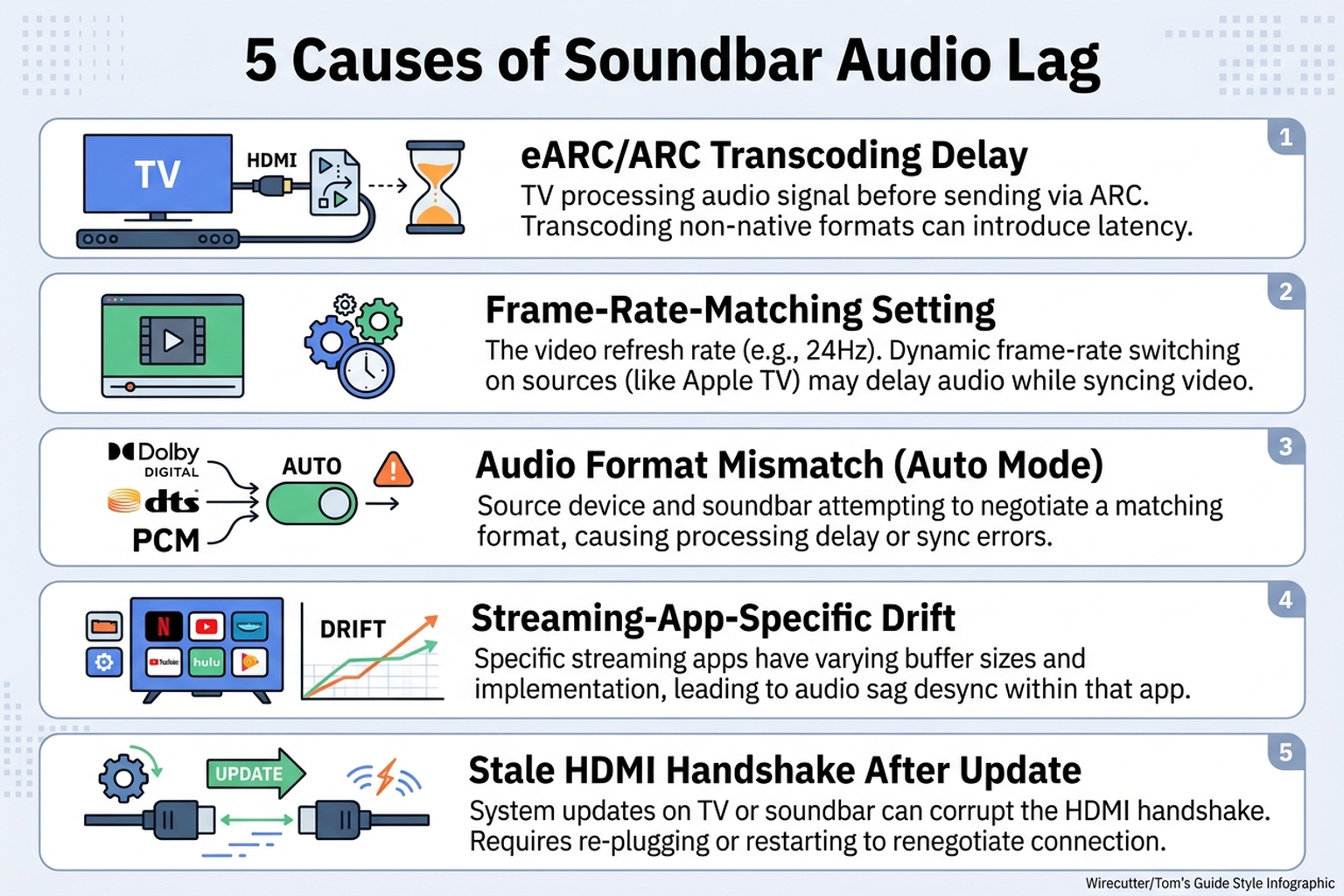
If the picture is consistently ahead of the sound — or, less commonly, behind it — one of five specific points in the signal chain is almost always responsible, rather than a failing soundbar unit.
| Cause | What it looks like | Fixable at home? |
|---|---|---|
| eARC/ARC transcoding delay | Audio consistently lags by a fixed amount across every source | Yes — manual audio-delay slider |
| Frame-rate-matching setting | Delay appears or changes specifically after a streaming device switches resolution/frame rate | Yes — turn off Match Frame Rate |
| Audio-format mismatch (“Auto” mode) | Delay is inconsistent, sometimes fine, sometimes off, depending on content | Yes — force a fixed output format |
| Streaming-app-specific drift | Only one app (e.g. one streaming service) drifts, others stay in sync on the same TV and soundbar | Partial — app update or codec workaround |
| Stale HDMI handshake after a software update | Sync was fine, then broke suddenly after a TV or soundbar firmware update, with no new content type | Yes — full power-cycle re-handshake |
Transcoding delay is the most consistently documented cause in lab testing: when a TV receives an audio signal over HDMI, decodes it, and re-encodes it before sending it back out over eARC to the soundbar, that extra processing step adds latency that varies by model and audio format — RTINGS classifies a “good” result on its latency test as falling within roughly -55ms to 75ms, with results outside that band flagged as more likely to be perceptible. That range is consistent with the ITU-R BT.1359 broadcast standard’s detectability threshold, which places the point where attentive viewers start to notice audio leading video at roughly +45ms.
2. Why “my soundbar is broken” is usually the wrong diagnosis
A soundbar is the last stop in a chain that starts at the streaming app, passes through the streaming device’s video processing, gets handed to the TV, and is then extracted and sent back out over HDMI-ARC or eARC. A delay introduced at any point earlier in that chain shows up at the soundbar as “bad audio sync,” even though the soundbar itself decoded and played the signal correctly the instant it received it.
That’s exactly why the same soundbar can sync perfectly with a cable box and drift on a specific streaming app: the app and its frame-rate handling, not the soundbar’s internal processing, is the variable that changed. Apple’s own support community has documented this with its “Match Frame Rate” feature on Apple TV, which switches HDMI output resolution and frame rate to match each piece of content — a process that can introduce a brief resync delay large enough to throw off lip sync, and is commonly disabled as a fix.
RTINGS’ testing adds a counterintuitive finding here: plugging the soundbar into the TV’s dedicated eARC port is not always the lowest-latency option. Connecting the soundbar to a secondary HDMI input instead — effectively putting the soundbar earlier in the signal chain, the way an AV receiver would normally sit — let the soundbar start processing audio from an earlier point in the pipeline in several of their tested configurations, reducing total delay versus the “proper” eARC connection.
Format mismatches compound the problem in a different way. Most soundbars default to an “Auto” audio-output mode that switches between PCM, Dolby Digital, and Dolby Digital Plus depending on what the content provides — and because each format can take a different amount of time for the soundbar to detect and decode, switching between them mid-session produces inconsistent delay rather than a fixed, easily-correctable offset.
3. Brand- and platform-specific patterns worth knowing
Sonos. Sonos documents a manual fix directly in its support content: the Sonos app’s Settings > System > [room] > TV Dialog Sync menu includes an audio-delay slider adjustable in roughly 10-millisecond increments, intended to be tuned while watching a clip with visible speech until lips and audio line up. Sonos’s own community forum has a long-running thread specifically about Arc and Samsung QLED sync drift, where the most consistently reported workaround is setting the TV’s audio output to a fixed Dolby Digital or PCM passthrough rather than leaving it on Auto.
Samsung. Samsung’s support documentation exposes the relevant setting under Settings → Sound → Expert Settings, labeled “Digital Audio Out Delay” or “AV Sync Adjustment” depending on the model year, functioning as the manual offset slider that resolves a fixed, consistent delay. Samsung’s own community forum has an extended thread on eARC-specific lip-sync complaints, which is a reasonable signal this is a frequent support contact on current-generation sets rather than an isolated report.
LG. LG’s support content for current webOS sets exposes a similar manual AV-sync offset, and LG TVs are among the models RTINGS tested in its roughly-500-measurement ARC/eARC latency study, which found eARC consistently reduced — but did not eliminate — the delay that ARC introduced on the same hardware.
Sony (BRAVIA). Sony’s own published troubleshooting guide walks through lip-sync delay as a named, expected scenario rather than a defect, and directs owners to the TV’s built-in “Audio sync” or “Lip sync” setting as the first step, ahead of any hardware swap.
Roku and streaming-device layer. Roku publishes a dedicated support article for sync issues specific to its Streambar and smart-soundbar line, separate from the TV manufacturer’s own guidance — evidence that the streaming-device layer is a distinct point of failure from both the TV and the soundbar, not just a pass-through.
Apple TV. Apple’s support documentation and community threads both point to the “Match Frame Rate” toggle and the “Wireless Audio Sync” calibration tool (under Video and Audio settings) as the two Apple-TV-specific levers, independent of whatever delay the TV or soundbar separately introduces.
Cross-platform. Forum reports across AVS Forum, Tom’s Guide, and Reddit converge on the same pattern: when only one streaming app drifts while others on the same TV and soundbar stay in sync, the fault sits in that app’s playback pipeline, not the hardware — and the practical fix is usually an app update or a format workaround (switching that app’s audio output setting) rather than anything adjustable on the TV or soundbar itself.
4. What to actually do, in order
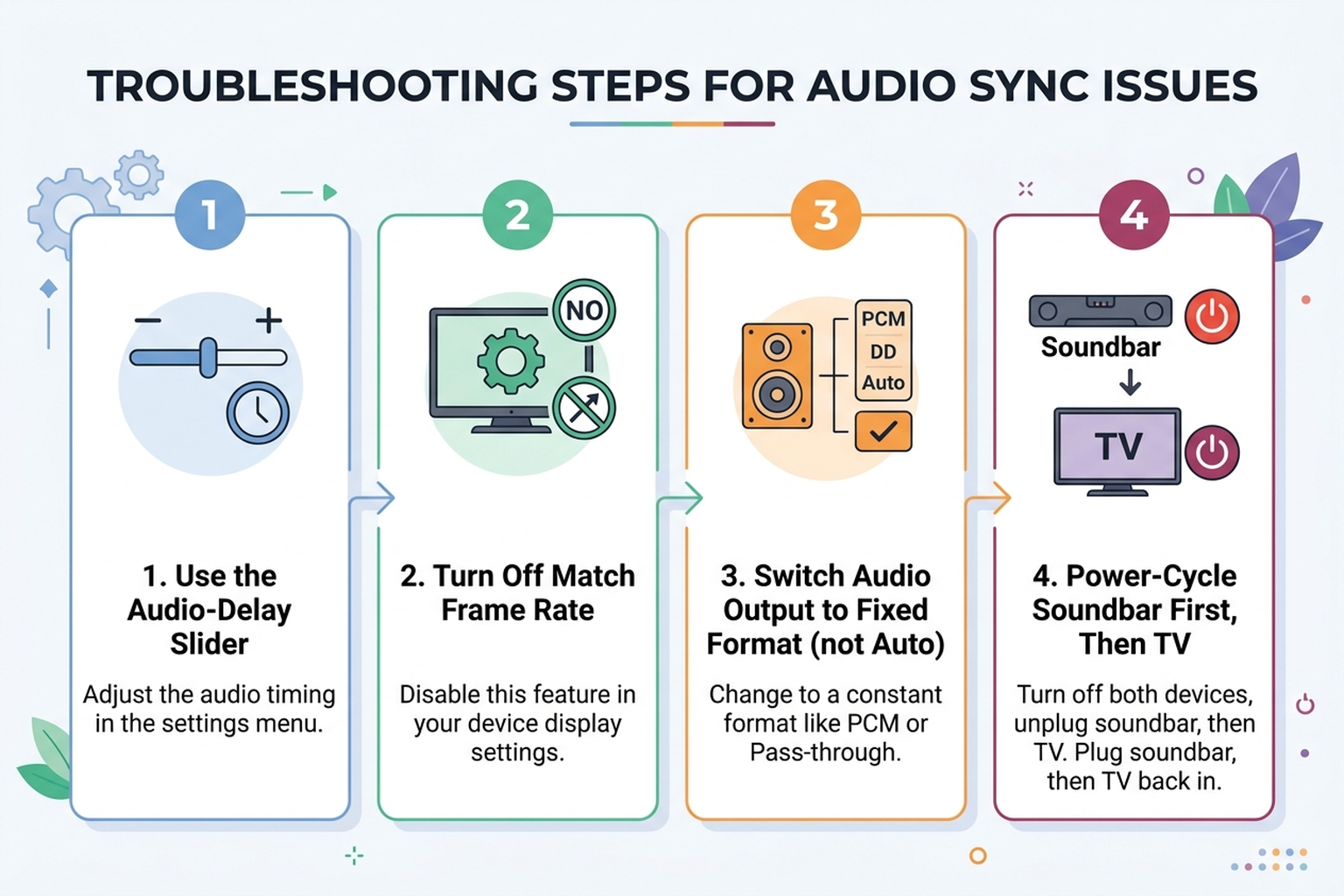
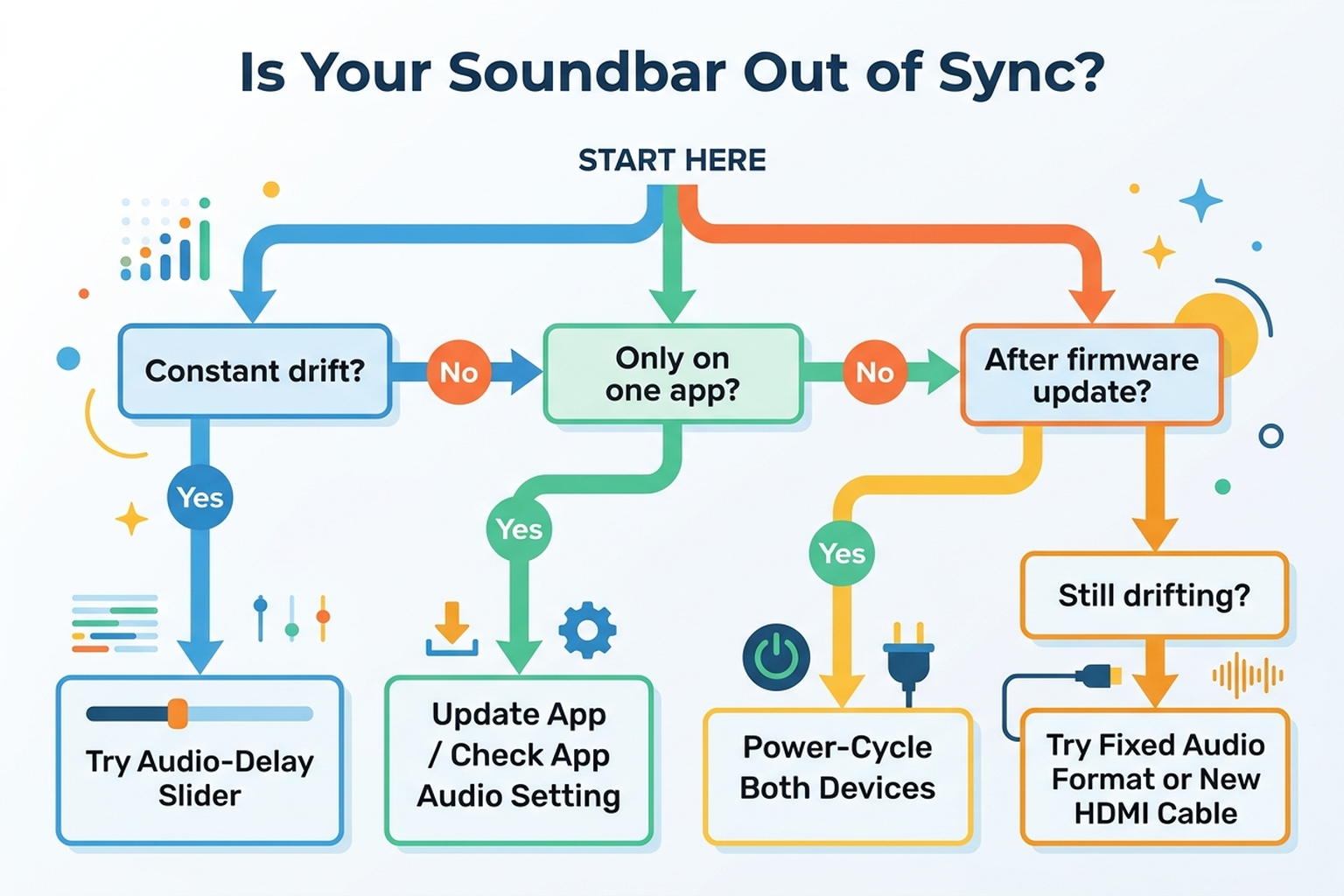
- Use the manual audio-delay slider first. Nearly every TV and soundbar sold in the last five years has one — look for “Audio Delay,” “Lip Sync,” “AV Sync Adjustment,” or “Digital Audio Out Delay” in the sound settings menu, or the Sonos app’s TV Dialog Sync menu for Sonos hardware. This resolves a fixed, consistent delay with no new equipment.
- Identify whether the drift is constant or only happens on one app. If only one streaming app drifts while everything else stays in sync, the fault is in that app’s pipeline — check for an app update, or try switching that app’s own audio-output setting if it has one, rather than adjusting TV or soundbar settings that won’t address an app-specific bug.
- Turn off frame-rate-matching features on the streaming device. Apple TV’s “Match Frame Rate,” and equivalent settings on other streaming boxes, can introduce a brief resync delay every time content switches resolution or frame rate.
- Force a fixed audio-output format instead of “Auto.” Switching the soundbar or TV’s digital audio output to a fixed PCM or Dolby Digital passthrough, rather than Auto, removes the variable decode-time swings that happen when the format changes mid-session.
- Try the soundbar’s secondary HDMI input instead of the dedicated ARC/eARC port, if the soundbar has one. RTINGS’ testing found this reduced total latency in several tested configurations, despite seeming like the “wrong” port to use.
- Power-cycle both devices in order. Unplug the soundbar and TV for roughly 30-60 seconds, then power the soundbar on first and the TV second, letting a fresh HDMI handshake complete before resuming playback — a documented fix for sync problems that appear suddenly after a firmware update with no new content type involved.
- Check for a pending firmware update on the TV and soundbar. Manufacturers periodically ship fixes specifically for ARC/eARC handshake and sync regressions; an outdated firmware version is a common and easily checked variable.
- Prefer a wired HDMI-eARC connection over Bluetooth for the primary TV audio path if drift gets progressively worse over the course of a viewing session — a pattern more consistent with Bluetooth-specific latency drift than with a fixed ARC/eARC transcoding delay.
5. If the fix is a setting, not a new soundbar
Editorial recommendation, not personal testing. If the sync issue traces to a frame-rate or format setting rather than the soundbar’s own hardware, no new purchase is usually needed — these are relevant only if the existing setup is the actual bottleneck.
- Monoprice Certified Premium HDMI Cable, 6ft, 4K@60Hz, HDR, 18Gbps — a worthwhile check if the current HDMI cable predates the eARC spec; an older cable rated below the required bandwidth can fall back to standard ARC and reintroduce the higher transcoding delay even when both the TV and soundbar support eARC.
6. If the soundbar itself is the right next step
If the audio-delay slider, format settings, and HDMI connection have all been checked and the current soundbar still has no manual sync adjustment at all — common on older or entry-level models — a soundbar with a documented, adjustable lip-sync setting is the more durable fix than continuing to live with a fixed offset.
- Samsung HW-Q990D on Amazon — exposes Samsung’s full “AV Sync Adjustment” range in its companion app, relevant on Samsung TVs where the same manufacturer’s audio-delay implementation tends to be most consistently supported.
- Sonos Arc Ultra on Amazon — pairs with the Sonos app’s dedicated TV Dialog Sync slider described above, independent of whatever sync controls the TV itself offers.
- Bose Smart Ultra Soundbar on Amazon — includes a manual audio-sync adjustment in the Bose app, a useful fallback on TVs whose own built-in delay setting is limited to a handful of coarse steps.
- LG S70TY on Amazon — a current mid-range option with LG’s own AV-sync offset exposed in the soundbar’s own menu, relevant when pairing with a non-LG TV that lacks a fine-grained delay control.
7. The decision flowchart
8. The bottom line
Dialogue drifting behind the picture is almost never a sign that a soundbar has failed — it’s a delay introduced somewhere upstream in the signal chain: eARC/ARC transcoding inside the TV, a frame-rate-matching setting on the streaming device, an audio-format mismatch, an app-specific bug, or a stale HDMI handshake after an update, in roughly that order of how often each shows up in independent testing and support documentation. The manual audio-delay slider built into nearly every TV and soundbar from the last five years resolves a meaningful share of cases with no new equipment and no cost. A soundbar purchase only becomes the right next step once the existing setup’s settings, cable, and HDMI port have all been ruled out.
Limitations of this analysis
To be explicit about what this article does not establish:
- We did not personally reproduce a sync failure on every soundbar or TV combination named here. The causes and fixes described are drawn from independent lab testing, manufacturer support documentation, and aggregated forum sourcing, not from a controlled test we ran ourselves.
- RTINGS’ roughly-500-measurement latency figures reflect the specific TV and soundbar models in their test pool as of their published methodology, and individual unit or firmware-version variance can shift results somewhat. The ITU-R BT.1359 detectability threshold cited is a broadcast-industry reference point, not a guarantee of what any individual viewer will notice — perceptibility varies by person and content type.
- App-specific drift reports cited from community forums (Apple Community, AVS Forum, Tom’s Guide, Reddit) are individual user reports, not a manufacturer-published failure-rate statistic, and streaming-app playback pipelines change frequently with software updates.
- Manufacturer menu labels and setting locations change by model year and firmware version; the setting names cited (e.g. “Digital Audio Out Delay,” “TV Dialog Sync”) reflect current published support documentation as of October 2026 and may differ on older or newer firmware.
- Soundbar ownership and market figures are industry estimates from the Consumer Technology Association and research-firm reporting, used here for context rather than as a basis for any specific causal claim.