Smart Lock Won't Connect to Wi-Fi? 5 Real Causes (2026)
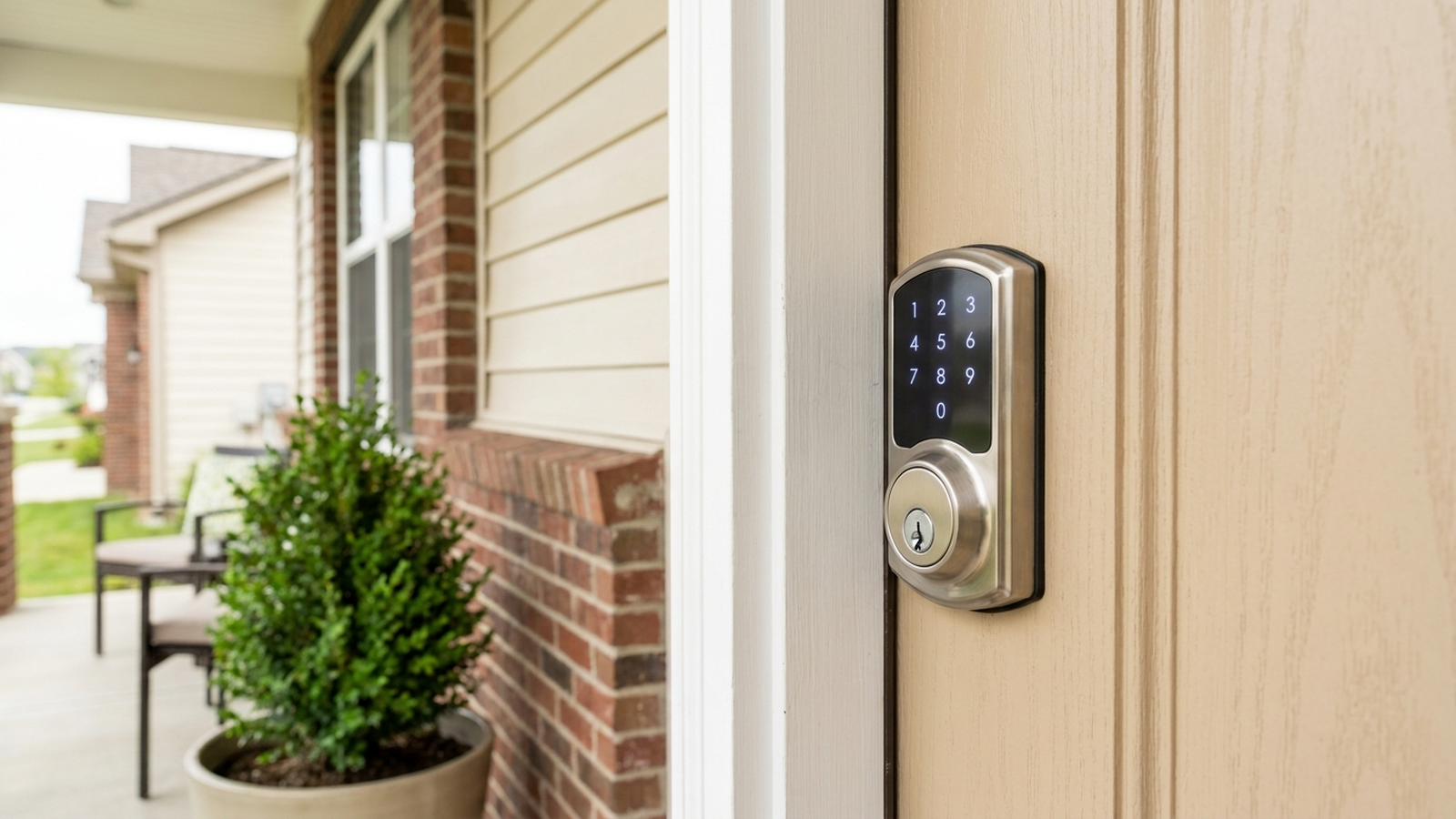
TL;DR. A smart lock that won’t connect to Wi-Fi is rarely a defective unit — it’s almost always a mismatch between what the lock’s radio can do and what the router is offering it. The five most documented causes are a 5GHz-only or merged-band network the lock physically cannot join, a Wi-Fi bridge or module placed too far from the lock or not fully seated, mesh-router band steering that keeps handing the lock between bands it can’t track, outdated lock or bridge firmware, and simple distance or interference from metal doors and thick walls.
A note on links and methodology
As an Amazon Associate, Arekore earns from qualifying purchases. The Amazon product links in this article include our affiliate tracking ID and may earn us a commission if you buy through them, at no additional cost to you. See our Links Policy for details on how we select products and how commissions do not influence our recommendations.
We also did not personally test the specific locks named below. Every cause and fix in this article is an editorial synthesis of manufacturer support documentation, independent lab test findings, and aggregated public troubleshooting reports, cited inline.
Methodology
This is an editorial analysis based on publicly available data collected in September 2026. We did not run a controlled network test ourselves; instead we synthesized:
- Manufacturer troubleshooting guidance — August Support’s Wi-Fi Smart Lock and August Connect bridge troubleshooting articles, Yale’s “Trouble Connecting to Lock” and Connected by August/Yale Access Module documentation, and community-sourced Schlage Encode support threads on 2.4GHz-only network requirements.
- Independent lab and editorial testing — Wirecutter’s ongoing smart lock coverage (updated through 2026), which currently names the Schlage Encode Plus its pick for maximum physical security and the August Wi-Fi as a top choice for renters; the Yale Assure Lock 2 also consistently ranks among top picks in expert reviews from outlets including Wirecutter and CNET.
- Owner troubleshooting Q&A archives — JustAnswer threads specific to Schlage Encode models losing their Wi-Fi connection, and home-networking explainers documenting how mesh routers and band steering interact with single-band IoT hardware.
- Aggregated Amazon customer review sentiment for the models referenced below, read via each product’s public “Customers say” panel and review text on amazon.com in September 2026. We do not report a precise review-count N for every claim because Amazon’s review panels do not expose a stable, verifiable count for every product; where a specific figure appears in the text below, it is attributed to the source that published it.
- Market and category data — per Grand View Research’s 2026 industry report, the US-relevant global smart lock market is valued at roughly $4.0 billion in 2026 with a projected 20.1% compound annual growth rate through 2033, while Persistence Market Research estimates the US market alone at approximately $1.6 billion in 2026 — underscoring how common this connectivity question is likely to become as adoption grows.
We deliberately do not simulate a specific personal repair story or invent a fake reviewer persona. The advice below is a synthesis of manufacturer documentation, independent testing, and aggregated troubleshooting patterns — treat it as a starting framework, not a substitute for your specific router’s admin panel or your lock manufacturer’s own support line.
1. Five reasons a smart lock won’t connect to Wi-Fi
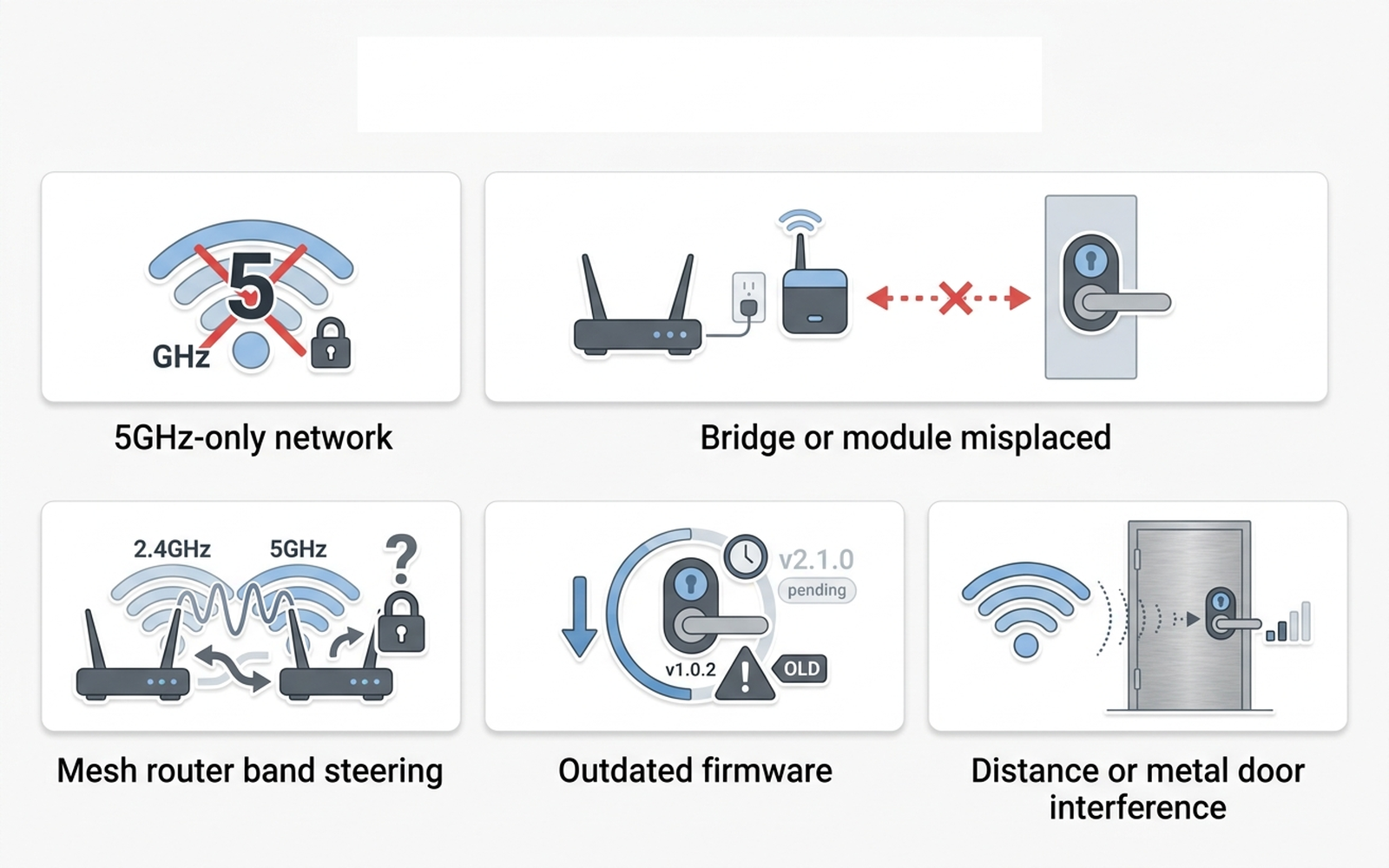
| Cause | What it looks like | Fixable at home? |
|---|---|---|
| 5GHz-only or merged-band network | Setup never finds a network, or lock drops offline shortly after connecting | Yes — split or add a 2.4GHz band |
| Bridge/module misplaced or unseated | Module shows an error, or lock connects to phone but never syncs remotely | Yes — reseat module or reposition bridge |
| Mesh router band steering | Lock connects fine, then randomly goes offline for no obvious reason | Yes — disable steering for that device |
| Outdated lock or bridge firmware | Intermittent drops that a factory reset temporarily “fixes” | Yes — usually via the app |
| Distance or metal-door interference | Weak or no signal specifically at the door, strong signal elsewhere | Sometimes — extender helps, thick doors limit it |
Nearly every smart lock sold today — August, Schlage Encode, and Yale Assure — uses a 2.4GHz-only Wi-Fi radio, whether that radio lives in the lock itself or in a companion bridge module. According to August Support’s own troubleshooting documentation, a Wi-Fi bridge “might not work if your network is on a 5GHz-only mode,” and the fix is to verify the router is actively broadcasting a 2.4GHz signal rather than assuming it already is. This single mismatch — a modern router quietly favoring or merging into 5GHz — is arguably the most common root cause reported across manufacturer support content, because a phone connects to the same network name without any trouble, which makes the lock look defective when it isn’t.
2. Why the lock “connects” once and then goes dark
Bridge and module placement is the second most-documented cause. August Support’s guidance on a Wi-Fi bridge going offline recommends keeping the bridge within 15 feet of the lock and trying an opposite-facing or perpendicular wall if the connection is unreliable — door hardware and wall framing can attenuate a 2.4GHz signal more than owners expect. For locks that use a plug-in accessory module rather than a separate bridge — the Connected by August/Yale Access module being one documented example — support content describes a distinct “Module Communications Error” that occurs when the module isn’t fully seated in the lock body, with the fix being to remove a battery, wait several seconds, and reseat the module before retrying setup.
The third and most modern-specific cause is mesh-router band steering. Home-networking explainers converge on the same pattern: current mesh systems and Wi-Fi 6 routers increasingly merge the 2.4GHz and 5GHz bands under a single network name and automatically steer client devices between them for better throughput — a feature that benefits a laptop and actively works against a single-band IoT device like a smart lock, which can only ever “hear” one of those bands. One home-networking write-up on this exact failure mode put it bluntly: a router that merges bands is “great for a laptop and a problem for a lock that can only hear one of those channels.” The lock connects successfully at setup, then drops or fails to reconnect the next time the router’s steering logic tries to hand it to a band the lock’s radio doesn’t support.
3. Brand-specific patterns worth knowing
August / Yale (bridge and module locks). August Support’s documentation on a Connect bridge showing no LED activity at all — even after a reboot and an outlet change — flags that scenario as one that needs direct manufacturer support rather than further home troubleshooting. Short of that extreme, the standard sequence — confirm internet is working, reboot the bridge by unplugging it, and reposition it closer to or on a different wall from the lock — resolves the large majority of documented cases according to August’s own support content.
Schlage Encode / Encode Plus. Because the Encode line builds Wi-Fi directly into the lock rather than using a separate bridge, its documented connectivity issues center almost entirely on the network side rather than a placement problem. Schlage’s own product documentation and widely repeated owner guidance state that Encode models require a 2.4GHz network with straightforward WPA2-PSK security — networks using WPA3-only security, or an SSID that mixes both bands under one name, are the recurring cause cited in troubleshooting threads. Aggregated Amazon review sentiment for the Schlage Encode Plus — where a large share of the roughly 500-plus rated reviews for the model discuss connectivity at some point — describes intermittent Wi-Fi dropouts as a recurring theme, with most reviewers who diagnosed the issue tracing it back to router settings or signal range rather than a hardware fault in the lock itself.
Yale Assure Lock 2. Yale’s own “Trouble Connecting to Lock” support article recommends a specific device-side reset sequence — turning a phone’s Bluetooth and Wi-Fi off, waiting at least 30 seconds, then turning both back on — before assuming the lock itself is at fault, and separately flags that a home network’s frequency “may have changed from 2.4GHz to 5GHz without realizing,” particularly after a router firmware update or an ISP-issued router swap.
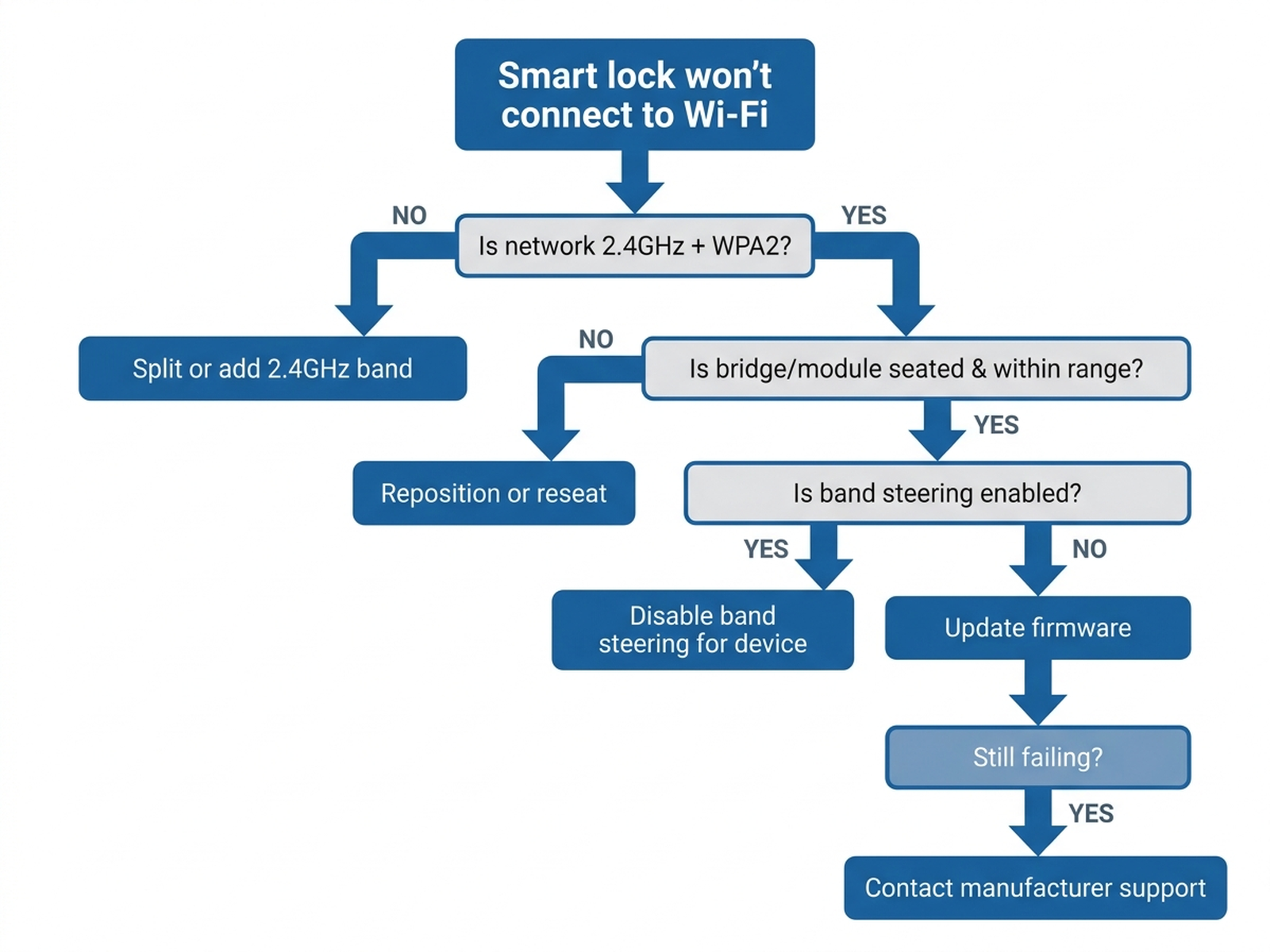
Cross-brand. Across every brand surveyed, manufacturer support content converges on the same troubleshooting order: confirm the network is genuinely 2.4GHz and using compatible security first, check bridge or module placement and seating second, then rule out band steering and firmware before considering the lock hardware itself.
4. What to actually do, in order
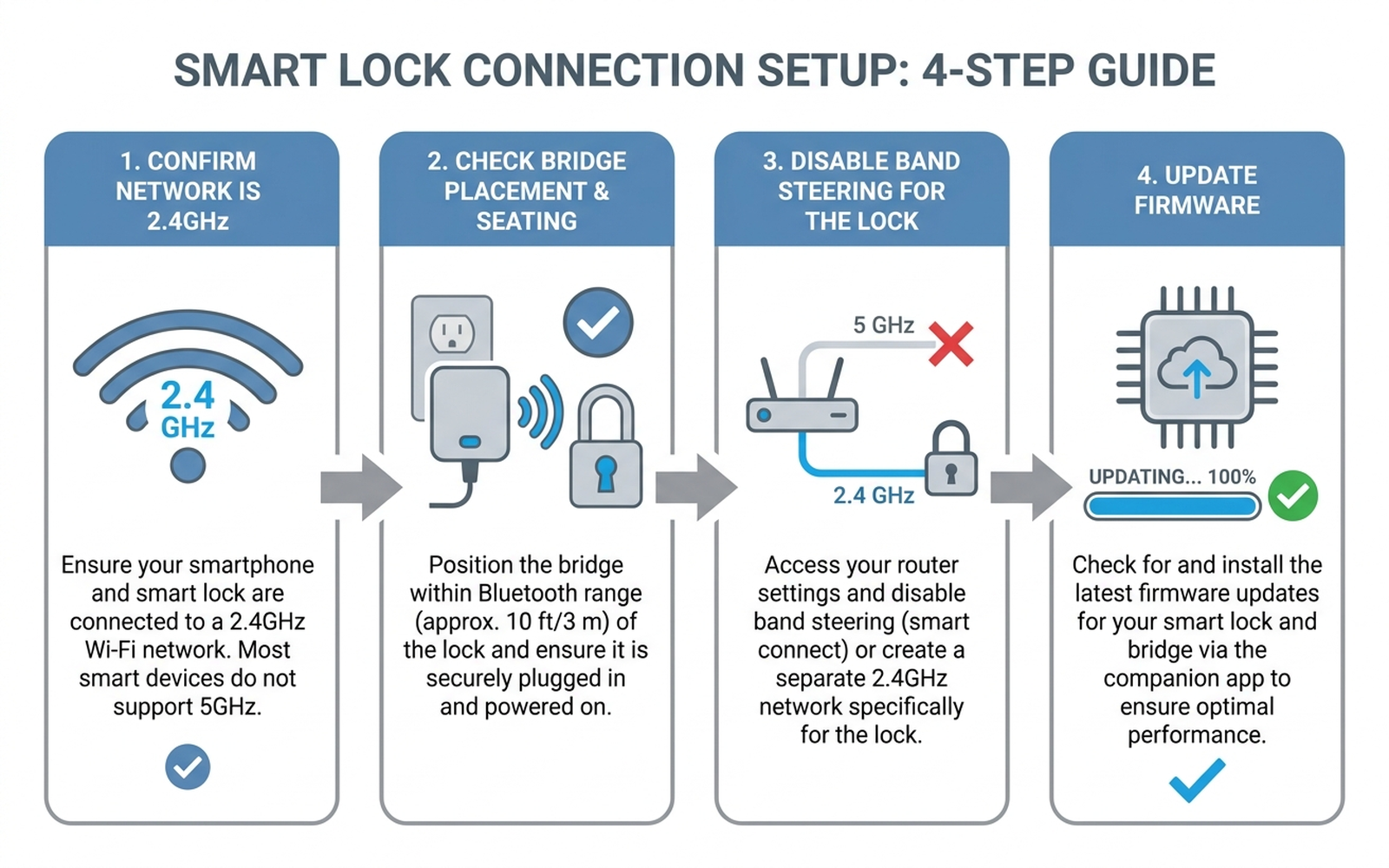
- Confirm your network is broadcasting a real 2.4GHz option. Log into the router admin panel (not just the phone’s Wi-Fi list) and check whether 2.4GHz and 5GHz are merged under one SSID or split into two. If merged, most routers offer a setting to split them, or to disable the automatic band-steering feature entirely for a specific device.
- Move the lock’s setup device, and the bridge if it has one, onto that 2.4GHz network explicitly, not whichever band the phone auto-selects. August and Yale both document setup failures traced to a phone being on 5GHz while the lock’s radio can only reach 2.4GHz.
- Check bridge distance and orientation, or reseat a plug-in module. Keep a Wi-Fi bridge within roughly 15 feet of the lock and try a different wall orientation if the connection is unreliable; for a module-based lock, remove a battery, wait, and reseat the module if you see a communication error.
- Update lock and bridge/module firmware through the manufacturer’s app. Several documented intermittent-drop cases were resolved by a firmware update that a factory reset alone did not fix.
- Add a dedicated 2.4GHz access point or extender near the door if the router itself can’t be reconfigured (common with ISP-locked or landlord-controlled routers) — this sidesteps band-steering and distance issues at once without touching the main network’s settings.
- Contact manufacturer support if a bridge shows zero LED activity after every step above, or a Schlage/Yale/August lock still won’t hold a connection on a confirmed 2.4GHz WPA2-PSK network — at that point a hardware fault in the lock’s own radio is a realistic possibility that home troubleshooting can’t rule out.
5. If the fix is better Wi-Fi coverage at the door
Editorial recommendation, not personal testing. The accessory below addresses cases where distance or a metal door — not a setting — is the recurring cause.
- TP-Link RE220 AC750 Wi-Fi Range Extender — dual-band extender manufacturer-rated for up to 1,200 sq. ft. and 30 devices; placing one near the door puts a stronger 2.4GHz signal within the bridge or lock’s effective range without reconfiguring the main router.
- Yale Wi-Fi Smart Module (AYR-MOD-WF1-USA) — manufacturer-stated add-on for existing Yale Assure digital locks and levers that only have Bluetooth, letting an owner add direct Wi-Fi without replacing the whole lock body.
6. If it’s time for a lock upgrade
If the recurring cause turns out to be an aging bridge design or a lock generation with a weaker antenna, current-generation models are independently documented to reduce these specific failure modes by building Wi-Fi directly into the lock rather than relying on a separate bridge.
- Schlage Encode Plus Smart WiFi Deadbolt — Wirecutter names this its pick for maximum physical security among consumer smart locks, and its built-in Wi-Fi radio removes the separate-bridge failure point entirely, at the cost of requiring the 2.4GHz-only network described above.
- Yale Assure Lock 2 Touchscreen with Wi-Fi (YRD450-WF1) — consistently ranks among top picks in expert reviews from outlets including Wirecutter and CNET; Wi-Fi is built in from the factory rather than added via a separate bridge accessory.
7. The decision flowchart
8. The bottom line
A smart lock that won’t connect to Wi-Fi is almost always following a specific, documented cause — a 5GHz-only or band-merged network the lock’s radio can’t join, a bridge or module that’s misplaced or unseated, mesh-router band steering, stale firmware, or genuine distance and door-material interference — rather than a broken unit. Working through network band, bridge placement, steering settings, and firmware in that order resolves the large majority of documented cases without a support call or a return. If the lock still won’t hold a connection after all of that on a confirmed 2.4GHz WPA2-PSK network, a hardware fault in the lock’s own radio becomes a realistic possibility, and that’s the point where manufacturer support makes more sense than continuing to adjust the router.
Limitations of this analysis
To be explicit about what this article does not establish:
- We did not personally reproduce this issue on the specific locks named here. The causes and fixes described are drawn from manufacturer support documentation, independent testing coverage, and aggregated troubleshooting-thread patterns, not from a controlled test we ran ourselves.
- Band-steering behavior varies by router manufacturer and firmware version and may not generalize to every mesh system or ISP-provided router.
- Wirecutter’s smart lock rankings reflect specific models tested under Wirecutter’s own lab conditions and may not predict performance differences between every model or firmware combination.
- Amazon review sentiment was read from each ASIN’s public review panels in September 2026 and reflects aggregated impressions, not a scientific sample.
- Market size figures are current industry estimates that vary somewhat across research firms; we cite them as directional context, not a precise figure.