Smart Doorbell Keeps Losing Wi-Fi? 5 Real Causes (2026)
TL;DR. Doorbell Wi-Fi dropouts are almost never a defective unit. The five most commonly documented causes are weak signal at the door, router band steering pushing the doorbell toward a 5GHz band it can’t use, an overloaded home network, low power/battery voltage, and physical interference from metal doors or brick. Splitting your router’s 2.4GHz and 5GHz networks and moving a mesh node or extender closer to the door resolves the majority of cases without buying a new doorbell.
A note on links and methodology
As an Amazon Associate, Arekore earns from qualifying purchases. The Amazon product links in this article include our affiliate tracking ID and may earn us a commission if you buy through them, at no additional cost to you. See our Links Policy for details on how we select products and how commissions do not influence our recommendations.
We also did not personally test the specific doorbells or extenders named below. Every cause and fix in this article is an editorial synthesis of manufacturer documentation, independent testing, and aggregated public data, cited inline.
Methodology
This is an editorial analysis based on publicly available data collected in August 2026. We did not run controlled network tests ourselves; instead we synthesized:
- Independent product testing — Consumer Reports’ lab-tested video doorbell rankings, which evaluate connectivity and reliability rather than relying on advertised specs alone, alongside Tom’s Guide’s ongoing video doorbell testing coverage.
- Manufacturer support documentation — Ring’s official Wi-Fi troubleshooting guidance, Eufy’s Camera Signal Issues FAQ, and Wyze’s published weak-signal-strength support article.
- User-reported patterns from manufacturer and community forums — threads in the Ring Community forum and independent camera/security forums documenting recurring disconnect complaints, including cases where visitors gave up waiting because the doorbell never established a live connection.
- Networking documentation on band steering — reporting from MakeUseOf and How-To Geek on how router band steering interacts with 2.4GHz-only smart home devices, plus router-manufacturer support pages (Motorola, TP-Link) that document how to disable it.
- Aggregated Amazon customer review sentiment on amazon.com for the specific doorbells and extenders referenced below, read via each product’s “Top reviews” and “Customers say” panels in August 2026. We do not report a precise review-count N because Amazon’s review panels do not expose a stable, verifiable count; a fabricated number would be misleading.
We deliberately do not simulate a specific personal troubleshooting story or invent a fake reviewer persona. The advice below is a synthesis of manufacturer documentation, independent testing, and aggregated review patterns — treat it as a starting framework, not a substitute for a manufacturer’s own diagnostic tool.
1. Five things that cause “random” doorbell dropouts
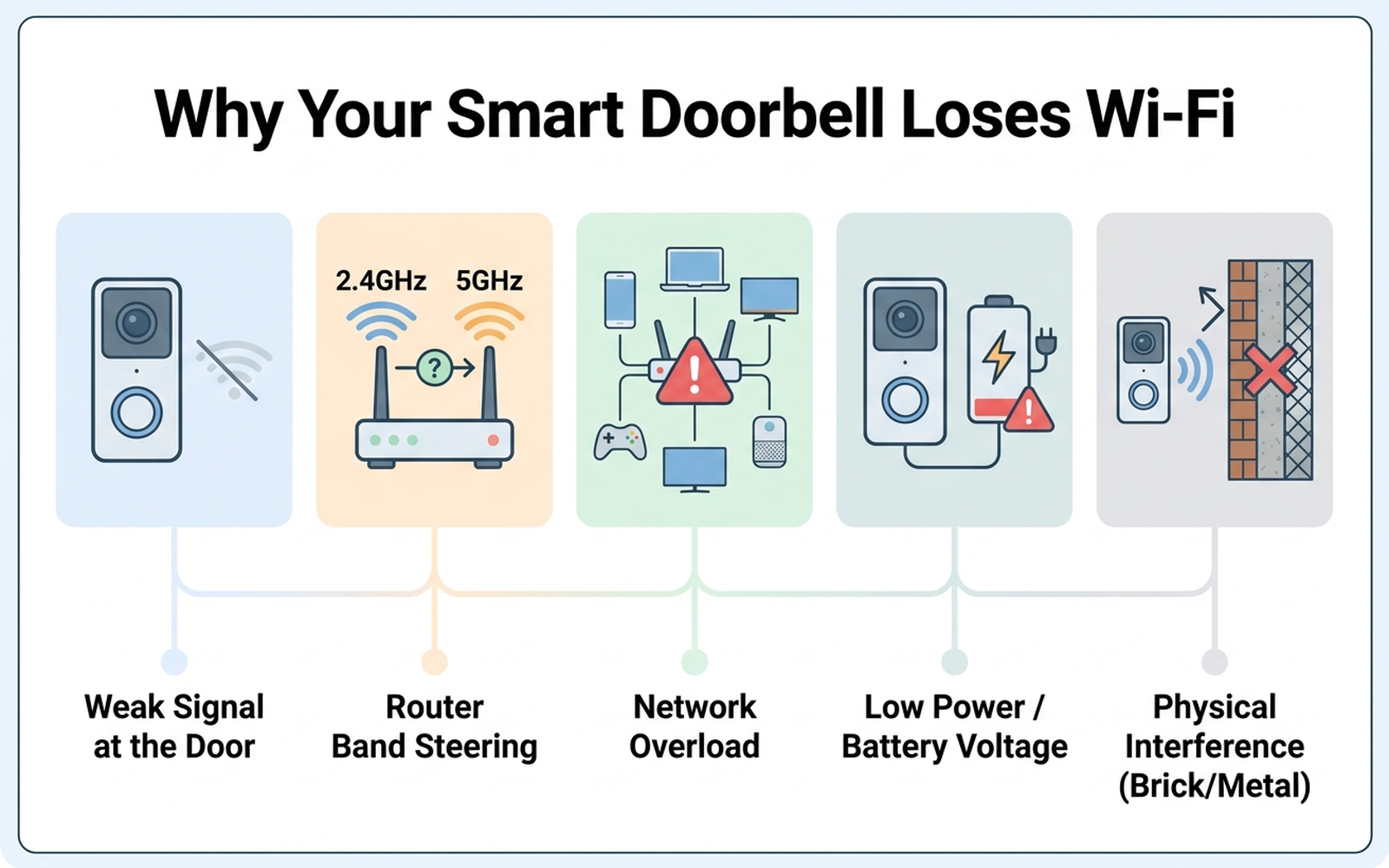
“Random” doorbell disconnects usually map to one of a handful of well-documented causes:
| Cause | What it looks like | Fixable at home? |
|---|---|---|
| Weak signal at the door | Doorbell is the device farthest from the router in the house | Yes — usually |
| Router band steering | Doorbell intermittently drops after a router firmware update or new mesh system | Yes |
| Network overload | Drops get worse as more smart home devices are added | Yes |
| Low power/battery voltage | Wired unit below the transformer’s rated voltage, or battery below ~20% | Yes |
| Physical interference | Metal storm doors, brick, or stucco between doorbell and router | Partially |
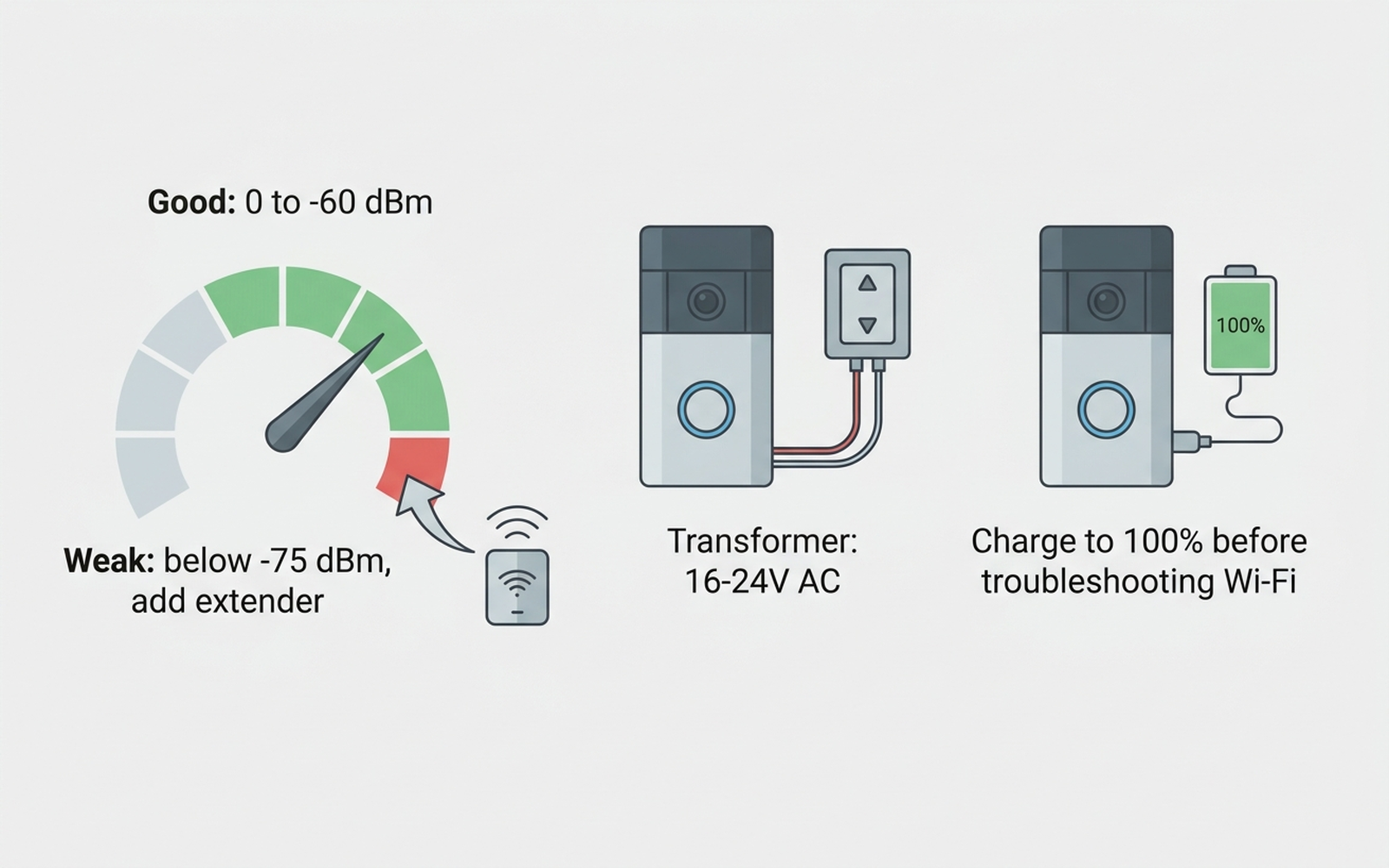
Doorbells sit at the front of the house, which is frequently the point in a home’s floor plan farthest from the router and the most likely spot to sit behind brick, stucco, or a metal storm door — all materials that measurably attenuate Wi-Fi signal. The general guidance cited across camera-manufacturer support documentation is that RSSI (signal strength) should stay between 0 and -60 dBm for a stable connection, with Wyze’s own support documentation flagging anything below -75 dBm as weak enough to warrant adding a router or extender in that area.
A second, less obvious cause shows up after router upgrades: band steering. Most modern routers broadcast one combined network name and automatically decide whether each device connects on 2.4GHz or 5GHz. The overwhelming majority of smart home devices, including nearly all video doorbells, only support 2.4GHz — but band steering can still attempt to steer a doorbell toward 5GHz based on signal strength, and the back-and-forth handoff between bands is enough to register as a dropout in the manufacturer’s app, per reporting from MakeUseOf and How-To Geek on this exact failure mode.
Network overload is the third cause worth ruling out: every additional smart device on a home network competes for the router’s available connections and processing capacity, and manufacturer support pages generally recommend disconnecting unused devices or upgrading routers once a household passes roughly 20 connected devices.
2. Why wired vs. battery power changes the diagnosis
Power problems can look identical to Wi-Fi problems, because a doorbell running on insufficient power will drop its connection to conserve energy or brown out mid-transmission — which is why manufacturer troubleshooting flows for both Ring and Eufy check power before network settings.
- Wired doorbells need their existing transformer to output within the doorbell’s rated range — commonly 16-24V AC — per manufacturer installation documentation. A transformer built for a simple mechanical chime often under-delivers once a Wi-Fi radio and camera are added to the circuit, which independent installation guides flag as a frequent, under-diagnosed cause of “Wi-Fi” complaints that are actually power complaints.
- Battery-powered doorbells (the Eufy and Ring “Battery Doorbell” lines, among others) will throttle Wi-Fi reporting as the battery depletes; manufacturer guidance is to treat any battery below roughly 20% as a likely contributor to reported connectivity drops, not just shorter battery life.
Both Eufy and Wyze publish minimum internet-speed guidance alongside their signal-strength recommendations — Eufy’s support documentation specifies an upload speed greater than 2 Mbps per device for smooth streaming, a number worth checking directly at the router if a doorbell drops mainly during live-view attempts rather than at rest.
3. Brand-specific patterns worth knowing
Ring. Ring devices connect on 2.4GHz only, but Ring’s own troubleshooting documentation and threads in the Ring Community forum describe a recurring pattern: doorbells that go offline and require repeated manual reconnection, sometimes severe enough that one Ring Pro owner reported never being able to establish a connection at all before visitors gave up waiting. Ring’s official first-line troubleshooting steps are resetting the router and doorbell, checking for band-steering or SSID conflicts, and testing with a phone hotspot to isolate whether the home network itself is the problem.
Eufy. Eufy’s Camera Signal Issues FAQ documents that its video doorbells only support 2.4GHz Wi-Fi and recommends confirming upload speed and RSSI before assuming a hardware fault. Eufy’s community forum also has an archived thread specifically walking through weak-signal fixes for battery-powered units, reinforcing that battery voltage and signal strength are diagnosed together rather than separately.
Wyze. Wyze’s own support article states that any device reporting an RSSI weaker than -75 dBm should get a router or extender added nearby, and separate Wyze forum discussion threads on “lessons re Wi-Fi connection stability” describe users solving persistent drops by disabling band steering and manually assigning devices to the 2.4GHz SSID.
4. What to actually do, in order
- Split your router’s 2.4GHz and 5GHz networks into separate SSIDs and connect the doorbell to the 2.4GHz one manually. This is the single fix most consistently recommended across router-manufacturer support pages (Motorola, TP-Link) for band-steering-related smart home disconnects.
- Check signal strength (RSSI) in the doorbell’s app, if it exposes one. Anything weaker than roughly -75 dBm is a documented threshold for adding a router or mesh node closer to the door.
- For wired units, confirm the transformer outputs the doorbell’s rated voltage (commonly 16-24V AC) before assuming it’s a network issue — an underpowered chime transformer is a well-documented, easy-to-miss cause.
- For battery units, charge to 100% and recheck — manufacturer guidance treats low battery as a contributor to reported Wi-Fi drops, not only shorter runtime.
- Disconnect unused smart home devices, or add a second access point if the household is past roughly 20 connected devices, per manufacturer network-capacity guidance.
- Add a mesh node or Wi-Fi extender near the door if the router itself is more than one or two rooms away, or is blocked by brick, stucco, or a metal storm door.
- Assign the doorbell a static IP in router settings, which several manufacturer troubleshooting flows list as a way to prevent intermittent re-authentication drops.
5. If a signal boost is the fix: current extender options
Editorial recommendation, not personal testing. If steps 1-5 above don’t resolve the drops and the root cause is genuinely weak signal at the door, a purpose-built extender or mesh add-on is the next step manufacturer documentation itself recommends.
- Ring Chime Pro (2nd Gen) — dual-band 2.4GHz/5GHz plug-in extender built specifically for Ring devices; the manufacturer’s stated coverage claim is up to 2,000 sq. ft. of added range for Ring cameras and doorbells specifically.
- TP-Link AC1900 RE550 — dual-band extender rated by the manufacturer at up to 2,200-2,800 sq. ft. and 32-35 devices, with EasyMesh support for integrating into an existing mesh network rather than creating a separate SSID.
- Amazon eero 6 mesh Wi-Fi extender — add-on extender for an existing eero mesh system, manufacturer-rated for up to 1,500 additional sq. ft. of Wi-Fi 6 coverage; requires an existing eero network to pair with.
6. If you’re replacing the doorbell itself
If the doorbell is several years old and still struggling after every fix above, current-generation doorbells generally ship with improved 2.4GHz radios and clearer in-app signal diagnostics than older models.
- Ring Battery Doorbell (Head-to-Toe Video) — Ring’s current best-selling battery doorbell line; check RSSI in-app immediately after setup rather than after problems start.
- eufy Security Video Doorbell E340 — 2.4GHz-only, dual-camera doorbell; Eufy’s own FAQ documentation makes signal and upload-speed troubleshooting more explicit than some competitors’ apps.
Consumer Reports’ lab-tested rankings note that connectivity reliability, not just video quality, is a scored category for current doorbell models — worth checking before assuming any single brand solves signal problems outright.
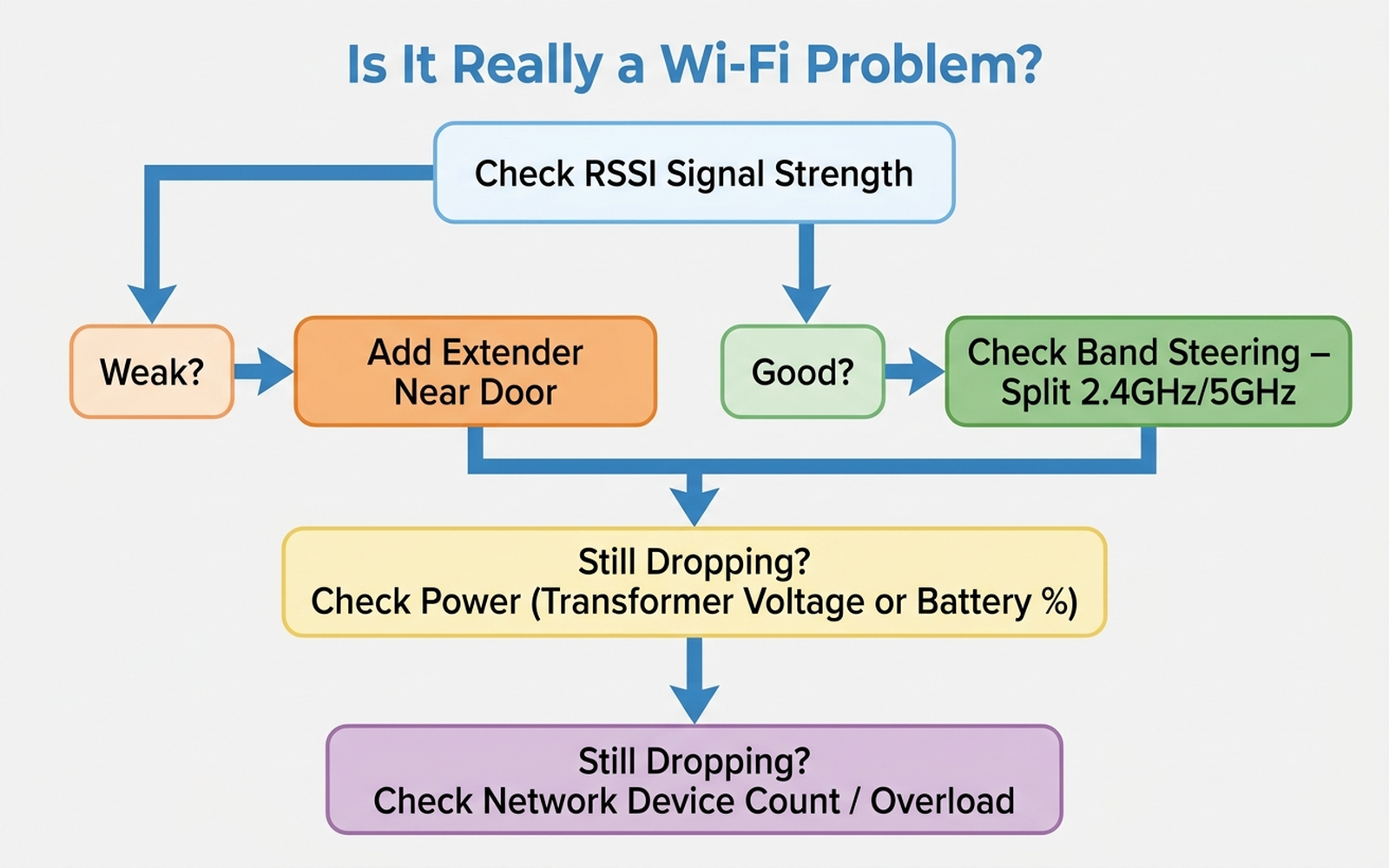
7. The decision flowchart
8. The bottom line
Most smart doorbell Wi-Fi dropouts trace back to weak signal at the door, router band steering, network overload, or low power — all fixable without buying a new doorbell. Splitting the 2.4GHz and 5GHz bands and checking RSSI resolves more cases than any other single step. If the doorbell still drops after every fix above and sits far from the router behind brick or a metal door, that’s the point where a dedicated extender is worth adding.
Limitations of this analysis
To be explicit about what this article does not establish:
- We did not personally reproduce these connectivity issues on the specific units named here. The causes and fixes described are drawn from manufacturer support documentation, independent testing methodology, and aggregated forum/review patterns, not from a controlled test we ran ourselves.
- RSSI thresholds (0 to -60 dBm ideal, below -75 dBm weak) are general manufacturer guidance and can vary by specific router hardware, wall material, and doorbell model.
- Transformer voltage ranges (16-24V AC) are typical, not universal — always confirm against the specific doorbell manufacturer’s installation documentation before assuming a mismatch.
- Extender coverage figures (square footage, device counts) are manufacturer-published claims, not independently verified in our own testing.
- Amazon review sentiment was read from each ASIN’s public review panels in August 2026 and reflects aggregated impressions, not a scientific sample.