Security Camera Keeps Going Offline? 5 Real Causes (2026)
TL;DR. A security camera that keeps dropping offline is rarely a defective unit. The five most documented causes are weak Wi-Fi signal (anything below roughly -70 dBm gets unreliable), a router reboot or firmware update that fails to hand the camera a fresh IP address, a low battery — made worse by cold weather — on battery-powered models, 2.4GHz network congestion that peaks in the evening, and a brand-side cloud outage that makes a perfectly working camera read as offline account-wide. Checking signal strength, giving the camera a fixed IP, and confirming the brand’s status page before assuming a local fault resolves the large majority of documented cases.
A note on links and methodology
As an Amazon Associate, Arekore earns from qualifying purchases. The Amazon product links in this article include our affiliate tracking ID and may earn us a commission if you buy through them, at no additional cost to you. See our Links Policy for details on how we select products and how commissions do not influence our recommendations.
We did not personally test the specific cameras or routers named below. Every cause and fix in this article is an editorial synthesis of manufacturer support documentation, independent lab test findings, and aggregated public troubleshooting reports, cited inline.
Methodology
This is an editorial analysis based on publicly available data collected in September 2026. We did not run a controlled test ourselves; instead we synthesized:
- Manufacturer support documentation — Ring’s official Device Health / signal-strength troubleshooting guidance, Arlo’s connectivity and SmartHub/base-station diagnostics, and Ring’s published operating-temperature specification (-4°F to 122°F, with charging disabled below freezing).
- Independent networking references — published RSSI/dBm signal-strength guidance (an optimal signal is -67 dBm or stronger; below roughly -70 dBm is generally considered poor, and below -80 dBm is often unreliable) and documented per-wall signal attenuation figures (roughly 10-15 dBm of loss per masonry or brick wall).
- Consumer Reports’ 2026 home security camera testing, which evaluates response time, video quality, and smart features across current Ring, Arlo, and Wyze models, alongside its ongoing data-security and privacy scoring.
- Aggregated third-party troubleshooting content from smart-home support sites (Wasserstein Home, Asurion, smart-home diagnostics guides) documenting the most frequently reported causes of Ring, Arlo, and Wyze cameras going offline.
- Documented cloud-outage history, including the October 2025 AWS cloud-computing outage that took down Ring doorbells and cameras nationwide alongside other AWS-dependent services, cited by multiple news outlets at the time.
- Market context — Parks Associates’ 2026 Smart Home Tracker finding 43% of US internet households now own a security solution and roughly 13% (more than 15 million households) rely on just a standalone smart camera or video doorbell as their home security setup, underscoring how common this troubleshooting question is.
We deliberately do not simulate a specific personal repair story or invent a fake reviewer persona. The advice below is a synthesis of manufacturer documentation, independent networking references, and aggregated troubleshooting patterns — treat it as a starting framework, not a substitute for your specific model’s support page.
1. Five reasons a security camera keeps going offline
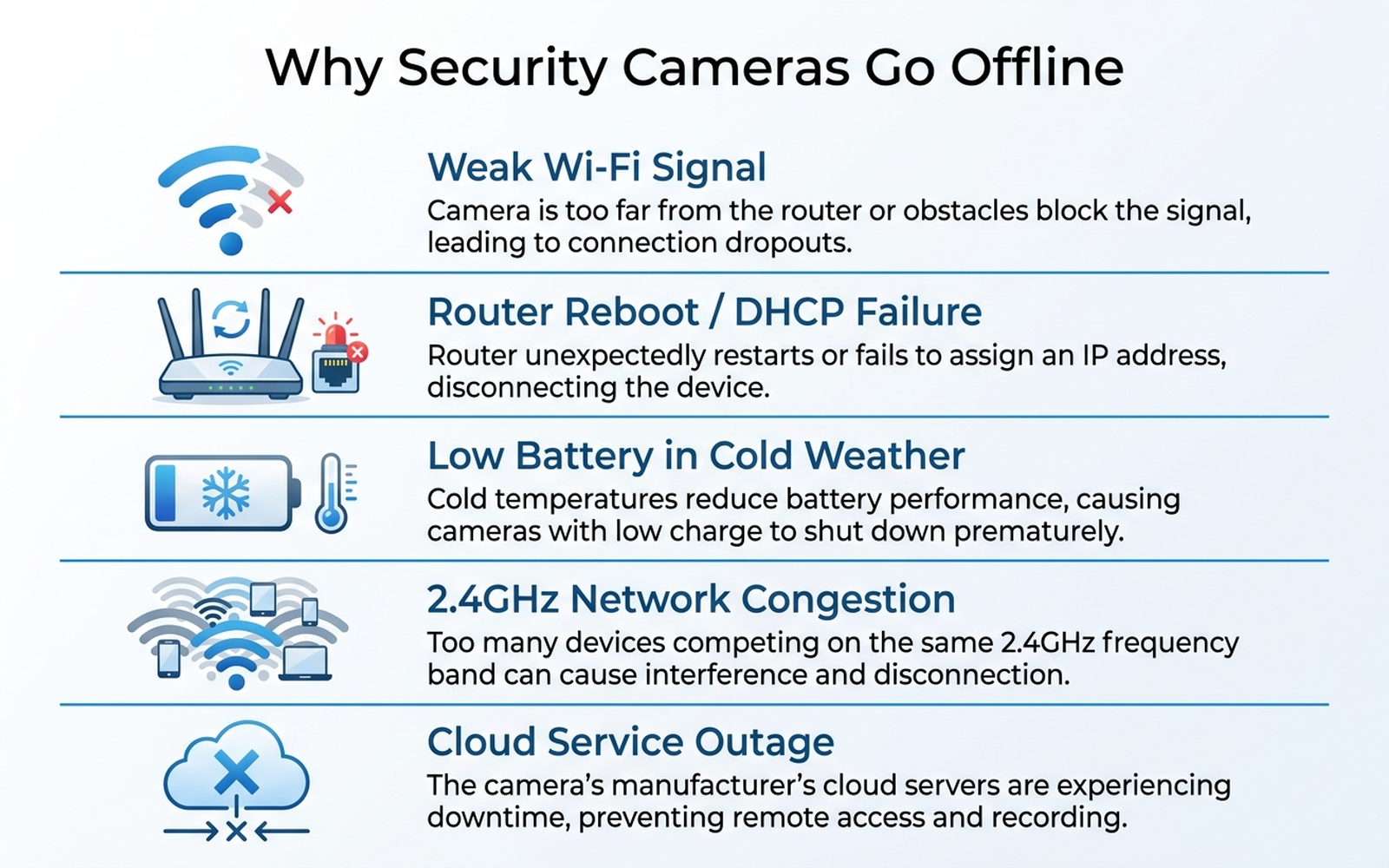
Before assuming the camera itself is broken, it helps to know that most “offline” reports trace back to one of five causes, and only one of them is specific to the physical unit:
| Cause | What it looks like | Fixable at home? |
|---|---|---|
| Weak Wi-Fi signal | Camera drops out intermittently, especially outdoors or through exterior walls | Yes — reposition or add a mesh node |
| Router reboot / DHCP failure | Camera goes offline right after a router restart, ISP outage, or firmware update and doesn’t reconnect on its own | Yes — usually a manual reconnect or reservation |
| Low battery (cold weather) | Battery-powered camera disconnects more in winter than summer, or a fully charged battery drains unusually fast | Yes — recharge, or move to a wired model |
| 2.4GHz network congestion | Drops cluster in the evening when more devices are streaming or gaming | Yes — reduce congestion or separate bands |
| Brand-side cloud outage | Multiple devices from the same brand go offline at once, even though the camera’s own light and local network look normal | No — wait for the brand to resolve it |
According to Ring’s own Device Health troubleshooting guidance, an in-app signal-strength (RSSI) reading worse than roughly -60 to -70 dBm is the single most commonly cited cause of a camera that drops offline intermittently rather than staying disconnected outright. Third-party smart-home diagnostics guides converge on the same starting point: check signal strength before assuming a hardware fault.
2. Why Wi-Fi signal degrades enough to disconnect a camera
Published networking references put -67 dBm as a strong, reliable signal and -70 dBm or worse as the point where connections start dropping; below roughly -80 dBm, a connection is often unreliable outright. The problem for security cameras specifically is that they’re almost always mounted outdoors or at the edge of the property, exactly where signal is weakest — and documented per-wall attenuation figures show roughly 10-15 dBm of signal loss for each masonry or brick wall the signal has to pass through. A camera mounted in a detached garage or over a back door two exterior walls from the router can easily be sitting at a signal level that’s fine 90% of the time and drops the moment a neighbor’s microwave or a rainy day adds a few more dBm of interference on the same crowded 2.4GHz band most routers and cameras still use.
This is also why moisture matters: rain and high humidity absorb 2.4GHz signal, which is why some households report a camera that connects reliably in dry weather and drops during storms — not a coincidence, according to smart-home diagnostics guides that flag humidity as a contributing factor alongside distance and wall count.
3. Router reboots, firmware updates, and DHCP failures
A router that briefly restarts — for a firmware update, an ISP-side outage, or a manual reboot — can fail to hand a camera a fresh IP address on reconnect. Documented DHCP troubleshooting guidance describes this exact failure mode: after a reboot, the DHCP service can temporarily stop issuing addresses correctly, and a client that fails to renew its lease loses its IP address entirely rather than automatically recovering. Most other devices on a home network (phones, laptops) recover quickly because a person is actively using them and notices a problem; a camera sitting untouched in a garage or on a porch has no one prompting it to retry, so it can stay disconnected long after the router itself is back online.
The standard fix documented across router vendor support content is a DHCP reservation — assigning the camera a fixed IP address tied to its MAC address in the router’s admin settings, so it doesn’t have to negotiate a new lease every time the router restarts.
4. Battery drain, cold weather, and network congestion
Two lower-ranked but still frequently cited causes affect different camera types:
- Battery-powered cameras in cold weather. Ring’s own published operating range is -4°F to 122°F, but the company explicitly states charging is disabled below freezing — meaning a battery that’s already low going into a cold snap won’t recharge until temperatures rise, and cold temperatures independently reduce how much charge a battery holds. Aggregated troubleshooting content attributes a meaningful share of winter “offline” complaints to batteries that were already near empty, not a defective camera.
- 2.4GHz congestion, worse at night. Documented troubleshooting guidance for nighttime-specific disconnects points to a predictable pattern: infrared night vision and spotlights draw more power and generate more heat after dark, more household devices are actively streaming or gaming in the evening, and neighboring routers on the same channel add co-channel interference — all compounding at exactly the hours a security camera matters most.
5. When it’s not your setup at all: cloud and backend outages
Not every “offline” reading is local. Ring, Arlo, and other cloud-dependent brands rely on backend infrastructure that occasionally fails independent of anything in a household’s control — Arlo’s own service has documented cloud outages roughly 2-3 times per year according to smart-home troubleshooting trackers, and the October 2025 AWS cloud-computing outage took down Ring doorbells and cameras nationwide alongside numerous other AWS-dependent consumer services, an incident widely reported at the time. The tell is scale: if every camera from the same brand in a household (or a neighborhood) goes offline simultaneously while the local network and other internet-connected devices work fine, checking the brand’s public status page before power-cycling anything saves time that troubleshooting a healthy camera would otherwise waste.
6. Brand-specific patterns worth knowing
Ring. Ring’s Device Health screen surfaces the RSSI signal-strength reading directly in-app, which independent troubleshooting guides recommend checking first. Consumer Reports’ broader camera testing has flagged Ring models for comparatively weaker data-privacy scoring rather than connectivity specifically, but Ring’s cloud-dependency means the brand’s own outages (including the October 2025 AWS incident) do periodically take an otherwise healthy camera fleet offline at once.
Arlo. Arlo’s higher-end cameras route through a SmartHub or base station rather than connecting directly to a home router, which adds a second point of failure: a base station losing its own connection takes every attached camera offline even if each individual camera’s local signal is fine. Documented Arlo cloud outages recur a few times a year according to smart-home trackers, separate from any local Wi-Fi issue.
Wyze. Wyze’s budget positioning pairs with reviewer-documented Wi-Fi connectivity complaints on some models, consistent with the general pattern that a camera mounted further from the router is more exposed to signal-strength issues regardless of brand — Wyze’s lower price point doesn’t appear in available documentation to correlate with a fundamentally different chipset-level connectivity issue, but its typical buyer profile (multiple budget cameras spread across a property) increases the odds that at least one unit sits at the edge of usable range.
eufy. Cameras built around local (on-device or home-hub) storage rather than mandatory cloud video review are documented to be less exposed to a brand-side cloud outage specifically, since local recording continues even if the companion app’s remote-viewing service is down — though the camera still requires a working local Wi-Fi connection for live view and mobile alerts, so it isn’t immune to signal or router issues.
7. What to actually do, in order
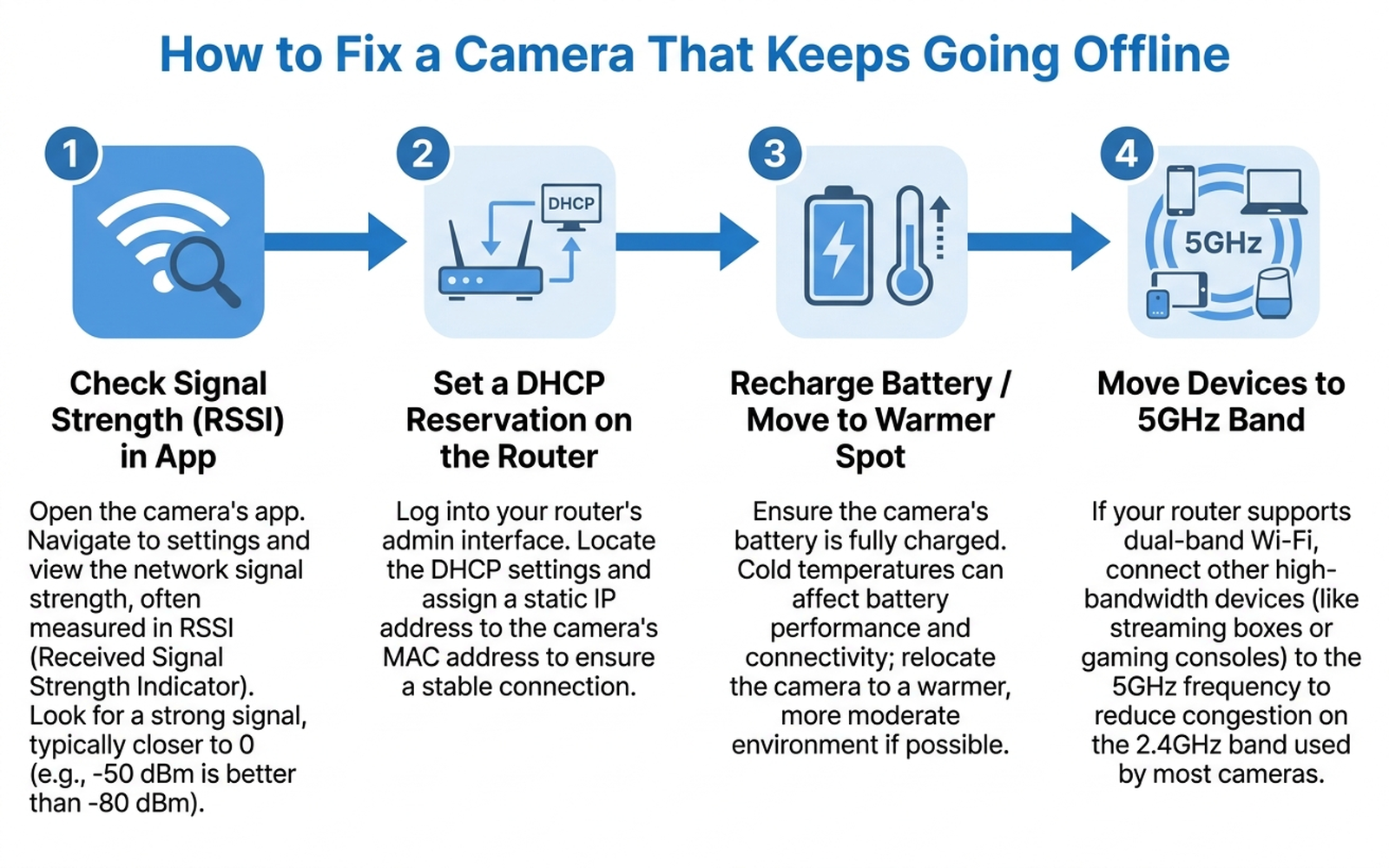
- Check the in-app signal-strength (RSSI) reading first. Most brands expose this under a device health or settings screen. A reading worse than roughly -70 dBm points to a Wi-Fi range problem, not a hardware fault.
- If signal is weak, reposition the camera or add a mesh Wi-Fi node closer to it, rather than assuming the camera needs replacing. An outdoor-rated extender is the more durable fix for a detached garage or backyard unit.
- Set a DHCP reservation for the camera in the router’s admin settings so a router reboot or firmware update doesn’t force it to renegotiate an IP address it may fail to reacquire on its own.
- For battery-powered cameras, confirm the charge level before assuming a fault, especially in cold weather. Ring’s own guidance notes charging stops below freezing; a battery that was already low going into a cold snap will keep dropping until it’s recharged in a warmer space.
- If drops cluster in the evening, check for 2.4GHz congestion. Moving other high-bandwidth devices to the 5GHz band, or adding a dedicated Wi-Fi node near the camera, reduces competition on the crowded 2.4GHz channel most cameras still use.
- Before troubleshooting further, check the brand’s public status page. If multiple devices from the same brand are offline at once, it’s very likely a cloud-side outage rather than anything fixable locally.
- Contact manufacturer support if the camera stays offline after all of the above — at that point a failed Wi-Fi radio or other hardware fault is a realistic possibility that routine troubleshooting won’t resolve.
Comparison Table
Prices are approximate amazon.com figures as of 2026-09-09 and fluctuate.
| Failure cause | Typical setup affected | Fix | Approx. cost |
|---|---|---|---|
| Weak Wi-Fi signal / interference | Outdoor or edge-of-property camera, any brand | Reposition camera, or add a mesh/extender node | ~$40–$150 |
| Router reboot / DHCP lease failure | Any Wi-Fi-connected camera | Set a DHCP reservation for the camera’s MAC address | Free (router settings) |
| Low battery in cold weather | Battery-powered cameras (Ring, Arlo, eufy battery lines) | Recharge in a warmer space, or switch to a wired/PoE model | Free to ~$150+ (wired camera) |
| 2.4GHz network congestion | Multi-camera households, evening hours | Move other devices to 5GHz, add a dedicated node near the camera | Free to ~$40–$150 |
| Router itself losing power during an outage | Any camera on a home network | Battery backup (UPS) for the router and modem | ~$60–$100 |
| Brand-side cloud outage | Entire camera fleet from one brand, simultaneously | Check status page; wait for brand to resolve | Free |
8. The decision flowchart
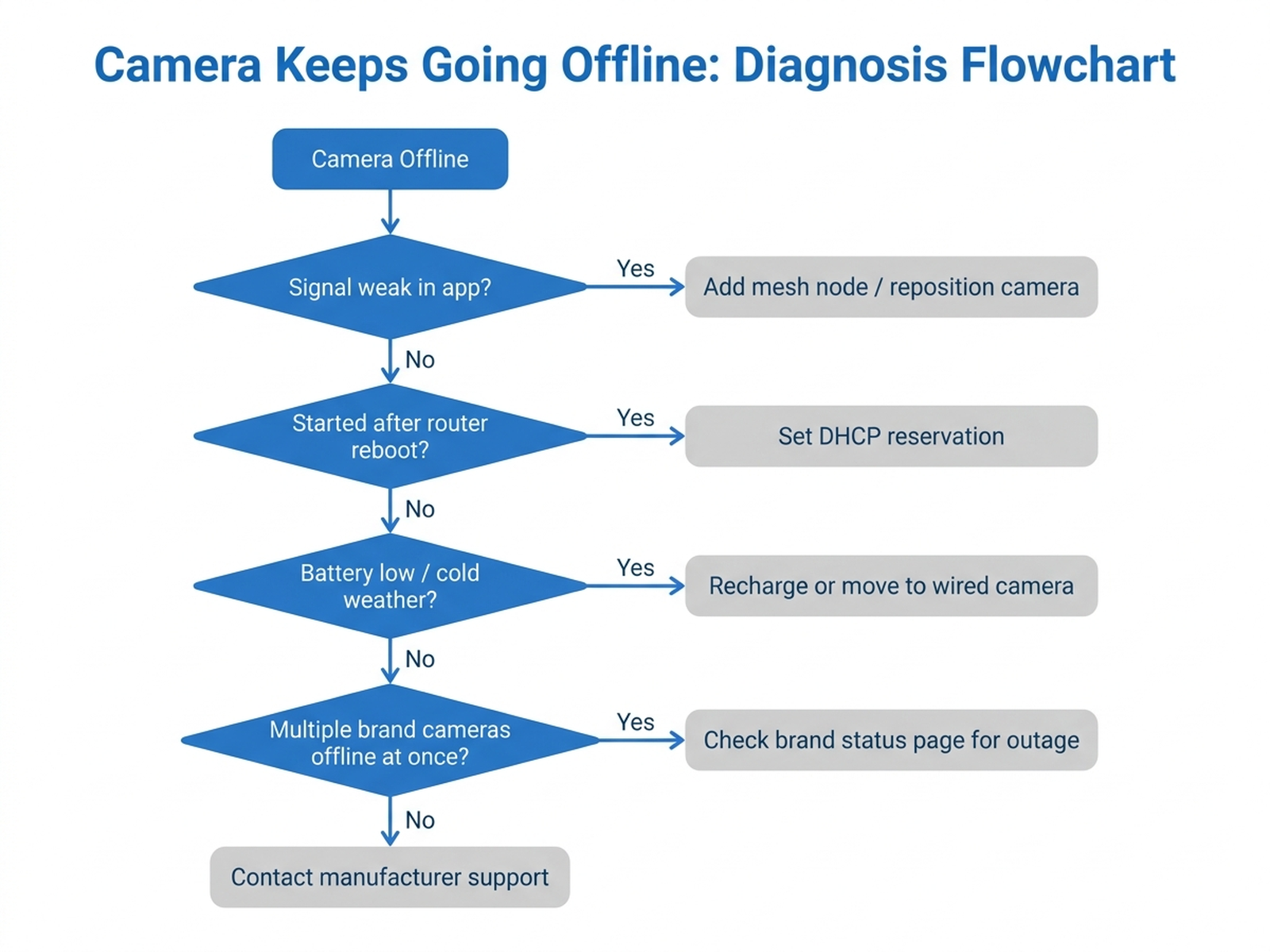
Start with the in-app signal-strength reading. If it’s weak, the cause is Wi-Fi range — reposition the camera or add a mesh node before checking anything else. If signal is strong but the offline event started right after a router restart or firmware update, set a DHCP reservation for the camera. If neither applies and the camera is battery-powered, check the charge level, especially in cold weather. If none of those match and multiple cameras from the same brand went offline at the same time, check the brand’s status page for a cloud-side outage before assuming a local fault.
9. If the fix is stabilizing your network: current options
Editorial recommendation, not personal testing. Two of the causes above — weak signal at the camera’s location and the router losing power during an outage — are addressed by dedicated networking hardware rather than a settings change.
- TP-Link RE305 AC1200 Wi-Fi Range Extender — a low-cost way to boost signal to a camera mounted at the edge of a router’s range, addressing the single most commonly cited offline cause.
- APC Back-UPS Connect (CP12142LI) — a compact battery backup built specifically for a router and modem, keeping the network (and any wired cameras on it) online through a brief power interruption rather than dropping every connected device the moment utility power flickers.
10. The bottom line
A security camera that keeps going offline is, in the large majority of documented cases, responding to a weak Wi-Fi signal, a router that didn’t hand it a fresh IP address after a reboot, a low battery in cold weather, evening network congestion, or a brand-side cloud outage that has nothing to do with the camera itself — not a broken unit. Working through the signal-strength check, DHCP reservation, and battery checks in order resolves most reported cases without a replacement. If the camera still won’t stay online after all of that and the brand’s status page shows no outage, a hardware fault is a realistic possibility, and that’s the point where contacting manufacturer support makes more sense than continuing to adjust settings.
Limitations of this analysis
To be explicit about what this article does not establish:
- We did not personally reproduce this issue on the specific cameras or routers named here. The causes and fixes described are drawn from manufacturer support documentation, published networking references, and aggregated troubleshooting-thread patterns, not from a controlled test we ran ourselves.
- RSSI/dBm thresholds cited above are general networking guidance, not a brand-specific spec; a given camera model’s actual reconnection behavior at a particular signal level can vary.
- Cloud-outage frequency figures (e.g., Arlo’s roughly 2-3 outages per year) come from third-party smart-home troubleshooting trackers, not from the brands’ own public incident disclosures, and may undercount minor or regional outages.
- The October 2025 AWS outage is cited as a documented precedent for brand-side cloud dependency, not as a claim that it is ongoing or representative of current Ring reliability.
- Market ownership figures are current industry estimates from Parks Associates and may vary somewhat from other research firms’ methodology.
- Individual results vary based on router hardware, home construction materials, local Wi-Fi interference, and how closely a household’s symptoms match the causes described here.
Before you buy a mesh node, a UPS, or a new camera, paste the product link into Arekore — our AI assistant checks review authenticity, surfaces what the one-star reviews actually complain about, and compares prices, free, in about five minutes.