Robot Vacuum Stuck in the Same Spot? 5 Real Causes (2026)
TL;DR. A robot vacuum that stalls in the same spot every run is almost never defective — it’s reacting to something in that specific location. The five most commonly documented causes are a cord or rug fringe tangling the brush or wheels, a rug edge or threshold the robot can’t climb cleanly, a dark or reflective floor confusing the cliff sensors, a dirty wheel encoder or bumper sensor, and a map that no longer matches the room. Clearing the spot, wiping the sensors and wheels, and setting a no-go zone around the trouble area resolves the large majority of documented cases without a repair or replacement.
A note on links and methodology
As an Amazon Associate, Arekore earns from qualifying purchases. The Amazon product links in this article include our affiliate tracking ID and may earn us a commission if you buy through them, at no additional cost to you. See our Links Policy for details on how we select products and how commissions do not influence our recommendations.
We also did not personally test the specific machines named below. Every cause and fix in this article is an editorial synthesis of manufacturer support documentation, independent lab test findings, and aggregated public troubleshooting reports, cited inline.
Methodology
This is an editorial analysis based on publicly available data collected in August 2026. We did not run a controlled navigation test ourselves; instead we synthesized:
- Manufacturer and retailer troubleshooting guidance — eufy’s official “How to Stop Robot Vacuum from Getting Stuck” support article, ECOVACS’s published troubleshooting guide on repeated stalling, and Narwal’s consumer guidance on why robot vacuums get stuck in the same location.
- Independent lab test findings — RTINGS.com’s ongoing robot vacuum test bench (reviewed and updated through 2026), which rates navigation and obstacle-avoidance performance across current models including the Roborock Saros 10R and the eufy Omni S1 Pro, and Tom’s Guide’s expert-sourced explainer on why robot vacuums go in circles.
- Owner troubleshooting Q&A archives — JustAnswer threads specific to Shark models circling or stopping, and vacuum-repair guides (VacuumMentor, TheHowToLab) that catalog the specific obstacles (cords, rugs, thresholds, furniture legs) most frequently reported as stall points.
- Aggregated Amazon customer review sentiment and expert test notes for the accessories and models referenced below, read via Consumer Reports’ 2026 robot vacuum test notes and each product’s public “Customers say” panel on amazon.com in August 2026. We do not report a precise review-count N because Amazon’s review panels do not expose a stable, verifiable count; a fabricated number would be misleading.
- Market and category data — per Coherent Market Insights’ 2026 residential robotic vacuum cleaner market report, North America holds an estimated 43.8% share of the global robot vacuum market, underscoring how common this troubleshooting question is likely to be.
We deliberately do not simulate a specific personal repair story or invent a fake reviewer persona. The advice below is a synthesis of manufacturer documentation, independent lab testing, and aggregated troubleshooting patterns — treat it as a starting framework, not a substitute for your specific model’s manual.
1. Five reasons a robot vacuum stalls in the same spot
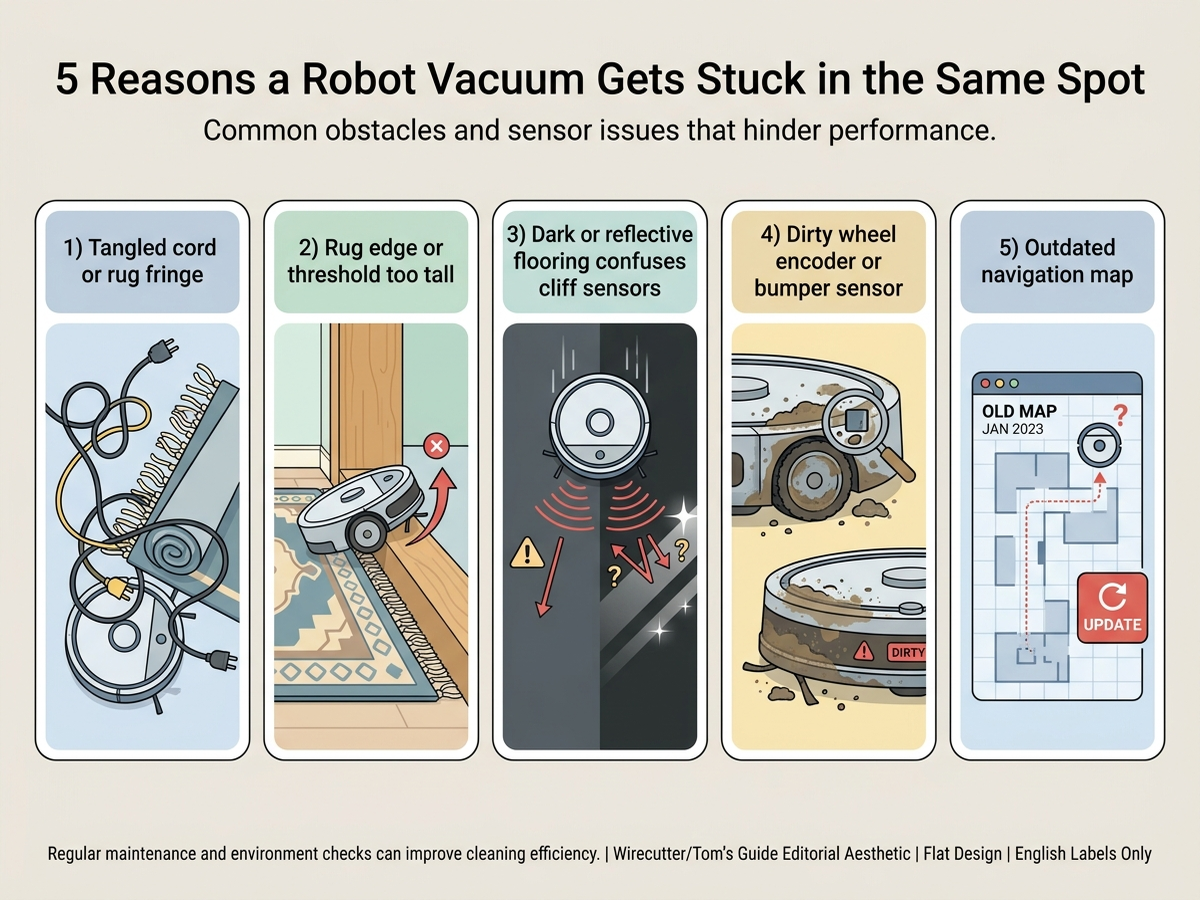
If the stall happens in a specific, repeatable location rather than randomly around the house, the cause is almost always tied to something physically or optically different about that spot:
| Cause | What it looks like | Fixable at home? |
|---|---|---|
| Tangled cord or rug fringe | Robot stops mid-room near a charging cable, lamp cord, or fringed rug edge | Yes — usually |
| Rug edge or threshold too tall | Robot climbs partway onto a thick rug or door threshold, then stalls or reverses repeatedly | Yes, with a ramp or no-go zone |
| Dark or reflective flooring | Robot stops abruptly before entering a specific tile, hardwood, or rug section | Yes — usually |
| Dirty wheel encoder or bumper sensor | Robot spins in circles or reverses at the same point without an obvious obstacle | Sometimes — cleaning fixes most cases |
| Outdated or corrupted map | Robot hesitates, backtracks, or avoids a spot that used to be clear | Yes — remap the room |
Cords are one of the most frequently documented stall triggers, according to eufy’s own troubleshooting guidance: a charging cable or lamp cord can wrap around the main roller, side brush, or wheel axle and physically stop the robot from moving, even though the motor keeps trying. Rugs create a related but distinct problem — a loose edge, thick pile, or long fringe can be pulled into the brush or bunch up under the robot’s chassis, according to the same guidance and Narwal’s consumer troubleshooting content.
2. Why the exact same spot, every time
A robot vacuum that stalls unpredictably around the house usually points to a general maintenance issue — dirty sensors, worn wheels, low battery. A robot that stalls at the same coordinates every run points to something specific about that location instead. Cliff sensors detect drop-offs using infrared light, and dark, glossy, or reflective flooring can absorb or scatter that light enough that the robot misreads a normal floor as a stair edge and refuses to cross it — a pattern documented across multiple manufacturer support guides.
Wheel encoder problems produce a related but visually different symptom. Tom’s Guide’s explainer, citing appliance-repair sourcing, notes that each wheel has an encoder sensor tracking how far it has turned; when one encoder is dirty, blocked, or faulty, the robot’s software concludes that wheel isn’t moving correctly and compensates by turning in place — which reads as “stuck spinning” rather than “stopped dead,” but is functionally the same repeatable failure point. A stuck bumper sensor produces a similar pattern: the robot believes it’s touching an obstacle that isn’t there, so it backs away and re-approaches the same spot repeatedly.
3. Brand-specific patterns worth knowing
iRobot Roomba. Owner troubleshooting reports commonly flag door thresholds as a repeat stall point for lower-clearance Roomba models — a threshold over roughly half an inch is a frequently cited height where a robot climbs partway on and then stalls or reverses on repeated passes. iRobot’s own support guidance recommends clearing cords and loose rug edges from frequently-stalled rooms before assuming a hardware fault.
Shark. JustAnswer troubleshooting threads specific to Shark models describe circling or repeated-stop behavior tied to a stuck bumper or dirty cliff sensor, with tapping the bumper and wiping the sensor array as the first-line fixes Shark’s own support content recommends before escalating to a reset.
Eufy. RTINGS’ 2026 comparative testing found the eufy Omni S1 Pro — which layers a 3D depth-vision system on top of LiDAR mapping — better built and less prone to navigation errors than a comparable Eufy model relying on LiDAR alone, suggesting that added obstacle-sensing hardware measurably reduces stall frequency rather than just marketing claims. Separately, Consumer Reports’ notes highlight the eufy C10’s 2.85-inch low-profile chassis as a documented advantage for avoiding getting wedged under furniture with tight clearance.
Cross-brand. Across every brand surveyed, manufacturer support content converges on the same troubleshooting order: clear the physical area first, clean the sensors and wheels second, and only consider a map reset or hardware fault third.
4. What to actually do, in order
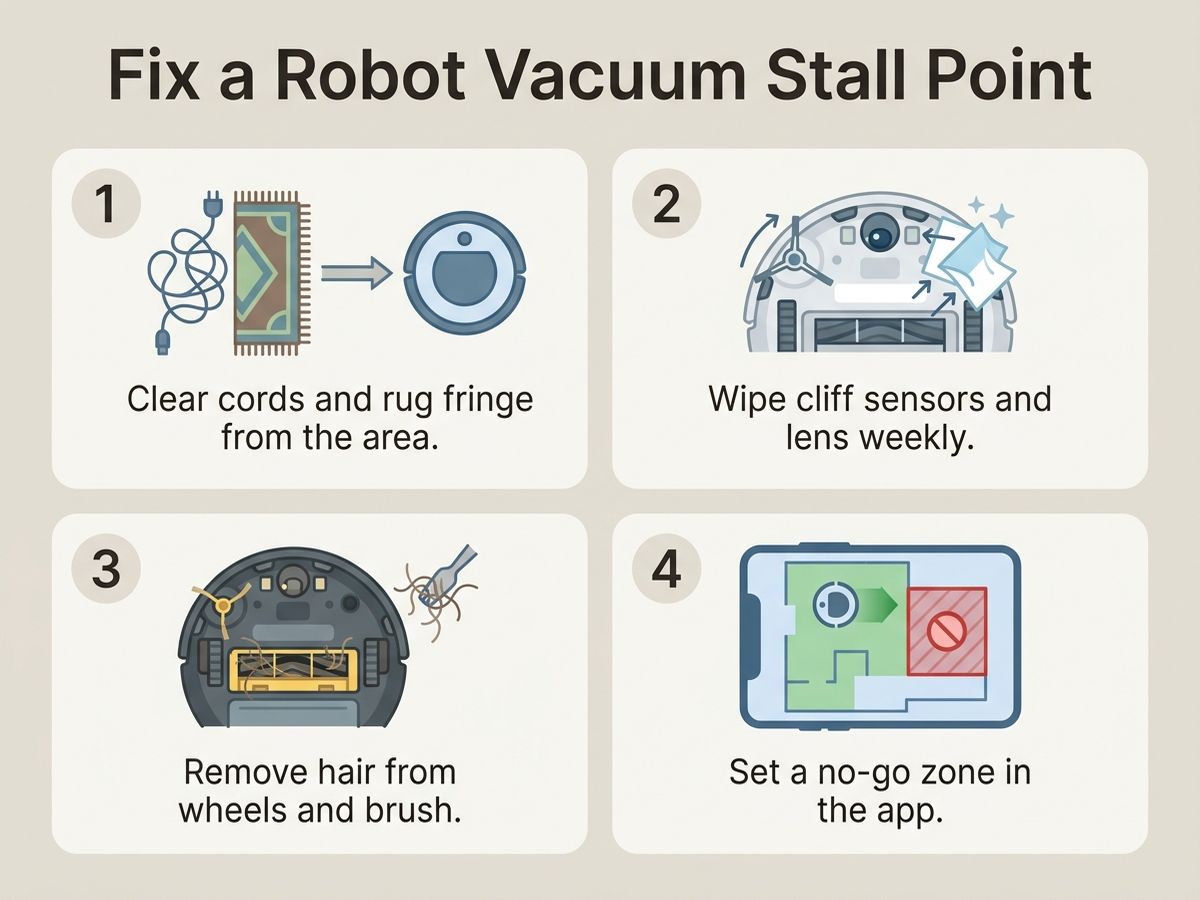
- Walk the exact stall spot and remove anything a wheel or brush could catch — cords, cables, rug fringe, small toys, pet hair mats. This resolves the largest share of documented cases according to manufacturer troubleshooting guidance.
- Wipe the cliff sensors (the small lenses on the robot’s underside near the edges) with a dry microfiber cloth, and check for embedded hair or debris in the wheel wells and main brush.
- Check the rug or threshold height at that spot. If it’s a thick rug edge or a threshold over roughly 0.6 inches, either add a low-profile transition ramp or set the area as a no-go zone in the app rather than expecting the robot to climb it reliably.
- Set a no-go zone or virtual wall around the specific trouble spot in the manufacturer’s app — this is the fastest fix when the underlying cause is dark flooring, a reflective surface, or persistent furniture-gap confusion that cleaning won’t resolve.
- Delete and rebuild the room map if the stall point coincides with recently moved furniture or a remodeled area — an outdated map is a documented, easy-to-miss cause of a robot avoiding or mishandling a spot that used to be clear.
- Contact manufacturer support if the robot still stalls at the same spot after clearing, cleaning, and remapping — at that point a faulty wheel encoder or bumper sensor is a realistic possibility that routine maintenance won’t fix.
5. If the fix is a boundary accessory: current options
Editorial recommendation, not personal testing. Manufacturer troubleshooting content assumes the stall spot has already been cleared of cords and debris; the accessories below address the cases where the room layout itself — not clutter — is the recurring trigger.
- 13.13ft Magnetic Boundary Strips, compatible with Shark, Xiaomi, Eufy, Roborock, and Neato — a physical, no-app-required boundary for robots without reliable virtual no-go zones; manufacturer-stated compatibility across the major brands covered in this article.
- eufy Robot Vacuum C10, 2.85-inch slim design with LiDAR mapping — Consumer Reports’ test notes cite this chassis height as a documented advantage for clearing low-clearance furniture gaps that trap taller robots.
6. If the stalling means it’s time for better navigation hardware
If cleaning, boundary-setting, and remapping haven’t resolved a recurring stall and the unit is already several years old, current-generation navigation hardware is independently documented to reduce stall frequency.
- Roborock Saros 10R Robot Vacuum and Mop — RTINGS rates this as its top-tested robot vacuum for 2026, citing multiple solid-state LiDAR sensors and obstacle recognition for stronger obstacle avoidance without a tall chassis.
- eufy Robot Vacuum Omni S1 Pro — RTINGS found this model’s added 3D depth-vision layer on top of LiDAR produced fewer navigation errors in comparative testing than a LiDAR-only Eufy model.
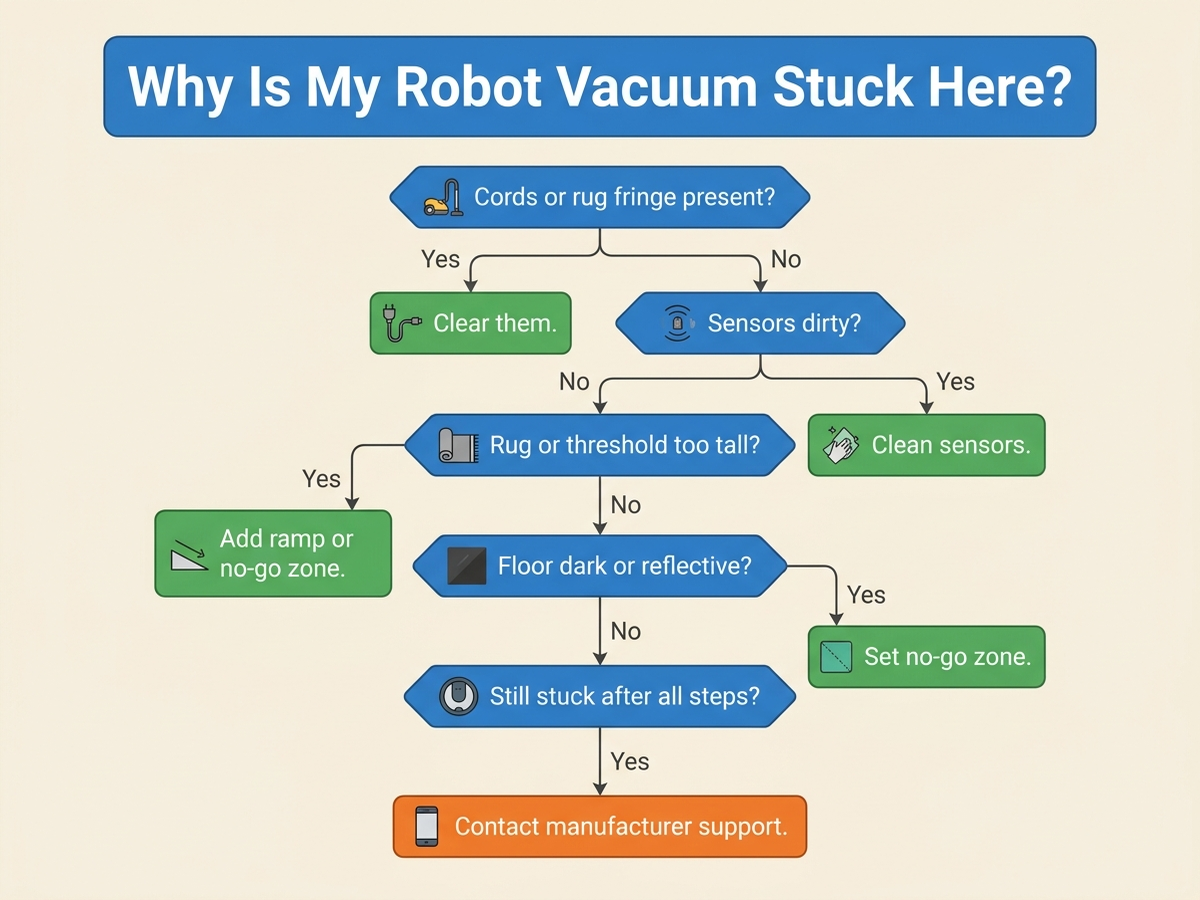
7. The decision flowchart
8. The bottom line
A robot vacuum stalling in the same spot, run after run, is almost always a specific, fixable trigger at that location — a cord, a rug edge, a dark floor patch, a dirty sensor, or a stale map — rather than a broken unit. Clearing the area, wiping the sensors, and setting a no-go zone resolves the large majority of documented cases. If the stall persists after all three steps and a remap, a wheel encoder or bumper sensor fault is a realistic possibility, and that’s the point where contacting manufacturer support makes more sense than continuing to clear the same spot every day.
Limitations of this analysis
To be explicit about what this article does not establish:
- We did not personally reproduce this issue on the specific machines named here. The causes and fixes described are drawn from manufacturer support documentation, independent lab test findings, and aggregated troubleshooting-thread patterns, not from a controlled test we ran ourselves.
- Threshold height and clearance figures are drawn from specific documented examples (Consumer Reports’ test notes, manufacturer specs) and may not generalize to every model or every threshold in a given home.
- RTINGS navigation comparisons reflect specific model pairs tested under RTINGS’ own lab conditions and may not predict performance differences between every model combination.
- Amazon review sentiment was read from each ASIN’s public review panels in August 2026 and reflects aggregated impressions, not a scientific sample.
- Market penetration and regional share figures are current industry estimates that vary somewhat across research firms; we cite them as directional context, not a precise figure.