Robot Mop Won't Return to Dock? 5 Real Causes (2026)
TL;DR. A robot mop or vacuum that won’t return to its dock almost never has a dead motor or a broken wheel — it’s a signal, placement, or map problem standing between the robot and a dock it can’t actually detect. The five most documented causes are a dock that isn’t placed per spec (not against a wall, too little clearance, or sitting on carpet instead of a hard floor), dirty charging contacts or a blocked IR sensor window, a corrupted or outdated map after the dock or furniture moved, a battery too depleted to make the return trip, and a software or Wi-Fi glitch that a simple restart usually clears. Working through dock placement, contacts, and map freshness in that order resolves the large majority of documented cases without a support call.
A note on links and methodology
As an Amazon Associate, Arekore earns from qualifying purchases. The Amazon product links in this article include our affiliate tracking ID and may earn us a commission if you buy through them, at no additional cost to you. See our Links Policy for details on how we select products and how commissions do not influence our recommendations.
We also did not personally test the specific machines named below. Every cause and fix in this article is an editorial synthesis of manufacturer support documentation, independent lab test findings, and aggregated public troubleshooting reports, cited inline.
Methodology
This is an editorial analysis based on publicly available data collected in November 2026. We did not run a controlled docking test ourselves; instead we synthesized:
- Manufacturer troubleshooting documentation — iRobot’s official support article “Does Not Return Home, All Roomba Models,” which specifies dock clearance of at least 4 ft from stairs and a hard, level surface against a wall, along with a separate note for Roomba Essential models about a thin plastic film left over the IR window on the bumper and dock; Dreame’s support article “Robot Vacuum Stray: How to Guide It Back to the Dock,” which addresses map drift and lost-robot recovery specifically.
- Independent review findings — a documented pattern from Tom’s Guide’s hands-on testing of the Roborock Qrevo Curv, later summarized in comparison coverage, that the dock has trouble completing a docking attempt when placed on carpet rather than hard flooring, with the fix being to relocate the dock onto a hard surface.
- Aggregated owner troubleshooting reports — consumer-guide aggregation and expert-Q&A sites (JustAnswer, Trunetto, RoboFaults, HomeSaver, Smart Floor Clean) that compile the most frequently reported docking-failure causes and fixes across the iRobot, Roborock, Dreame, Ecovacs, and Tineco product lines, including the role of dirty charging contacts, blocked sensors, and depleted batteries.
- Aggregated Amazon customer review sentiment for the models referenced below, read via each product’s public “Customers say” panel and review text on amazon.com in November 2026. We do not report a precise review-count N for every claim because Amazon’s review panels do not expose a stable, verifiable count for every product; where a specific figure appears in the text below, it is attributed to the source that published it.
- Market data — per IMARC Group’s 2026 industry report, the global robotic vacuum cleaner market is estimated at roughly USD 12.3 billion in 2026 and projected to grow at a 16.12% compound annual growth rate through 2034, while Fortune Business Insights independently puts the 2026 figure closer to USD 8.16 billion with a 14.62% CAGR through 2034 — the spread between estimates reflects differing market definitions, but both point to a fast-growing category where a common support question like this one affects a growing number of households.
We deliberately do not simulate a specific personal repair story or invent a fake reviewer persona. The guidance below is a synthesis of manufacturer documentation, independent testing, and aggregated troubleshooting patterns — treat it as a starting framework, not a substitute for your specific model’s manual.
1. Five reasons a robot mop won’t return to its dock
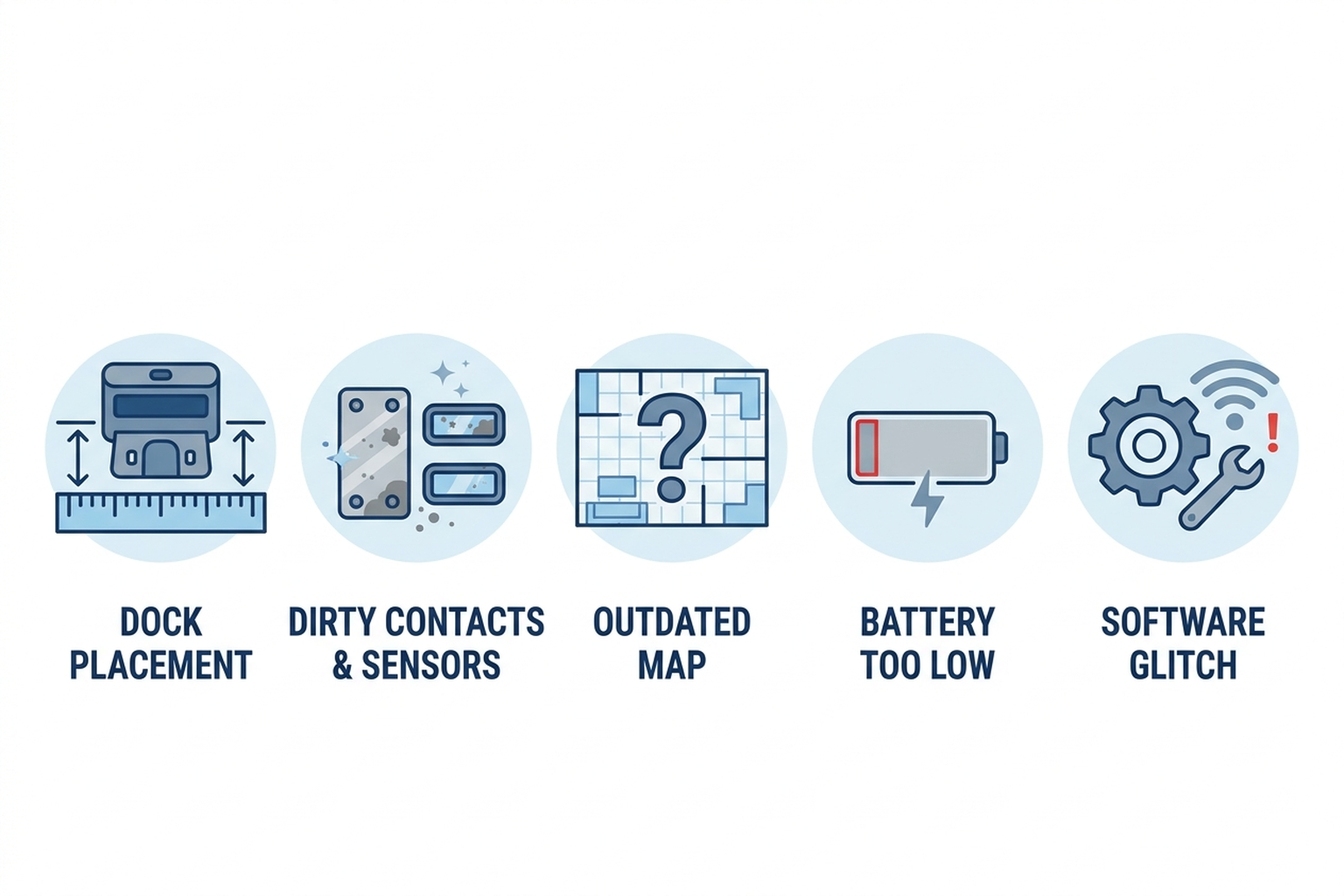
| Cause | What it looks like | Fixable at home? |
|---|---|---|
| Dock placement or clearance | Robot wanders near the dock without connecting, or never attempts the approach | Yes — reposition per manufacturer spec |
| Dirty contacts or blocked IR sensor | Robot touches the dock but doesn’t charge, or stops short of it | Yes — wipe contacts and sensor windows |
| Outdated or corrupted map | Robot heads to where the dock used to be, or drives in circles near it | Yes — update or rebuild the map |
| Battery too depleted for the return trip | Robot stops mid-clean far from the dock and never attempts to return | Yes — let it fully charge, shorten cleaning zones |
| Software or Wi-Fi glitch | App’s “Home” command does nothing, or behavior is inconsistent run to run | Yes — restart robot and dock, update firmware |
iRobot’s own support documentation for “Does Not Return Home, All Roomba Models” leads with placement, not hardware: the Home Dock needs a hard, level surface against a wall, a clear approach path, and at least 4 ft of separation from any stairs. The same article adds a model-specific detail easy to miss — on Roomba Essential units, a thin plastic protective film is sometimes left in place over the IR window on both the bumper and the dock after unboxing, which physically blocks the exact signal the robot needs to find home. Dock placement and an unremoved shipping film are not defects; they’re the single most common reason a brand-new or recently moved setup can’t dock on its own.
2. Why a robot can “see” the dock and still fail to connect
Dirty charging contacts and blocked sensors are the second most-documented cause, and they produce a distinctive symptom: the robot gets close to or even touches the dock, but doesn’t begin charging, or backs away and tries again. Aggregated troubleshooting guidance converges on a simple explanation — household dust, floor wax residue, and pet dander build up on the metal charging pins over weeks of normal use, and a dirty or oxidized contact can prevent current from passing even when the physical alignment is correct. The same dust layer can coat the IR receiver window on the robot’s bumper or the dock’s emitter, which is the signal the two use to line up for the final approach; a blocked window makes the robot behave as if the dock isn’t broadcasting at all, even though it is.
Map and navigation drift is the third cause, and it’s specific to LiDAR- and camera-navigation robots rather than the simpler bump-and-IR models. Dreame’s own support content, in an article specifically about guiding a stray robot back to its dock, treats this as a distinct failure mode from a sensor problem — if the dock has been moved, or if furniture rearrangement has changed the layout enough to confuse the stored map, the robot may navigate confidently toward a dock location that no longer matches reality. iRobot’s equivalent guidance recommends updating the dock’s position in the app’s saved map after a move, or deleting the map outright and letting the robot rebuild it from scratch on the next full cleaning run — treating a stale map as a data problem, not a hardware one.
3. Brand-specific patterns worth knowing
iRobot (Roomba / Combo line). iRobot’s support documentation is explicit that if a Roomba is picked up and moved mid-cycle — common when a pet knocks it off course or an owner relocates it manually — the robot can lose its positional reference and struggle to find the dock from an unfamiliar starting point, even with the dock itself working correctly. iRobot’s recommended diagnostic step is to manually place the robot within 6 ft of the dock, facing it, and confirm it can complete a short return from close range before assuming a longer-distance failure means something is broken.
Roborock. A documented pattern specific to Roborock’s higher-end self-washing dock models, surfaced in Tom’s Guide’s hands-on testing of the Qrevo Curv and summarized in subsequent comparison coverage, is that the dock has trouble completing a docking attempt when placed on carpet or a rug rather than directly on a hard floor — the dock’s self-leveling and the robot’s final alignment both assume a stable, non-compressible surface. The fix documented across Roborock troubleshooting guidance is straightforward: relocate the dock fully onto hard flooring, even if that means a few extra inches of hallway placement, rather than treating it as a hardware fault.
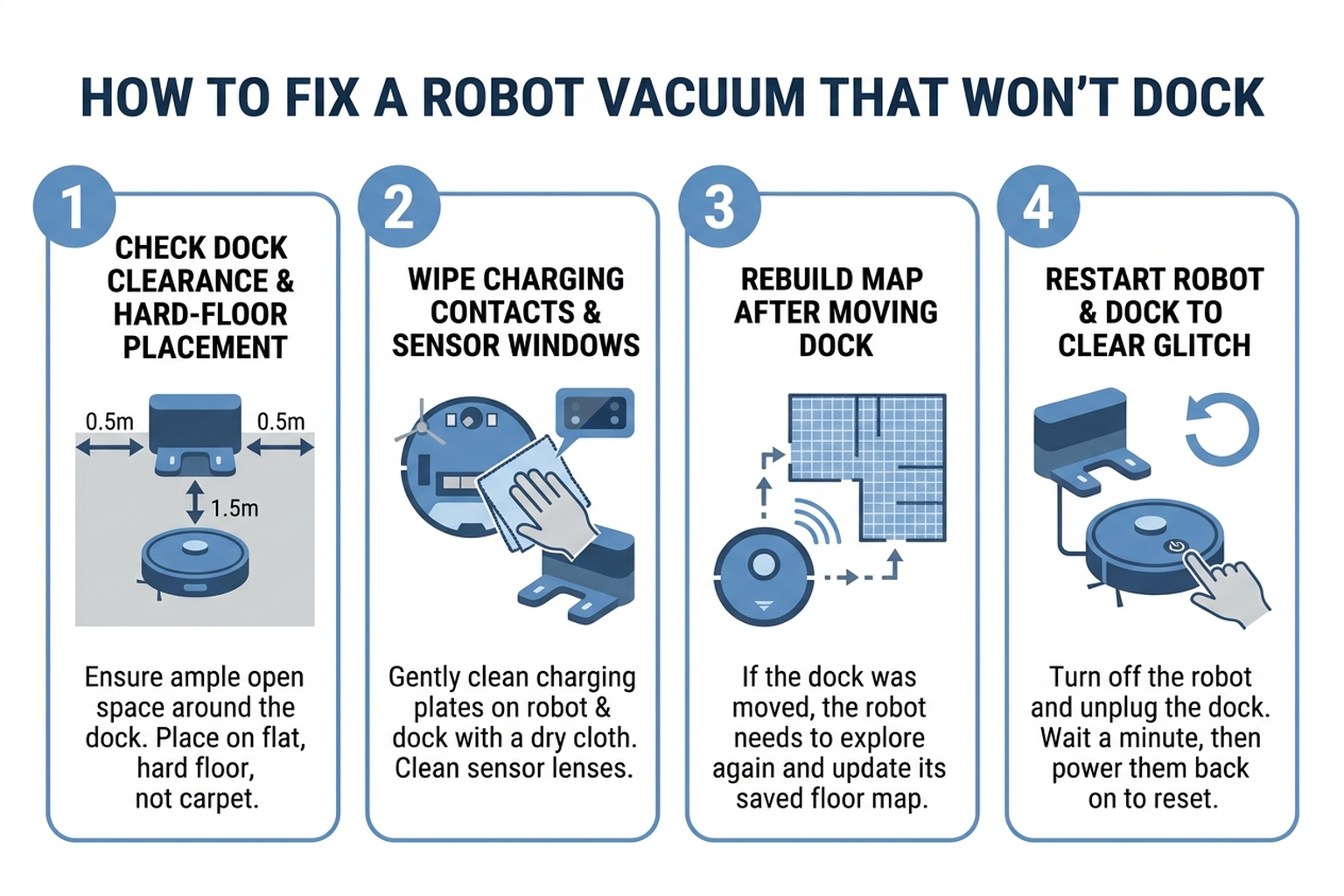
Dreame, Tineco, and Ecovacs. Support and aggregated troubleshooting content for these brands converges on a maintenance-first sequence: clear roughly 1.5–2 ft in front of the dock and at least 0.5 ft on each side, confirm the dock has power and its own indicator light is lit, wipe both the robot’s and dock’s charging pins and downward-facing sensors with a dry cloth, and restart both the robot and dock before assuming a map or hardware issue. Dreame’s guidance specifically frames a robot that’s driven to the wrong location as a “stray robot” scenario solvable by manually returning it to the dock and letting it re-anchor its map, rather than a problem requiring a factory reset.
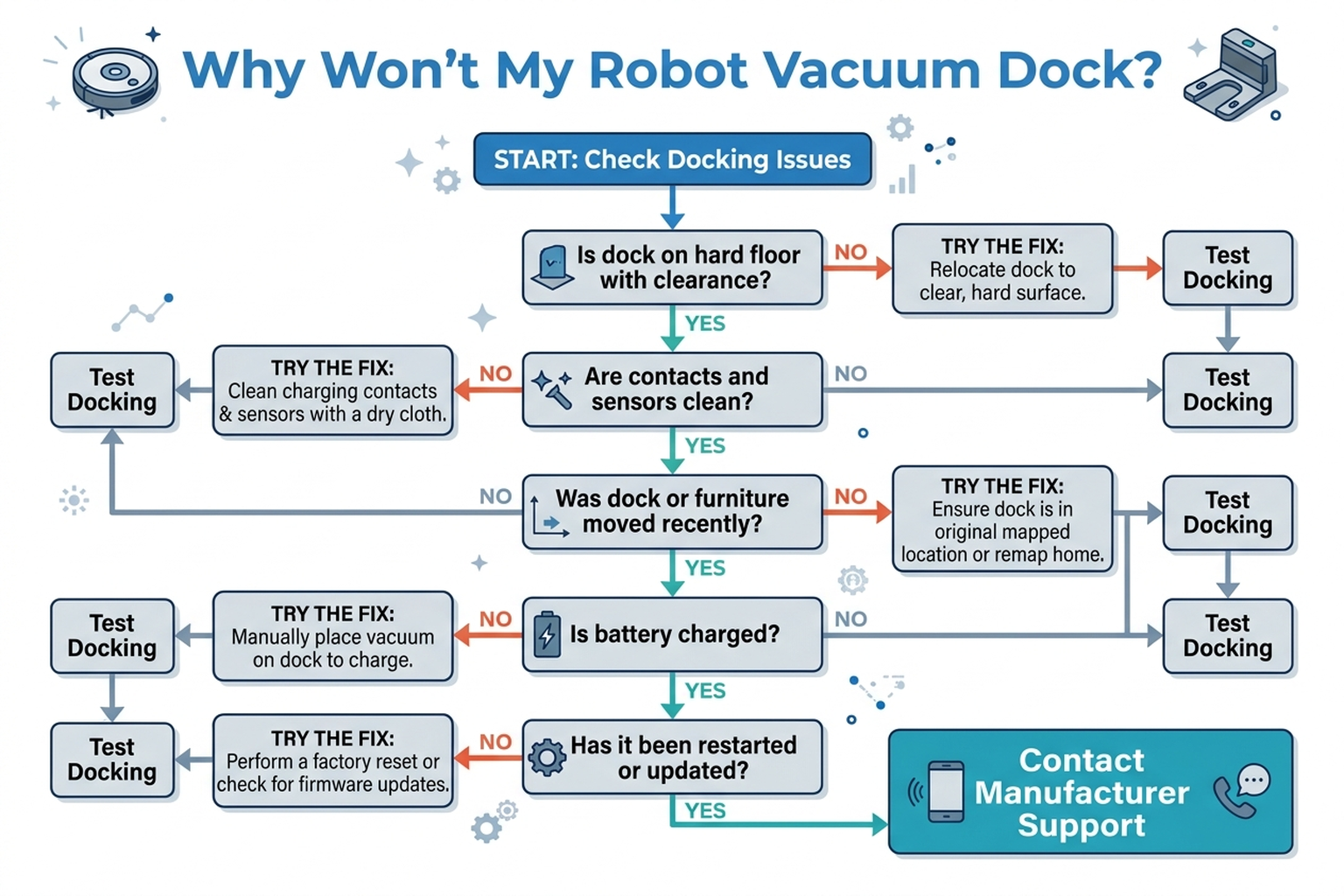
Cross-brand. Across every brand surveyed, manufacturer support content converges on the same troubleshooting order: confirm dock placement and clearance first, clean contacts and sensors second, and only then consider a map rebuild, a battery issue, or a software reset.
4. What to actually do, in order
- Check dock placement against spec. Put the dock on a hard, level, non-carpeted surface against a wall, with a clear approach path and the clearance your manufacturer specifies (iRobot calls for at least 4 ft from stairs; most brands want roughly 1.5–2 ft clear in front and 0.5 ft on each side).
- Remove any shipping film and wipe both sets of sensors. Check for a thin protective film left over the IR window on the robot’s bumper and on the dock, then wipe the charging contacts on both the robot and dock, along with the IR or downward-facing sensor windows, using a dry cloth or a lightly dampened melamine sponge.
- Test a short-range return. Manually place the robot within about 6 ft of the dock, facing it, and confirm it can dock successfully from close range before troubleshooting a longer-distance failure as something more complex.
- Update the dock’s saved location, or rebuild the map, if anything moved. If the dock or major furniture has been relocated, update the dock position in the app’s map, or delete the map entirely and let the robot build a fresh one during its next full cleaning run.
- Let the robot fully charge, then shorten cleaning zones if battery depletion is the pattern. A robot that consistently stops far from the dock and never attempts a return — rather than approaching and failing — may simply be running out of battery before the trip home; scheduling shorter runs or more frequent cleanings addresses this directly.
- Restart the robot and dock, then check for a firmware or app update. Unplug the dock for about 30 seconds, restart the robot, and confirm both the robot’s firmware and the companion app are current — a fresh boot and an up-to-date build resolve a documented share of intermittent docking failures that placement and cleaning alone don’t explain.
- Contact manufacturer support if the robot still can’t dock after confirming placement, clean contacts and sensors, a fresh map, adequate battery, and current firmware — at that point a failed IR emitter, a damaged charging pin, or another internal fault becomes a realistic possibility that home troubleshooting can’t rule out.
5. If the fix is maintenance, not replacement
Editorial recommendation, not personal testing. These address the two most commonly documented causes above — dirty contacts and dock placement — rather than a hardware upgrade.
- CRC QD Contact Cleaner, 11 oz Aerosol Spray — a quick-drying, plastic-safe electronics cleaner manufacturer-rated for connectors and contacts, sized to clean charging pins without leaving the residue a household cleaner can.
- Waterproof Non-Slip Base Station Mat for Roborock, Dreame, Xiaomi, and Ecovacs Docks — a flat, rigid, non-slip pad sized to give a dock a stable hard-floor footing when the only available spot is carpet or a rug, directly addressing the documented Roborock carpet-docking issue above.
6. If it’s time for a more reliable navigation system
If dock placement and contact cleaning haven’t resolved the problem, current-generation models with faster, more robust mapping are independently documented to reduce how often navigation drift causes a failed return.
- iRobot Roomba Combo j9+ — builds a complete LiDAR map of the home roughly 7x faster than prior generations according to iRobot’s own product documentation, which shortens the window during which a stale or incomplete map can cause the robot to misjudge the dock’s location.
- Roborock Qrevo Curv — Tom’s Guide’s hands-on review names it a strong self-emptying pick for both hardwood and carpet cleaning performance; owners should place the dock itself on hard flooring only, per the documented carpet-docking issue above, rather than assume the unit is defective if docking fails on a rug.
7. The decision flowchart
8. The bottom line
A robot mop or vacuum that won’t return to its dock is almost always following a specific, documented cause — a dock that isn’t placed per spec, dirty contacts or a blocked sensor, a stale map after something moved, a battery that ran out before the trip home, or a software glitch — rather than a defective unit. Working through placement, cleaning, and map freshness in that order resolves the large majority of documented cases without a support call or a return. If the robot still can’t dock after all of that, with a confirmed hard-floor dock location, clean contacts, a fresh map, and current firmware, a hardware fault in the robot’s own sensor or charging circuit becomes a realistic possibility, and that’s the point where manufacturer support makes more sense than continuing to adjust placement.
Limitations of this analysis
To be explicit about what this article does not establish:
- We did not personally reproduce this issue on the specific machines named here. The causes and fixes described are drawn from manufacturer support documentation, independent review findings, and aggregated troubleshooting-thread patterns, not from a controlled docking test we ran ourselves.
- The Roborock carpet-docking pattern comes from Tom’s Guide’s testing of the Qrevo Curv specifically; we cite it as a documented example of a placement-related failure mode, not as a claim that every Roborock model or every unit of that model behaves identically.
- Brand-specific guidance summarized here reflects each manufacturer’s published support content as of November 2026 and may not cover every generation or regional variant of a given product line.
- Amazon review sentiment was read from each ASIN’s public review panels in November 2026 and reflects aggregated impressions, not a scientific sample.
- Market size and growth figures vary meaningfully across research firms depending on market definition and scope; we cite two independent estimates as directional context, not a single precise figure.