Robot Mop Leaving Streaks on Floors? 5 Real Causes (2026)

TL;DR. A robot mop that leaves streaks almost never has a broken motor or a bad pass pattern — the pad is either saturated with too much water, smearing dirty water instead of clean water, or gliding on a worn-out surface that can no longer agitate grime. The five most commonly documented causes are an over-saturated pad, a dirty water tank or dock reservoir, a worn or clogged mop pad, floors that weren’t vacuumed first, and (on specific glossy-floor models) a roller or spray pattern that’s simply mismatched to a reflective surface. Cleaning the tank, lowering the water flow, and swapping a worn pad resolves the large majority of documented cases; a genuinely mismatched floor-and-hardware combination is the one cause a setting change won’t fully fix.
A note on links and methodology
As an Amazon Associate, Arekore earns from qualifying purchases. The Amazon product links in this article include our affiliate tracking ID and may earn us a commission if you buy through them, at no additional cost to you. See our Links Policy for details on how we select products and how commissions do not influence our recommendations.
We also did not personally test the specific machines named below. Every cause and fix in this article is an editorial synthesis of manufacturer support documentation, independent lab test findings, and aggregated public troubleshooting reports, cited inline.
Methodology
This is an editorial analysis based on publicly available data collected in October 2026. We did not run a controlled mopping test ourselves; instead we synthesized:
- Manufacturer troubleshooting documentation — iRobot’s official support article “Braava jet: Why is my Robot Mop leaving streaks on the floor?”, which distinguishes “clean streaks” (wrong cleaning solution) from “dirty streaks” (reused or dirty pad), and Roborock’s and Tineco’s equivalent support guidance on tank maintenance and water-flow settings.
- Independent lab test and explainer sourcing — Vacuum Wars’ published hard-floor-cleaner test methodology, which scores mopping performance using a combined stain-removal score and a “Water Penalty Score” (measured by weighing a paper towel before and after wiping a 4×4 ft area, since excess residual water is what produces streaks), and Tom’s Guide’s reporting after consulting appliance-repair experts on the most common robot-mop mistakes.
- Model-specific independent review findings — Tom’s Guide’s hands-on review of the Roborock Qrevo Curv 2 Flow, which documented out-of-the-box water streaks and uneven roller wetting on light-colored, high-gloss tile, later resolved via a water-flow settings change, alongside ongoing support-forum reports that high-gloss or dark laminate floors remain more prone to visible streaking at the edge of the roller’s path than matte floors.
- Aggregated owner troubleshooting reports — consumer-guide aggregation sites (TheHowToLab, Trunetto, Auto Home Bots, ScrubHelm) that compile the most frequently reported robot-mop streaking causes and fixes across the iRobot, Roborock, Dreame, and Tineco product lines.
- Market data — per a Research and Markets 2026 forecast, the global robot vacuum-mop market is projected to reach USD 5.77 billion in 2026, growing at a 9.79% CAGR to USD 10.15 billion by 2032, underscoring how common this troubleshooting question has become as combo mopping robots move into mainstream households.
We deliberately do not simulate a specific personal repair story or invent a fake reviewer persona. The guidance below is a synthesis of manufacturer documentation, independent lab testing, and aggregated troubleshooting patterns — treat it as a starting framework, not a substitute for your specific model’s manual.
1. Five reasons a robot mop leaves streaks
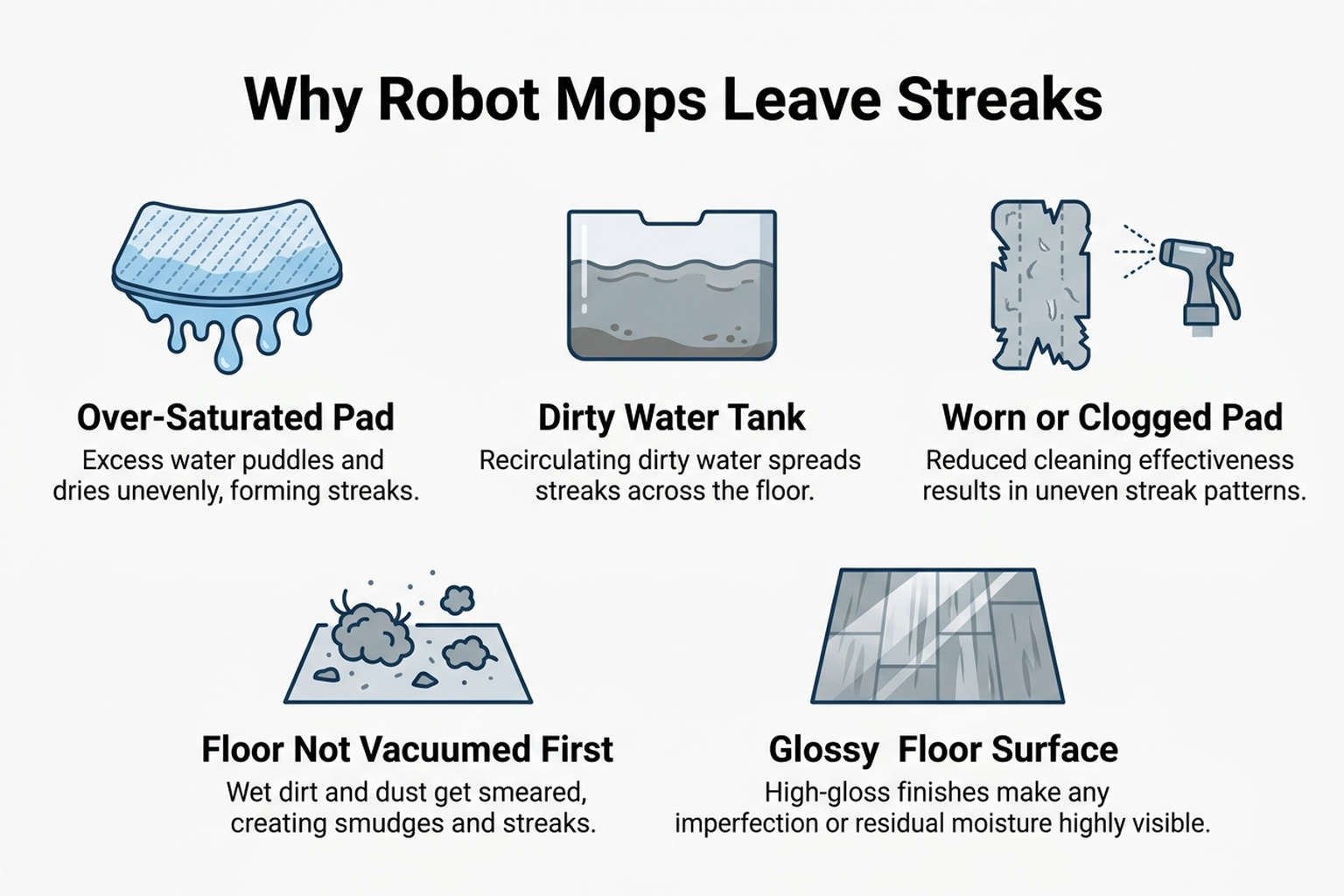
Streaks fall into two distinct categories that manufacturer support content treats very differently, and mixing them up leads to the wrong fix:
| Cause | What it looks like | Fixable at home? |
|---|---|---|
| Over-saturated pad (too much water) | Streaks appear wet, then dry into a hazy film as excess water evaporates unevenly | Yes — lower the water-flow setting |
| Dirty water tank or dock reservoir | Dark or dirty-looking streaks, especially on light-colored floors; the robot is effectively mopping with yesterday’s dirt | Yes — empty and rinse daily |
| Worn or clogged mop pad | Pad glides instead of scrubbing; streaks appear even on a short-term mess | Yes — replace the pad |
| Floor not vacuumed/swept first | Fine debris gets smeared into wet streak lines rather than picked up | Yes — run dry mode before wet mode |
| Glossy or reflective floor surface | Faint streak lines visible only at certain light angles, concentrated at the edge of the roller or pad’s path | Partially — settings help, hardware mismatch may persist |
iRobot’s own support documentation for the Braava jet line draws a clean distinction between two failure modes that look similar but have opposite causes: a clean streak (a dry-looking line with no visible dirt) usually means the wrong cleaning solution — water or iRobot’s own Hard Floor Solution only — while a dirty streak (visibly grimy) means the pad wasn’t fresh or clean at the start of the cycle. Meanwhile, Roborock’s support guidance for its self-washing dock models traces dirty streaks to a different source entirely: a contaminated clean-water tank or scaled-up dock water path, which mops every subsequent pass with water that’s already dirty before it reaches the floor.
2. Why more water makes streaks worse, not better
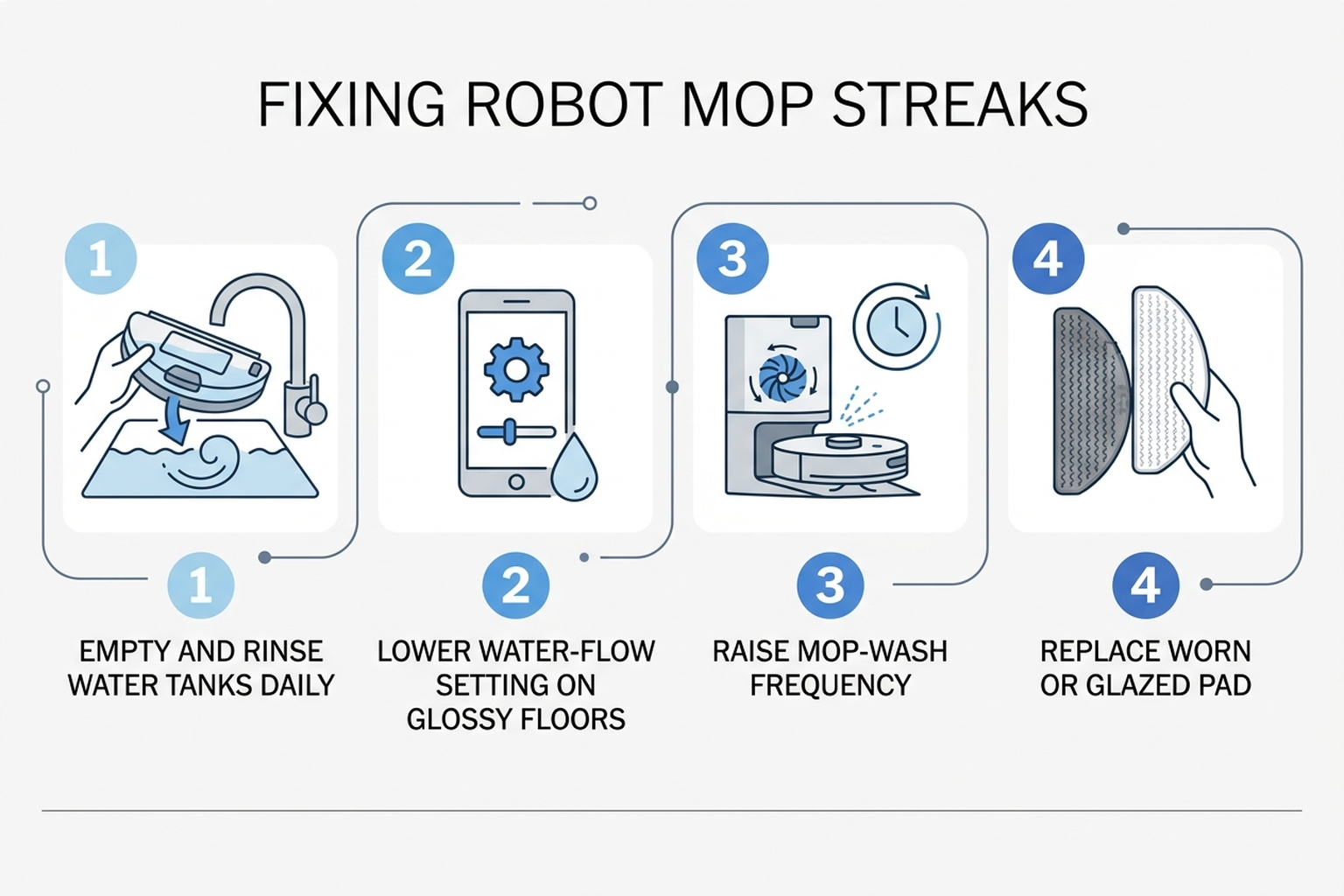
It’s counterintuitive, but on hardwood or polished tile, more water usually means more visible streaking, not cleaner floors — the pad can’t absorb or evenly spread the excess liquid before it starts to dry, and the result is a hazy film where the water last sat. Vacuum Wars built a specific “Water Penalty Score” into its hard-floor-cleaner test methodology for exactly this reason: it weighs a paper towel before and after wiping a 4×4 ft test area, scoring machines down for leaving behind excess residual water, independent of how well they lifted stains in the first place. A high stain-removal score paired with a high water penalty is, in practice, the profile of a machine that cleans but also streaks.
The dirty-water failure mode works differently. If the dock’s clean-water reservoir, wash tray, or water channels build up slime or mineral scale, the robot is depositing contaminated water onto the floor on every pass, regardless of how well-calibrated the water-flow setting is. Roborock’s own troubleshooting guidance recommends raising the mop-wash frequency — from the often-default “every 25–30 minutes” or “by area” setting to every 10–15 minutes, or a wash after each room — as a bigger lever on mop cleanliness than any pad or detergent change, precisely because a pad that re-wets itself with dirty water between washes can’t help but redeposit dirt no matter how new it is.
A worn pad compounds both problems. iRobot, Roborock, and Tineco support content all converge on the same underlying mechanism: a pad’s micro-texture is what lets it agitate and lift grime rather than just push dirty water around, and that texture flattens and clogs with repeated washing and use. Once it’s glazed over, the pad behaves less like a scrubber and more like a squeegee smearing whatever is already on the floor.
3. Brand-specific patterns worth knowing
iRobot (Braava jet / Roomba Combo). iRobot’s support content is unusually explicit about separating clean streaks (wrong solution) from dirty streaks (dirty or reused pad), and recommends a specific recovery step beyond just fixing the root cause: running a second dry pass after a wet mopping cycle to pick up any residual streak lines the wet pass left behind. iRobot also recommends vacuuming or sweeping before any wet mopping cycle, since debris left on the floor gets smeared into wet lines rather than lifted.
Roborock. Roborock’s troubleshooting guidance for its self-washing dock models (Q Revo, S7, S8 series and newer) centers on three levers: mop-wash frequency, water-flow level, and tank hygiene — empty the dirty-water tank after every cleaning (or at least daily), since standing dirty water is both an odor source and a direct cause of the next cycle’s streaks. Notably, Tom’s Guide’s hands-on review of the Qrevo Curv 2 Flow documented real out-of-the-box streaking on light-colored, high-gloss tile from uneven roller wetting — resolved in that case by a water-flow settings change, but flagged in the review and in ongoing support-forum threads as a pattern specific to reflective flooring that owners with that floor type should weigh before buying.
Tineco and Dreame. Tineco’s and Dreame’s own troubleshooting documentation (via aggregated guide sites Trunetto and TheHowToLab) point to the same core checklist — fresh or clean pad, adequate water flow, clean tank — with one addition specific to these brands’ roller-mop and self-cleaning-station designs: debris that accumulates inside the internal tubing or wash tray between full cleanings can reintroduce dirt into an otherwise clean water supply, which is why periodic manual tank and tray cleaning (not just relying on the self-clean cycle) is part of both brands’ official maintenance guidance.
Cross-brand. Across every brand surveyed, manufacturer support content converges on the same troubleshooting order: rule out a dirty tank and a worn pad first, lower the water-flow setting second, and only consider a hardware or floor-surface mismatch third.
4. What to actually do, in order
- Empty and rinse both water tanks (clean and dirty reservoirs, plus the dock’s wash tray if your model has one) — standing or scaled-up water is the single most commonly cited cause of dirty streaks across every brand’s own support content.
- Check the mop pad. If it’s a single-use wet pad, use a fresh one each cycle; if it’s washable, make sure it’s clean and fully dry before reinstalling, and replace it outright if it’s glazed, thinned, or more than a few months old.
- Vacuum or dry-mop first, then run the wet-mopping cycle separately — debris left on the floor gets smeared into wet streak lines instead of being lifted away.
- Lower the water-flow setting, especially on hardwood or polished tile — Vacuum Wars’ Water Penalty testing and Tom’s Guide’s reporting both point to excess water, not insufficient water, as the more common root cause of streaking.
- Raise the mop-wash frequency in the app (every 10–15 minutes or after each room, rather than the default “by area” setting) if your model has a self-washing dock — this does more for streak-free results than changing pads or cleaning solution.
- Use only the manufacturer-approved cleaning solution, in the recommended amount — one capful per tank, not a splash of a household floor cleaner, which can leave a hazy buildup film over time and in some cases damage the robot’s internal mechanisms.
- If streaks persist only on high-gloss or dark laminate floors after all of the above, treat it as a documented floor-and-hardware mismatch rather than a defect — a settings change helps, as it did in Tom’s Guide’s Qrevo Curv testing, but owners especially sensitive to visible streaking on reflective floors may want to weigh that pattern before choosing a roller-mop design.
5. If the fix is a maintenance accessory
Editorial recommendation, not personal testing. These address the most commonly documented causes above — the wrong cleaning solution and a worn-out pad — rather than a hardware upgrade.
- iRobot Authentic Hard Floor Cleaner Concentrate, 16 oz (Pack of 2), compatible with Braava and Roomba Combo models — a manufacturer-formulated solution sized to avoid the overdosing that causes the hazy “clean streak” buildup iRobot’s own support content warns against.
- roborock 2-Pack Microfiber Mop Cloths (genuine replacement pads) — a direct, low-cost way to rule out a glazed or worn pad as the cause before assuming the dock or settings are at fault.
6. If the streaking means it’s time for better hardware
If tank cleaning, a fresh pad, and a lower water-flow setting haven’t resolved the problem, two current approaches are independently documented to reduce how often streaking recurs — with one important caveat.
- Roborock Qrevo Curv — its self-washing dock and adjustable water-flow controls are built to address the dirty-tank and over-saturation causes directly; Tom’s Guide’s testing of the related Qrevo Curv 2 Flow found real streaking out of the box on high-gloss tile that a settings change resolved, so owners with reflective flooring should expect to tune water flow after setup rather than assume defaults will be streak-free.
- iRobot Roomba Combo j9+ — pairs iRobot’s documented dry-before-wet sequencing logic (the robot vacuums before it mops in the same pass) with automatic mop-pad lifting on carpet, which avoids a separate documented failure mode: a wet pad dragging across carpet and depositing dirty water at the transition point.
7. The decision flowchart
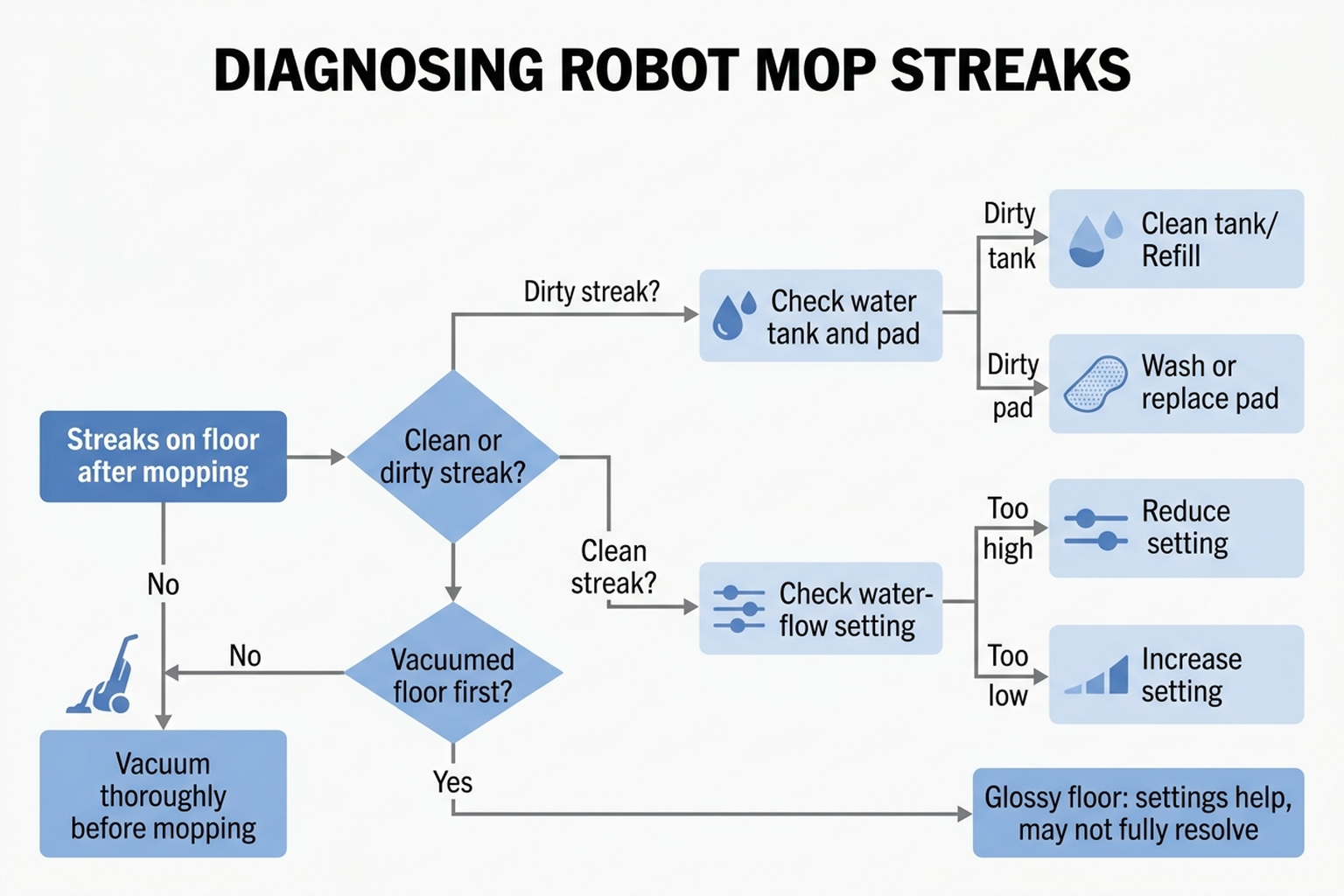
8. The bottom line
A robot mop leaving streaks is almost always a specific, fixable issue — too much water, a dirty tank, a worn pad, or unvacuumed debris — rather than a defective unit. Emptying and rinsing the tanks, swapping a worn pad, lowering the water-flow setting, and vacuuming before mopping resolves the large majority of documented cases. The one exception worth knowing about in advance: on high-gloss tile or dark laminate, even a well-maintained roller-mop system can show faint streak lines that a settings adjustment reduces but doesn’t always fully eliminate — a pattern specific enough to specific floor types that it’s worth weighing before buying a roller-style mop if streak-free high-gloss floors are a priority.
Limitations of this analysis
To be explicit about what this article does not establish:
- We did not personally reproduce this issue on the specific machines named here. The causes and fixes described are drawn from manufacturer support documentation, independent lab test findings, and aggregated troubleshooting-thread patterns, not from a controlled mopping test we ran ourselves.
- Vacuum Wars’ Water Penalty Score reflects its own lab test bench and methodology, and may not predict streaking behavior on every model combination or every real-world floor finish.
- The Qrevo Curv 2 Flow streaking finding comes from Tom’s Guide’s review of that specific model; we cite it as a documented example of a glossy-floor streaking pattern, not as a claim that every Roborock model or every unit of that model streaks identically.
- Brand-specific guidance summarized here reflects each manufacturer’s published support content as of October 2026 and may not cover every generation or regional variant of a given product line.
- Market size and growth figures are a single research firm’s 2026 forecast; estimates vary across research firms and we cite this one as directional context, not a precise figure.