How to Fix a Robot Mop That Keeps Remapping Your Home
TL;DR. A robot mop that rebuilds its map every single run, instead of reusing the one it already made, is almost always caused by a setting or a habit, not a hardware fault. The most commonly documented triggers are Map Saving Mode being switched off in the app, the robot being carried between floors or picked up mid-clean, a dock that isn’t sitting flush against a flat wall with clear space on both sides, dirty or light-confused LiDAR and cliff sensors, and — in multi-floor homes — two floors whose layouts look similar enough that the robot loads the wrong saved map. Fixing the setting, the dock placement, and the sensors resolves the large majority of documented cases without a factory reset or a repair.
A note on links and methodology
As an Amazon Associate, Arekore earns from qualifying purchases. The Amazon product links in this article include our affiliate tracking ID and may earn us a commission if you buy through them, at no additional cost to you. See our Links Policy for details on how we select products and how commissions do not influence our recommendations.
We did not personally test the specific machines named below. Every cause and fix in this article is an editorial synthesis of manufacturer support documentation, independent lab test findings, and aggregated public troubleshooting reports, cited inline.
Methodology
This is an editorial analysis based on publicly available data collected in September 2026. We did not run a controlled mapping test ourselves; instead we synthesized:
- Manufacturer troubleshooting documentation — Roborock’s own support articles on why mapping data disappears or is lost, Ecovacs’s published guide on robot vacuum-mops that fail to map correctly, and Dreame’s consumer guidance on maps that come out moved, broken, or overlapping.
- Independent lab test findings — RTINGS.com’s ongoing robot vacuum test bench, which rates the Roborock Saros 10R as its top overall pick for 2026 and the Dreame X50 Ultra as its top pick for carpet, citing navigation and mapping performance as a core part of both scores.
- Owner troubleshooting archives — JustAnswer’s model-specific Roborock remapping threads, and independent repair-and-troubleshooting guides (VacuumMentor, Trunetto, HouseholdRobot, RoboVacGuide) that catalog the specific, repeatable triggers behind maps that reset, scramble, or fail to save.
- Aggregated Amazon customer review sentiment for the models referenced below, read via each product’s public “Customers say” panel and Consumer Reports’ 2026 robot vacuum test notes in September 2026. We do not report a precise review-count N because Amazon’s review panels do not expose a stable, verifiable count; a fabricated number would be misleading.
- Market and category data — per Statista’s 2026 estimate, the global cleaning robot market is on track to reach roughly $13.7 billion in 2026, and per one industry market-research estimate, the self-cleaning robot vacuum-and-mop segment specifically was valued at roughly $5.4 billion in 2025 and is projected to keep growing through the rest of the decade — a scale that helps explain why mapping-reliability complaints show up so frequently in owner troubleshooting forums.
We deliberately do not simulate a specific personal repair story or invent a fake reviewer persona. The advice below is a synthesis of manufacturer documentation, independent lab testing, and aggregated troubleshooting patterns — treat it as a starting framework, not a substitute for your specific model’s manual.
1. Five reasons a robot mop keeps remapping instead of reusing its map
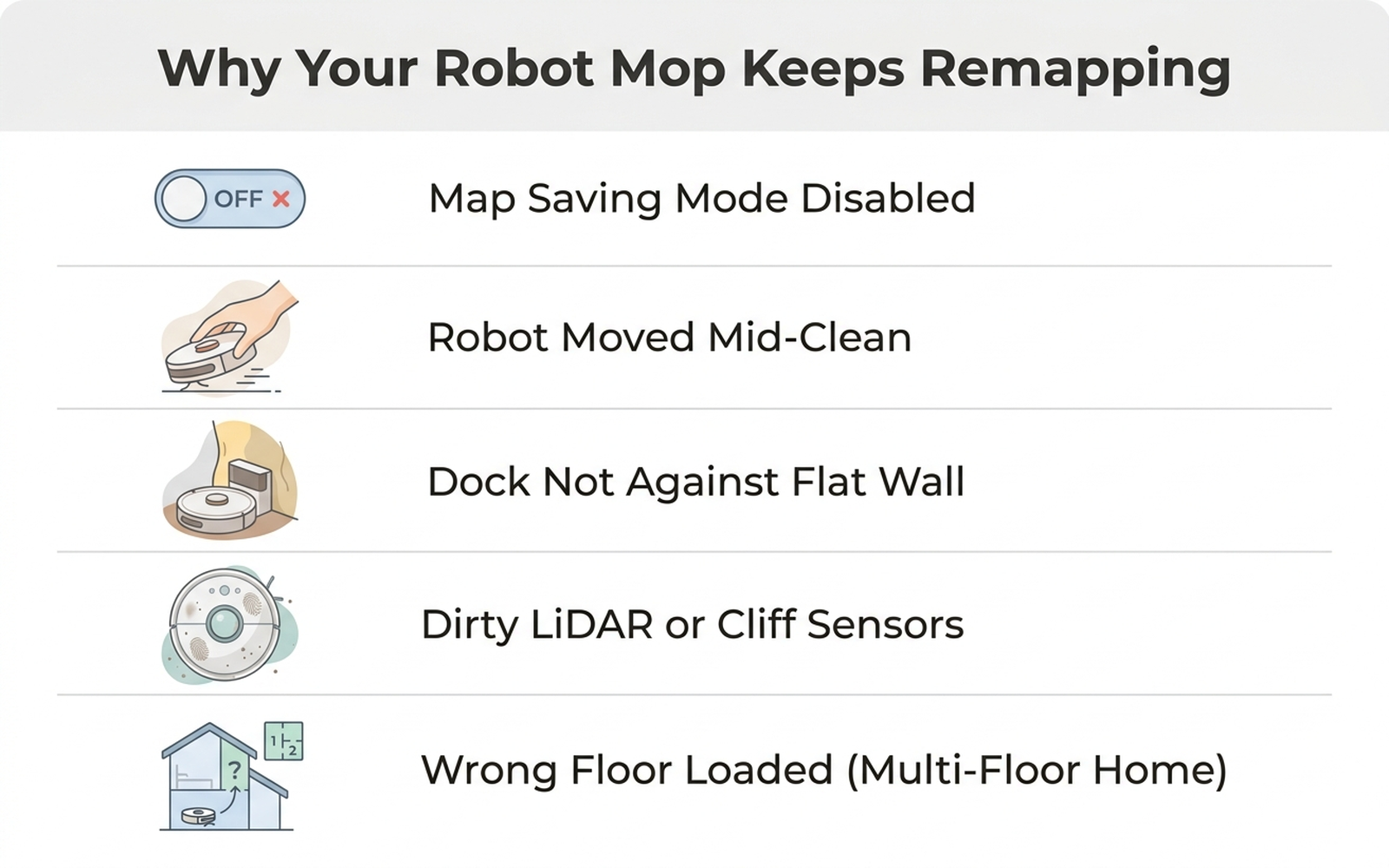
If your robot mop rebuilds its entire floor plan from scratch on every cleaning run rather than reusing a saved layout, the cause is almost always one of five well-documented triggers:
| Cause | What it looks like | Fixable at home? |
|---|---|---|
| Map Saving Mode turned off | Some models ship with this setting disabled by default; the robot wipes its map after every clean, by design | Yes — one toggle in the app |
| Robot picked up or moved mid-run | Map comes out warped, overlapping, or partially blank after that session | Yes — avoid moving it while active |
| Dock not against a flat wall / not enough clearance | Robot can’t reliably relocate itself relative to its start point, so it starts a fresh map instead of loading the old one | Yes — reposition the dock |
| Dirty or light-confused sensors | Rooms appear in the wrong place, walls look skewed, or mapping stalls partway through | Yes — usually, with cleaning |
| Wrong floor loaded in a multi-floor home | Two similarly-shaped floors get merged into one scrambled map, or the robot starts fresh because it can’t tell which floor it’s on | Yes — manual floor selection + distinct dock spots |
Roborock’s own support documentation confirms the first cause directly: on some models, Map Saved Mode ships off in the Roborock app’s Settings menu, and without it enabled the robot discards its map after every single cleaning session — which reads to an owner exactly like “it keeps remapping,” even though nothing is actually broken.
2. Why picking the robot up mid-clean scrambles the map
Most mapping robots build their floor plan using LiDAR or camera-based simultaneous localization and mapping (SLAM), which tracks the robot’s position relative to a fixed starting point — almost always the dock. Manufacturer guidance from Ecovacs and Dreame both converge on the same warning: lifting the robot while it is actively cleaning breaks that positional reference. The robot’s internal sense of “where am I” resets, and depending on the model, it either produces a visibly warped or overlapping map for that session, or abandons the in-progress map and starts over on the next run.
Dock placement causes a related but distinct problem. Independent troubleshooting guides consistently flag dock position as underrated: the dock needs to sit against a flat wall with clear space on both sides and in front, because the robot uses the dock’s exact position as its map’s anchor point. A dock that’s crooked, in a corner, or has furniture crowding one side gives the robot an unreliable reference point every time it returns — which some models handle by simply discarding the old map and building a new one rather than risk misaligning cleaning passes against a shaky anchor.
Dirty or confused sensors produce a slower, subtler version of the same symptom. Ecovacs’s own troubleshooting guidance and Dreame’s mapping-fix article both note that a dirty LiDAR turret, camera lens, or cliff sensor — or strong, direct sunlight hitting a reflective floor — can distort the geometry the robot is building in real time, so rooms come out skewed, walls look bent, or the mapping run stalls before finishing. That distorted map is often unusable on the next run, so the robot defaults back to a fresh mapping pass.
3. Brand-specific patterns worth knowing
Roborock. Roborock’s own support center documents that mapping data can disappear specifically because Map Saved Mode was never turned on, that an unstable Wi-Fi connection during a mapping run can prevent the map from syncing and saving, and that firmware updates have, in some documented cases, wiped previously saved maps — a pattern independent troubleshooting sites have also cataloged as “map deleted after firmware update.” RTINGS rates the Roborock Saros 10R as its top-tested robot vacuum overall for 2026, citing multiple solid-state LiDAR sensors and strong obstacle recognition — hardware advantages that reduce, but do not eliminate, the software-side map-saving issues above.
iRobot. iRobot’s own Imprint Smart Maps documentation is built around a specific workflow: the robot needs at least one fully completed, uninterrupted mapping run from the dock before it can reliably reuse a saved layout, and it treats significantly rearranged furniture or a newly closed-off room as a signal to remap rather than force a stale map onto a changed space.
Ecovacs / Dreame. Both brands’ support content specifically addresses maps that come back “moved,” “broken,” or with overlapping, skewed rooms — Dreame attributes this pattern most often to the robot being interrupted or picked up mid-run, while Ecovacs’s guidance points to routes blocked by closed doors, strong or changing light, and dirty sensors as the leading causes of a map that fails to build cleanly on the first attempt.
Cross-brand, multi-floor homes. Independent troubleshooting guides note that a robot identifies which floor it’s on primarily by comparing the current layout against saved maps and by using the dock’s position as a landmark — not by sensing altitude. If two floors have a similar footprint, the robot can occasionally load the wrong saved map or merge the two into one scrambled result; placing the dock in a visually distinct spot on each floor, and manually selecting the floor in the app before starting a clean, are the two fixes every brand’s guidance converges on.
4. What to actually do, in order
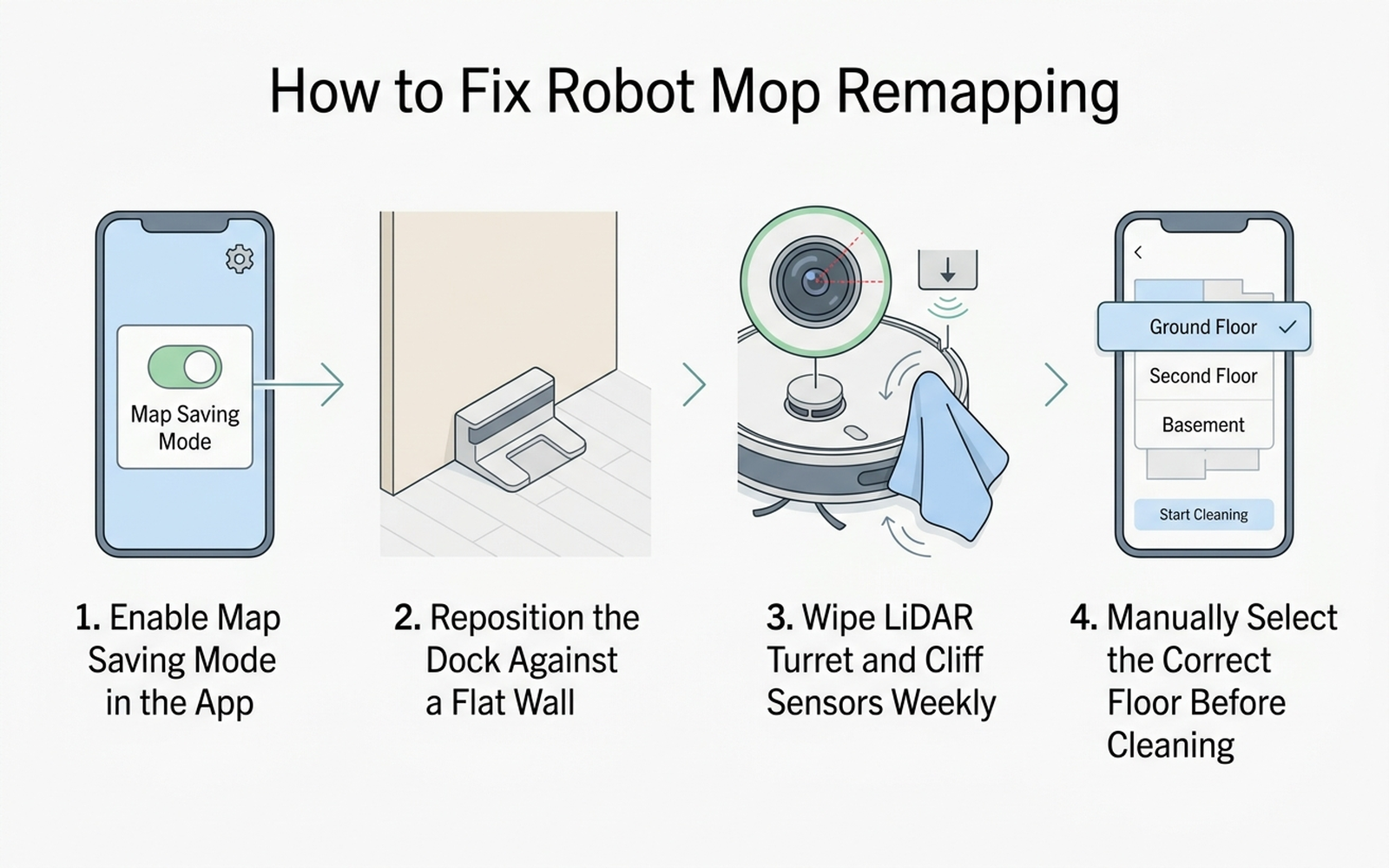
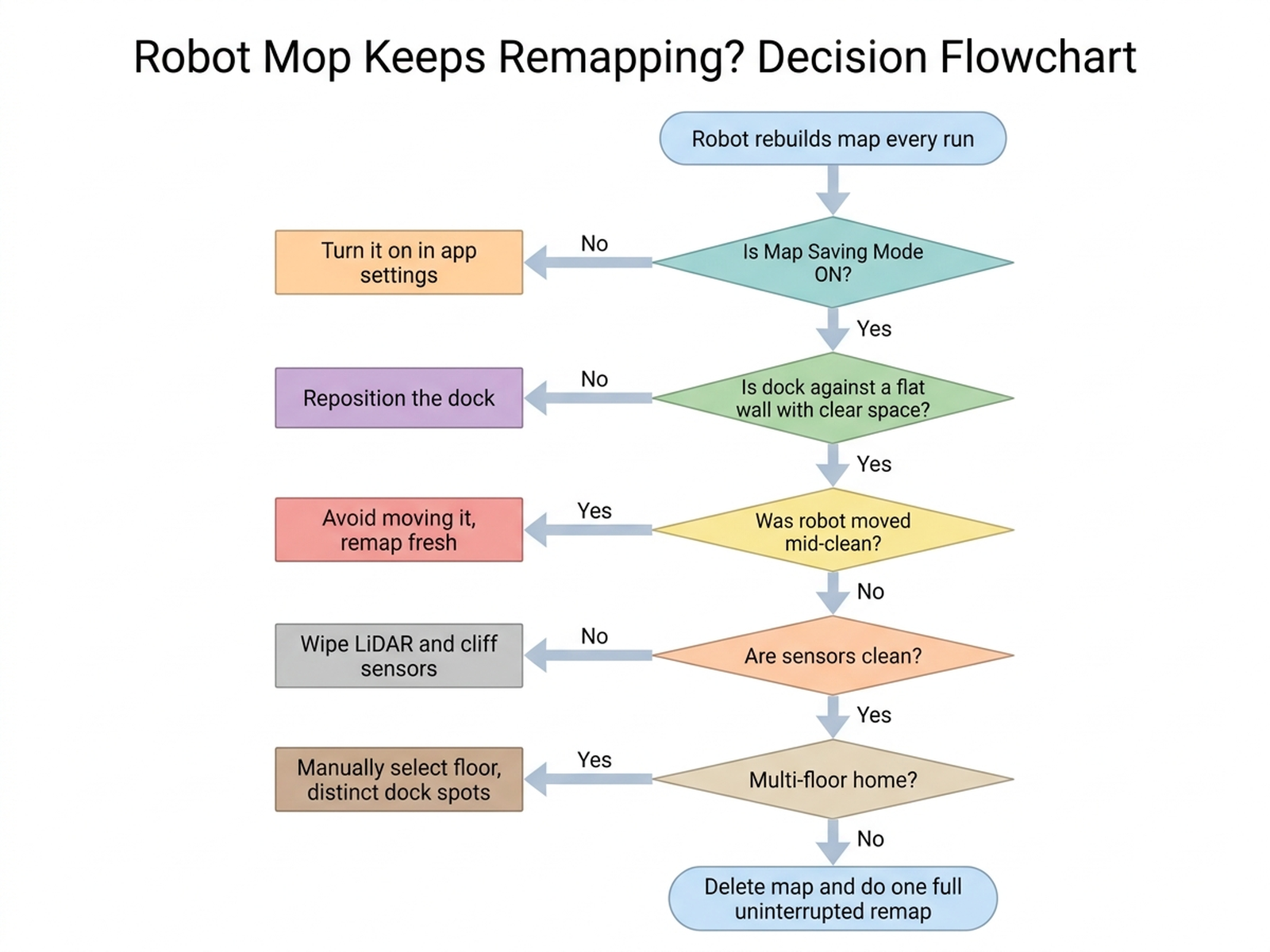
- Check whether Map Saving Mode is even turned on. In the app’s Settings, confirm this is enabled before assuming a hardware problem — on models that ship with it off, remapping every run is the expected, working behavior, not a fault.
- Reposition the dock against a flat wall, with clear floor space on both sides and in front, and avoid corners or spots crowded by furniture — this gives the robot a stable anchor point to relocate against.
- Never pick up or manually move the robot while a cleaning or mapping run is in progress. If you need to move it, pause the run in the app first, and if the map still comes out wrong afterward, delete it and start a fresh full-home clean rather than a partial zone clean.
- Wipe the LiDAR turret, camera lens, and cliff sensors with a dry microfiber cloth, and reduce direct sunlight or bright reflections on the floor during the robot’s first few mapping runs.
- In a multi-floor home, manually select the correct floor in the app before every run, and place the dock in a visually distinct location on each floor so the robot has a clear landmark to tell them apart.
- Update the app and the robot’s firmware, then confirm the map is still present afterward — some owners have documented maps disappearing specifically after a firmware update, so it’s worth checking rather than assuming the update is unrelated.
- If the map still won’t hold after all of the above, delete it and remap on purpose: clear the floor of cords and clutter, start from the dock, and let the robot complete one full, uninterrupted pass rather than a partial or zone clean.
5. If the issue turns out to be aging navigation hardware
Editorial recommendation, not personal testing. The steps above resolve the documented majority of remapping complaints. If a robot still can’t hold a map after a clean dock placement, an enabled Map Saving Mode, and a full uninterrupted remap, current-generation navigation hardware is independently documented to be more consistent.
- Roborock Qrevo Curv Robot Vacuum and Mop — uses LiDAR-based mapping with an AdaptiLift chassis; Tom’s Guide and Vacuum Wars both reviewed it favorably for consistent, accurate mapping alongside strong mop-edge coverage.
- iRobot Roomba Combo j9+ — built around iRobot’s Imprint Smart Maps workflow; TinyReno’s 11-week independent test rated a comparable iRobot Combo model “the most reliable multi-floor mapper” in its test group.
6. The decision flowchart
7. The bottom line
A robot mop that rebuilds its map on every single run is, in the large majority of documented cases, reacting to a setting or a habit rather than failing hardware: Map Saving Mode left off, a dock that isn’t giving it a stable anchor, being picked up mid-clean, dirty sensors, or — in a multi-floor home — two floors it can’t reliably tell apart. Working through those five checks in order resolves most reported cases without a factory reset, a repair, or a replacement.
Limitations of this analysis
To be explicit about what this article does not establish:
- We did not personally reproduce this issue on the specific machines named here. The causes and fixes described are drawn from manufacturer support documentation, independent lab test findings, and aggregated troubleshooting-thread patterns, not from a controlled test we ran ourselves.
- Firmware-related map loss is a specific, documented pattern reported by some owners, not a universal outcome of every firmware update on every model.
- RTINGS’ navigation rankings reflect specific model pairs tested under RTINGS’ own lab conditions and may not predict every model’s mapping reliability.
- Amazon review sentiment was read from each ASIN’s public review panels in September 2026 and reflects aggregated impressions, not a scientific sample.
- Market size figures are current industry estimates that vary across research firms; we cite them as directional context, not a precise figure.
Before you buy a replacement robot on the theory that yours is simply broken, it’s worth checking whether the listing you’re eyeing actually solves the problem you have. That is exactly what Arekore does: paste the Amazon URL and our AI analyzes review authenticity and surfaces the most useful low-star feedback — including recurring mapping complaints — in about five minutes.