Sticky Keyboard Switches 2026: Clean or Replace?
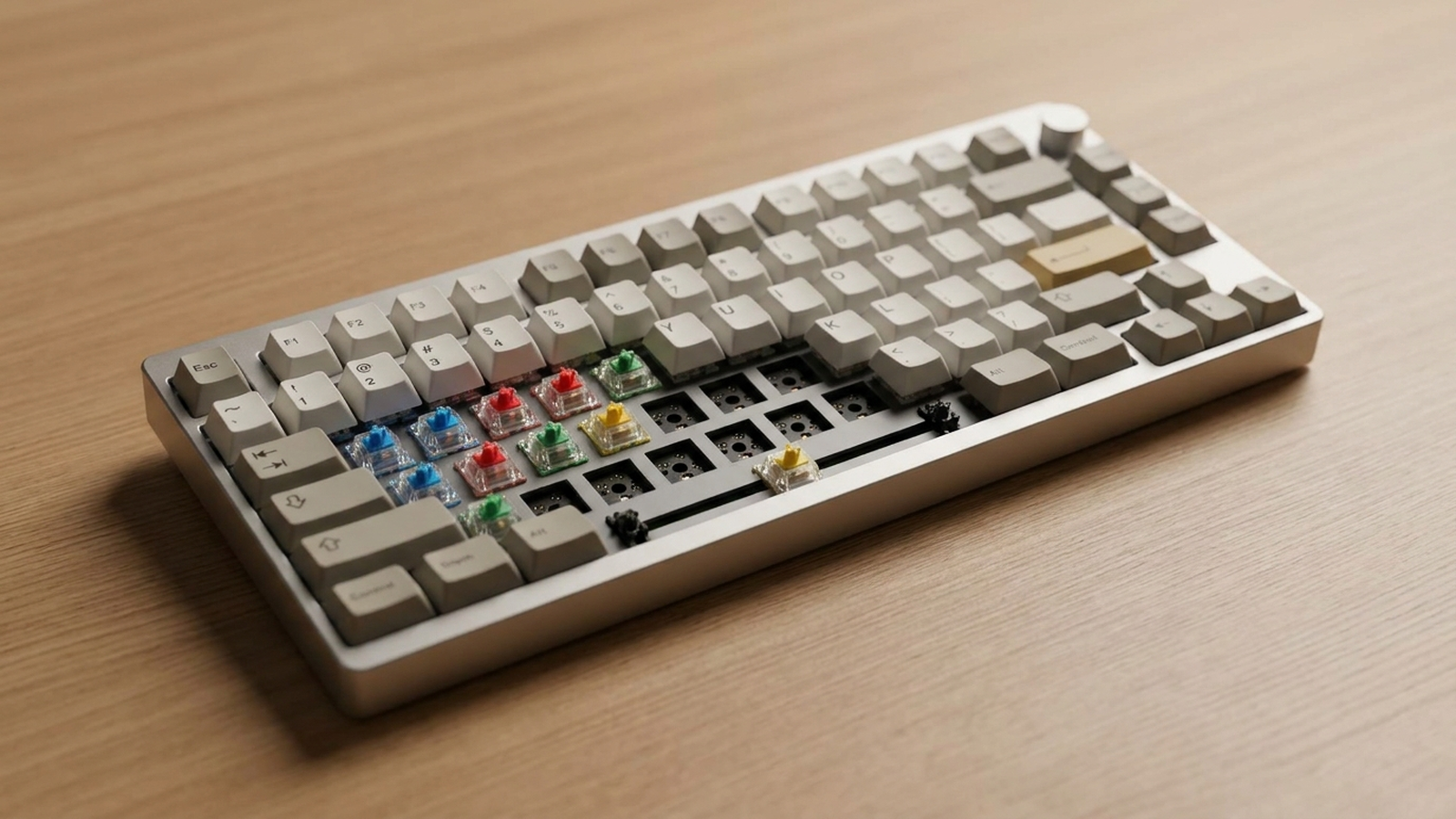
TL;DR. Most “sticky” switches are caused by one of two very different problems that need opposite fixes: debris or spilled liquid residue inside the housing (fix with isopropyl alcohol or contact cleaner, no disassembly required) or over-lubrication from a DIY lube job gone wrong (fix by removing and re-lubing, or replacing the switch). A switch that was fine for months and suddenly sticks is almost always contamination; a switch that has felt “off” ever since you lubed your board yourself is almost always over-lube. Full replacement is the right call only when the stem is physically bent, cracked, or the switch is soldered and cleaning has already failed.
A note on links and methodology
As an Amazon Associate, Arekore earns from qualifying purchases. The Amazon product links in this article include our affiliate tracking ID and may earn us a commission if you buy through them, at no additional cost to you. See our Links Policy for details on how we select products and how commissions do not influence our recommendations.
We also did not personally test the specific units named below in a lab setting. Every diagnostic and product recommendation here is an editorial synthesis of public data, cited inline.
Methodology
This is an editorial analysis based on publicly available data, collected in August 2026. We synthesized: (a) aggregated amazon.com customer review sentiment for switch lubricants, contact cleaners, and switch-cleaning tool kits; (b) RTINGS’ mechanical keyboard switch testing, which evaluates switch feel and consistency across brands; (c) manufacturer and community documentation from Gateron and Krytox on correct lubrication technique, including the specific failure mode of over-applying lubricant to switch legs; and (d) recurring troubleshooting patterns from enthusiast repair guides and forum threads (Tom’s Hardware, mechanical-keyboard repair guides) describing the diagnostic steps used to distinguish contamination from over-lube. We do not report a precise review-count N for any single ASIN because Amazon’s public review panels do not expose a stable, verifiable count; a fabricated number would be misleading. Where we cite a specific technique or failure rate from community sources, we label it as an aggregated community pattern rather than an independently verified lab result. Prices are amazon.com figures at the time of writing and fluctuate.
Why mechanical keyboard switches turn “sticky” in the first place
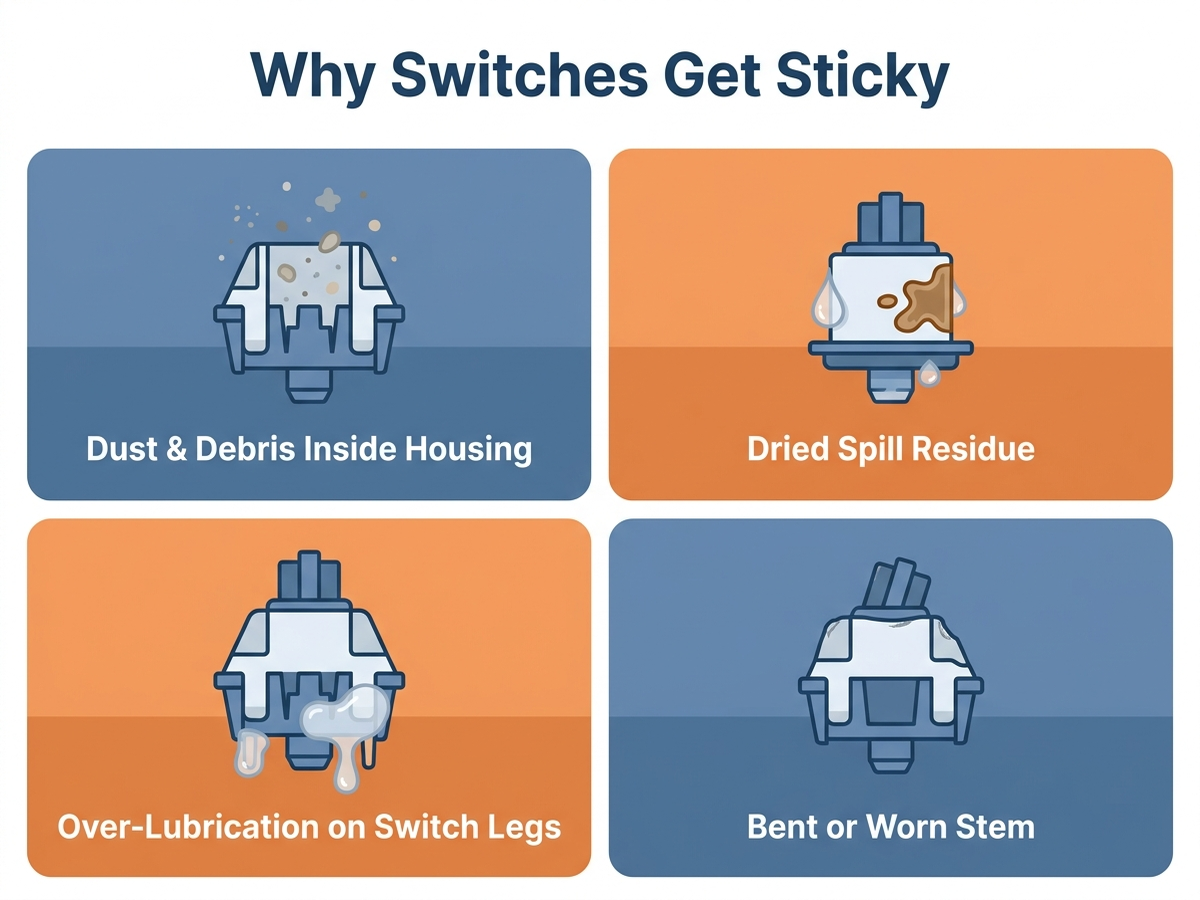
“Sticky” describes two genuinely different mechanical symptoms that get lumped together in casual troubleshooting: a key that feels gritty or catches partway through its travel, and a key that feels smooth but registers late, double, or not at all. Aggregated troubleshooting sources converge on four root causes:
- Dust, hair, or food debris inside the switch housing. Even a small crumb lodged between the stem and housing walls can cause a catch partway through the keystroke. This is the most common cause on boards that have never been opened and have simply been used at a desk for months.
- Dried spill residue. A coffee or soda spill that gets wiped off the keycaps often leaves a thin sugary or sticky film inside the switch itself, which IPA alone frequently cannot fully dissolve if it has hardened.
- Over-lubrication from a DIY lube job. This is specific to enthusiast boards where the owner (or a pre-lubed switch from the factory) applied lubricant to the switch’s legs — the metal contacts that slide against the leaf spring — rather than just the stem rails. Community repair sources describe over-lubed legs as one of the most common causes of a switch that feels “mushy” or catches, because the lubricant makes the leg stick to the leaf spring instead of sliding cleanly past it.
- A worn or slightly bent stem, usually from age or from forcing a keycap off at an angle. This is a mechanical deformation, not a contamination problem, and cleaning or re-lubing will not fix it.
The practical distinction that determines your fix: contamination problems respond to cleaning; over-lube and bent-stem problems require disassembly, re-lubrication, or replacement.
Comparison Table: Fixes and What They Actually Solve
Prices are approximate amazon.com figures at the time of writing (August 2026) and fluctuate.
| Fix | ASIN | Approx. price | What it addresses | Doesn’t fix |
|---|---|---|---|---|
| 99% isopropyl alcohol (generic, any brand) | — (widely available) | $6-$10 | Light dust, oils, and fresh residue inside the switch, applied without disassembly | Hardened spill residue; over-lube; bent stems |
| CRC QD Electronic Cleaner, 11 oz aerosol | B0BGD1Q58F | ~$9-$11 | Deeper contamination and dried residue via a penetrating spray, no disassembly | Over-lube; mechanical stem damage |
| 5-Piece Keycap and Switch Puller Kit | B0BLCCX759 | ~$8-$10 | Safe keycap and switch removal for hot-swap boards, needed before deeper cleaning or replacement | The stickiness itself — it’s an access tool, not a fix |
| Krytox GPL 205g0 Switch Lubricant | B08M4HY9WG | ~$8-$14 | Re-lubricating a switch correctly after removing over-applied factory or DIY lube | Contamination from debris or spills |
| Gateron Switches Sample Pack, 20 pieces | B0CY1SHCVL | ~$15-$20 | Full switch replacement on hot-swap boards when cleaning and re-lube don’t resolve it | Soldered (non-hot-swap) boards without desoldering |
1. Isopropyl alcohol — the first thing to try, no disassembly required
For a board that was working fine and started catching or feeling gritty, the community-standard first fix is applying a few drops of 99% isopropyl alcohol directly into the gap around the stem, then pressing the key rapidly several dozen times to work the alcohol through the internal contacts and let it evaporate. This works because it dissolves light oils, dust binders, and fresh (not yet hardened) spill residue without needing to open the switch. It is free if you already own IPA for other cleaning, or roughly $6-$10 for a bottle sold specifically as electronics-safe.
This fix does not help if the problem is over-lubrication, because IPA can thin the lubricant temporarily but the excess grease redeposits once it evaporates. It also will not resolve hardened, sugary spill residue that has been sitting for weeks — that needs the stronger option below.
2. Contact cleaner spray for deeper or hardened contamination
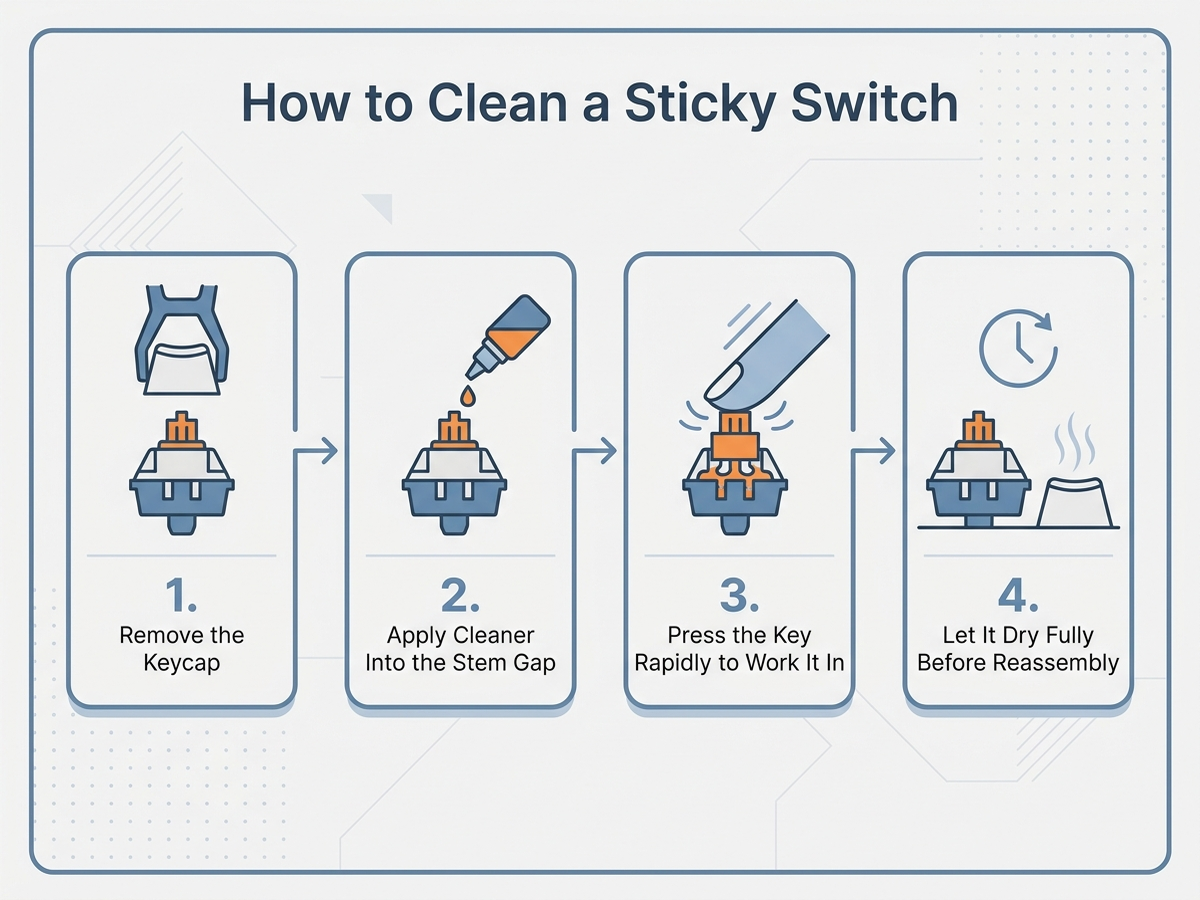
When IPA alone doesn’t clear a catch, a dedicated electronic contact cleaner is the next step up. CRC QD Electronic Cleaner (ASIN B0BGD1Q58F, 11 wt. oz. aerosol) is formulated to displace moisture and dissolve oxidation on electrical contacts, is labeled plastic-safe, and dries without leaving a residue — which matters inside a switch housing where any leftover film can just cause the same sticking again. Spray a short burst directly at the stem gap with the keycap removed, press the key repeatedly to work it through the internal leaf-spring contacts, and let it air-dry fully — manufacturer guidance and aggregated user reports both note it evaporates quickly, but “quickly” still means giving it a minute or two before testing.
Check CRC QD Electronic Cleaner on Amazon
If your board is hot-swappable, removing the switch entirely for a more thorough clean is easier and safer with the right tools than prying with a flathead screwdriver, which risks bending the pins.
Check the 5-Piece Keycap and Switch Puller Kit on Amazon
3. Over-lubricated switches need re-lubing, not more cleaning
If the sticky feeling started right after you (or the factory) lubed the switches — rather than developing gradually from dust or a spill — spraying more cleaner into the housing usually will not fix it, because the excess lubricant is on the metal leaf-spring legs inside the switch, not sitting loose as debris. Community repair sources describe over-lubed legs as the single most common cause of a “failed” DIY lube mod: applying grease to the entire stem, including the legs that make electrical contact with the leaf spring, causes the leg to stick to the spring instead of sliding cleanly past it as the key is pressed.
The fix requires opening the switch with a switch opener, wiping the excess lubricant off the legs specifically (leaving a thin film only on the stem rails), and reassembling. If you’re relubing from scratch rather than just fixing an over-lube mistake, Krytox GPL 205g0 (ASIN B08M4HY9WG) is described in enthusiast sources as the community-standard lubricant for linear switches, valued for a thin, non-migrating film that smooths travel without over-dampening the keystroke. The critical technique point echoed across sources: apply it to the stem rails and spring only, never to the legs.
Check Krytox GPL 205g0 Switch Lubricant on Amazon
4. When to just replace the switch
Replacement is the right call in three specific situations: the stem is visibly bent, cracked, or worn from age; the switch has been cleaned and correctly re-lubed and still sticks, suggesting an internal mechanical fault rather than contamination; or the board is soldered rather than hot-swappable, in which case attempting an in-place fix (rather than desoldering and replacing) is often more time-consuming than swapping the part. On a hot-swap board, replacement takes seconds per key with the puller tool above — no soldering iron required.
A sample pack like the Gateron Series switches, 20 pieces (ASIN B0CY1SHCVL) is a practical way to have a few spare switches on hand covering different actuation feels (linear, tactile) without committing to a full 100+ switch set, useful if only one or two keys on your board are affected. Note this is a mixed sample pack, not a matched set — check the specific switch types included against what your board currently uses before buying if consistent feel across all keys matters to you.
Check the Gateron Series Switches Sample Pack on Amazon
If your board is soldered rather than hot-swap, replacing individual switches requires a desoldering iron and solder wick — at that point, cleaning with contact cleaner first is worth the extra attempt before committing to a desoldering project.
Decision Flowchart: Which Fix Do You Actually Need?
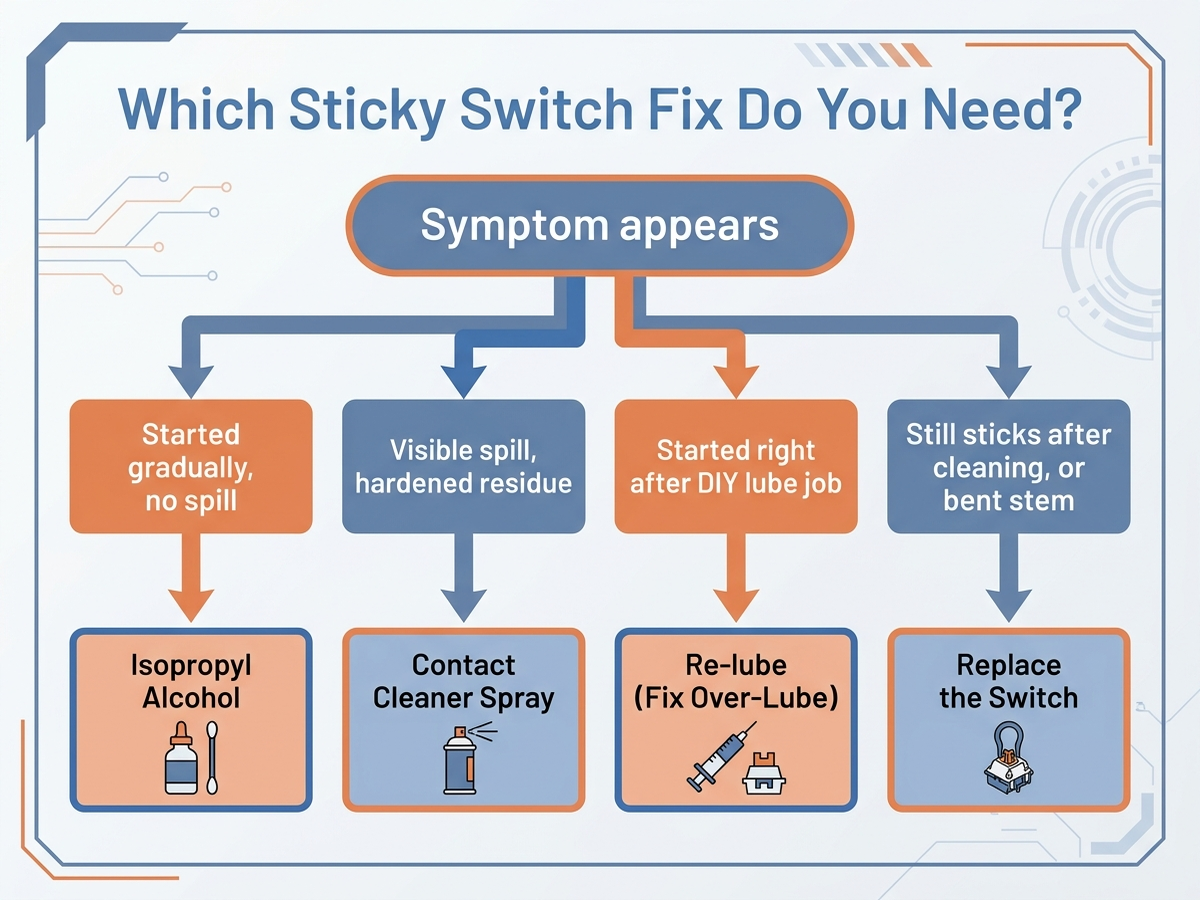
- Key started catching gradually, no spill, board never opened: likely dust or light debris — start with isopropyl alcohol, no disassembly needed.
- Visible spill happened, residue feels sugary or hardened: contact cleaner spray with the keycap removed is more likely to fully dissolve it than IPA alone.
- Stickiness began right after you lubed the switches yourself: over-lube on the switch legs — open the switch and wipe the legs clean, then re-lube stem rails only.
- Cleaned and re-lubed correctly, still sticks, or stem looks visibly bent: mechanical fault — replace the switch (hot-swap) or desolder and replace (soldered board).
Editorial Recommendations by Situation
- First thing to try for any sudden stickiness, always: a few drops of 99% isopropyl alcohol worked in by pressing the key repeatedly. It’s cheap, requires no tools, and resolves debris-based sticking in most cases.
- Best fix for hardened spill residue: CRC QD Electronic Cleaner (B0BGD1Q58F) — a stronger, penetrating spray designed for exactly this kind of buildup.
- Necessary tool if you’re going deeper than surface cleaning: the 5-Piece Keycap and Switch Puller Kit (B0BLCCX759), which lets you remove switches on a hot-swap board without bending pins.
- Best fix if the problem is self-inflicted over-lube: Krytox GPL 205g0 (B08M4HY9WG) to correctly re-lube stem rails only, after wiping excess grease off the switch legs.
- Best fix when cleaning and re-lubing don’t resolve it: replace the switch — a sample pack like the Gateron Series 20-piece pack (B0CY1SHCVL) covers a couple of affected keys without buying a full set.
Limitations of this analysis
To be explicit about what this article does not establish:
- We did not run controlled before/after measurements of switch actuation force, feel, or catch severity on any product named here. The diagnostic framework and product recommendations are drawn from aggregated community repair documentation and manufacturer technique guidance, not an independent lab test.
- The four-cause breakdown is a synthesis of recurring troubleshooting patterns, not an exhaustive engineering diagnosis. A switch with genuine internal component failure (broken spring, cracked leaf contact) may not respond to any of these fixes and should simply be replaced.
- Prices fluctuate and are approximate amazon.com figures captured at the time of writing; confirm current pricing on the linked listing before buying.
- Switch type, board design, and how the switch was originally lubricated at the factory all affect results; a pre-lubed factory switch and a bare DIY-lubed switch can fail in different ways even with identical symptoms.
The Bottom Line
A sticky mechanical keyboard switch almost always falls into one of two categories: contamination, which responds to isopropyl alcohol or a stronger contact cleaner without disassembly, or over-lubrication and mechanical wear, which requires opening the switch to fix or simply replacing it. The fastest way to tell them apart is timing — stickiness that developed gradually is usually debris, while stickiness that appeared right after a lube job is almost always over-lube on the switch legs.