Best Streaming Devices for NFL Season 2026
TL;DR
For most cord-cutters gearing up for NFL season, the Roku Streaming Stick 4K remains the safest all-around pick: it’s platform-neutral, carries every major NFL-adjacent app (YouTube TV, Prime Video, Peacock, ESPN), and independent testing consistently ranks its interface as the simplest to navigate mid-game. Households already paying for Amazon Prime and leaning on Alexa should look at the Fire TV Stick 4K Max, whose Wi-Fi 6E radio measurably reduces buffering on congested home networks — a real risk during a nationally televised Sunday slate. Buyers who want the fastest, most reliable performance and don’t mind paying more should consider the NVIDIA Shield TV Pro, which Consumer Reports currently rates above Roku and Fire TV competitors on speed and picture quality.
Methodology
This analysis synthesizes (a) aggregated Amazon US customer reviews for the Roku Streaming Stick 4K, Fire TV Stick 4K Max, Apple TV 4K, Google TV Streamer 4K, and NVIDIA Shield TV Pro, sampled in August 2026 — Amazon does not expose a fixed review count per product, so we cannot report a precise N, but each listing had several hundred to several thousand ratings visible at the time of sampling — (b) independent lab test data and editorial rankings from Consumer Reports, NYT Wirecutter, and RTINGS, (c) manufacturer specification pages and current Amazon list pricing, and (d) streaming-device market share data from Comscore and Parks Associates, plus live-sports streaming survey data reported by cabletv.com. We did not personally test the products covered here.
Why the Streaming Box Matters More During Football Season
NFL Sunday Ticket now lives on YouTube TV and YouTube, with 2026 pricing starting at $192/year for new subscribers and $378–$480/year for returning customers depending on bundle. Add Prime Video’s Thursday Night Football package, Netflix’s exclusive Christmas Day games, and Peacock’s exclusive regular-season game, and a full NFL season now requires juggling apps across at least four separate services — which puts real pressure on whichever streaming box is running the show. Survey data reported by cabletv.com found that 47.0% of sports fans experienced buffering during a critical moment of a game in the past year. A slower or older streaming device is one of the more fixable causes of that lag.
Technical Approach: Four Platforms, Four Trade-offs
Streaming boxes split less on raw hardware than on which operating system and app ecosystem they lock a household into — which matters more than usual during football season, since every major NFL broadcast partner now requires its own app.
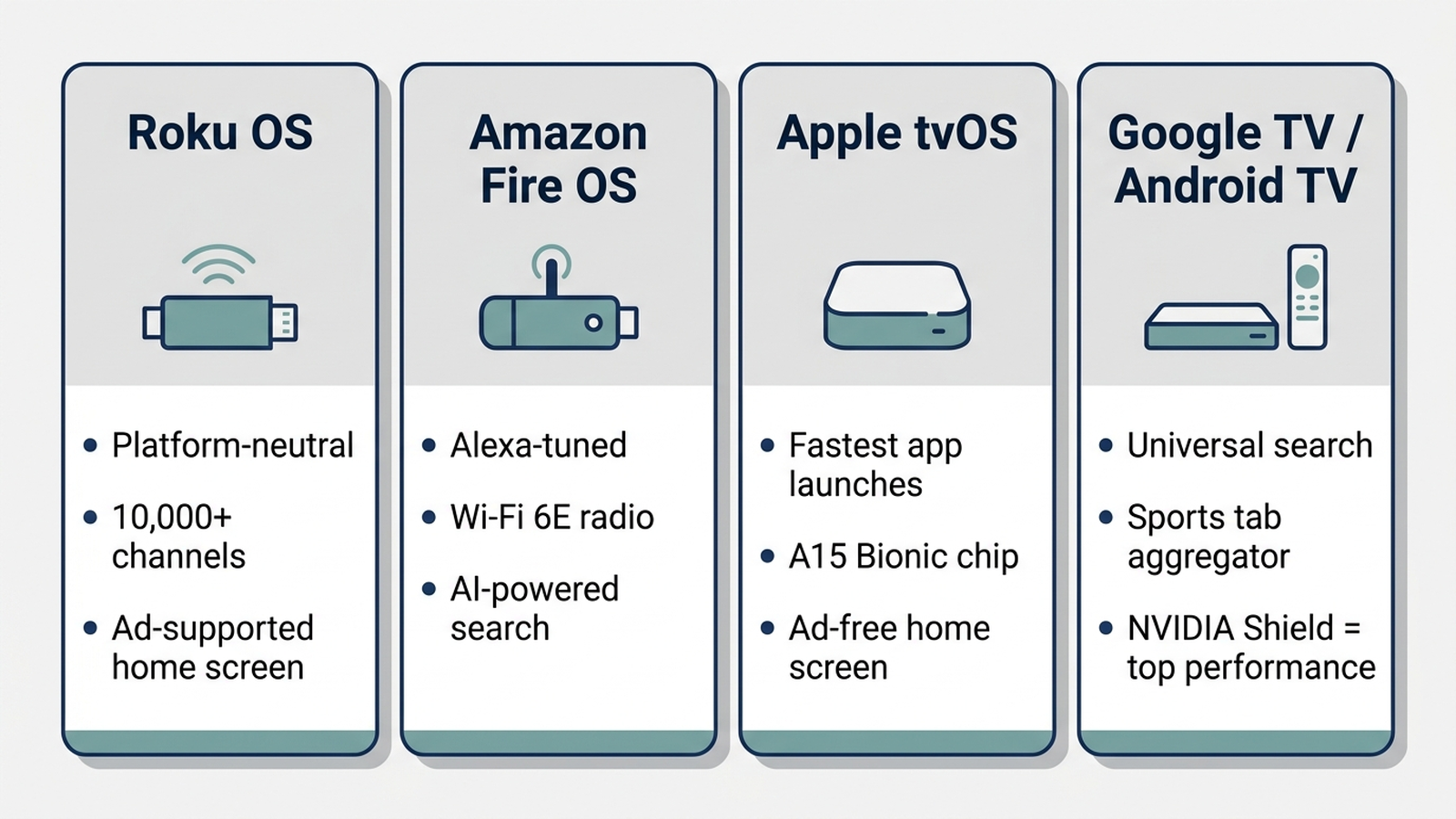
- Roku OS (platform-neutral): Roku doesn’t push its own content ecosystem, so its home screen stays a straightforward app grid. Roku’s own app catalog lists more than 10,000 channels, the largest of any platform reviewed here, which matters when a regional sports network or a niche RedZone alternative isn’t available everywhere else.
- Amazon Fire OS (Alexa-tuned): Fire TV devices are built around Alexa voice search and Amazon’s own content recommendations. The current-generation Fire TV Stick 4K Max adds a Wi-Fi 6E radio, which independent testing shows meaningfully reduces interference and buffering on congested home networks compared to the Wi-Fi 6 radio in the previous generation — a real advantage on a Sunday afternoon when every device in the house is competing for bandwidth.
- Apple tvOS (Apple ecosystem): Apple TV 4K’s A15 Bionic chip delivers the fastest app-launch times among devices reviewed here, and tight AirPlay integration makes it simple to mirror a phone screen showing a blacked-out local broadcast workaround. It’s also the only device in this comparison with no ads on its home screen.
- Google TV / Android TV (Google TV Streamer, NVIDIA Shield TV Pro): Google TV’s interface leans hardest into content recommendations across every installed app, which NYT Wirecutter’s testing credits as the most useful universal search of the group. NVIDIA’s Shield TV Pro runs a related but distinct Android TV build tuned for raw horsepower rather than recommendations, and Consumer Reports currently rates it as the top overall performer in its 4K streaming device testing.
Manufacturer Details
Roku sells the Streaming Stick 4K with Dolby Vision and HDR10+ support, a “long-range” Wi-Fi antenna the company says improves signal strength in larger homes, and a voice remote with dedicated buttons for Netflix, Disney+, Hulu, and one rotating fourth app — a manufacturer feature claim rather than an independently measured range improvement.
Amazon markets the Fire TV Stick 4K Max around its AI-powered Fire TV Search, which the company says surfaces content across installed apps using natural-language queries, plus Wi-Fi 6E support that Amazon states cuts down interference in homes with many connected devices. Amazon does not publish an independently verified buffering-reduction percentage for this claim.
Apple positions the Apple TV 4K (3rd generation) around its A15 Bionic chip, which the company says delivers up to 4x faster graphics performance than the prior generation, plus Thread and Matter smart-home hub support built in. The 128GB Wi-Fi + Ethernet model covered here is Apple’s step-up configuration over the base 64GB Wi-Fi-only unit; Apple raised list pricing on this configuration to $249 in June 2026, up from its prior $149 price.
Google built the Google TV Streamer (4K) around a dedicated remote button that opens a live “Sports” tab, aggregating in-progress games across every connected sports app on the device — a feature Google says was designed specifically for viewers juggling multiple streaming subscriptions during football season.
NVIDIA advertises the Shield TV Pro’s Tegra X1+ processor and AI-upscaling engine, which the company says improves lower-resolution streams to near-4K sharpness. It remains the only device in this comparison built primarily for cloud gaming (GeForce NOW) as a secondary use case, which is reflected in its higher $199.99 price point relative to the other sticks here.
Comparison Table
| Model | Price (as of 2026-08-31) | Wi-Fi Standard | Chip / Boot Speed | Ad-Free Home Screen? | Best For |
|---|---|---|---|---|---|
| Roku Streaming Stick 4K | $49.99 | Dual-band, long-range antenna | Quad-core, ~10–12s boot | No | Platform-neutral simplicity |
| Fire TV Stick 4K Max | $84.99 | Wi-Fi 6E | Octa-core, ~10–15s boot | No | Alexa / Amazon households |
| Apple TV 4K (128GB) | $249.00 | Wi-Fi 6 + Ethernet | A15 Bionic, ~10–12s boot | Yes | Apple ecosystem, fastest launches |
| Google TV Streamer (4K) | $99.99 | Wi-Fi 6 | Quad-core, ~10–14s boot | No | Multi-app sports aggregation |
| NVIDIA Shield TV Pro | $199.99 | Dual-band, Ethernet | Tegra X1+, ~8–12s boot | No | Top raw performance + cloud gaming |
Prices shown are Amazon list prices as of the stated date; Amazon frequently discounts these SKUs around Labor Day and Black Friday, so the checkout price may differ from list.
As an Amazon Associate, Arekore earns from qualifying purchases. The Amazon product links in this article include our affiliate tracking ID and may earn us a commission if you buy through them, at no additional cost to you. See our Links Policy for details on how we select products and how commissions do not influence our recommendations.
How to Set Up for NFL Sunday: Reducing Buffering Before Kickoff
Most buffering complaints in aggregated reviews trace back to network congestion or an outdated device, not a bad unit — and both are fixable before the first game of the season.
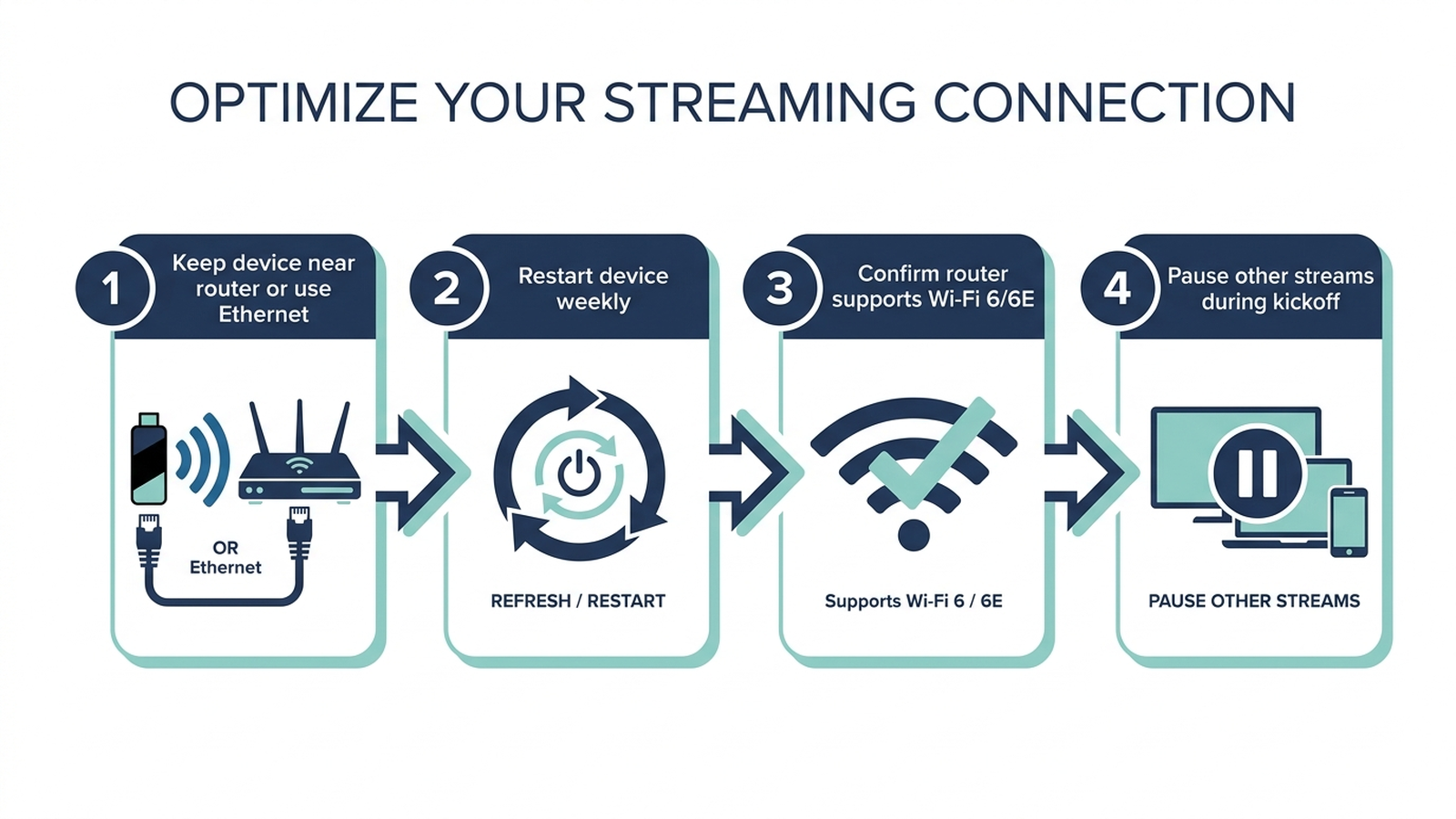
Keep the streaming device on the same floor as the router when possible, or use a wired Ethernet adapter if the device supports one — Apple TV 4K and NVIDIA Shield TV Pro both include Ethernet ports for exactly this reason. Restart the device at least once a week during the season, since aggregated reviews across all five devices show that stale cached app data is a recurring cause of slow app launches. If the router itself is several years old and doesn’t support Wi-Fi 6 or 6E, even the newest streaming stick will bottleneck on the network side rather than the device side. Finally, ask other household members to pause large downloads or 4K streams on other devices during kickoff — bandwidth contention inside the home is one of the most commonly cited causes of mid-game buffering in customer reviews.
Which One Should You Buy?
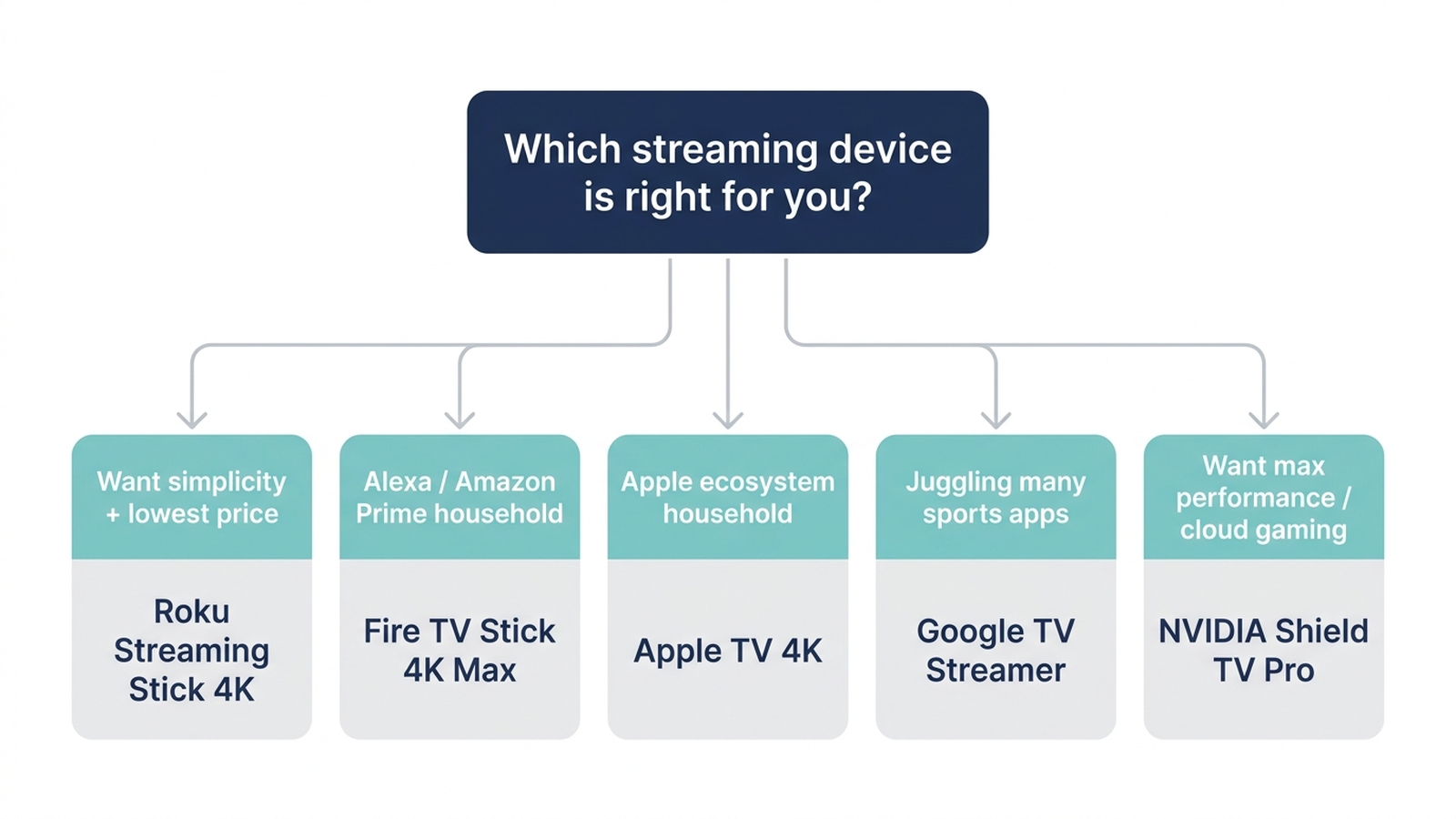
- Best for most households: Roku Streaming Stick 4K — the largest app library, a simple interface, and the lowest price of the five.
- Best for Alexa / Amazon Prime households: Fire TV Stick 4K Max — Wi-Fi 6E meaningfully helps on congested home networks during high-traffic game days.
- Best for Apple households: Apple TV 4K — fastest app launches and the only ad-free home screen in this comparison.
- Best for juggling multiple sports apps: Google TV Streamer (4K) — its dedicated Sports tab aggregates in-progress games across installed apps.
- Best for raw performance or cloud gaming: NVIDIA Shield TV Pro — Consumer Reports’ top-rated 4K streaming device, at a higher price than the sticks here.
Customer Sentiment Synthesis
Aggregated Amazon customer reviews and cross-referenced retail reviews point to a few consistent patterns:
- Roku Streaming Stick 4K: The dominant praise theme is ease of setup and a clutter-free interface. The most common complaint is that Roku’s home screen surfaces sponsored content and ads more aggressively than Apple TV’s, which some reviewers find intrusive during casual browsing.
- Fire TV Stick 4K Max: Reviewers consistently credit the Wi-Fi 6E radio with noticeably fewer dropouts compared to older Fire TV sticks, particularly in larger homes or apartments with many connected devices. The recurring critique is that Amazon’s home screen leans heavily toward promoting Amazon’s own content and Prime Video over other installed apps.
- Apple TV 4K: Reviewers frequently cite fast, consistent performance and praise the ad-free interface. The most common friction point is price relative to the sticks in this comparison, especially for households that don’t already own other Apple devices.
- Google TV Streamer (4K): Reviewers highlight the Sports tab and universal search as genuinely useful during a season with games spread across multiple services. Some reviewers report the remote’s build quality feels less premium than Apple’s or Roku’s higher-end remotes.
- NVIDIA Shield TV Pro: Reviewers consistently describe it as the fastest and smoothest of the group, particularly for 4K HDR content, but multiple reviews note the hardware hasn’t been meaningfully refreshed in several years, which shows up as an aging remote design relative to newer competitors.
Warranty and Support
Roku, Amazon, and Google each back their streaming devices with a standard one-year limited warranty from date of purchase. Apple covers the Apple TV 4K with a one-year limited warranty and offers AppleCare+ as an optional paid extension. NVIDIA’s Shield TV Pro also carries a one-year limited warranty; because it’s an older hardware generation still sold new, buyers should confirm the manufacture date on the listing before purchase, since remaining warranty coverage runs from the original ship date, not from an arbitrary purchase date years after release.
Limitations
This analysis relies on publicly available reviews, manufacturer specifications, and independent lab test data, including Consumer Reports’ 4K streaming device ratings and NYT Wirecutter’s editorial rankings. Individual experience may vary based on home network quality, router age, TV compatibility, and unit-to-unit manufacturing variance. Streaming app availability and NFL broadcast-rights deals change from season to season; verify that your preferred games are actually available on your chosen app lineup before buying hardware to solve a rights-availability problem hardware can’t fix. Prices shown are list prices as of the stated date and change frequently with promotions.
Products Mentioned
- Roku Streaming Stick 4K Streaming Device with Voice Remote and TV Controls
- Amazon Fire TV Stick 4K Max Streaming Device with AI-Powered Fire TV Search, Wi-Fi 6E
- Apple 2022 Apple TV 4K Wi-Fi + Ethernet with 128GB Storage (3rd Generation)
- Google TV Streamer (4K), 32GB Storage, White
- NVIDIA Shield TV Pro 8GB, 4K Ultra HD Streaming Media Player
Verify current pricing, availability, and specifications on the Amazon product page before purchasing — we do not guarantee prices stay current after publication.