Make a College Laptop Last Four Years (2026 Guide)
The average college student spends $761 on a laptop and expects it to survive four years of lecture halls, all-nighters, and dorm-room moves, according to aggregated 2025–2026 student-device usage and purchasing surveys. That is a real budget commitment on top of tuition, and the laptop rarely gets a second look until something breaks — a battery that suddenly drains in two hours, a hard drive that will not take one more app update, or a cracked screen with no coverage left.
Most of what shortens a laptop’s useful life is not a manufacturing defect. It is charging habits, storage headroom, and whether the owner bought (or skipped) the right warranty for their own risk profile. This guide synthesizes manufacturer battery guidance, independent reliability data, and aggregated Amazon customer-review sentiment into a plan for making a laptop purchased today still feel usable at graduation.
This article is provided by Arekore, an AI shopping assistant. Paste a product URL and our AI checks review authenticity, digs into low-star feedback, and compares prices in about five minutes.
TL;DR / Quick Verdict
- Battery: charge between 20% and 80% when you can. Lithium-ion batteries typically last 300–500 full charge cycles before falling below 80% of original capacity; keeping charge in that middle band and avoiding heat can push usable life well past that baseline.
- Storage: buy more than you think you need, or plan an external drive from day one. 512GB is workable for writing and browsing; 1TB is the safer four-year buy once video, design software, or large datasets enter the picture.
- Reliability varies by brand more than most students assume. Consumer Reports’ member survey of more than 75,000 laptops found Apple’s failure rate around 10% by year three, versus 16–19% for the Windows brands it tracked.
- Extended warranties are a bet, not a default. They make sense for accident-prone owners and expensive machines; they are a weak bet for a careful owner with a modest laptop and a backup habit already in place.
How We Reached These Conclusions (Methodology)
This is an editorial analysis, not a hands-on test. We did not personally test the products covered here. This guide synthesizes four kinds of public information: (a) battery-chemistry guidance from RTINGS’ laptop battery testing program, iFixit, and manufacturer support documentation; (b) Consumer Reports’ laptop reliability member survey (2023–2025 data, 75,000+ laptops) and its extended-warranty purchase-rate findings; (c) aggregated 2025–2026 student-device usage and purchasing survey data (average spend, brand share); and (d) aggregated amazon.com customer-review sentiment across best-selling college laptop, external SSD, and extended-warranty listings, sampled in July 2026, plus manufacturer specifications. Reliability percentages and warranty terms are attributed to their source; where a figure is a manufacturer claim rather than an independently measured result, it is labeled as such. Prices are amazon.com figures at the time of writing and fluctuate.
Three Ways a College Laptop Fails Early
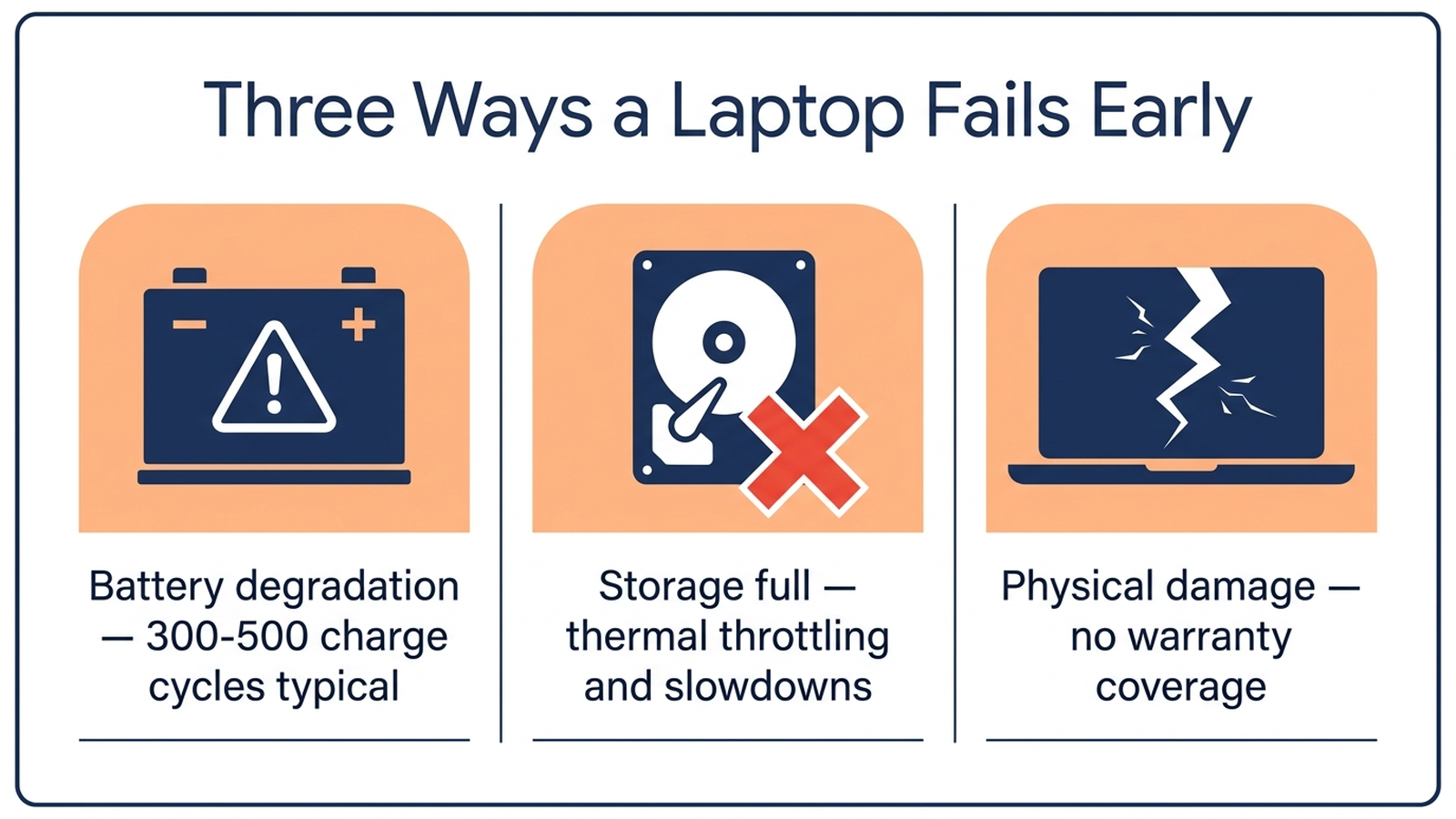
Before getting into fixes, it helps to separate the three failure modes, because each has a different cause and a different remedy:
- Battery degradation. A predictable chemical process tied to charge cycles and heat, not a defect. Every lithium-ion battery loses capacity over time; the question is how fast.
- Storage exhaustion. Not a hardware failure at all — a full drive slows down macOS and Windows alike, and forces students into a stressful file-deleting scramble during finals week, when the laptop is under the most load.
- Physical and mechanical failure. Spilled coffee, a cracked hinge, a dropped bag. This is where warranty coverage decisions matter, because battery and storage habits do not protect against an accident.
Battery: The Chemistry Behind “It Doesn’t Last All Day Anymore”
Every laptop battery is rated in charge cycles — one full 0-to-100% cycle, which can be split across multiple partial charges. Manufacturer and independent battery-chemistry sources converge on a baseline: 300 to 500 full cycles before a lithium-ion battery typically drops below 80% of its original capacity, the threshold most manufacturers use to define “degraded.” A student who charges from empty to full once a day would burn through that baseline in roughly one to one-and-a-half academic years — which is exactly the “why does my two-year-old laptop only last three hours now” complaint that shows up across aggregated laptop reviews.
The fix is not to charge less often — it is to charge in a narrower band. Charging and discharging between roughly 20% and 80%, rather than 0% and 100%, reduces the chemical and voltage stress that drives degradation, and several manufacturers (Lenovo, Dell, Samsung, and Apple’s Optimized Battery Charging) now ship software that enforces a charge ceiling automatically. Heat compounds the damage: sustained high temperatures — a laptop charging under a blanket, or left in a hot car — can shorten battery lifespan by 25% or more, independent of cycle count.
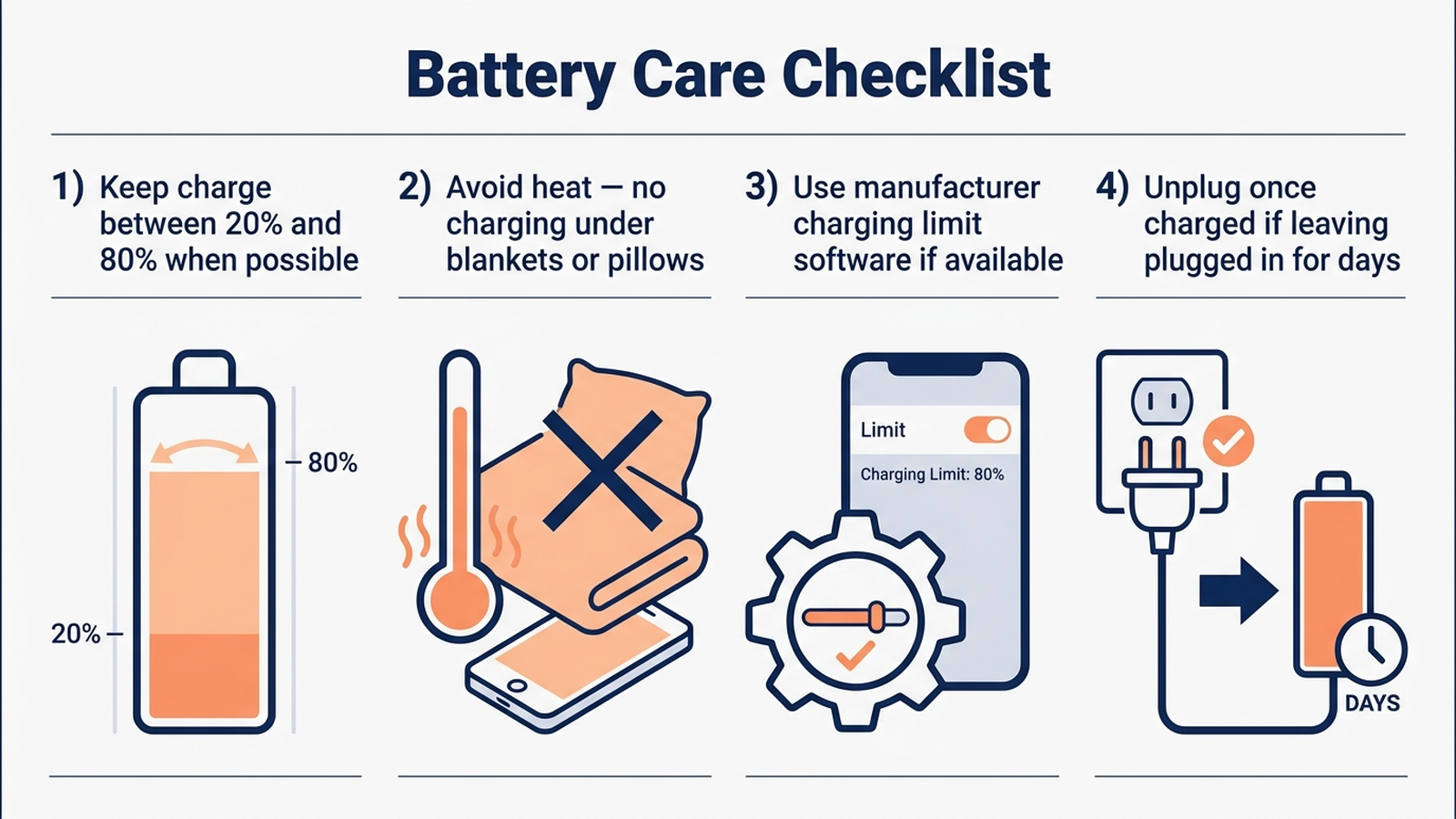
Four habits, in order of impact:
- Turn on the manufacturer’s charge-limit feature if the laptop has one (Lenovo Vantage, Dell Power Manager, Samsung Settings, macOS Optimized Battery Charging). This is the single highest-leverage change, because it removes the discipline requirement — the software enforces the 80% ceiling for you during long stretches plugged in at a desk.
- Avoid charging in bed or under blankets. Trapped heat is the fastest way to accelerate degradation, and it is also the most common way laptops get damaged among dorm-dwelling students who study in bed.
- Unplug once charged if the laptop will sit plugged in for days. A laptop left at 100% and connected to power for a multi-day stretch (heading home for break, for example) sees more chemical stress than one topped up and then run on battery for a while.
- Do not obsess over occasional full charges. A road trip or long flight is a fine time to charge to 100% — the habit that matters is the daily default, not a single exception.
Storage: Buy Ahead of Your Habits, Not Behind Them
Storage capacity is “more about your habits than the laptop itself,” as one buyer’s guide puts it — a machine used for email, word processing, and web browsing needs far less room than one holding video projects, design files, or a research dataset. The practical ranges independent buying guides converge on:
- 512GB SSD: workable for a humanities or business student doing writing, browsing, and standard coursework apps.
- 1TB SSD: the safer choice once the laptop needs to hold offline lecture recordings, a design or video-editing course, or four years of accumulated files without active pruning.
The reason storage headroom matters more than students expect: a nearly full SSD does not just run out of room — it slows down. Both macOS and Windows use free drive space for virtual memory and temporary files, so a drive at 90%+ capacity shows up as system-wide sluggishness, not just a “disk full” warning, and it tends to arrive during the exact weeks (finals, thesis crunch) when the laptop is working hardest.
Two ways to build in headroom for four years:
- Buy more SSD than the current habit requires. If 512GB feels sufficient today, 1TB is the safer four-year bet, because course loads (design, film, data science) tend to escalate mid-degree, not at move-in.
- Add a portable SSD as overflow rather than upgrading internal storage. Internal SSD upgrades on modern thin laptops often require identifying the correct M.2 slot and PCIe generation, and can void a manufacturer warranty if done incorrectly — a real risk for a laptop that still needs to survive three more years of coverage. A portable drive sidesteps that risk entirely and doubles as an offline backup, which matters independent of storage math: it is the fastest recovery path if the internal drive fails or the laptop is lost.
Which Laptops the Data Points Toward
Amazon’s college-laptop best-seller lists and independent buying guides (PCWorld, Tom’s Guide) converge on the same handful of models for the 2026 school year, at different price and durability tiers.
Apple MacBook Air 13” (M4 chip, 16GB/512GB) — the reliability pick
Consumer Reports’ member survey gives Apple laptops the lowest failure rate of any brand it tracks — about 10% by the third year of ownership, versus 16–19% for the Windows brands surveyed. Independent testing credits the M4 MacBook Air with roughly 18 hours of real-world battery life, and aggregated Amazon sentiment consistently cites battery longevity and build quality as the standout strengths after extended ownership. It holds an estimated 45% share among US college students, per student-purchasing survey data — the highest of any single model. At 512GB, this configuration suits writing- and browsing-heavy majors; students in video or design coursework should look at the 1TB configuration instead.
Check the Apple MacBook Air 13” M4 (16GB/512GB) on Amazon
Lenovo IdeaPad Slim 5i (16GB/1TB) — the Windows value pick
Lenovo tops global student brand preference at 23%, per the same survey data, credited largely to durability in business and engineering programs. This configuration pairs a 10-core Intel Core i7 with 16GB of RAM and a full 1TB SSD — enough storage headroom to skip the “will I run out of space” question for most majors. Aggregated Amazon reviews favor its touchscreen and backlit keyboard for late-night studying; the recurring critique across similar mid-tier Windows laptops is shorter real-world battery life than Apple’s Silicon-based competitors, so charge-limit software (Lenovo Vantage is preinstalled) matters more on this pick than on the MacBook Air.
Check the Lenovo IdeaPad Slim 5i (16GB/1TB) on Amazon
Samsung T7 Portable SSD (1TB) — the storage-and-backup insurance policy
Rated for USB 3.2 Gen 2 speeds up to 1,050MB/s and shock-resistant to a 6-foot drop, this is the most-reviewed portable SSD on Amazon in the “students and professionals” category. Aggregated sentiment highlights its size (smaller than a deck of cards) and reliability for video and photo overflow storage. Pairing one with either laptop above turns a fixed internal SSD choice into an expandable one, and functions as an offline backup independent of cloud storage subscriptions.
Check the Samsung T7 Portable SSD (1TB) on Amazon
Comparison Table
Prices are approximate amazon.com figures at the time of writing (July 2026) and fluctuate.
| Product | ASIN | Approx. price | Battery (independent/mfr. claim) | Storage | Reliability signal |
|---|---|---|---|---|---|
| Apple MacBook Air 13” M4 (16GB/512GB) | B0DZD96R5S | ~$1,000–$1,100 | ~18 hrs (independent testing) | 512GB (1TB config available) | ~10% failure rate by year 3 (Consumer Reports) |
| Lenovo IdeaPad Slim 5i (16GB/1TB) | B0DTDNYVXQ | ~$800–$950 | Manufacturer claim, varies by config | 1TB | Lenovo tops global student brand preference (23%) |
| Samsung T7 Portable SSD (1TB) | B0874XN4D8 | ~$80–$100 | N/A (storage device) | 1TB add-on | N/A |
| Asurion 4-Year Laptop Protection Plan ($1,000–$1,249.99) | B07P97TNYX | ~$130–$160 | N/A (protection plan) | N/A | Covers mechanical failure + optional accidental damage |
Do You Need an Extended Warranty?
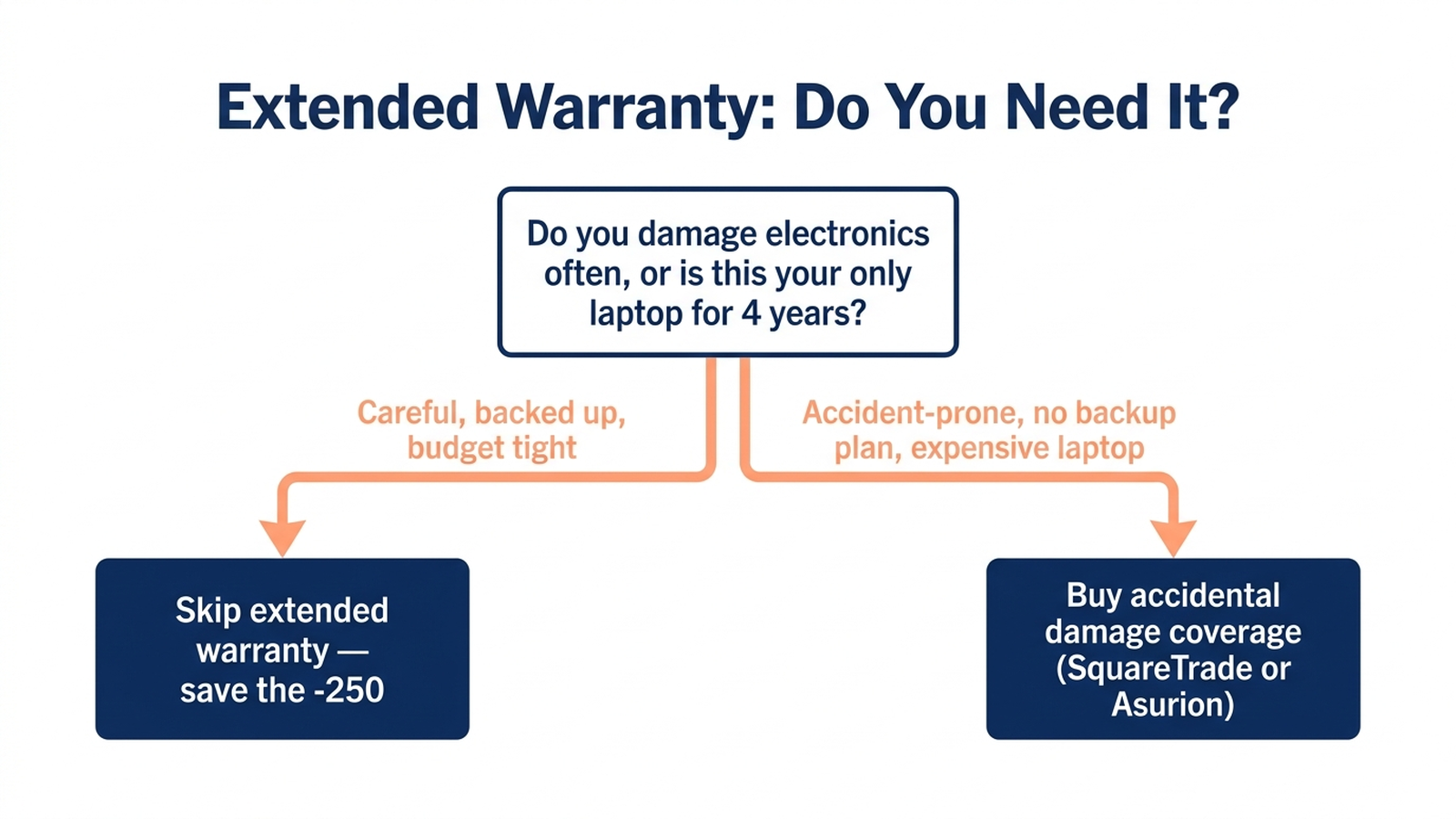
Manufacturer warranties (typically one year, extendable to two or three with AppleCare+ or Lenovo’s premium care) cover mechanical and manufacturing defects but not accidents — a cracked screen from a dropped bag is the single most common reason students file a claim, and it is exactly what a standard warranty excludes.
Third-party accidental-damage plans from Asurion and SquareTrade fill that gap, typically covering drops, spills, and power surges for two to four years, with a deductible on repairs. The honest tradeoff, per Consumer Reports’ survey findings: 16% of Windows laptop owners buy extended coverage, versus 36% of Apple laptop owners — a gap that tracks with repair cost rather than reliability, since Apple repairs (especially screen and logic-board work) run meaningfully higher out of pocket than most Windows equivalents.
Use this to decide:
- Skip it if: you rarely damage electronics, you already back up files (cloud or the portable SSD above), and the laptop is a mid-range Windows machine where an out-of-pocket repair is a few hundred dollars, not over a thousand.
- Buy it if: you have a history of drops or spills, you are not maintaining a backup habit, or the laptop is an expensive configuration (MacBook Pro, high-end MacBook Air) where a single cracked-screen repair can cost close to what the plan does.
- Read the deductible before buying either way. Some plans carry a deductible per claim (commonly cited around $29 for screen repairs, higher for other damage on comparable plans) — factor that into whether the plan actually saves money versus a single out-of-pocket repair over four years.
Check the Asurion 4-Year Laptop Protection Plan on Amazon
Limitations
This analysis relies on publicly available battery-chemistry guidance, Consumer Reports’ member survey data, student-purchasing survey statistics, and aggregated amazon.com reviews, rather than our own instrumented battery-cycle or drop testing. Battery-cycle counts and degradation curves vary by individual unit, usage pattern, and climate; the 300–500 cycle baseline is a general lithium-ion figure, not a guarantee for any specific model. Reliability percentages reflect survey respondents over a specific multi-year window and may not predict any individual unit’s outcome. Manufacturer-claimed battery life and warranty deductible amounts are noted as claims where we could not independently verify them. Individual experience may vary.
Bottom Line
A laptop that survives four years of college is less about which model you buy and more about three ongoing habits: keep the battery between 20% and 80% when practical (and let manufacturer software do it automatically if available), buy more storage headroom than your current habits demand, and decide on warranty coverage based on your own accident history rather than a blanket yes or no. None of that costs more than the laptop itself — it just has to happen from week one, not after the battery is already down to three hours.
Before you buy, paste the product link into Arekore — our AI assistant checks review authenticity, surfaces what the one-star reviews actually complain about, and compares prices, free, in about five minutes.