FlexiSpot E7 vs Uplift V2: Which Standing Desk Wins in 2026?
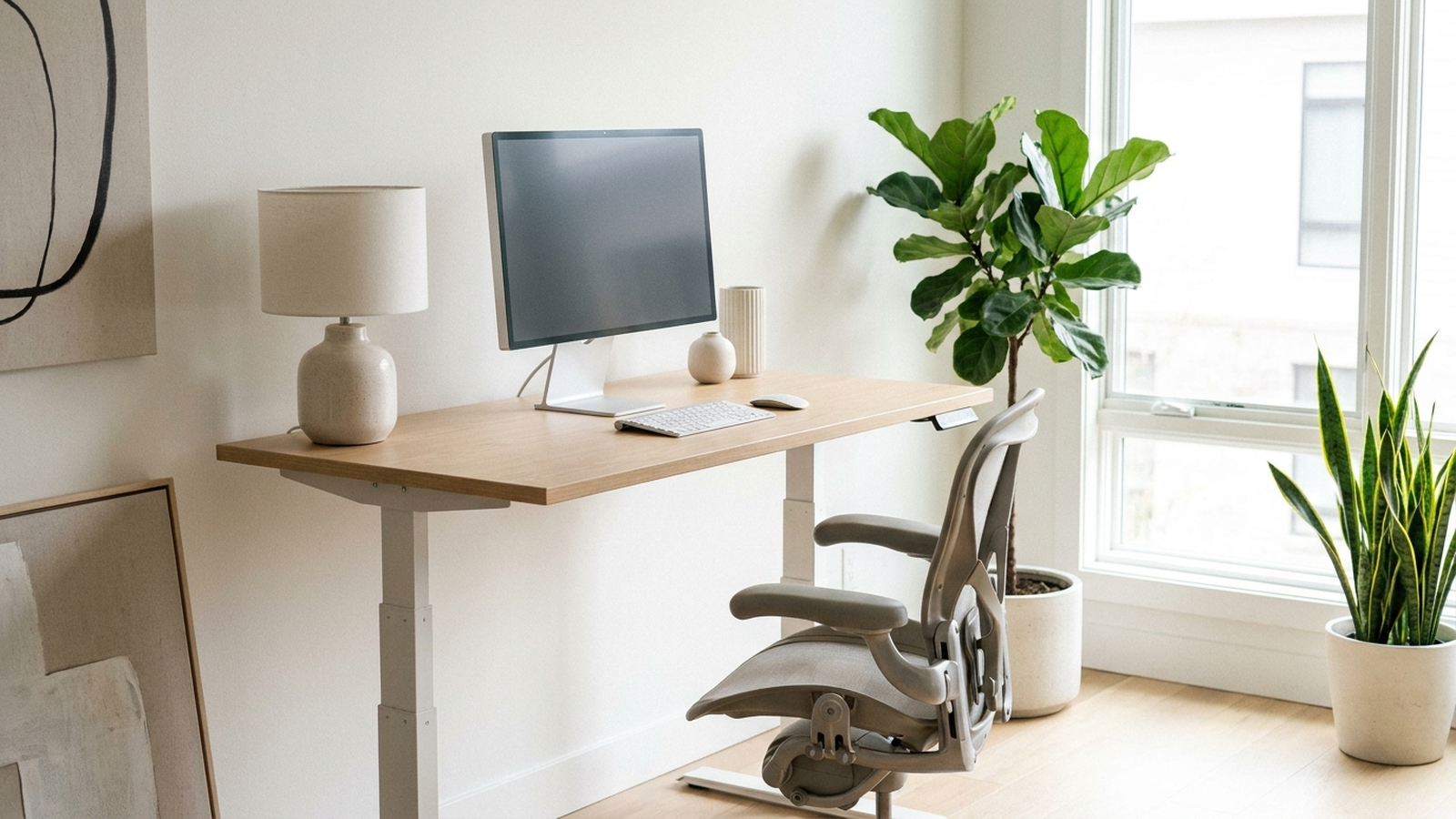
Two names come up in almost every standing-desk thread on Reddit and every “best of” roundup for 2026: FlexiSpot and Uplift. Both make dual-motor, three-stage-leg frames that top independent test rankings, and both show up constantly in side-by-side comparisons because they’re the two desks buyers actually cross-shop before checkout. This guide isolates that specific decision — FlexiSpot E7 Pro vs. Uplift V2 — using aggregated Amazon review data, independent hands-on testing, and manufacturer specifications, rather than a broader roundup of every desk on the market.
As an Amazon Associate, Arekore earns from qualifying purchases. The Amazon product links in this article include our affiliate tracking ID and may earn us a commission if you buy through them, at no additional cost to you. See our Links Policy for details on how we select products and how commissions do not influence our recommendations.
TL;DR / Quick Verdict
- Best overall stability and warranty: the Uplift V2 — independent testers measured about 0.5 in of wobble at max standing height, versus roughly 0.7 in for the FlexiSpot E7 Pro, and it carries the more comprehensive warranty of the two on Amazon.
- Best value: the FlexiSpot E7 Pro — roughly $120–150 cheaper than a comparable Uplift V2 configuration, with a manufacturer weight rating that matches or beats it depending on SKU.
- The real trade-off: the V2 wins on measured stability, height range, and warranty depth; the E7 Pro wins on price and (on this configuration) raw weight capacity. Neither desk is a wrong choice — this is a “how much are you willing to pay for the last 10% of rigidity” decision.
How We Reached These Conclusions (Methodology)
This is an editorial analysis, not a hands-on review — we did not personally test either desk. This guide synthesizes three kinds of public information: (a) aggregated amazon.com customer ratings and the substance of both praise and complaints in reviews, sampled in August 2026; (b) independent third-party testing and reporting, including outlets that specifically measure wobble at maximum height with a dial gauge rather than relying on marketing copy; and (c) manufacturer specifications from FlexiSpot and Uplift. Where we cite a manufacturer figure — a weight rating, a noise level, a travel speed — we label it as such rather than as an independently verified result. Prices are amazon.com figures as of 2026-08-30 and change frequently, especially around Labor Day and Black Friday.
Why This Match-Up Specifically
FlexiSpot and Uplift dominate the premium end of the US standing-desk category for a reason: market-research estimates from firms including Global Market Insights and Grand View Research put North America at roughly 35–38% of the global standing-desk market, with the United States accounting for about 89% of that regional revenue, and put US annual unit volumes in the 3.5–4.2 million range for 2026, growing 6–9% a year as hybrid work stays entrenched. These figures vary by research firm, so treat them as directional rather than precise. At the top of that volume, buyers aren’t choosing between “a standing desk or not” — they’re choosing between the two brands that consistently place at the top of independent rankings: Wirecutter has named an Uplift desk its top pick for nine consecutive years running, while FlexiSpot’s E7 line is the model independent testers cite most often as the closest competitor on stability and specs for meaningfully less money.
That’s the actual decision most shoppers in this price tier are making, which is why this article treats it as a direct two-way comparison rather than folding in a third, lower-tier budget option.
1. The Technology: Where These Two Desks Actually Differ
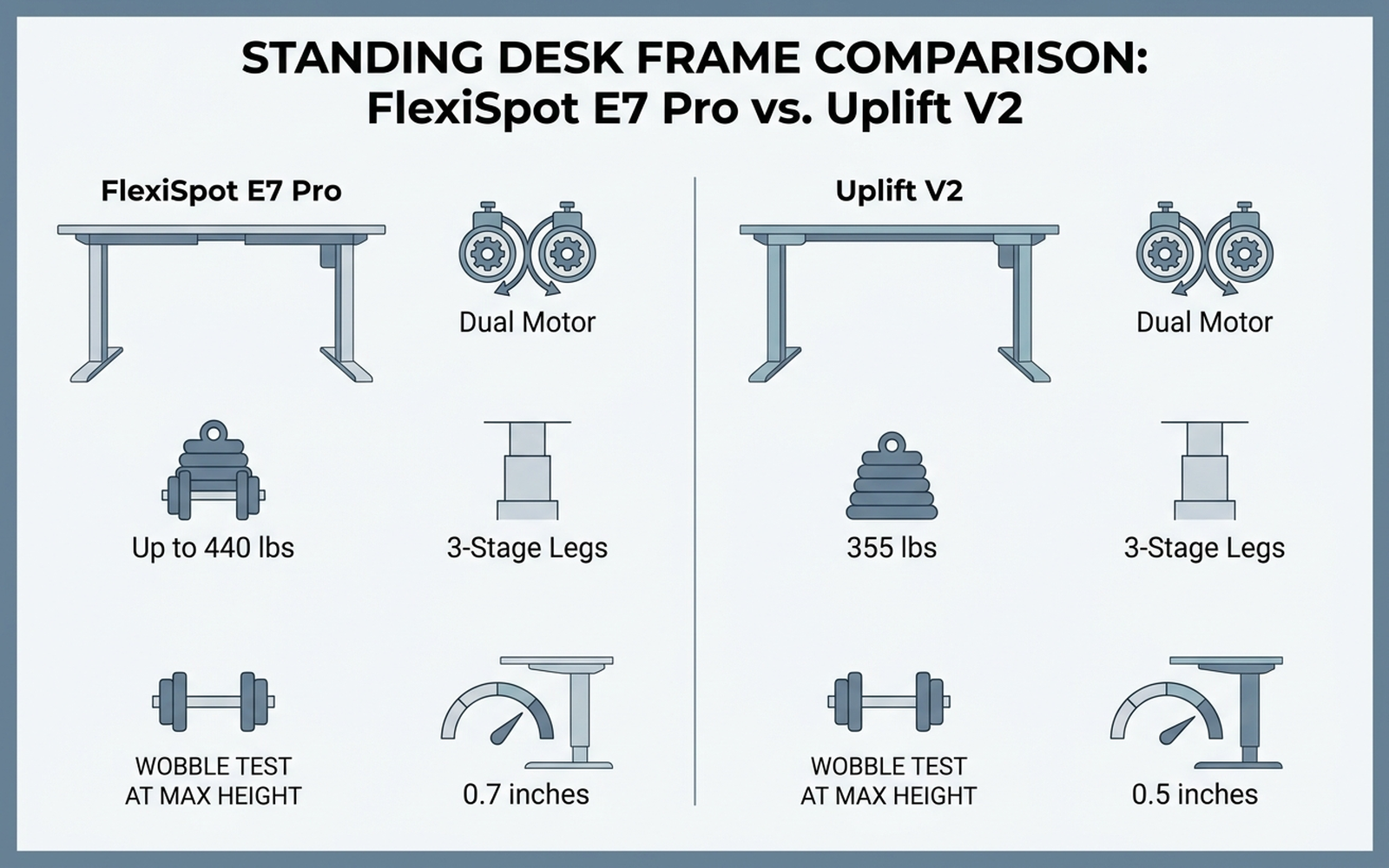
On paper, the two frames look nearly identical: both use dual motors (one per leg) and three-stage telescoping legs, both are rated to carry heavy multi-monitor setups, and both move at a similar 1.5–1.6 inches per second. The differences that actually show up in daily use come down to three measured specs:
- Stability under load. This is the single most-cited differentiator in independent testing. Reviewers who measure wobble with a dial gauge at maximum standing height report the Uplift V2 sways about 0.5 inches, while the FlexiSpot E7 Pro comes in close behind at roughly 0.7 inches. Both are usable — neither desk feels unstable during normal typing — but the V2’s inverted-leg geometry gives it a small, measurable edge at the extremes.
- Height range. Reviewers measure the E7 Pro’s range at roughly 25 in to 50.6 in, marginally wider than the V2’s roughly 24.3 in to 49.9 in on a comparable configuration — useful context if you’re unusually tall or short, though the gap is small enough that most buyers won’t notice it.
- Weight capacity. This is where SKU choice matters more than brand. Both the FlexiSpot E7 Pro and the Uplift V2 carry a 355 lb manufacturer rating on their standard configurations; some FlexiSpot listings (larger desktop, different leg spec) advertise up to 440 lb. Confirm the rating on the exact SKU you’re buying rather than assuming every “E7 Pro” or “V2” listing shares the same number.
Bottom line: at this tier, both frames clear the bar for “stable enough for daily use.” The V2 buys you a small, independently measured stability edge and the longer track record; the E7 Pro buys you the same core capability for less money.
2. Comparison Table
Prices are amazon.com figures as of 2026-08-30 and fluctuate; weight capacities, speeds, and wobble measurements are manufacturer or independent-test figures as cited.
| Model | ASIN | Approx. price | Motor / legs | Weight capacity | Wobble at max height | Warranty (per Amazon listing) |
|---|---|---|---|---|---|---|
| Uplift V2 (2-leg, bamboo desktop) | B01MU31LAW | ~$600–650 | Dual / 3-stage | 355 lb (manufacturer spec) | ~0.5 in (independent test) | 15 years, frame/motors/electronics |
| FlexiSpot E7 Pro (48×30, black) | B08B3X9CKH | ~$450–480 | Dual / 3-stage | up to 440 lb (manufacturer spec, SKU-dependent) | ~0.7 in (independent test) | 5 yr frame/motor + 2 yr electronics |
Note on SKU variation: both brands sell numerous size, color, and desktop-material variants at different price points. The figures above reflect the specific ASINs linked in this article — always check weight capacity and warranty terms on the exact listing before buying, since they can shift between configurations of the “same” desk.
3. Customer Sentiment Synthesis
What aggregated Amazon reviews and independent testers say about each desk specifically.
Uplift V2 (ASIN B01MU31LAW)
Aggregated reviews and independent write-ups consistently praise the V2’s rigidity at full height and its enormous catalog of desktop and accessory options — reviewers describe configuring bamboo, laminate, or solid-wood tops in dozens of sizes directly through Uplift’s own configurator. The most frequently repeated complaint in customer reviews is shipping damage: buyers report scuffed or chipped legs and desktop corners on arrival, which several reviewers attribute to inconsistent freight-carrier handling rather than the product itself, and recommend ordering through Amazon specifically for the easier return process. A smaller number of reviews flag a bulky plastic wire-track spacer as looking cheaper than the rest of the build, and note that the V2’s height-range ceiling can make it unsuitable as a treadmill desk for taller users. Assembly is consistently described as taking longer than competing desks — budget 60–90 minutes.
FlexiSpot E7 Pro (ASIN B08B3X9CKH)
The E7 Pro’s most-repeated praise, across both Amazon reviews and independent long-term testing, centers on stability that holds up over time — reviewers describe no perceptible wobble during normal typing, even after years of daily use. FlexiSpot’s own spec sheet lists motor noise at roughly 50–52 dB during height adjustment (manufacturer figure), comparable to a quiet refrigerator hum that lasts only the few seconds of travel. Minor wobble shows up in testing only when a desk is deliberately pushed at the very top of its height range above 49 inches — not during ordinary use. The recurring criticism in reviews is that assembly is heavy and time-consuming (plan on 60–90 minutes, sometimes with a second person for the desktop), and that the warranty terms on the Amazon-listed E7 Pro (5 years frame/motor, 2 years electronics) are shorter than what FlexiSpot advertises for the base E7 sold direct.
4. How to Set Either Desk Up Correctly
Buying the more stable desk doesn’t help if it’s configured wrong. The ergonomic guidance is identical regardless of which brand you choose:
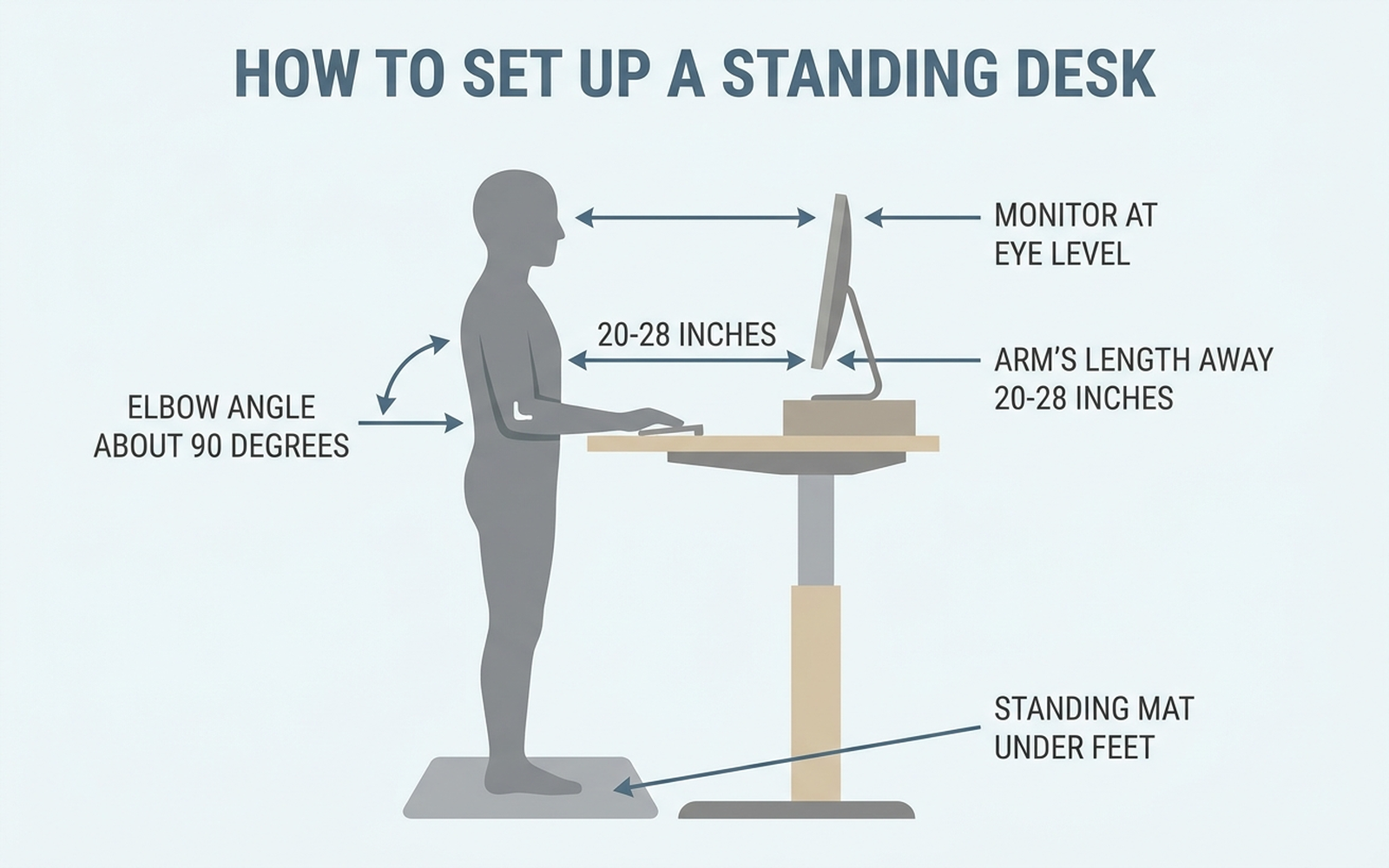
- Set elbow height first. Standing, your forearms should sit roughly parallel to the floor with elbows bent about 90 degrees; set the desk to that height before worrying about the monitor.
- Monitor at eye level, arm’s length away. The top of the screen should sit at or just below eye level, roughly 20–28 inches from your face, so your neck stays neutral.
- Alternate rather than stand all day. Ergonomists generally recommend switching between sitting and standing every 30–60 minutes — both desks’ memory-preset buttons make this a one-touch habit.
- Add an anti-fatigue mat. It’s the accessory owners of both desks most often say they wish they’d bought on day one.
- Total your gear weight before buying. Add up monitors, arms, and any desktop PC, and stay comfortably under whichever desk’s rated capacity you choose — running near the ceiling is where owners report the most wobble complaints on either brand.
5. Which One Should You Buy? A Decision Flow
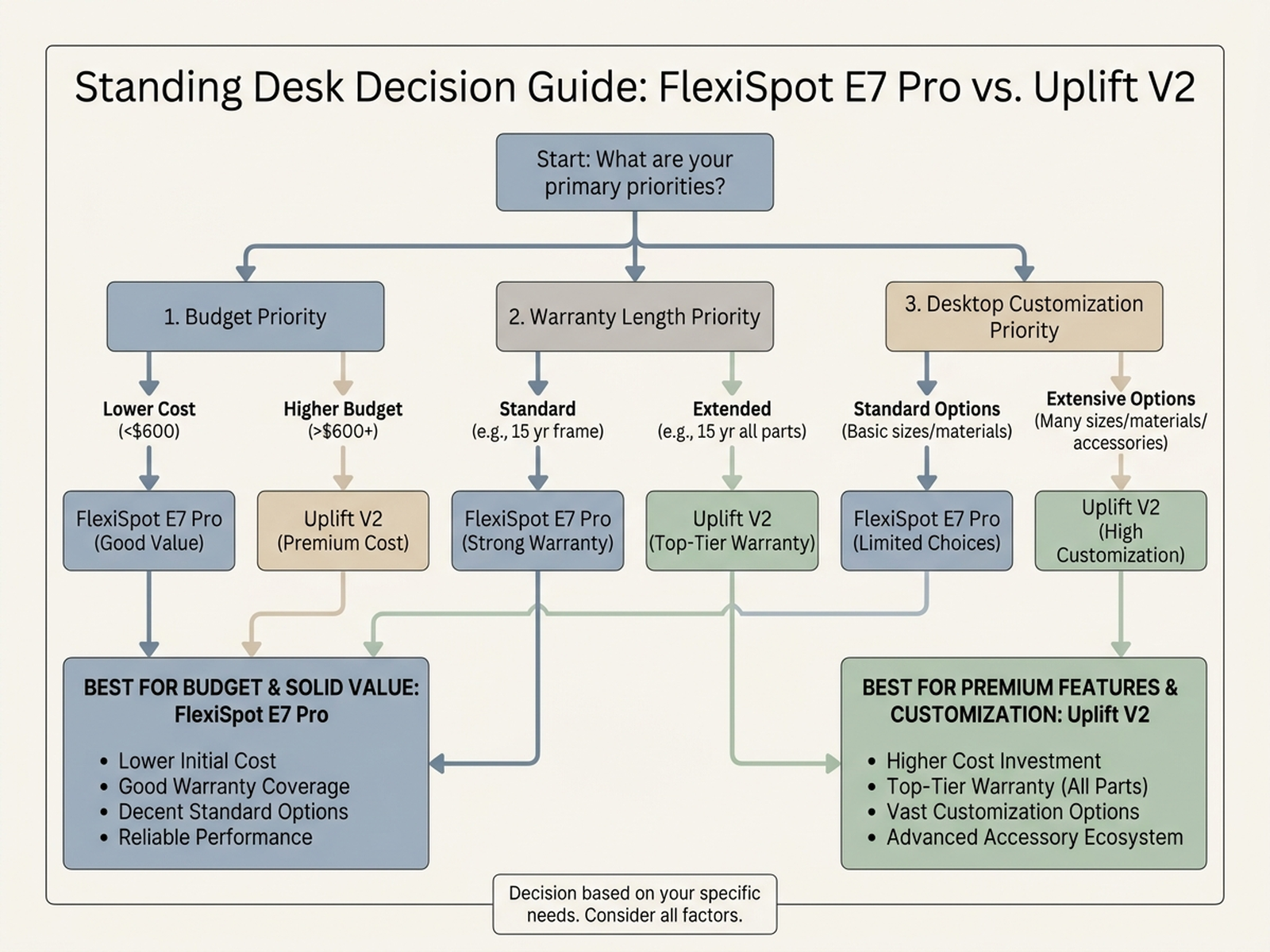
- You want the lowest measured wobble and the longest, most comprehensive warranty → Uplift V2. Configure it directly through Uplift’s own site for the full range of desktop options.
- You want the same core stability for meaningfully less money → FlexiSpot E7 Pro. The best-value pick for most home offices that don’t need Uplift’s deeper customization catalog.
- You’re deciding based on desktop material and size options → Uplift V2, which offers a substantially larger configurator through its own site than FlexiSpot’s Amazon-listed SKUs.
- You want the shortest possible assembly and support timeline via Amazon Prime returns → either desk works, but check current Prime eligibility on the specific listing, since both brands sell some SKUs directly rather than through Prime fulfillment.
6. Warranty and Support
Warranty depth is a reasonable proxy for how long a manufacturer expects a desk to perform without service:
- Uplift V2: a 15-year warranty covering frame, motors, and electronics — the more comprehensive of the two as listed on Amazon.
- FlexiSpot E7 Pro: the Amazon listing states 5 years on the frame and motor plus 2 years on the control panel and electronics; FlexiSpot’s own site markets longer terms on some direct-sale configurations of the base E7, so confirm the exact terms on the SKU you’re buying rather than assuming brand-wide consistency.
For a desk you’ll use daily for years, this gap is one of the clearest ways the Uplift V2 justifies its higher price.
7. Editorial Recommendation by Use Case
- Best overall stability and warranty, budget flexible: Uplift V2 — the measurably lower wobble and the longer warranty win when price isn’t the deciding factor.
- Best value for most home offices: FlexiSpot E7 Pro — comparable core stability and an equal-or-higher manufacturer weight rating for roughly $120–150 less.
- Best for very tall or very short users: FlexiSpot E7 Pro, with a marginally wider height range on the configurations reviewers measured.
- Best for maximum desktop customization: Uplift V2, via its own direct-sale configurator rather than the narrower Amazon-listed SKUs.
8. Limitations of This Analysis
This analysis relies on publicly available reviews, independent test measurements, and manufacturer specifications rather than our own hands-on testing of either desk. Wobble measurements (0.5 in for the Uplift V2, 0.7 in for the FlexiSpot E7 Pro) come from independent testers using specific methodologies and specific SKUs; results can vary with desktop material, floor levelness, and assembly quality, and we did not independently reproduce these measurements. Weight capacity and warranty terms vary meaningfully across each brand’s many SKUs — the figures cited here apply to the exact ASINs linked in this article and should always be reconfirmed on the current product page before purchasing. Both brands update model lineups frequently (Uplift has introduced newer variants beyond the V2, and FlexiSpot’s E7 family includes the standard E7, E7 Pro, and E7 Plus), so treat this as a snapshot of the 2026 lineup rather than a permanent ranking.
9. Verify Before You Buy
A spec sheet only tells part of the story, and the gap between these two desks — half an inch of wobble, a few years of warranty coverage — is exactly the kind of detail that gets lost between marketing pages. Before committing several hundred dollars to a desk you’ll use every day, it’s worth reading past the five-star reviews and into the one- and two-star ones, where shipping-damage complaints and assembly headaches actually surface.
That’s what Arekore is built for. Paste a product URL and our AI shopping assistant checks review authenticity, surfaces the substance of low-star feedback, and compares prices across retailers — turning an afternoon of research into about five minutes. Trying to decide between the FlexiSpot E7 Pro and the Uplift V2? Let the aggregated data, not the marketing copy, make the call.
Products mentioned in this article
- Uplift V2 Standing Desk (2-Leg, Bamboo Desktop) — view on Amazon
- FlexiSpot E7 Pro Electric Standing Desk (48×30, Black) — view on Amazon
Product links go to amazon.com. Prices and availability were accurate at the time of writing and are subject to change.