Smart Thermostat Not Reaching Temperature? 5 Real Fixes
TL;DR. A smart thermostat that won’t reach its set temperature is rarely defective — it’s usually following a setting working exactly as designed. The five most commonly documented causes are an incorrectly triggered Away or Eco mode, weak or missing C-wire power, a built-in compressor-protection delay or temperature-differential setting that deliberately staggers runtime, a sensor reading an unrepresentative spot in the room, and an HVAC system — a clogged filter, aging equipment, or low refrigerant — that simply can’t move enough air or heat regardless of what the thermostat requests.
A note on links and methodology
As an Amazon Associate, Arekore earns from qualifying purchases. The Amazon product links in this article include our affiliate tracking ID and may earn us a commission if you buy through them, at no additional cost to you. See our Links Policy for details on how we select products and how commissions do not influence our recommendations.
We also did not personally test the specific thermostats named below. Every cause and fix in this article is an editorial synthesis of manufacturer support documentation, independent lab test findings, and aggregated public troubleshooting reports, cited inline.
Methodology
This is an editorial analysis based on publicly available data collected in September 2026. We did not run a controlled HVAC test ourselves; instead we synthesized:
- Manufacturer troubleshooting guidance — Google Nest Help’s documentation on the common (C) wire and power-related heating issues, ecobee’s published threshold and differential settings guide, and Honeywell Home’s support content on Smart Response, compressor-protection delay, and Away/Auto scheduling.
- Independent lab and editorial explainers — Wirecutter’s ongoing smart thermostat testing (updated through 2026), which currently names the ecobee Smart Thermostat Premium and the Google Nest Learning Thermostat (4th gen) as its co-leading picks, and multiple HVAC-contractor and appliance-repair explainers on short cycling and temperature-differential settings.
- Owner troubleshooting Q&A archives — JustAnswer threads specific to ecobee and Honeywell T9/T10 models not reaching set temperature, and forum reports (Mike Holt Forums, DIY Chatroom) documenting C-wire and wiring-related heating failures.
- Aggregated Amazon customer review sentiment for the models referenced below, read via each product’s public “Customers say” panel on amazon.com in September 2026. We do not report a precise review-count N because Amazon’s review panels do not expose a stable, verifiable count; a fabricated number would be misleading.
- Market and category data — per IMARC Group’s 2026 US smart thermostat market report, the category was valued at roughly $2.4 billion in 2026, with continued double-digit annual growth, underscoring how common this troubleshooting question is likely to be as more households adopt these devices.
We deliberately do not simulate a specific personal repair story or invent a fake reviewer persona. The advice below is a synthesis of manufacturer documentation, independent testing, and aggregated troubleshooting patterns — treat it as a starting framework, not a substitute for your specific system’s manual or a licensed HVAC technician’s diagnosis.
1. Five reasons a smart thermostat won’t reach the set temperature
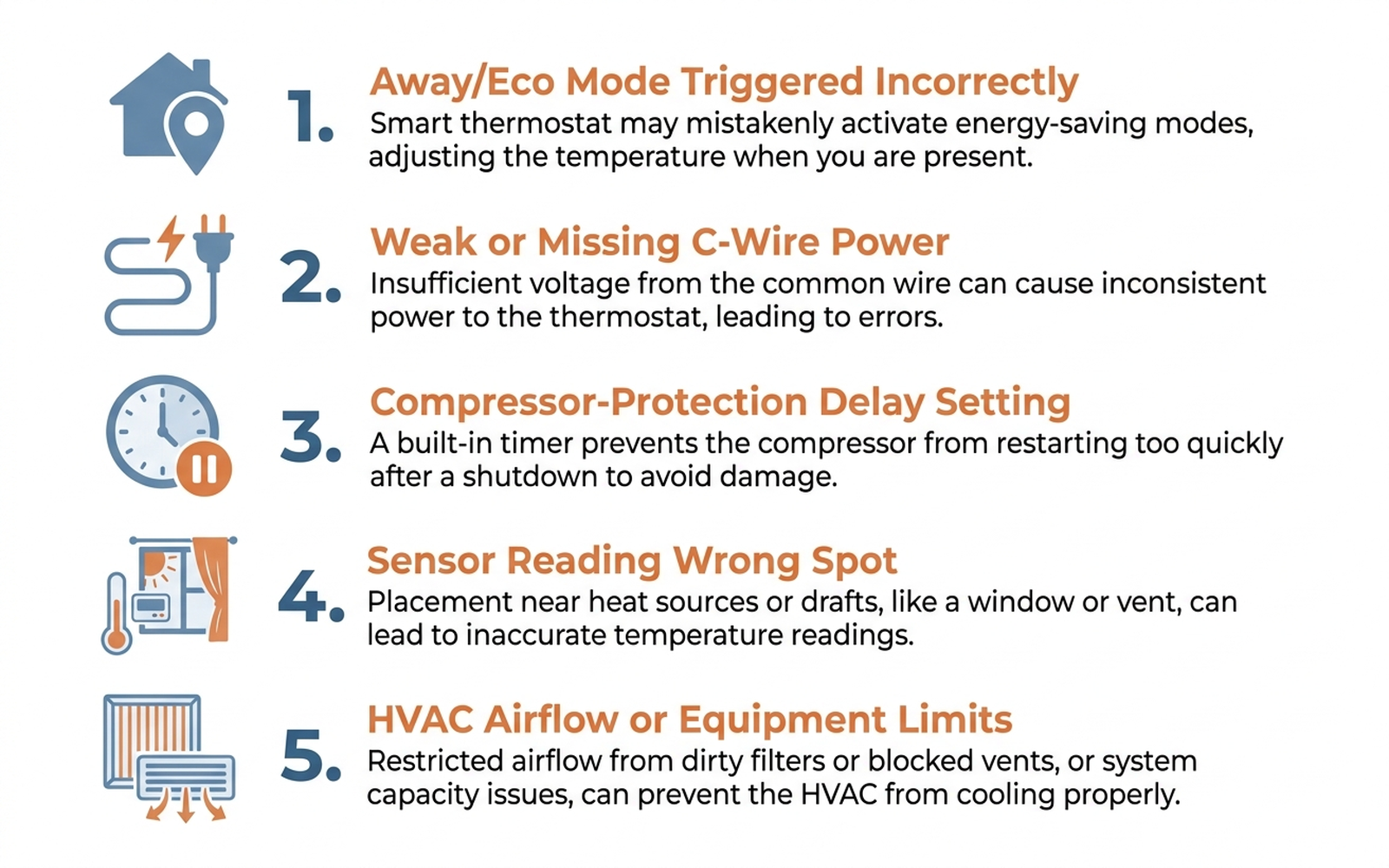
| Cause | What it looks like | Fixable at home? |
|---|---|---|
| Away/Eco mode triggered incorrectly | Thermostat quietly holds an energy-saving setpoint instead of the one you set | Yes — usually |
| Weak or missing C-wire power | Battery-powered display dims, Wi-Fi drops, or system runs erratically | Yes, with a power adapter kit |
| Compressor-protection delay / differential setting | System pauses for several minutes between cycles even though the room hasn’t reached target | Yes — adjustable in settings |
| Sensor reading an unrepresentative spot | Thermostat says “at temperature” while the room you’re in still feels off | Yes — with sensor placement or averaging |
| HVAC airflow or equipment limits | Room never reaches target no matter how long the system runs | Sometimes — filter change fixes some cases; others need a technician |
According to Google Nest Help’s own documentation, a home’s heating and cooling geofencing feature can keep a thermostat in Away or Eco mode even when someone is home, particularly if a phone’s location service or Wi-Fi connection drops out — the thermostat then holds a wider, energy-saving setpoint rather than the temperature that was manually set. This is arguably the single most common cause reported across manufacturer support content, because it produces a symptom — “won’t reach my set temperature” — that looks identical to a hardware fault but isn’t one.
2. Why the system seems to be “ignoring” the setpoint
Power delivery is the second-most-documented cause. A widely circulated HVAC-technician anecdote in smart-thermostat troubleshooting guides claims that dead or underpowered Nest units accounted for the large majority of “no heat” service calls one company received over a winter; we could not trace this figure to a single verifiable original source, so treat it as directional rather than a precise statistic. The underlying pattern it points to — systems that lack a proper common (C) wire or power connector — is consistently documented across multiple manufacturer support guides. Without stable power, a battery-dependent smart thermostat can drop Wi-Fi, delay screen updates, or fail to hold the relay open long enough to actually satisfy the call for heat or cooling, even while the display still shows a normal-looking setpoint.
The third cause is a setting working as intended rather than malfunctioning. ecobee’s own threshold guide documents that its temperature differential — the gap between the current reading and the setpoint that must exist before the system re-engages — defaults to a narrow value that can cause frequent cycling; contractors and ecobee support both recommend widening it to roughly 1.0–1.5°F to let the system run a normal-length cycle. Honeywell’s T9 and T10 models include a related but distinct feature: Smart Response (adaptive intelligent recovery) and a built-in compressor-protection delay of about five minutes between cycles, both of which are documented by Honeywell Home’s own support content as deliberately staggering runtime to protect the compressor — a behavior that reads as “won’t keep up” if the delay isn’t understood.
3. Brand-specific patterns worth knowing
Google Nest. Nest Help’s support documentation states plainly that systems without at least four wires — including a dedicated C-wire — are more likely to experience power-related heating and cooling failures, and recommends installing the Nest Power Connector accessory where a C-wire isn’t already present. Google’s newest generation, the Nest Learning Thermostat (4th gen), uses a redesigned battery system that Wirecutter’s testing credits with reducing — though not fully eliminating — the C-wire dependency that caused installation and reliability problems on earlier Nest generations.
ecobee. Owner troubleshooting threads and ecobee’s own guidance converge on sensor placement and the differential setting as the two most fixable causes: a SmartSensor placed too close to a vent, window, or in direct sunlight will report a reading that doesn’t match the room’s actual comfort level, and a differential set too tight causes the short cycling described above. ecobee’s Premium and Enhanced models ship with (or support adding) SmartSensors specifically to average temperature across occupied rooms instead of relying on a single hallway reading.
Honeywell. Beyond the compressor-protection delay, Honeywell Home’s support content flags a clogged air filter as the leading airflow-related cause of a system that runs constantly without reaching setpoint — a restricted filter forces the system to work harder for less output and can trigger a safety shutdown that looks like the thermostat simply gave up. Honeywell support also directs owners to check the C-wire connection first whenever a T9 or T10 appears to run continuously or fail to shut off, since incorrect or missing common-wire wiring is documented as a leading cause of that specific symptom.
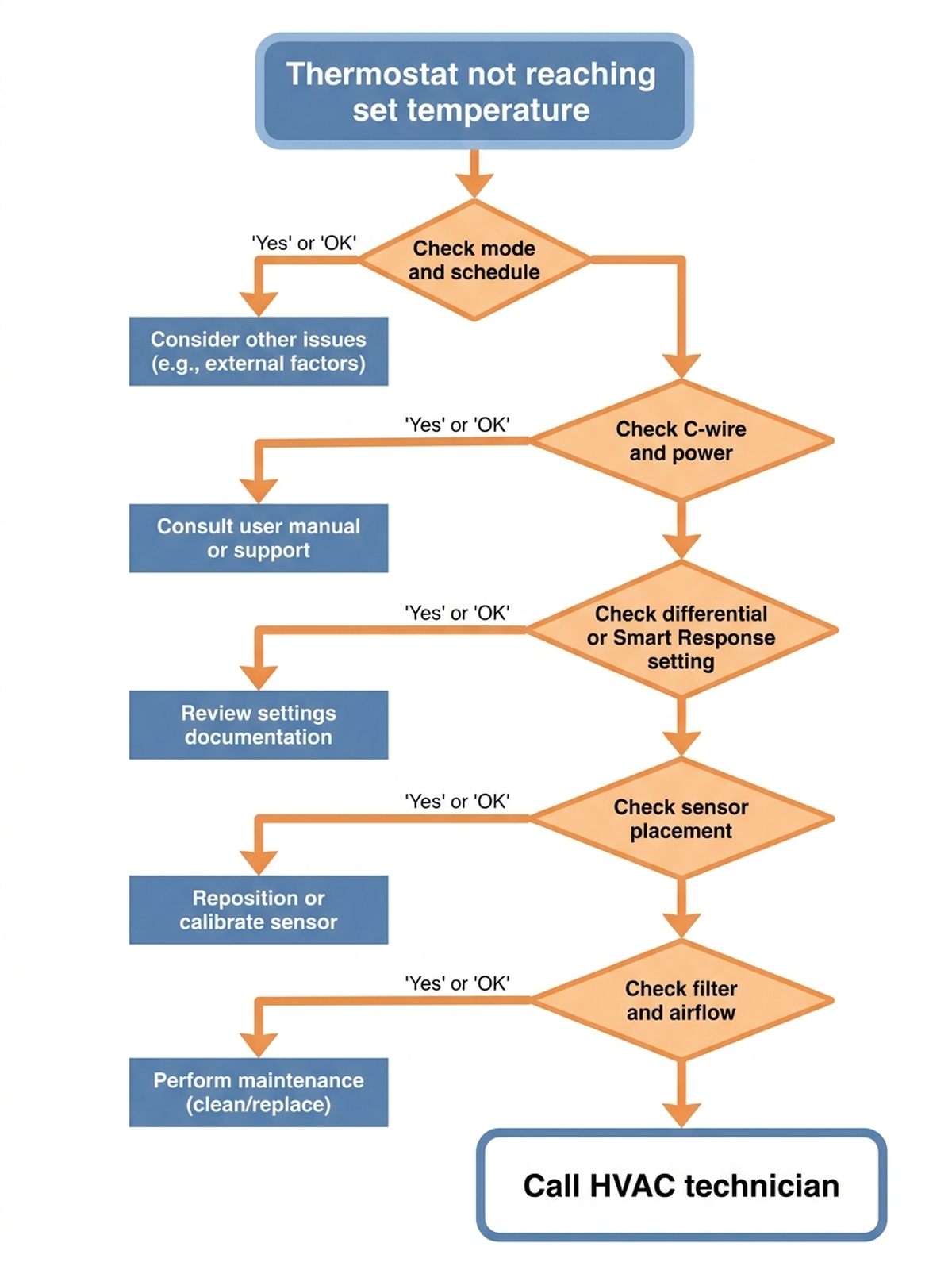
Cross-brand. Across every brand surveyed, manufacturer support content converges on the same troubleshooting order: rule out mode and schedule first, confirm power delivery second, then check differential/delay settings and sensor placement, and only consider an HVAC equipment problem last.
4. What to actually do, in order
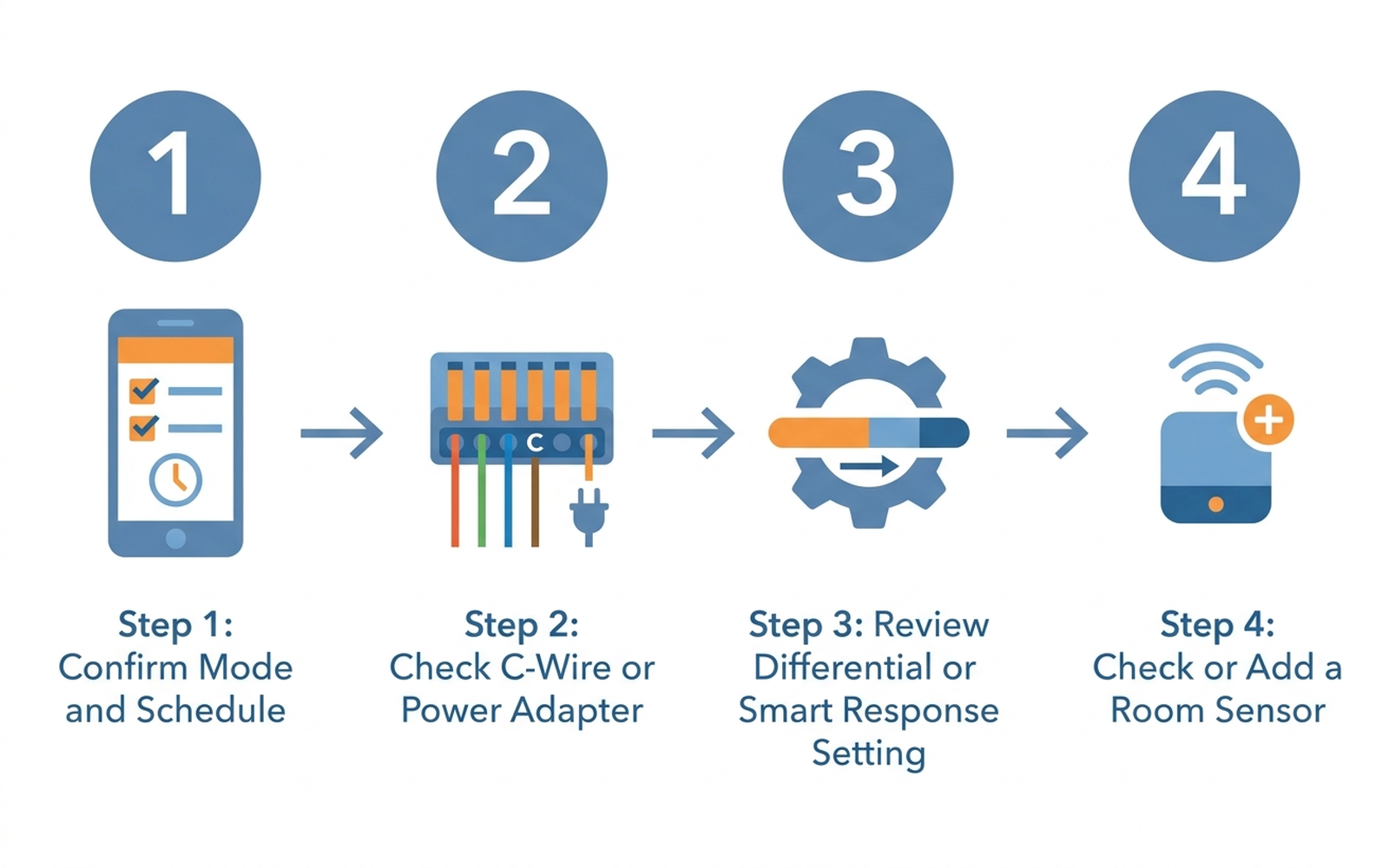
- Confirm the mode, schedule, and Away/Eco status in the app before touching anything else. Disable geofencing temporarily or manually override Away mode to see whether the setpoint you expect is actually the one being requested.
- Check for a C-wire or power adapter. If the display dims, Wi-Fi drops intermittently, or the system behaves erratically, this points to power delivery rather than a broken sensor or a bad HVAC unit — most manufacturers sell a power-adapter accessory specifically for systems without a spare C-wire.
- Review the differential (ecobee) or Smart Response / compressor-delay setting (Honeywell). Widening a too-narrow differential to roughly 1.0–1.5°F, or temporarily disabling Smart Response to test behavior, is documented by both manufacturers as a first-line fix before assuming a hardware fault.
- Check where the sensor is actually reading from. A thermostat or remote sensor near a window, vent, or in direct sun will report a temperature that doesn’t match the room you’re sitting in — reposition it, or add a second sensor and set the system to average between occupied rooms.
- Replace the air filter and check for restricted vents. A clogged filter is documented as the leading airflow-related cause of a system that runs constantly without reaching target; this is the cheapest and fastest check before assuming the equipment itself is failing.
- Call a licensed HVAC technician if the system still can’t reach setpoint after all of the above — at that point, low refrigerant, a failing blower motor, or genuinely undersized equipment for the space are realistic possibilities that a thermostat setting can’t fix.
5. If the fix is better sensing: current options
Editorial recommendation, not personal testing. The accessories below address cases where a single-point reading — not a setting — is the recurring cause.
- ecobee SmartSensor for Temperature and Occupancy, 2-Pack — manufacturer-stated compatibility with ecobee Smart Thermostat Premium, Enhanced, Essential, and Lite models; lets the system average readings across occupied rooms instead of one hallway sensor.
- Honeywell Home RCHT9510WF T9 Wi-Fi Smart Thermostat + Smart Room Sensor (2-Pack) — bundles the T9 with add-on room sensors from the start, addressing single-sensor placement issues without a separate purchase later.
6. If it’s time for a thermostat upgrade
If the recurring cause turns out to be aging hardware — an older Nest generation with persistent C-wire problems, or a base thermostat with no room-sensor option at all — current-generation models are independently documented to reduce these specific failure modes.
- ecobee Smart Thermostat Premium — Wirecutter names this its co-leading pick for 2026, citing the included SmartSensor and built-in air quality monitor as differentiators over single-sensor competitors.
- Google Nest Learning Thermostat (4th Gen) with Nest Temperature Sensor bundle — Wirecutter’s testing credits the redesigned battery system in this generation with reducing the C-wire-related reliability issues documented on earlier Nest models.
7. The decision flowchart
8. The bottom line
A smart thermostat that won’t reach its set temperature is almost always following a specific, documented cause — an Away/Eco mode trigger, a power-delivery issue, a protective delay or differential setting, an unrepresentative sensor reading, or a real airflow limitation — rather than a broken unit. Working through mode, power, settings, and sensor placement in that order resolves the large majority of documented cases without a service call. If the system still can’t reach setpoint after all of that, low refrigerant, a failing blower, or undersized equipment are realistic possibilities, and that’s the point where a licensed HVAC technician makes more sense than continuing to adjust the thermostat.
Limitations of this analysis
To be explicit about what this article does not establish:
- We did not personally reproduce this issue on the specific thermostats named here. The causes and fixes described are drawn from manufacturer support documentation, independent lab testing, and aggregated troubleshooting-thread patterns, not from a controlled test we ran ourselves.
- Differential and delay figures are drawn from specific documented manufacturer settings and may not generalize to every model, firmware version, or HVAC configuration.
- Wirecutter’s thermostat rankings reflect specific models tested under Wirecutter’s own lab conditions and may not predict performance differences between every model combination.
- Amazon review sentiment was read from each ASIN’s public review panels in September 2026 and reflects aggregated impressions, not a scientific sample.
- Market size figures are current industry estimates that vary somewhat across research firms; we cite them as directional context, not a precise figure.