Espresso Machine Descale Light Won't Turn Off? Here's Why
TL;DR. A descale light that stays on after descaling is almost never a broken machine. The five most commonly documented causes are an incomplete final rinse, a water-hardness setting that doesn’t match your actual tap water, a descaling cycle that was interrupted or rushed, a stuck sensor or reed switch, and scale buildup severe enough to need a second full cycle. Running one more complete rinse-to-MAX cycle and then holding the manual reset button for 5-10 seconds clears the light in the large majority of documented cases without a repair call.
A note on links and methodology
As an Amazon Associate, Arekore earns from qualifying purchases. The Amazon product links in this article include our affiliate tracking ID and may earn us a commission if you buy through them, at no additional cost to you. See our Links Policy for details on how we select products and how commissions do not influence our recommendations.
We also did not personally test the specific machines or descaling products named below. Every cause and fix in this article is an editorial synthesis of manufacturer support documentation and aggregated public troubleshooting reports, cited inline.
Methodology
This is an editorial analysis based on publicly available data collected in August 2026. We did not run a controlled descaling test ourselves; instead we synthesized:
- Manufacturer support documentation — De’Longhi’s official “Descale Light is always flashing or not turning off” FAQ, De’Longhi’s Caffè Corso ESAM2800 help center article on the same symptom, and Breville’s published descaling and reset guidance for its Barista and Breville Infuser lines.
- Independent troubleshooting Q&A archives — JustAnswer threads specific to Breville and De’Longhi machines where the descale light stayed on after a completed descaling cycle, and a Fixya support thread documenting the same symptom across brands.
- Owner forum discussion — a Home-Barista.com thread on the Breville Infuser’s descale light staying on, which documents both the manual-reset button combination and the cases where it does not resolve the issue.
- Coffee-equipment retailer and water-quality guidance — Clive Coffee, Fellow, and espresso-focused water guides explaining how water hardness settings interact with descaling schedules, plus manufacturer guidance that scale buildup and descaling frequency scale directly with local water hardness.
- Aggregated Amazon customer review sentiment on amazon.com for the descaling products referenced below, read via each product’s “Top reviews” and “Customers say” panels in August 2026. We do not report a precise review-count N because Amazon’s review panels do not expose a stable, verifiable count; a fabricated number would be misleading.
We deliberately do not simulate a specific personal repair story or invent a fake reviewer persona. The advice below is a synthesis of manufacturer documentation and aggregated troubleshooting patterns — treat it as a starting framework, not a substitute for your machine’s own manual or manufacturer support line.
1. Five reasons the light stays on after you’ve already descaled
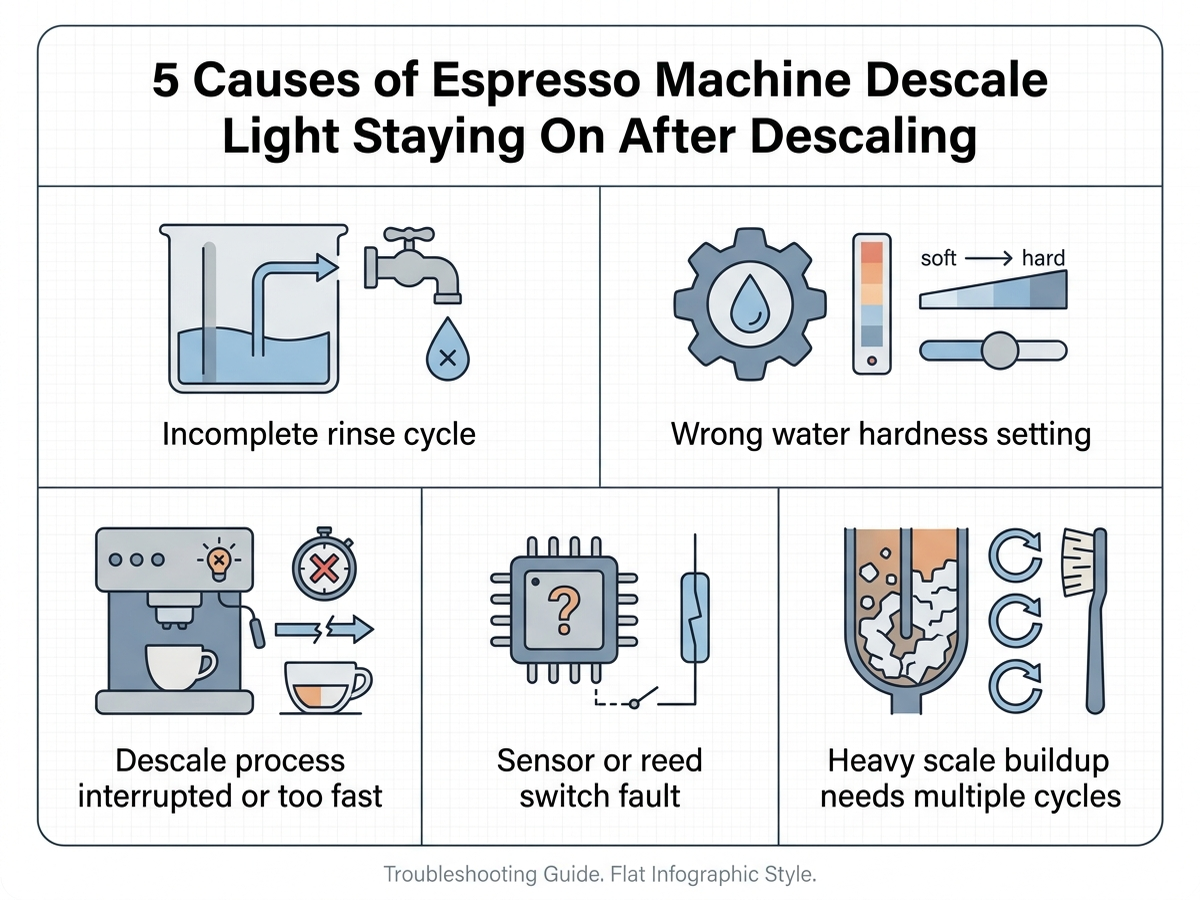
A stuck descale light almost always maps to one of five well-documented causes:
| Cause | What it looks like | Fixable at home? |
|---|---|---|
| Incomplete rinse | Descaling solution ran, but the final water-only rinse wasn’t completed to the MAX line | Yes — usually |
| Wrong water hardness setting | Light returns quickly, or the descaling interval feels too aggressive or too rare | Yes |
| Interrupted or rushed cycle | Machine was powered off, unplugged, or the cycle was skipped partway through | Yes |
| Sensor or reed switch fault | Light stays on even after 2+ full rinse-and-reset attempts | Sometimes — may need service |
| Heavy scale buildup | Machine hadn’t been descaled in a long time before this attempt | Yes, with a repeat cycle |
The most common cause, according to De’Longhi’s own support documentation, is simply that the machine hasn’t been rinsed with enough fresh water after the descaling solution finished circulating. De’Longhi’s FAQ specifically instructs owners to remove the water tank, fill it to the MAX line with plain tap water, run the rinse, and repeat with a second MAX-line fill for the final two rinses if the light doesn’t clear on the first attempt.
The second most common cause is a mismatch between the machine’s programmed water-hardness setting and the owner’s actual tap water. Coffee-equipment guides from Clive Coffee and Fellow explain that most semi-automatic and super-automatic machines use the hardness setting to calculate how often scale builds up and when to trigger the descale alert — an incorrect setting (often left at a factory default) can make the alert fire prematurely or, in some documented cases, prevent the reset from registering as complete because the machine’s internal counter doesn’t match the water actually run through it.
2. Why a rushed or interrupted cycle is a common, easy-to-miss cause
De’Longhi’s support documentation is explicit that the descale light stays lit if the process “was not correctly completed, was skipped, or was carried out too quickly” — meaning the machine expects a specific sequence of solution-cycle-then-rinse-cycle, and interrupting that sequence (unplugging mid-cycle, or assuming the light will clear before the full rinse finishes) leaves the internal counter in a state that reads as incomplete, even if most of the descaling actually happened.
This is why manufacturer troubleshooting flows for both Breville and De’Longhi check the rinse step before anything else: a JustAnswer troubleshooting thread specific to a Breville machine walks through confirming the rinse cycle ran to completion before moving to a manual reset, and the Home-Barista.com Breville Infuser thread documents owners resolving a stuck light simply by repeating the rinse-only step rather than the full descaling solution cycle.
3. Brand-specific patterns worth knowing
De’Longhi. De’Longhi’s official FAQ for its automatic machines states that a manual reset — holding the descaling button, or the button combination specified for that model, for roughly 5 seconds until the light turns off — is the documented path if a repeated rinse alone doesn’t clear it. De’Longhi’s separate Caffè Corso ESAM2800 support page for the same symptom confirms the rinse-to-MAX-line procedure as the first troubleshooting step before any button-based reset. Reset combinations vary by model generation, so De’Longhi directs owners to the specific model’s manual rather than a single universal combination.
Breville. Breville’s descale system tracks water volume through internal sensors rather than a simple timer, according to consumer troubleshooting guidance referencing Breville’s design; when those sensors don’t register the expected flow pattern during the rinse, the alert can stay lit even after descaling solution was correctly used. Breville-specific troubleshooting threads on JustAnswer and Home-Barista.com document a factory-reset procedure — commonly holding the power button, or a specific two-button combination depending on the model, for about 5-10 seconds — as the step that clears a persistent light when a repeat rinse does not.
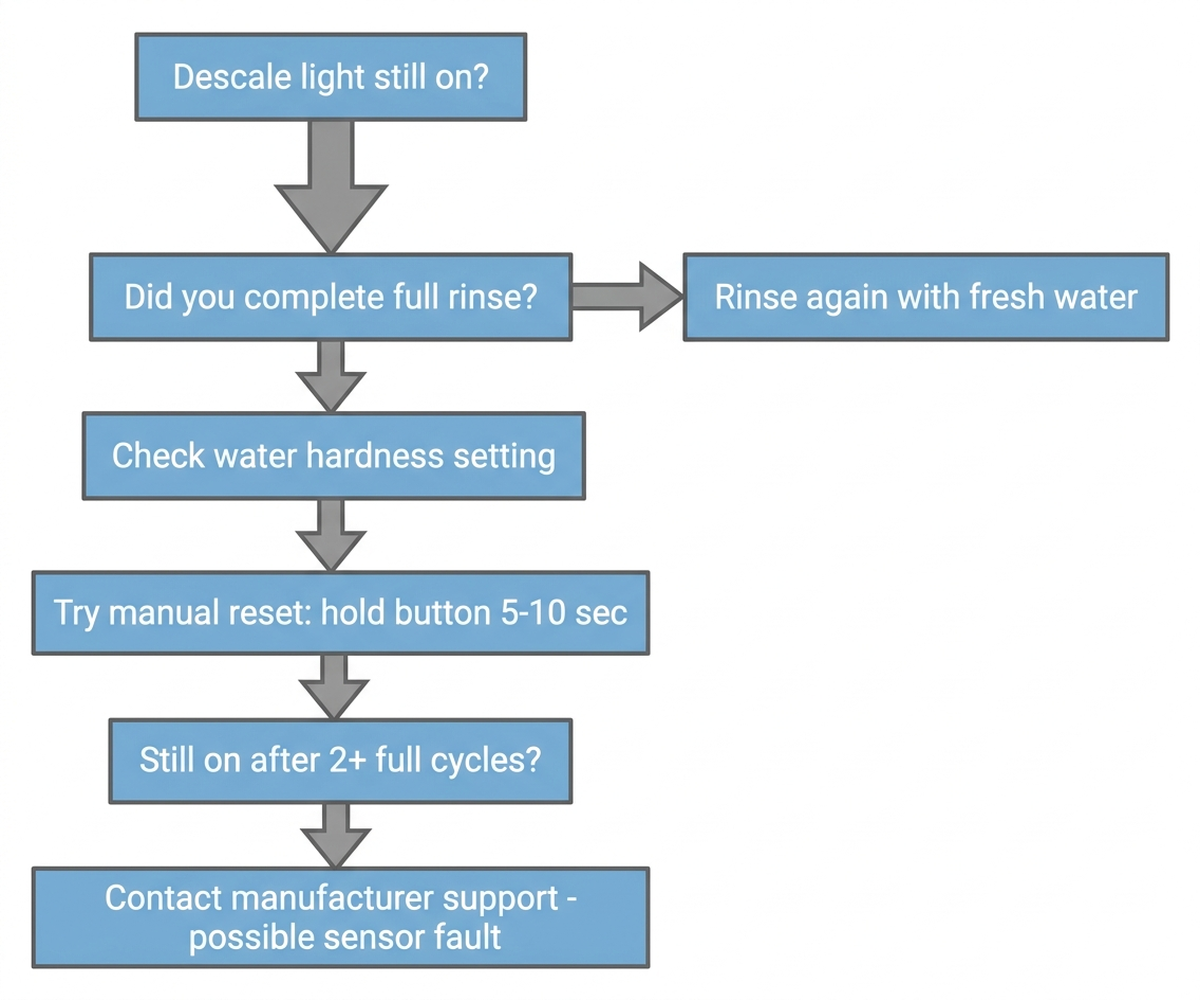
Cross-brand. Across both brands, an occasional but real cause is a genuinely faulty descaling sensor or reed switch, which is why manufacturer support flows converge on the same order: rinse fully, power-cycle the machine, attempt the manual reset, and only contact support if the light is still on after two or more complete attempts.
4. What to actually do, in order
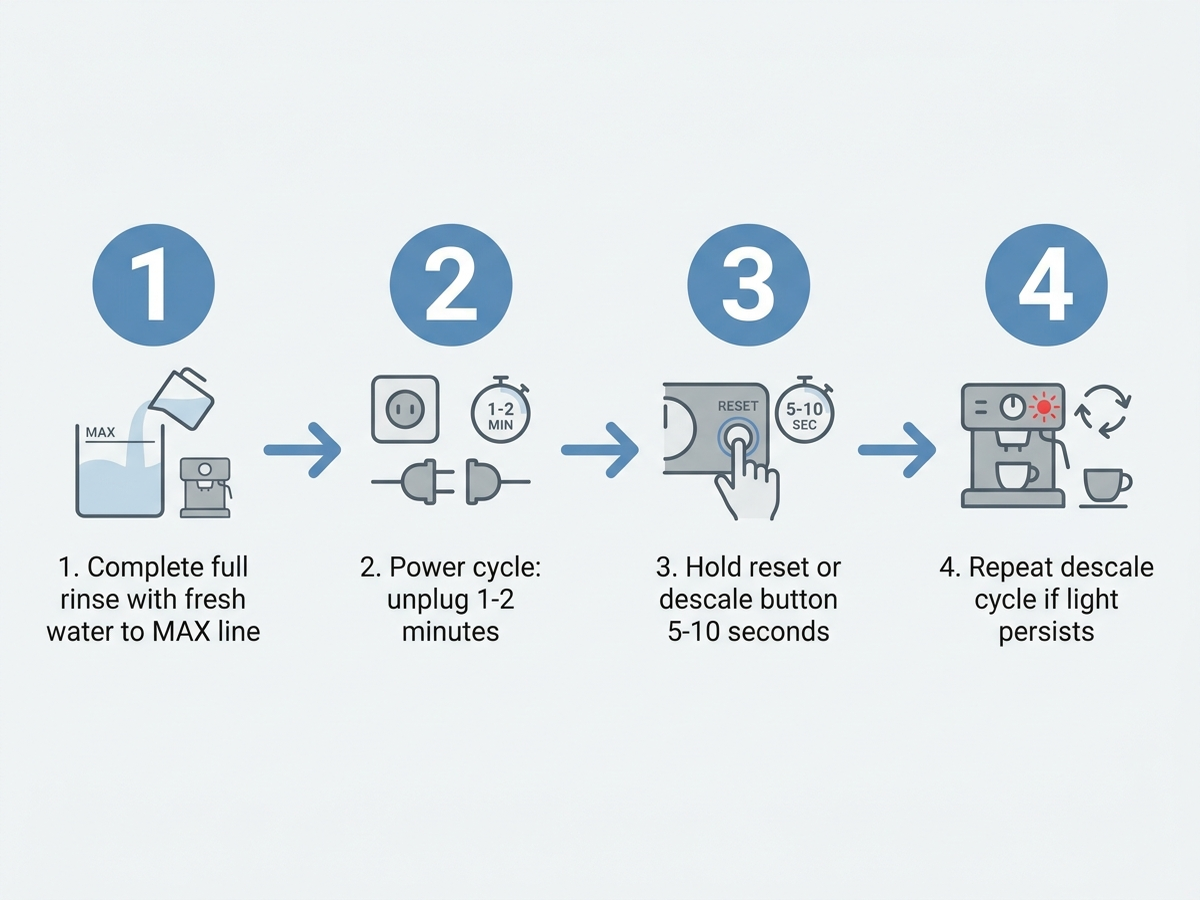
- Run one more full water-only rinse cycle, filling the tank to the MAX line with plain tap water — the single fix De’Longhi’s own documentation lists first, and the one most consistently reported to work across brand-specific troubleshooting threads.
- Power-cycle the machine. Unplug it for one to two minutes, then plug it back in — this is standard first-line guidance across manufacturer support content for clearing a lingering error state.
- Attempt the manual reset for your specific model: commonly holding the descale or reset button (or a two-button combination) for 5-10 seconds until the light changes or turns off. Check your model’s manual, since the exact combination varies by machine generation.
- Check and correct the water-hardness setting in the machine’s menu against your actual tap water, using a home hardness test strip if you don’t already know your local water hardness — an incorrect setting is a documented, easy-to-miss cause of both premature and stuck descale alerts.
- Repeat the full descaling cycle (solution, then two full rinses) if the light returns immediately or never cleared — heavy scale buildup from a long-overdue first descale sometimes requires more than one pass.
- Contact manufacturer support if the light is still on after two or more complete attempts — at that point, a sensor or reed-switch fault is a realistic possibility that a repeat rinse won’t fix.
5. If the fix is a proper descaling solution: current options
Editorial recommendation, not personal testing. Manufacturer troubleshooting content across both brands assumes the descaling solution itself was used correctly and at full strength — a weak or expired solution is a separate, quieter cause of an incomplete cycle.
- Urnex Dezcal Liquid Descaler, 33.6 oz — activated liquid descaler compatible with home espresso and coffee machines; manufacturer-stated 8 uses per bottle.
- Urnex Dezcal Descaling Powder — powder form compatible with Breville, De’Longhi, Nespresso, and Jura machines per the product’s stated compatibility list.
- Urnex Dezcal Descaling Tablets, 120-use — tablet form with manufacturer-stated universal compatibility across Keurig, Nespresso, Breville, and De’Longhi machines.
6. If the machine needs replacing anyway
If the descale light issue turns out to be a genuine sensor fault on an older machine already past its practical service life, current-generation semi-automatics generally ship with clearer in-app or on-panel descale status than older analog-light models.
- Breville Bambino Plus — compact semi-automatic with an LED descale indicator and Breville’s standard reset procedure documented in-app for current-generation units.
- De’Longhi EC685M Dedica Deluxe — De’Longhi’s compact manual-descale-reset line, with the reset combination specified directly in the included manual.
7. The decision flowchart
8. The bottom line
A descale light that won’t clear almost always comes down to an incomplete rinse, a wrong water-hardness setting, or a rushed cycle — not a broken machine. Running one more full rinse to the MAX line, power-cycling the machine, and then holding the manual reset button clears the light in the large majority of documented cases. If it’s still on after two or more complete attempts, a sensor or reed-switch fault is a realistic possibility, and that’s the point where contacting manufacturer support makes more sense than repeating the cycle a third time.
Limitations of this analysis
To be explicit about what this article does not establish:
- We did not personally reproduce this issue on the specific machines named here. The causes and fixes described are drawn from manufacturer support documentation and aggregated troubleshooting-thread patterns, not from a controlled test we ran ourselves.
- Manual reset button combinations vary by model generation and are described here in general terms; always confirm the exact combination against your specific machine’s manual before assuming a universal sequence.
- Water-hardness guidance is general and depends on your specific local water supply; a home test strip or your water utility’s published hardness report is more precise than an assumption.
- Descaling product compatibility claims (Breville, De’Longhi, Nespresso, Jura) are manufacturer-published, not independently verified in our own testing.
- Amazon review sentiment was read from each ASIN’s public review panels in August 2026 and reflects aggregated impressions, not a scientific sample.