Dehumidifier Not Collecting Water? 5 Real Causes (2026)
TL;DR. A dehumidifier that runs but doesn’t fill the bucket is almost never defective. The five most documented causes are a target humidity set above the room’s actual reading, a room colder than roughly 65°F that lets the coils frost over, a dirty filter or coil restricting airflow, a bucket that’s slightly misaligned and tripping the “full” sensor, and — least common — a failed compressor or fan motor. Checking the setpoint, room temperature, filter, and bucket seating resolves the large majority of documented cases without a repair or replacement.
A note on links and methodology
As an Amazon Associate, Arekore earns from qualifying purchases. The Amazon product links in this article include our affiliate tracking ID and may earn us a commission if you buy through them, at no additional cost to you. See our Links Policy for details on how we select products and how commissions do not influence our recommendations.
We also did not personally test the specific machines named below. Every cause and fix in this article is an editorial synthesis of manufacturer support documentation, independent lab test findings, and aggregated public troubleshooting reports, cited inline.
Methodology
This is an editorial analysis based on publicly available data collected in September 2026. We did not run a controlled test ourselves; instead we synthesized:
- Manufacturer support documentation — Frigidaire’s official “Dehumidifier – Not Collecting Water” support article, GE Appliances’ equivalent troubleshooting page, and PartSelect’s repair-parts guidance on units that stop pulling water from the air.
- Independent lab test findings — Consumer Reports’ 2026 dehumidifier test notes, which flag frost control on the evaporator coil as a key differentiator between models, and RTINGS’ ongoing dehumidifier test bench, which measures noise and performance across current models.
- Owner troubleshooting Q&A archives — JustAnswer threads specific to Frigidaire units not pulling water, and brand-specific consumer guides (dehumidifierbuyersguide.com, bestdehumidifierchoice.com) covering hOmeLabs and Vremi models.
- Aggregated Amazon customer review sentiment for the accessories and models referenced below, read via each product’s public “Customers say” panel on amazon.com in September 2026. We do not report a precise review-count N because Amazon’s review panels do not expose a stable, verifiable count; a fabricated number would be misleading.
- Market and category data — per Grand View Research’s 2026 dehumidifier market analysis, North America accounts for roughly a third of the global dehumidifier market, with the regional market projected to grow at a mid-to-high single-digit CAGR through the early 2030s, underscoring how common this troubleshooting question is likely to be in US households.
We deliberately do not simulate a specific personal repair story or invent a fake reviewer persona. The advice below is a synthesis of manufacturer documentation, independent lab testing, and aggregated troubleshooting patterns — treat it as a starting framework, not a substitute for your specific model’s manual.
1. Five reasons a dehumidifier isn’t collecting water
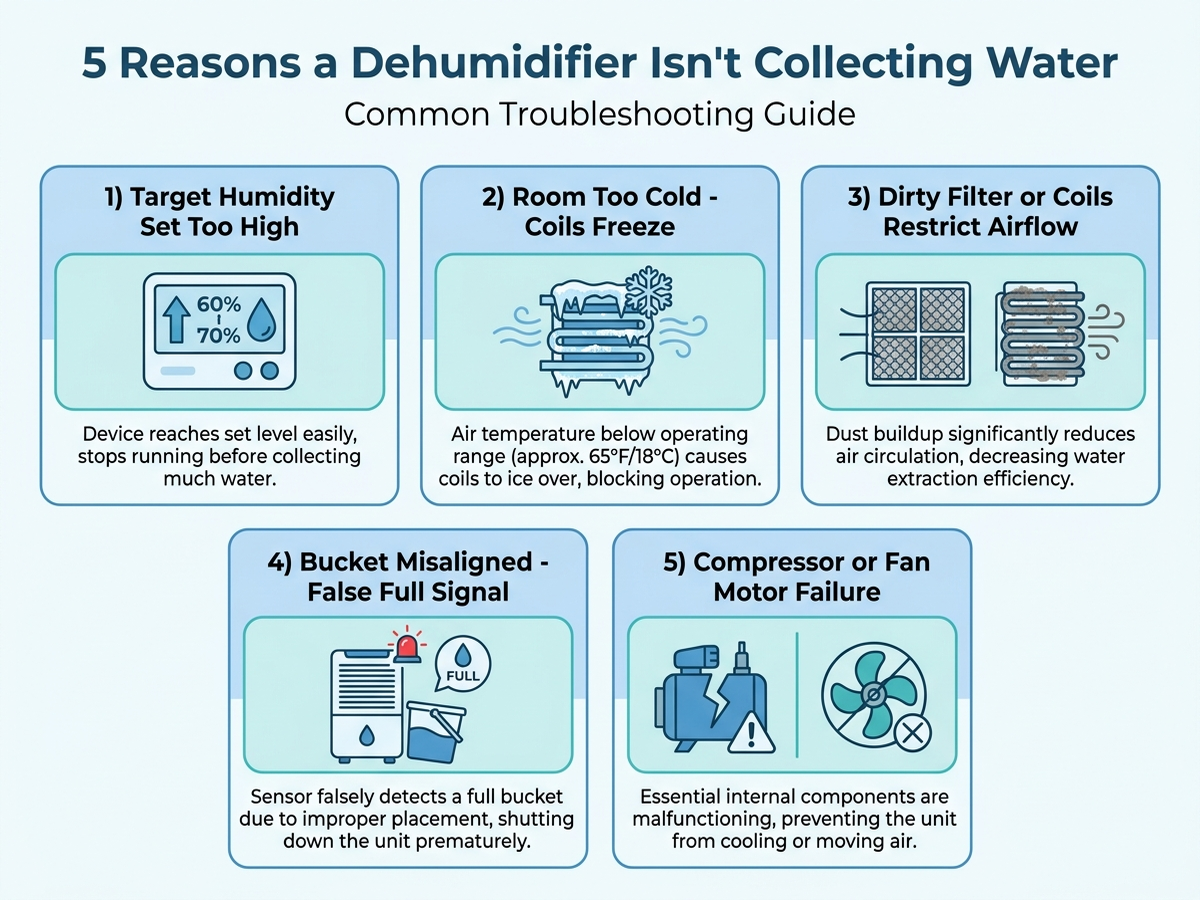
Before assuming the unit is broken, it helps to know that most “runs but doesn’t fill” reports trace back to one of five causes, and four of them are not hardware failures at all:
| Cause | What it looks like | Fixable at home? |
|---|---|---|
| Target humidity set too high | Unit runs briefly, then shuts off; bucket barely fills | Yes — lower the setpoint |
| Room too cold (below ~65°F) | Coils visibly frost or ice over; airflow weakens | Yes — usually |
| Dirty filter or coils | Weak airflow, longer run times, minimal water output | Yes — clean or replace filter |
| Bucket misaligned | Unit shuts off immediately or shows a “full” light with an empty bucket | Yes — reseat the bucket |
| Compressor or fan motor failure | Unit runs but produces no cooling sensation at the exhaust, or doesn’t run at all | Sometimes — usually needs service |
According to Frigidaire’s own troubleshooting guidance, the most common non-defect cause is a setpoint above the room’s current humidity: if the target is set higher than the actual reading, the unit’s control logic concludes the air is already dry enough and cycles off before meaningfully dehumidifying. PartSelect’s repair guidance for units that stop pulling water from the air similarly points to setpoint and temperature issues before hardware faults.
2. Why the coils freeze in a cold room

Most standard (non-low-temperature) dehumidifiers rely on refrigerant coils that pull moisture out of the air by chilling it below its dew point. When the surrounding room air itself is already cold — commonly cited around 65°F and below in manufacturer guidance — the coil can drop below freezing and the condensed moisture forms ice on the coil instead of dripping into the bucket. Once ice builds up, airflow across the coil drops further, output falls even more, and the unit can appear to be running normally while producing almost no water.
This is why basements and unheated garages are the most frequently cited setting for this exact complaint: they combine higher humidity (which should mean more water collected) with lower ambient temperature (which chokes off the coil’s ability to collect it). Consumer Reports’ 2026 test notes specifically flag frost control on the evaporator coil as a meaningful differentiator between dehumidifier models for this reason, and some manufacturers sell models rated for operation down to a lower minimum temperature specifically to address cold-room use.
A dirty filter compounds the same failure mode. Restricted airflow across the coil means less air contacts the cold surface per minute, which both reduces water collected and makes frost more likely to form and linger, according to Frigidaire’s and GE’s troubleshooting content.
3. Brand-specific patterns worth knowing
Frigidaire. Frigidaire’s official support article recommends checking and cleaning the filter first, adjusting fan speed based on room temperature and humidity (higher fan speed when both are high, lower fan speed when both are low, to let the air reach a lower dew point), and removing the bucket to check the water pickup for dirt or algae blockage before assuming a hardware fault.
hOmeLabs. A recurring pattern in owner troubleshooting content is not a hardware defect at all: several hOmeLabs models were re-badged to match current US Department of Energy pint-capacity standards, so a unit marketed under an older, higher pint number is often a smaller-capacity unit under today’s measurement standard. Reviewers who expect the marketed capacity in a cool, moderately humid room sometimes report “it’s not collecting water” when the unit is filling slowly but within spec for its actual capacity and the room conditions.
Vremi. Consumer troubleshooting guides for Vremi models converge on the same three checks as the general causes above: confirm the target humidity is set below the current room reading, confirm the room is reasonably sealed (open windows or doors let humid outdoor air in faster than the unit can remove it), and confirm room temperature is above roughly 60°F before assuming a fault.
Cross-brand. Across every brand surveyed, manufacturer and independent troubleshooting content converges on the same order of operations: check the setpoint and temperature first, check the filter and bucket seating second, and only consider the compressor or fan motor third.
4. What to actually do, in order
- Check the target humidity setting against the actual room reading. If the unit has a built-in humidity display, confirm the target is set at least several percentage points below the current reading — a target set too high or equal to the room’s humidity is the single most commonly cited non-defect cause.
- Check the room temperature. If it’s below roughly 65°F, either move the unit to a warmer space, wait for the room to warm up, or confirm the specific model is rated for low-temperature operation before continuing to run it in a cold room.
- Remove and inspect the filter. Rinse or replace it if visibly dirty — manufacturer guidance across brands lists a clogged filter as a leading cause of reduced water output.
- Remove the bucket and check the pickup area and float switch for dirt, algae, or misalignment, per Frigidaire’s own troubleshooting steps. Reseat it firmly; a bucket that isn’t fully seated can trigger a false “full” signal that stops collection even when it’s empty.
- Confirm the room is reasonably sealed. Open windows, doors, or a running exhaust fan let humid or dry outdoor air undercut the unit’s ability to make visible progress.
- Contact manufacturer support if the unit still isn’t collecting water after all of the above — at that point a failed compressor or fan motor is a realistic possibility that routine troubleshooting won’t fix.
5. If the fix is knowing your actual room conditions: current options
Editorial recommendation, not personal testing. Several of the causes above are invisible without a way to measure the room’s actual temperature and humidity rather than guessing.
- Govee Wireless Hygrometer Thermometer, Bluetooth Indoor Room Temperature and Humidity Monitor — a low-cost way to confirm the room’s actual humidity and temperature before assuming the dehumidifier’s built-in display is accurate or that the room is warm enough to avoid coil freezing.
6. If it’s time for a new unit: current options
If troubleshooting doesn’t resolve the issue and the unit is old, current-generation dehumidifiers documented by independent testing address the cold-room and capacity issues covered above directly.
- Frigidaire 50-Pint Dehumidifier with Wi-Fi and Energy Star Certification — manufacturer-stated custom humidity control and auto shut-off/restart, from the same brand whose official troubleshooting guidance this article draws on.
- Frigidaire 50-Pint Dehumidifier, 4,500 Sq Ft Coverage — a non-Wi-Fi option at the same capacity tier for buyers who want a simpler control panel.
7. The decision flowchart
8. The bottom line
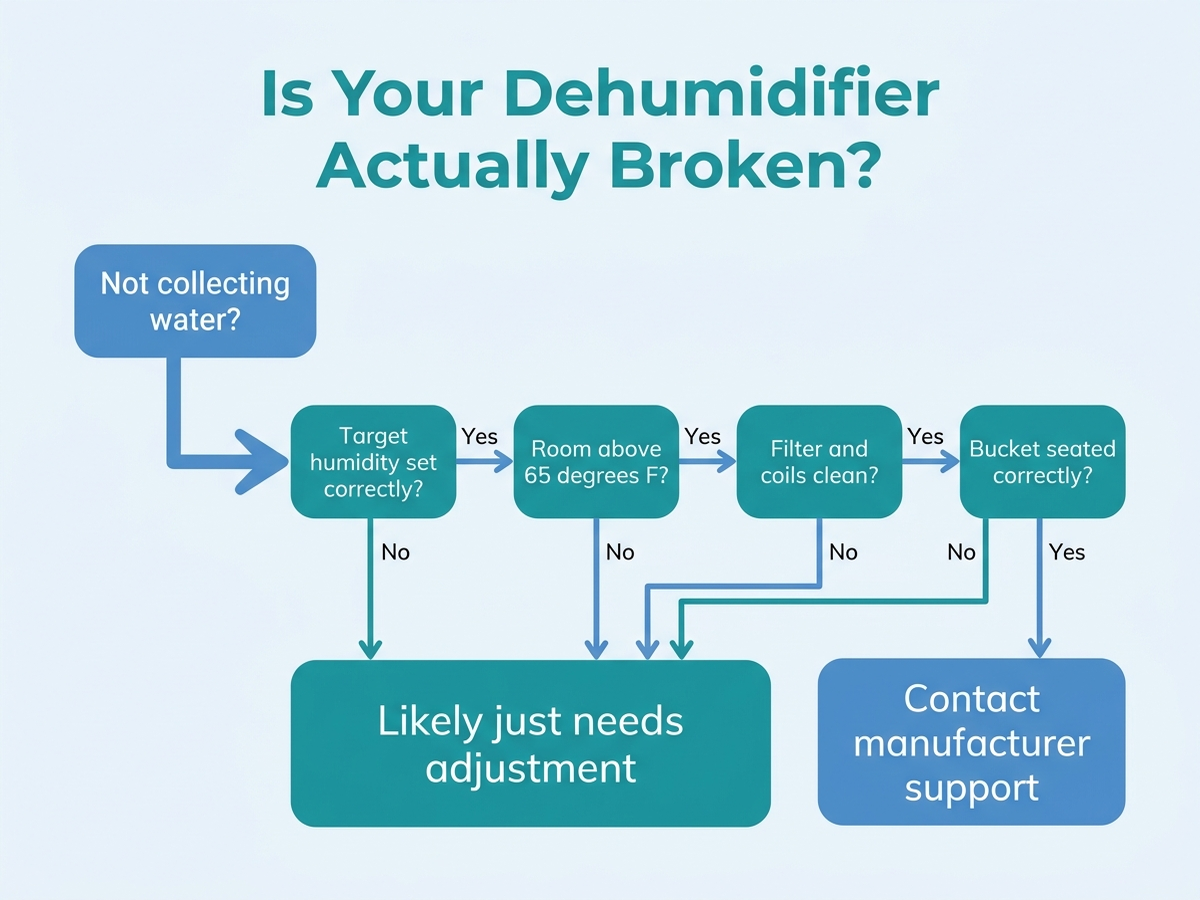
A dehumidifier that runs but doesn’t fill the bucket is, in the large majority of documented cases, responding correctly to a setpoint that’s too high, a room that’s too cold, a dirty filter, or a bucket that isn’t seated — not a broken compressor. Working through the setpoint, temperature, filter, and bucket checks in order resolves most reported cases without a service call. If the unit still isn’t collecting water after all four checks and the room is confirmed warm and humid enough, a compressor or fan motor fault is a realistic possibility, and that’s the point where contacting manufacturer support makes more sense than continuing to adjust settings.
Limitations of this analysis
To be explicit about what this article does not establish:
- We did not personally reproduce this issue on the specific machines named here. The causes and fixes described are drawn from manufacturer support documentation, independent lab test findings, and aggregated troubleshooting-thread patterns, not from a controlled test we ran ourselves.
- Minimum operating temperature figures vary by model. The roughly 65°F threshold cited above is a commonly cited general guideline in manufacturer troubleshooting content, not a universal spec; some models are explicitly rated for lower-temperature operation and some standard models may struggle above that threshold in very humid conditions.
- The hOmeLabs re-badging pattern reflects documented DOE standard changes affecting specific past models and may not apply to every current hOmeLabs unit on the market.
- Amazon review sentiment was read from each ASIN’s public review panels in September 2026 and reflects aggregated impressions, not a scientific sample.
- Market share and growth figures are current industry estimates that vary somewhat across research firms; we cite them as directional context, not a precise figure.