Best Mechanical Keyboards 2026 Under $150: Keychron vs Ducky
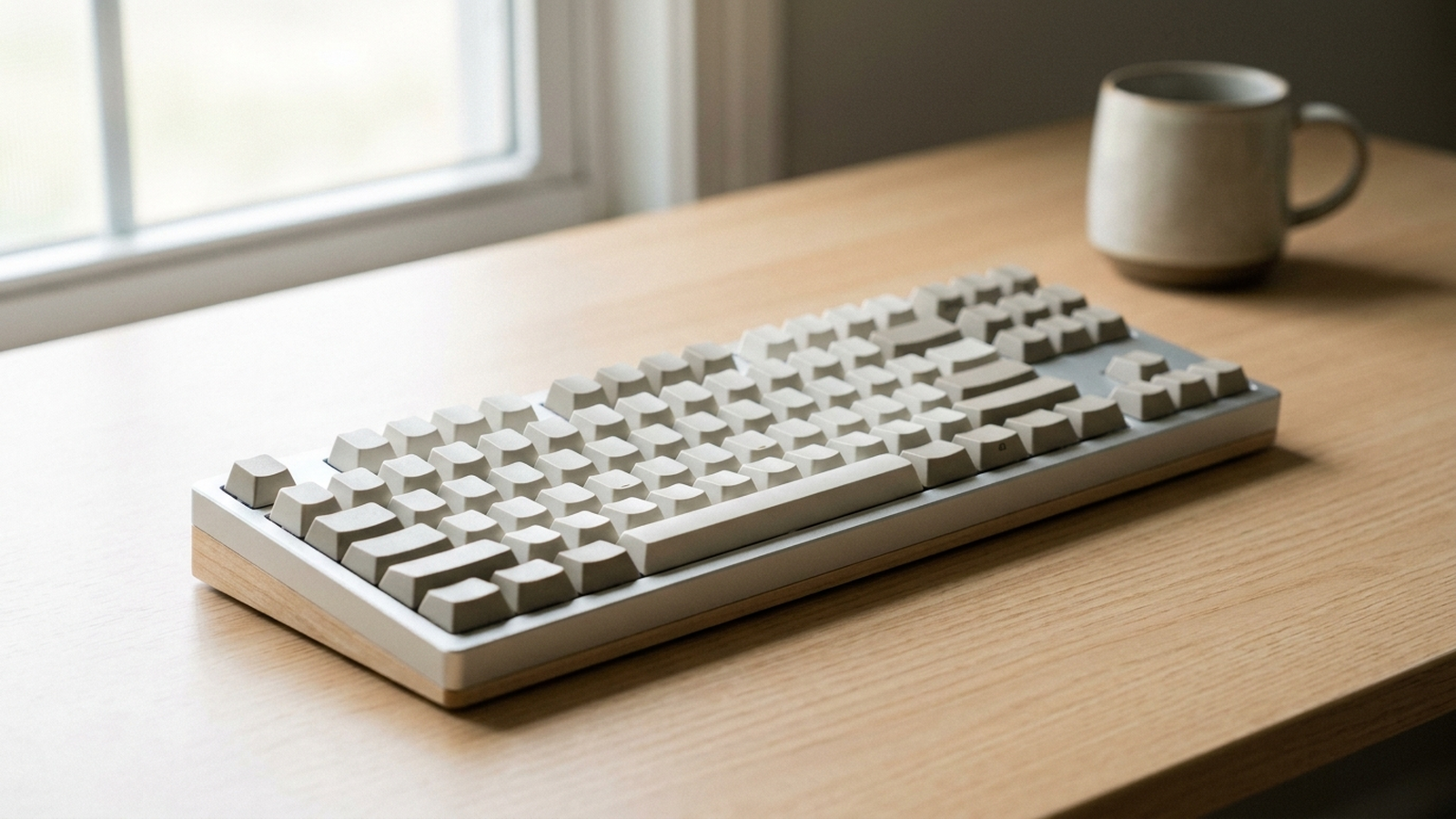
A few years ago, the mechanical keyboard was a niche obsession traded in Reddit threads and Discord group buys. It is now a mainstream upgrade. As more Americans built permanent home offices and rediscovered PC gaming, the sub-$150 mechanical keyboard became one of the most-searched desk upgrades on Amazon — and three boards keep surfacing at the top of that conversation: the wireless, Mac-friendly Keychron K8, the low-profile, office-focused Logitech MX Mechanical, and the wired enthusiast favorite Ducky One 3. This guide breaks down which one wins for which kind of buyer, using aggregated Amazon review data, independent lab and hands-on testing, and manufacturer specifications.
As an Amazon Associate, Arekore earns from qualifying purchases. The Amazon product links in this article may include our affiliate tracking ID and may earn us a commission if you buy through them, at no additional cost to you. See our Links Policy for details on how we select products and how commissions do not influence our recommendations.
TL;DR / Quick Verdict
- Best all-rounder and best value: the Keychron K8 — a tenkeyless board with Bluetooth, USB-C wired mode, Mac and Windows keycaps, a hot-swappable option, and a typical street price well under $100. The most flexible pick for the most people.
- Best for a quiet shared office: the Logitech MX Mechanical — low-profile switches, rock-solid multi-device wireless, and a muted typing sound. It is the priciest of the trio (often hovering right around $150–$170 at full price), so treat it as the productivity splurge.
- Best for typing feel and customization: the Ducky One 3 (TKL) — Cherry MX hot-swap sockets, double-shot PBT keycaps, and sound-dampening foam, all wired. No wireless and limited Mac support, but a superb out-of-box typing experience.
- The real choice: decide whether you value wireless flexibility (Keychron), a quiet low-profile office board (Logitech), or the best wired typing feel you can tune yourself (Ducky).
How We Reached These Conclusions (Methodology)
This is an editorial analysis, not a hands-on review. We did not personally test the products covered here. Instead, this guide synthesizes three kinds of public information: (a) aggregated amazon.com customer ratings and the substance of low-star reviews, sampled in June 2026; (b) independent third-party testing and reporting from RTINGS, Tom’s Guide, Tom’s Hardware, PC Gamer, and Reviewed (USA Today); and (c) manufacturer specifications. Where we cite a manufacturer figure — a battery rating, a switch lifespan, or a latency number — we label it as a manufacturer or test-platform claim rather than an independently verified result. We deliberately avoid quoting precise review counts or “percent of reviewers” figures we cannot verify; the sentiment summaries below are directional. Prices are amazon.com figures at the time of writing and change frequently, especially around Prime Day and the back-to-school season.
The US Mechanical-Keyboard Market in 2026
The mechanical keyboard is no longer a fringe purchase. Market researchers at Mordor Intelligence estimate the global mechanical keyboard market at roughly $2.66 billion in 2026, growing at about a 5% annual rate toward $3.4 billion by 2031. Other firms publish higher or lower figures — estimates range widely depending on how each defines the category — so treat the numbers as directional rather than precise. What every analyst agrees on is the direction: steady growth driven by hybrid work, the resurgence of PC gaming, and a maturing enthusiast hobby.
The single most important product trend is hot-swappability. Market-research trackers estimate that hot-swappable boards made up only around 17% of mechanical-keyboard shipments in 2023 (a directional industry figure), but the share has climbed quickly since; by 2026, a majority of new enthusiast-oriented models ship with hot-swap sockets, and even Logitech — historically a sealed-switch holdout — has begun building modular, repairable boards. Hot-swap lets you pull and replace switches with no soldering, which has turned the keyboard from a fixed appliance into a tinkerable platform.
The practical takeaway for a buyer with $150 or less: you no longer have to choose between “cheap and disposable” and “expensive and custom.” All three boards here are durable daily drivers; what separates them is how you connect, how it sounds, and how much you want to tinker.
1. First, Decide What Matters Most to You
Before comparing models, settle the three questions that explain most of the differences here:
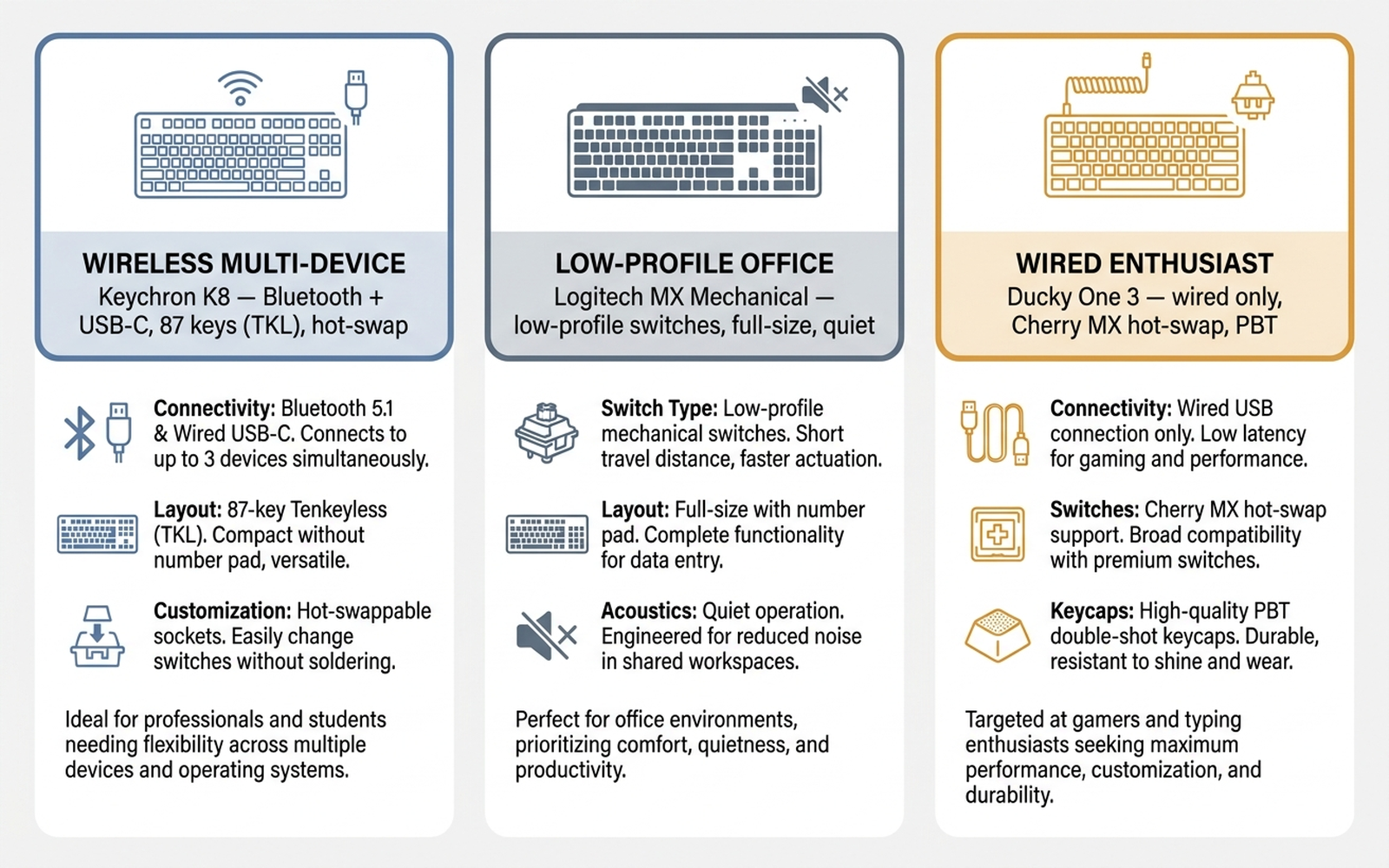
- Do you need wireless and want to switch between a Mac and a PC? The Keychron K8 pairs to up to three devices over Bluetooth, runs wired over USB-C, and ships with both Mac and Windows keycaps.
- Do you type all day in a shared or quiet space? The Logitech MX Mechanical uses low-profile switches and a tactile-quiet option engineered to keep the noise down, with the most polished multi-device experience here.
- Do you care most about how typing feels and sounds, and want to customize it? The Ducky One 3 is a wired board with Cherry MX hot-swap sockets, thick PBT keycaps, and internal foam for a deeper, more refined acoustic profile.
A useful rule of thumb from the aggregated reviews: any of these three is a genuine upgrade over a membrane keyboard. Above that baseline, you are mostly paying for connectivity and cross-platform flexibility (Keychron), a quiet, refined office experience (Logitech), or tunable typing feel (Ducky).
2. The Technology: Switches, Hot-Swap, and Keycaps
The marketing language around mechanical keyboards is dense, but only a few specs actually change your daily experience.
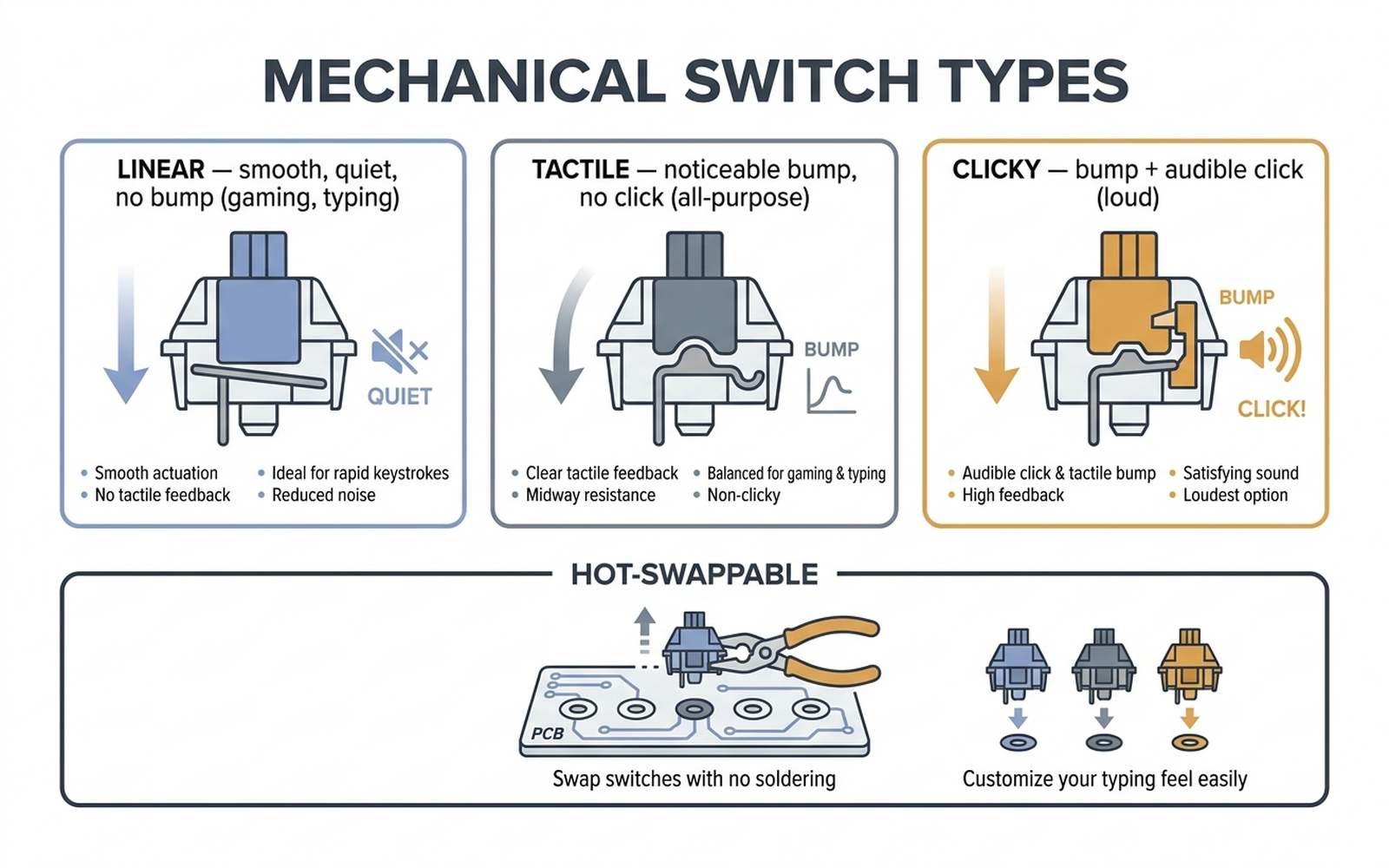
- Switch type. Switches come in three broad families. Linear switches (often “red”) are smooth top to bottom — popular for gaming and quiet typing. Tactile switches (“brown”) add a small bump you can feel, a good all-purpose choice. Clicky switches (“blue”) add an audible click on top of the bump — satisfying, but loud enough to annoy a roommate or a video call. All three of our picks offer at least linear and tactile options.
- Low-profile vs full-height. The Logitech MX Mechanical uses low-profile switches with a short travel distance, so it feels closer to a premium laptop keyboard. The Keychron K8 and Ducky One 3 use full-height switches with longer travel and the classic “thock.”
- Hot-swappable sockets. A hot-swap board lets you pull a switch out and push a new one in with a cheap puller — no soldering iron. The Ducky One 3 and the hot-swap version of the Keychron K8 both support this; the Logitech MX Mechanical does not (its switches are fixed).
- Keycap material. PBT plastic resists the greasy shine that ABS develops over time. The Ducky One 3 and Logitech MX Mechanical ship with PBT; many Keychron K8 configurations use ABS, with PBT available on higher trims.
- Connectivity. Wireless boards (Keychron K8, Logitech MX) add a small amount of input latency versus wired — generally a non-issue for typing and casual gaming, but competitive gamers still prefer wired. The Ducky One 3 is wired only, which is part of why its latency is excellent.
Bottom line: pick the switch feel you want first, then decide whether wireless and hot-swap matter enough to narrow the field.
3. Comparison Table
Prices are amazon.com figures at the time of writing (June 2026) and fluctuate. Battery life, latency, and switch lifespan are manufacturer or review-platform figures.
| Model | ASIN | Approx. price | Layout | Connectivity | Switches | Keycaps | Hot-swap |
|---|---|---|---|---|---|---|---|
| Keychron K8 | B0875SJ8FN | ~$79–$99 | TKL (87-key) | Bluetooth 5.1 + USB-C wired | Gateron (linear/tactile/clicky) | ABS (PBT on higher trims) | Yes (hot-swap version) |
| Logitech MX Mechanical (full-size) | B09LK1P1RD | ~$150–$170 | Full-size | Bluetooth + Logi Bolt receiver | Low-profile (tactile quiet/linear/clicky) | PBT | No |
| Ducky One 3 (TKL) | B09Y2GMCJR | ~$119–$129 | TKL (87-key) | Wired USB-C only | Cherry MX (red/brown/blue) | Double-shot PBT | Yes |
4. Keychron K8 — The Flexible All-Rounder
The Keychron K8 is, for many buyers, the default answer to “what’s a good first mechanical keyboard?” It is a tenkeyless (87-key) board that pairs over Bluetooth 5.1 to up to three devices and also runs wired over USB-C. Crucially for the large Mac-owning US audience, it ships with both Mac and Windows keycaps and a layout toggle, which most gaming-oriented boards ignore.
Independent reviewers have long treated the K8 as the value benchmark in this space. RTINGS keeps it in rotation as a solid wireless pick, and recent reviews of the broader K8 family generally agree that Keychron still hits the sweet spot for a dependable, great-feeling board without boutique pricing. The hot-swap version (ASIN B0875SJ8FN) adds the ability to change switches without soldering, plus an aluminum frame and RGB backlighting.
The trade-offs are real but minor at this price. The body is on the taller side and benefits from the included flip-out feet or a wrist rest. Many configurations ship with ABS keycaps that can develop shine over a year or two, and battery life with RGB on is modest (Keychron quotes far longer figures with the backlight off — a manufacturer claim). German tech outlet Notebookcheck has reported that Keychron’s newer revisions advertise battery life measured in hundreds of hours (a manufacturer figure), but the classic K8 is a charge-every-week-or-so board if you run the lights.
Aggregated sentiment: the K8 carries a high average rating across thousands of ratings (in the mid-4-star range at time of writing). Praise clusters around value, typing feel, and Mac compatibility; the most common complaints involve Bluetooth reconnection quirks and keycap quality on base trims.
Check the Keychron K8 on Amazon
5. Logitech MX Mechanical — The Quiet Office Board
The Logitech MX Mechanical is the mechanical keyboard for people who do not think of themselves as “keyboard people.” It belongs to Logitech’s productivity-focused MX line, and it shows: a full-size, low-profile layout, a metal top plate, PBT keycaps, smart backlighting with a proximity sensor, and the best multi-device experience here. It connects over Bluetooth or Logitech’s Logi Bolt USB receiver and switches between three devices with a tap of the Easy-Switch keys.
Reviewed (USA Today) framed the arrival of mechanical switches in Logitech’s office-focused MX line as a meaningful shift for the category, and Tom’s Hardware praised its easy device switching and low-profile comfort. The tactile quiet switch option (the configuration at ASIN B09LK1P1RD) is the headline: it delivers a mechanical bump while keeping the sound muted enough for an open-plan office or a Zoom call. Logitech rates battery life at up to 15 days with the backlight on and up to 10 months with it off (manufacturer figures), and measured input latency in independent testing sits in the low-teens of milliseconds — fine for productivity and casual play.
The catches: it is not hot-swappable (the switches are fixed), the low-profile feel is divisive among enthusiasts who prefer full travel, and it is the most expensive board in this guide — frequently sitting right around or just above the $150 line at full price, with the smaller MX Mechanical Mini listing near $149.99. If your priority is a quiet, premium, plug-and-forget office keyboard, that premium is the point; if you want to tinker, look elsewhere.
Aggregated sentiment: consistently high ratings, with reviewers highlighting build quality, the quiet switches, and seamless device switching. Recurring criticisms are the price and the inability to swap switches.
Check the Logitech MX Mechanical on Amazon
6. Ducky One 3 (TKL) — The Typing Enthusiast’s Pick
If the Keychron is about flexibility and the Logitech is about quiet productivity, the Ducky One 3 is about typing feel. It is a wired tenkeyless board built around Ducky’s “QUACK Mechanics” design philosophy: internal sound-dampening foam, hand-lubed stabilizers, Cherry MX hot-swap sockets, and thick double-shot PBT keycaps. The result is the deep, refined acoustic profile that enthusiasts chase, much of it present out of the box.
The reviews are strong. PC Gamer wrote that the One 3 “sets a high standard for gaming keyboards… built to survive the apocalypse,” and RTINGS ranks Ducky boards among the best for typing quality. Tom’s Guide’s review of the One 3 TKL was blunt about its plain looks but admiring of how it feels to type on.
The compromises follow from its philosophy. There is no wireless — this is a wired board only. Its configuration is hardware-based (DIP switches and key combinations) rather than software, which power users love for being driver-free but newcomers find fiddly. macOS support is limited, the chassis is plastic rather than metal, and at roughly $119–$129 it costs more than a base Keychron K8. None of that matters if your goal is the best wired typing experience under $150 that you can later tune with your own switches.
Aggregated sentiment: among the highest-rated boards in this category, with reviewers praising the typing feel, keycap quality, and durability. The most common complaints are the lack of wireless and the learning curve of the software-free configuration.
Check the Ducky One 3 TKL on Amazon
7. How to Choose: A Decision Flowchart
The three boards barely compete head-to-head; each is the clear answer to a different question.
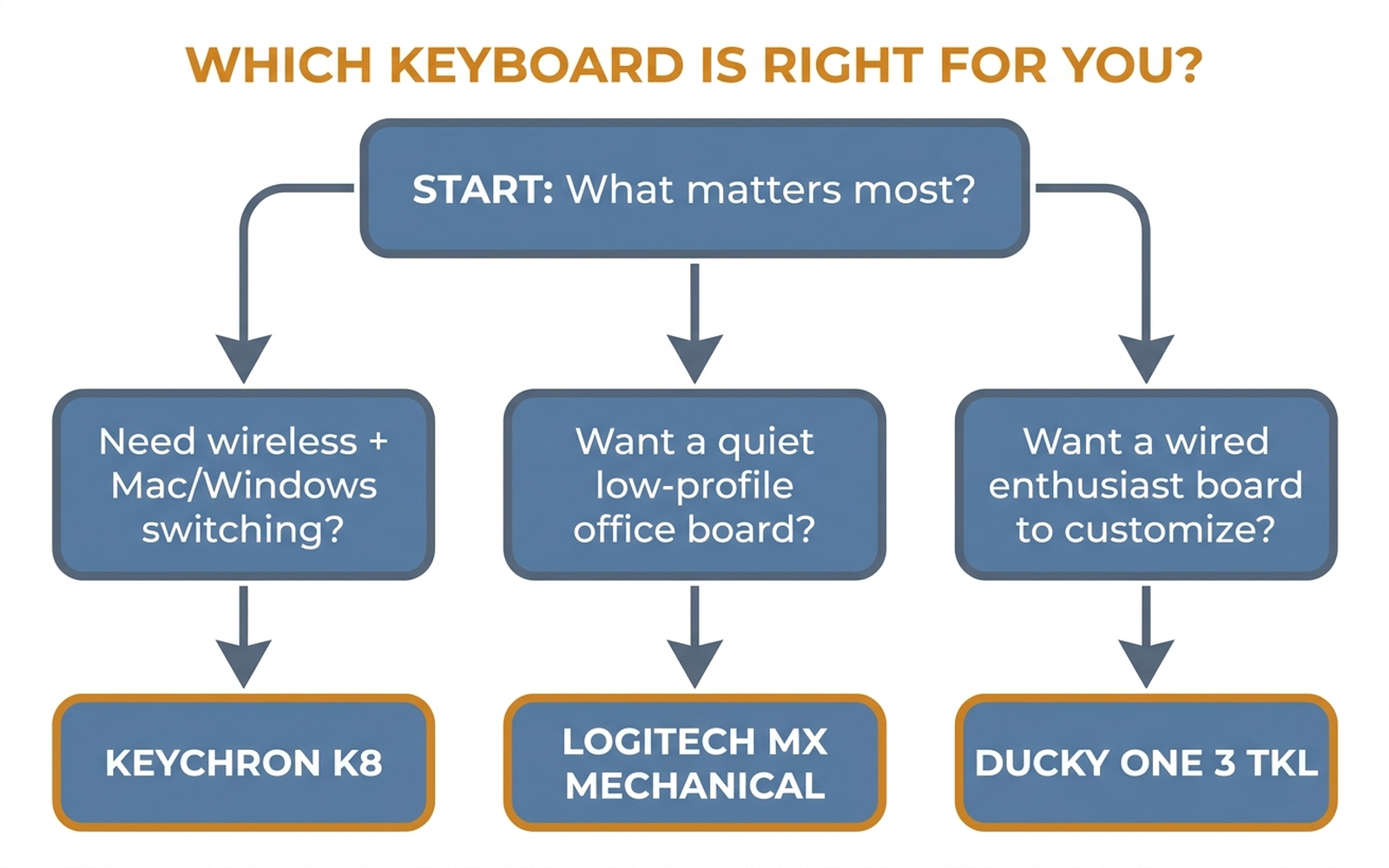
- Start with connectivity. Need to roam between a laptop, a desktop, and a tablet — or specifically a Mac? The Keychron K8 is built for that. Tethered to one PC and want the lowest latency? The wired Ducky One 3 has the edge.
- Then weigh the room. Sharing an office, recording video, or on frequent calls? The low-profile, tactile-quiet Logitech MX Mechanical keeps the peace.
- Finally, decide how much you want to tinker. Want to swap switches and chase the perfect sound? The hot-swap Ducky One 3 (or the hot-swap K8) rewards the effort. Want to unbox it and forget it? The sealed Logitech MX is the lowest-fuss option.
8. Editorial Recommendations by Use Case
- Best for most people / best value: Keychron K8. The combination of wireless, wired, Mac and Windows support, an optional hot-swap board, and a sub-$100 street price makes it the easiest board to recommend to a first-time buyer.
- Best for a quiet or shared workspace: Logitech MX Mechanical (tactile quiet). If a colleague or partner can hear your keyboard, this is the one that won’t get complaints — provided you accept the higher price and fixed switches.
- Best typing feel / best for enthusiasts: Ducky One 3 TKL. The out-of-box sound and feel, plus Cherry MX hot-swap and PBT keycaps, make it the connoisseur’s choice for a wired desk.
- Best for competitive gaming on a budget: Ducky One 3 TKL (wired, low latency) or a linear-switch Keychron K8 if you also want wireless flexibility.
9. Warranty, Support, and Longevity
All three brands offer the standard one-year limited warranty typical of the category in the US (confirm the current terms on each product page, as they occasionally change). Beyond the paper warranty, longevity comes down to design:
- Switch lifespan. Gateron and Cherry MX switches are both rated by their makers for roughly 50 million keystrokes (manufacturer figures). On hot-swap boards (Ducky One 3, hot-swap K8), a worn or scratchy switch can simply be replaced rather than retiring the keyboard.
- Keycap wear. PBT keycaps (Ducky, Logitech) resist shine far better than ABS, so they look new longer.
- Repairability. The hot-swap boards are the most future-proof: switches, keycaps, and stabilizers are all user-replaceable. The sealed Logitech trades that flexibility for simplicity.
The keyboards most likely to still be on your desk in five years are the ones you can service — which tilts the longevity argument toward the hot-swap options.
10. Limitations of This Analysis
This analysis relies on publicly available reviews, independent third-party tests, and manufacturer specifications; we did not personally test these keyboards, and individual experience varies with switch choice, desk setup, and unit-to-unit variance. “Typing feel” and “sound” are partly subjective and depend heavily on the specific switch and keycap configuration you buy — two versions of the same model can feel quite different. Market-size and shipment-share statistics come from third-party research firms whose methodologies differ, so we present them as directional. Prices, ASIN availability, and warranty terms change frequently; always confirm the current price, switch type, and layout on the product page before buying. Manufacturer claims (battery life, switch lifespan, latency) are labeled as such and are not independently verified here.
The Bottom Line
Under $150, you can no longer go badly wrong with a mechanical keyboard — but you can buy the wrong one for you. Choose the Keychron K8 if you want maximum flexibility and value, the Logitech MX Mechanical if you want a quiet, premium office board, and the Ducky One 3 if you want the best wired typing feel you can tune over time. Whichever you lean toward, verify the exact switch, layout, and current price before you check out — and if you want a second opinion on a specific listing, paste the URL into Arekore and let the AI scan the reviews and price history for you in about five minutes.