Best Home-Office Gear for Remote Freelancers in 2026
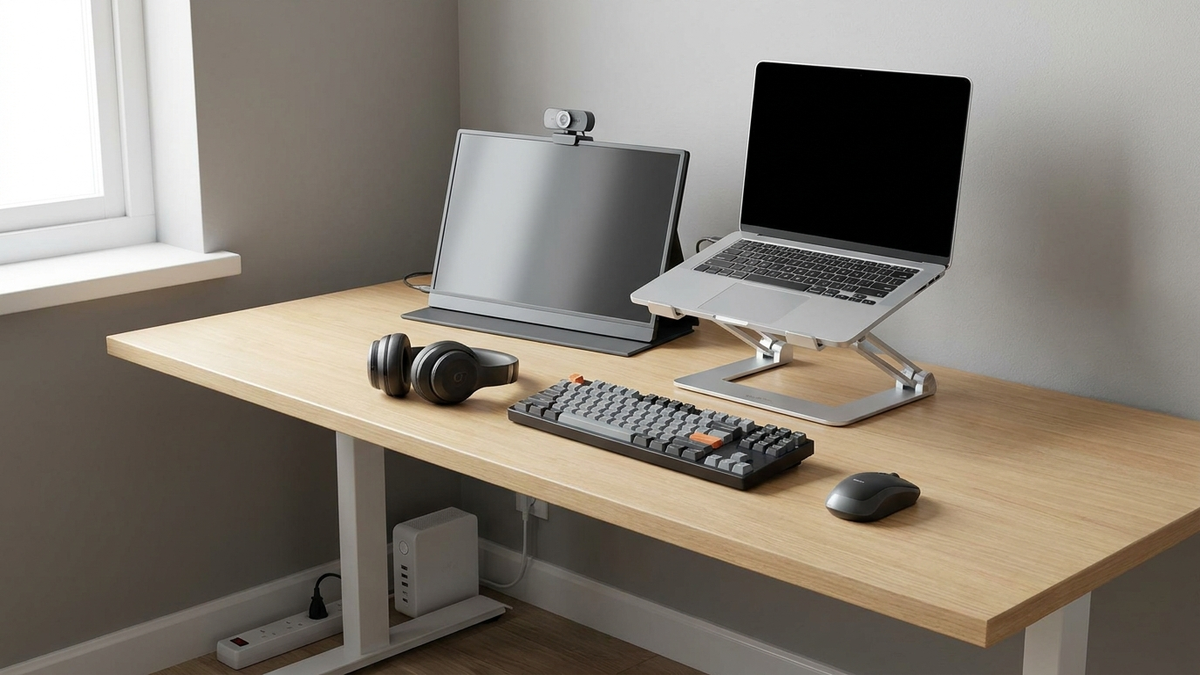
An employee sent home with a company laptop usually gets a monitor, a headset, and an IT ticket for anything that breaks. A freelancer gets none of that — every piece of the home office is a personal purchase, and every gap in it (a blown-out video call, a router that dies mid-invoice-deadline) is a gap in income, not just comfort. With 39% of the US workforce now freelancing in some capacity and roughly 73 million independent workers in the country (MBO Partners’ most recent State of Independence count), this guide focuses on the small set of gear gaps that repeatedly show up in aggregated reviews and freelance-work surveys, rather than a general “best desk accessories” list.
As an Amazon Associate, Arekore earns from qualifying purchases. The Amazon product links in this article include our affiliate tracking ID and may earn us a commission if you buy through them, at no additional cost to you. See our Links Policy for details on how we select products and how commissions do not influence our recommendations.
TL;DR / Quick Verdict
- The most straightforward second-screen fix: the ASUS ZenScreen MB16ACV portable monitor — a single USB-C cable adds a real second screen without a permanent desk setup.
- The professionalism upgrade clients actually notice: the Logitech Brio 500 webcam, rated by Tom’s Hardware as its best webcam pick for most people in 2026, with automatic light correction that removes the washed-out, backlit look of a default laptop camera on client calls.
- The budget noise fix for coworking days: the Anker Soundcore Life Q30, which RTINGS rates as a strong value hybrid-ANC headphone, though it handles low-frequency rumble better than nearby human chatter.
- The ergonomic base everything else sits on: a Nulaxy adjustable laptop stand, cheap enough to be an easy first purchase and a prerequisite for a proper external-keyboard setup.
- The one freelancers forget until it costs them a deadline: an APC Back-UPS Connect battery backup for the router and modem, keeping internet alive through short outages that would otherwise mean a missed client call.
How We Reached These Conclusions (Methodology)
This is an editorial analysis, not a hands-on review. We did not personally test the products covered here. This guide synthesizes (a) aggregated amazon.com customer ratings and the substance of both positive and low-star reviews, sampled the week of 2026-08-27; (b) independent third-party testing from RTINGS and Tom’s Hardware; (c) manufacturer specifications and published warranty terms; and (d) 2026 US freelance-workforce data from Upwork’s Future Workforce Index and MBO Partners’ State of Independence study, plus coworking-cost data from Archie’s industry report. Where we cite a manufacturer figure — noise-reduction percentage, battery runtime, monitor weight — we label it as a manufacturer claim rather than an independently verified result. Prices as of 2026-08-27 are amazon.com figures and fluctuate.
Why Freelancers Have a Different Gear Problem Than Employees
The freelance share of the US workforce keeps climbing: Upwork’s Future Workforce Index puts it at 39% in 2026, up from the mid-30s just a couple of years earlier, and MBO Partners’ State of Independence study counts roughly 73 million Americans doing independent work. Company adoption of freelance talent has normalized just as fast — 68% of companies now hire freelancers regularly, up from 48% in 2020 — which means more freelancers are working directly with client teams on video calls, shared documents, and deadlines that don’t pause for a bad Wi-Fi day.
That shift changes what “home office gear” means. An employee’s gear failure is IT’s problem; a freelancer’s is a lost afternoon of billable time or a client’s bad first impression. It also explains why freelance work is not purely home-based: flexibility (73.2%) and remote work (71.3%) top the list of reasons people choose freelancing, but a large share of that flexibility means alternating between a home desk, a coffee shop, and a coworking space — where the median US coworking membership runs about $220 a month and a plain hot desk averages around $215 a month. Gear that only works bolted to one desk doesn’t fit that pattern.
The Four Gaps That Actually Cost Freelancers Time or Clients
Across aggregated reviews and freelance-work commentary, four recurring gear gaps show up more often than general “nice to have” desk accessories.
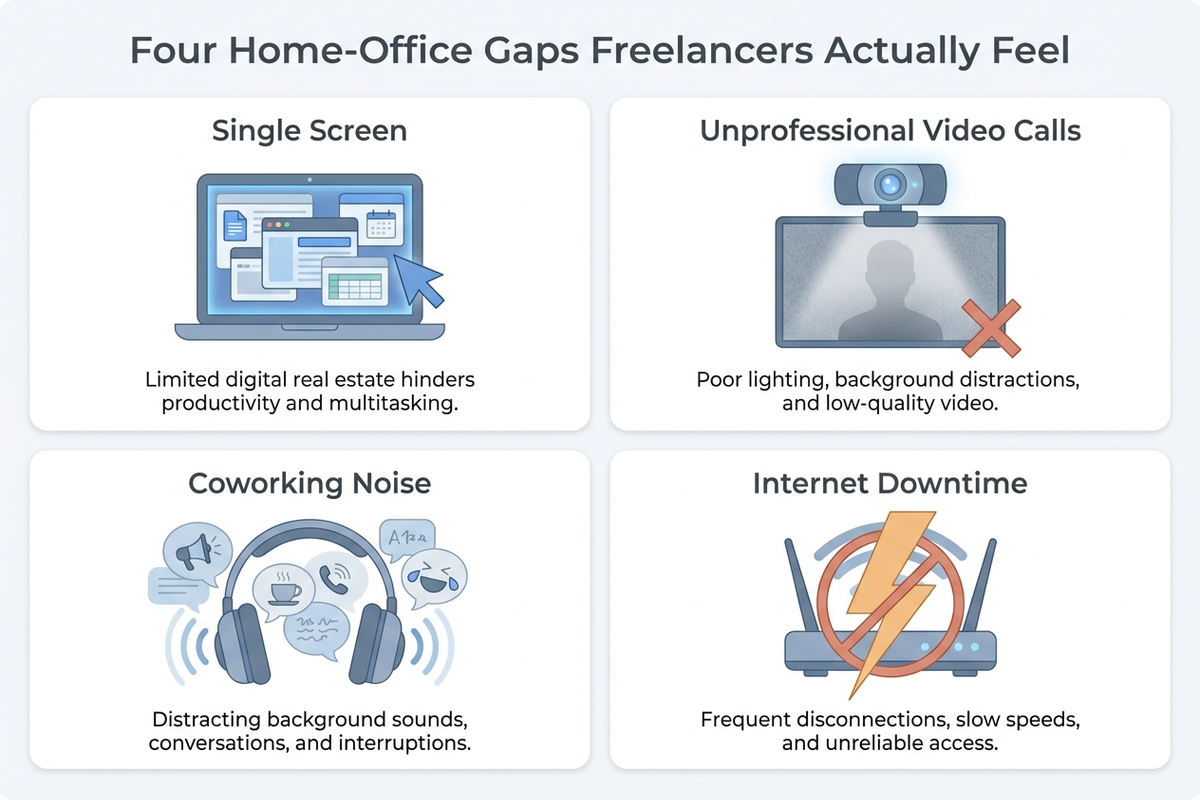
- A single laptop screen for everything. Without an employer-issued monitor, many freelancers work an entire project — invoicing, a client deck, a spreadsheet — on one 13–15 inch panel, which independent reviewers consistently flag as the biggest productivity tax in a home setup.
- A default laptop webcam on client calls. Built-in laptop cameras are typically low-light-weak and wide-angle-distorted; on a call where a client is silently forming an impression, that’s a cost, not just an inconvenience.
- No noise plan for coworking or café days. A freelancer who alternates locations needs headphones built for filtering human chatter, not just travel-style low-frequency noise.
- No backup plan for a home internet outage. An employee’s outage is the company’s problem to route around; a freelancer’s outage is a missed call or a blown deadline, and most home offices have zero backup power for the router.
Comparison Table
Prices as of 2026-08-27 are approximate amazon.com figures and fluctuate.
| Item | ASIN | Approx. price | Key spec | Warranty (manufacturer) | Fixes this problem |
|---|---|---|---|---|---|
| ASUS ZenScreen MB16ACV Portable Monitor | B0966YYP65 | ~$149–$179 | 15.6” FHD IPS, single USB-C cable for power + video, ~1.8 lb | 3-year ASUS warranty | Single-screen workflow limits |
| Logitech Brio 500 Webcam (Graphite) | B0BDYPQS78 | ~$99.99 | 1080p, auto light correction, dual noise-reduction mics, privacy cover | 2 years | Washed-out, unprofessional video on client calls |
| Anker Soundcore Life Q30 Headphones | B08HMWZBXC | ~$79.99–$85.99 | Hybrid ANC (3 modes), up to 50h ANC playtime (mfr. claim) | 18 months | No noise plan for coworking/café days |
| Nulaxy Adjustable Laptop Stand | B07P54RSPY | ~$27.99–$36.99 | Aluminum, dual-support riser, supports up to 22 lb, vented | 12 months | Poor posture, no base for external keyboard setup |
| APC Back-UPS Connect (CP12142LI) | B079HFML55 | ~$99–$139 | Lithium-ion, powers router/modem for hours, compact | 3-year limited | Router/modem downtime during a power outage |
1. ASUS ZenScreen MB16ACV — A Real Second Screen That Fits in a Bag
Freelancers who never got an employer-issued second monitor are, according to aggregated Amazon sentiment, among the most common buyers of portable monitors — not travelers, as the category name implies. The ASUS ZenScreen MB16ACV packs a 15.6-inch FHD IPS panel into a frame weighing roughly 1.8 lb (manufacturer specification) that runs off a single USB-C cable carrying both power and video, with a fold-out kickstand for instant setup on any flat surface. Tech outlets covering the broader ZenScreen line consistently credit the single-cable design for removing the setup friction that keeps many buyers from actually using a second screen daily.
Aggregated Amazon reviews are strongly positive on image quality and portability for the price, with the most common low-star complaints centering on brightness under direct sunlight — a real limitation for anyone planning to use it outdoors at a park table rather than an indoor café or coworking desk. ASUS backs the panel with a 3-year warranty, longer than most portable-monitor competitors.
Check the ASUS ZenScreen MB16ACV on Amazon
2. Logitech Brio 500 — The Webcam Upgrade Clients Actually Notice
A built-in laptop webcam is rarely the freelancer’s own choice — it’s whatever shipped with the machine, usually a low-light-weak, wide-angle sensor sitting below eye level. The Logitech Brio 500 replaces it with a dedicated 1080p sensor featuring RightLight-style automatic light correction, dual noise-reduction microphones, and a physical privacy cover, all over a single USB-C cable. Tom’s Hardware names the Brio 500 its best webcam pick for most people in 2026, specifically for how little manual adjustment it needs to look correct on a call.
Aggregated reviews highlight the auto-framing and automatic exposure correction as the features that most directly fix “washed out” or backlit video without the buyer touching a settings menu — a meaningful difference for freelancers on client calls where fiddling with camera settings mid-meeting isn’t an option. The most common low-star complaint is that the microphone, while adequate, is not a substitute for a dedicated USB microphone for anyone doing frequent presentations or recorded content. Logitech backs the unit with a 2-year warranty.
Check the Logitech Brio 500 on Amazon
3. Anker Soundcore Life Q30 — Budget ANC for Coworking and Café Days
Freelancers who split time between a home desk, a coworking space, and a coffee shop need a noise plan that a home-only worker doesn’t. RTINGS’ review of the Anker Soundcore Life Q30 rates it as a strong value hybrid-ANC headphone, with three switchable modes (Transport, Outdoor, Indoor) and a manufacturer-rated up to 50 hours of ANC playtime (80 hours with ANC off) that comfortably covers a full coworking day without a midday charge.
The honest caveat, per RTINGS and other independent reviewers, is that the Q30’s ANC is tuned more effectively against low-frequency rumble — HVAC systems, traffic — than against the higher-frequency human chatter that actually dominates a busy café or open coworking floor. Aggregated Amazon reviews back this up: buyers are highly satisfied with comfort and battery life, but the most common complaint from anyone hoping for total silence in a chatty office is that voices still get through more than airplane-style engine noise. Readers whose main irritant is specifically conversational noise should weigh a premium flagship model instead, per reviewer consensus; for a budget-conscious freelancer reset, the Q30 remains the strongest value pick in its price tier. Anker backs it with an 18-month warranty.
Check the Anker Soundcore Life Q30 on Amazon
4. Nulaxy Adjustable Laptop Stand — The Cheap Prerequisite Everything Else Needs
A portable monitor and an external webcam both work best at eye level, and a laptop propped flat on a desk sits well below it. The Nulaxy adjustable laptop stand solves that with an aluminum dual-support riser rated by the manufacturer to hold up to 22 lb, a vented design for heat, and a fully adjustable height range compatible with 10–16 inch laptops.
Aggregated Amazon reviews consistently praise the build quality and stability for the price, which is the lowest of any item in this guide. The recurring caveat from Nulaxy’s own product guidance and reflected in reviews: the stand is meant to be paired with an external keyboard and mouse, not typed on directly, since raising the laptop makes its built-in keyboard and trackpad awkward to use — a detail worth planning for rather than a flaw specific to this stand. There’s no dedicated third-party lab test for a product in this category, so this pick rests primarily on aggregated review consistency rather than an independent test.
Check the Nulaxy Adjustable Laptop Stand on Amazon
5. APC Back-UPS Connect — Keeping the Router Alive Through a Short Outage
The gear gap freelancers notice least until it costs them something: a home internet outage. An employee’s outage gets routed around by IT or covered by a company-issued hotspot; a freelancer’s outage is a missed client call or a blown deadline with no one else to escalate to. The APC Back-UPS Connect (CP12142LI) is a compact lithium-ion battery backup built specifically to power a router and modem — not a full desktop — for an extended runtime during a power interruption, by manufacturer specification.
Aggregated Amazon reviews are positive on the compact form factor compared to bulkier traditional UPS units, and on the simplicity of a device that only needs to keep two boxes alive rather than an entire office. The most common low-star complaint concerns battery degradation after a couple of years of daily charge cycles, which is typical for lithium-ion UPS units generally rather than a defect specific to this model — worth factoring into the replacement timeline rather than treating it as a one-time purchase. APC backs the unit with a 3-year limited warranty.
Check the APC Back-UPS Connect on Amazon
Making the Setup Actually Work Across Locations
Buying the gear solves half the problem; freelancers who split time across a home desk, a coworking space, and the occasional café need a routine that keeps it all charged and ready to move.
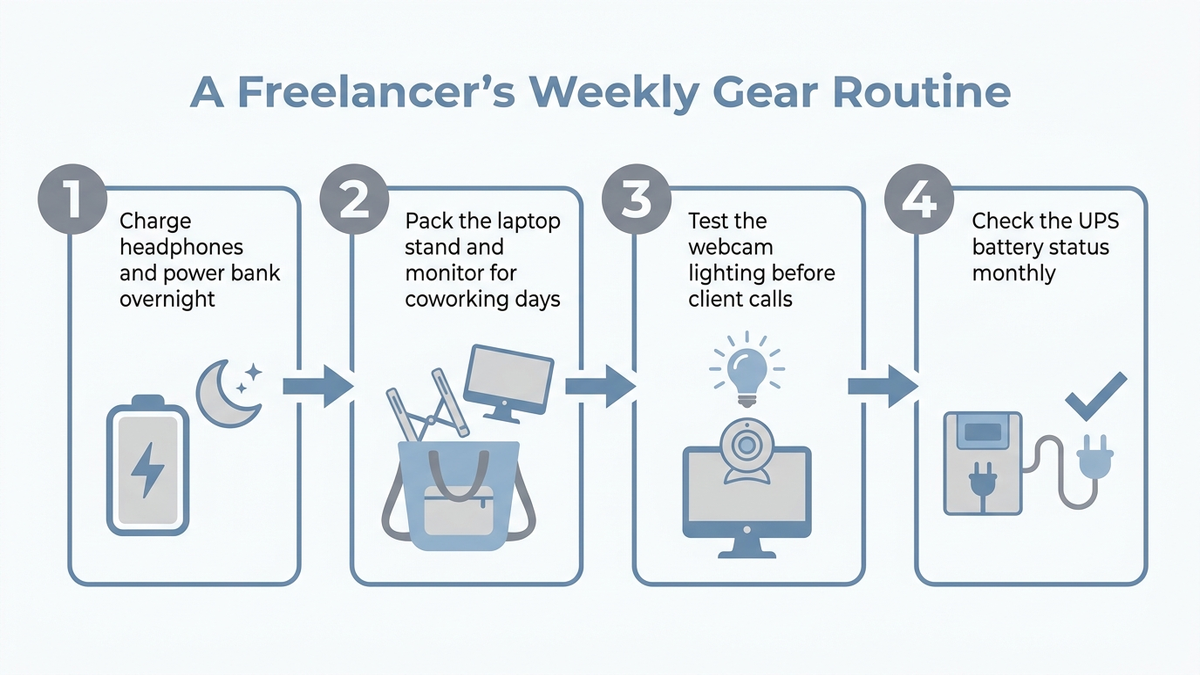
- Charge the headphones overnight, every night, not just before a coworking day. The most common “dead battery” complaint in aggregated reviews traces back to charging only when the previous charge was already low.
- Keep the laptop stand and monitor in a single grab-and-go bag if you alternate locations. Digging for two separate items across drawers is the most common reason reviewers say portable gear stops actually getting used.
- Test webcam lighting before the call, not during it. A minute spent facing a window or a small desk lamp before a client call avoids the mid-meeting scramble that automatic light correction can only partly fix in a genuinely dark room.
- Check the UPS battery status monthly. Lithium-ion battery backups lose capacity over time; a quick monthly check (most units have a status light or app) avoids discovering a dead backup during the outage it was bought for.
How to Prioritize: A Budget Flowchart
Few freelancers need all five items at once. This is the order that addresses the most common, highest-cost gaps first on a limited budget.
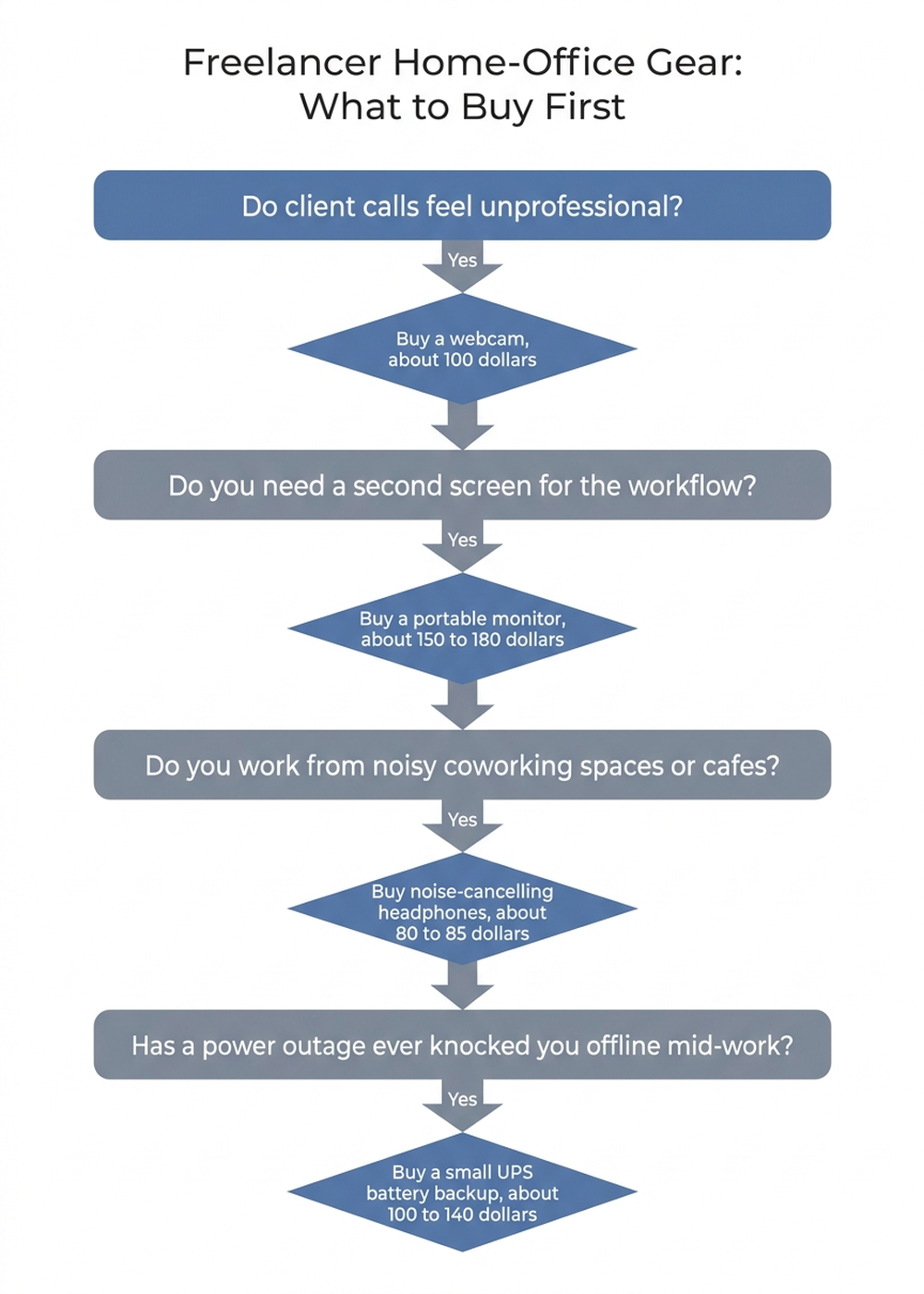
- Start with the laptop stand if you don’t have one (about $28–$37). It’s the cheapest item here and a prerequisite for using an external monitor or webcam at the correct eye level.
- Add the webcam next if client calls are a regular part of the work (about $100). This is the upgrade most likely to change a client’s first impression, and it pays for itself quickly for anyone doing weekly video calls.
- Add the portable monitor once single-screen work is a measurable productivity drag (about $150–$180). Worth confirming this is a real, recurring bottleneck — not every freelance workflow needs a second screen.
- Add the headphones if coworking or café noise is a genuine daily problem (about $80–$86). Skip this if you work exclusively from a quiet home office.
- Add the UPS last, as insurance rather than a daily-use item (about $99–$139). It’s the one purchase that pays for itself entirely on the day it’s needed and does nothing visible any other day — budget for it once the other, more frequently used items are covered.
Editorial Recommendations by Use Case
- Best single purchase for anyone on frequent client video calls: the Logitech Brio 500 — independent reviewers and aggregated sentiment agree it’s the fastest fix for an unprofessional-looking call.
- Best for freelancers who never got a second monitor: the ASUS ZenScreen MB16ACV, backed by a 3-year warranty and a single-cable setup reviewers consistently credit for actual daily use.
- Best for a freelancer who splits time between home and coworking spaces: the Anker Soundcore Life Q30, with the honest caveat from RTINGS that it beats hums and rumble better than chatter.
- Best cheapest fix with the broadest impact: the Nulaxy laptop stand — the foundation every other ergonomic and video upgrade depends on.
- Best insurance purchase, not a daily-use one: the APC Back-UPS Connect — low-visibility until the day a power blip would otherwise cost a client call.
Limitations of This Analysis
This analysis relies on publicly available Amazon reviews, independent third-party tests, and manufacturer specifications; we did not personally test these products, and individual experience varies with home layout, internet provider reliability, and the specific mix of coworking, café, and home-desk time. Freelance-workforce and coworking-cost statistics are drawn from several distinct 2026 surveys and industry reports with different methodologies and sample populations, so they should be read as directional context rather than a single unified figure. Prices, color variants, and warranty terms change frequently on Amazon listings — confirm the current price and version on the product page before buying. Noise-cancellation performance, battery runtime, and UPS backup time can vary with fit, ambient conditions, and unit-to-unit variance, and manufacturer figures are lab-measured rather than independently reproduced by us.
The Bottom Line
A freelancer’s home office doesn’t need an employer’s full IT budget, but the five gaps above — a single screen, a weak webcam, no noise plan, no ergonomic base, and no outage backup — are the ones that repeatedly show up in aggregated reviews as costing real time or client impressions, not just comfort. Starting with the cheapest, highest-leverage fix (a laptop stand) and adding a webcam, monitor, headphones, or UPS only once a specific gap is actually costing you something keeps the total spend flexible, from about $28 for the first item to roughly $490 if every gap applies. Whichever items you prioritize, verify the exact current price and version before checkout — and if you want a second opinion on a specific listing, paste the URL into Arekore and let the AI scan the reviews and price history for you in about five minutes.