Best Computer Monitors in 2026: Dell vs LG Compared
A laptop screen alone is not a home office setup — it is a compromise. Once you add a second display, the questions multiply fast: 1440p or 4K? A USB-C cable that also charges your laptop, or three separate cables? A built-in KVM switch, or none at all? This guide compares three monitors that anchor distinct approaches to the modern home-office display — the docking-focused Dell UltraSharp U2724DE, the value 4K LG UltraFine 27UP850-W, and the dual-input Samsung ViewFinity S8 (S80UD) — using aggregated Amazon review data, independent testing, and manufacturer specifications.
As an Amazon Associate, Arekore earns from qualifying purchases. The Amazon product links in this article may include our affiliate tracking ID and may earn us a commission if you buy through them, at no additional cost to you. See our Links Policy for details on how we select products and how commissions do not influence our recommendations.
TL;DR / Quick Verdict
- Best for single-cable laptop docking: the Dell UltraSharp U2724DE — a 27-inch QHD (2560x1440) IPS Black panel with a Thunderbolt 4 hub that can charge a laptop at up to 90W over one cable, usually in the $450–520 range.
- Best value 4K with USB-C: the LG UltraFine 27UP850-W — a 27-inch 4K UHD IPS panel with 90W USB-C power delivery and DisplayHDR 400, typically $300–380, one of the more affordable ways into a genuine 4K workspace.
- Best for switching between two computers: the Samsung ViewFinity S8 (S80UD) — a 27-inch 4K UHD panel with a built-in KVM switch and 90W USB-C, letting one keyboard and mouse control two machines without a separate KVM box, typically $330–400.
- The real choice: decide whether you need one cable to replace a docking station entirely (Dell), the most 4K resolution per dollar (LG), or the ability to flip between a work laptop and a personal PC on one screen (Samsung).
How We Reached These Conclusions (Methodology)
This is an editorial analysis, not a hands-on review. We did not personally test the products covered here. Instead, this guide synthesizes three kinds of public information: (a) aggregated amazon.com customer ratings and the substance of low- and high-star reviews, sampled in August 2026 — we did not capture and cannot report an exact review sample size for each model; (b) independent third-party testing and reporting from PCWorld, DisplayNinja, ITPro, and Tom’s Guide; and (c) manufacturer specifications. Where we cite a manufacturer figure — a power-delivery wattage, a color-gamut percentage, or a contrast ratio — we label it as a manufacturer claim rather than an independently verified result. Prices are amazon.com figures at the time of writing and change frequently.
The US Monitor Market in 2026
The monitor category is larger and more competitive than the “just a screen” reputation suggests. Research and Markets’ Monitor Market Report puts the global computer monitor market at roughly $75.2 billion in 2026, with growth projected toward $87.2 billion by 2030. Samsung Electronics, LG Electronics, and Dell Technologies are consistently named among the largest players in the category, alongside HP, Lenovo, and Acer, while ASUS, Acer, and Dell lead the gaming-monitor sub-segment specifically. Buying guides published this year converge on a similar recommendation for most home-office shoppers: a 27-inch 1440p or 4K IPS panel with USB-C power delivery in the $300–450 range covers the large majority of knowledge-worker needs, with 32-inch 4K or ultrawide displays reserved for spreadsheet-heavy or multi-window workflows. That “single-cable docking” trend — one USB-C cable carrying video, data, Ethernet, and laptop charging — is the single biggest shift in home-office monitor design since the return-to-office and hybrid-work era began.
1. First, Decide What Matters Most to You
Before comparing specific models, settle the question that explains most of the differences here: what problem are you actually trying to solve with a second screen?
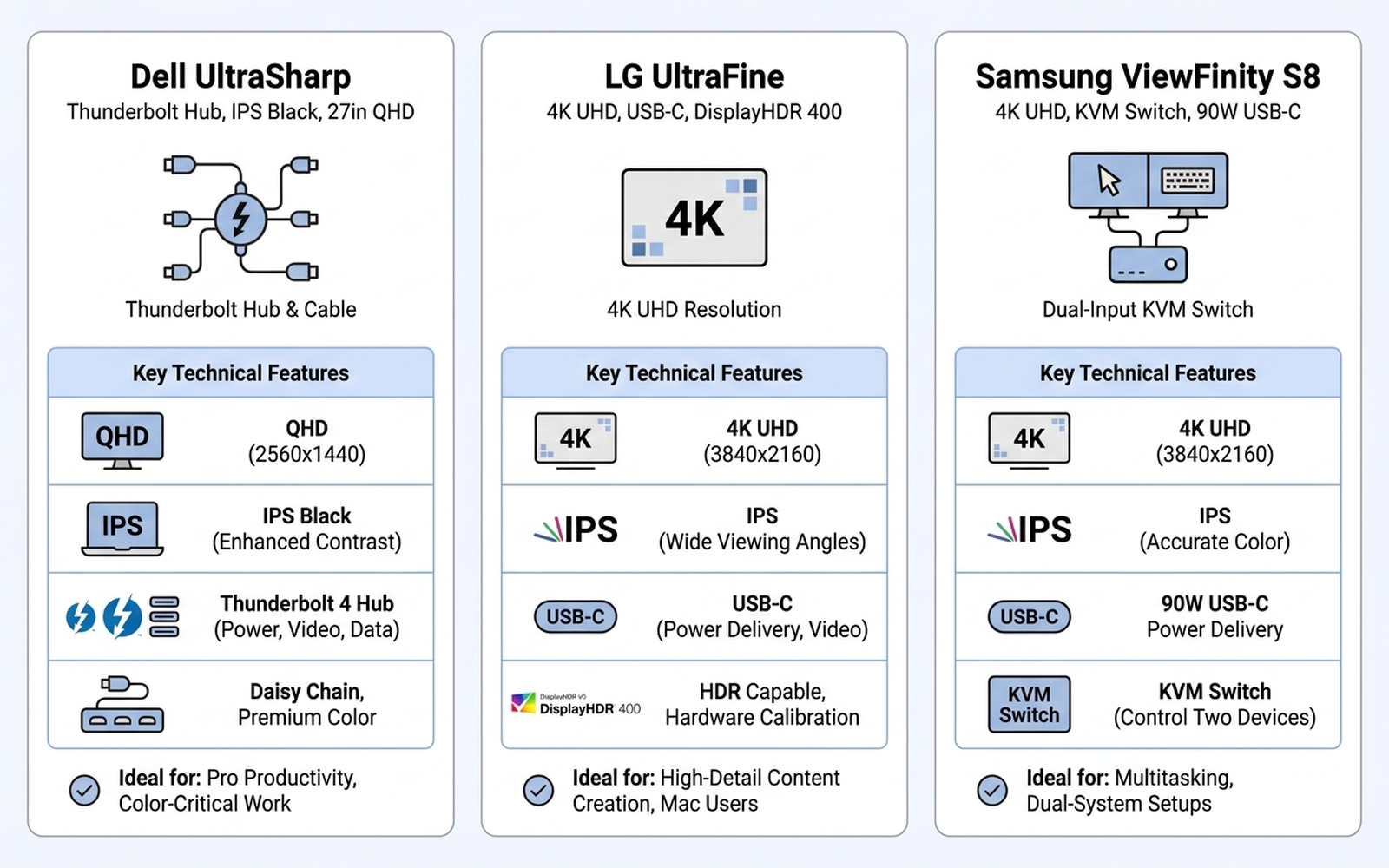
- Tired of plugging in three cables (power, video, USB) every time you sit down? A Thunderbolt or USB-C hub monitor like the Dell UltraSharp replaces a separate docking station with one cable.
- Want the sharpest possible image for design, photo editing, or just more visible desktop space, without paying a premium? A value 4K panel like the LG UltraFine gets you there for less than most 4K competitors.
- Juggling a work laptop and a personal computer, or a desktop and a laptop, on the same desk? A monitor with a built-in KVM switch like the Samsung ViewFinity S8 lets one keyboard and mouse control both without buying a separate KVM device.
A pattern shows up across the aggregated reviews for all three: buyers are rarely disappointed by sharpness or color at this price tier. Where satisfaction diverges is cable management and workflow fit — whether the monitor actually solves the specific inconvenience that made them buy in the first place.
2. The Technology: What Actually Separates These Monitors
All three are IPS-panel monitors in a similar price band, so the differences that matter come down to specific engineering choices rather than raw image quality:
- Resolution and pixel density. The Dell UltraSharp U2724DE uses a 2560x1440 (QHD) IPS Black panel — a panel technology Dell markets for deeper blacks and higher contrast than standard IPS. The LG UltraFine 27UP850-W and Samsung ViewFinity S8 both use 3840x2160 (4K UHD) panels, giving noticeably sharper text and more usable desktop space at the same 27-inch size, at the cost of needing more GPU power to drive at high refresh rates.
- USB-C power delivery. This is the single most-cited feature across all three product listings’ reviews. The Dell delivers up to 90W over its Thunderbolt 4 connection (manufacturer figure); the LG UltraFine delivers up to 90W over standard USB-C; the Samsung ViewFinity S8 also delivers up to 90W over USB-C. At this wattage, all three can fully charge most 13- to 16-inch laptops through the video cable alone, eliminating a separate power brick — a detail reviewers across PCWorld and DisplayNinja consistently flag as the practical reason to pick a USB-C monitor over a cheaper HDMI-only alternative.
- Connectivity for multiple sources. The Dell’s Thunderbolt 4 hub is built specifically for a single laptop-docking workflow, with additional USB-A and USB-C ports and, on some configurations, an RJ45 Ethernet jack. The Samsung ViewFinity S8’s built-in KVM switch is the connectivity feature that sets it apart: it can accept two separate computer inputs and switch the same USB keyboard/mouse between them without unplugging anything, a feature independent reviews at ITPro describe as effective for hybrid-work setups juggling a work laptop and personal PC.
- HDR and color gamut. The LG UltraFine 27UP850-W is VESA DisplayHDR 400 certified and covers a manufacturer-claimed 95% DCI-P3 color gamut. The Dell UltraSharp covers a manufacturer-claimed 98% DCI-P3. The Samsung ViewFinity S8 is HDR10-certified and covers 99% sRGB by manufacturer claim; independent color-accuracy testing found average color error (Delta E) results ranging from under 1 to as high as 1.8 depending on the specific test unit and calibration — a reminder that manufacturer color-gamut percentages describe the panel’s potential range, not necessarily out-of-box accuracy.
- Ergonomic stand. All three ship with height-adjustable stands; the Dell and Samsung both add pivot (portrait rotation) and tilt adjustment, which buying guides identify as important for anyone sitting at the monitor for a full workday.
Bottom line: the meaningful differences are cable-management architecture and multi-source switching, not panel sharpness — all three deliver a genuinely good image at this price tier.
3. Comparison Table
Prices are amazon.com figures at the time of writing (August 2026) and fluctuate.
| Model | ASIN | Approx. price | Resolution | USB-C power delivery | Standout feature |
|---|---|---|---|---|---|
| Dell UltraSharp U2724DE | B0CNJSX8N8 | ~$450–520 | 2560x1440 (QHD) | 90W (Thunderbolt 4) | Docking-station replacement |
| LG UltraFine 27UP850-W | B08YJMMYBX | ~$300–380 | 3840x2160 (4K UHD) | 90W (USB-C) | Best value 4K + HDR400 |
| Samsung ViewFinity S8 (S80UD) | B0D1DW1Z73 | ~$330–400 | 3840x2160 (4K UHD) | 90W (USB-C) | Built-in KVM switch |
4. Customer Sentiment Synthesis
What aggregated Amazon reviews and independent testers say about each monitor.
Dell UltraSharp U2724DE (ASIN B0CNJSX8N8)
Independent reviews from PCWorld, ITPro, and DisplayNinja consistently describe the U2724DE as a “do-it-all” home-office display, and aggregated Amazon reviews echo the same theme: buyers who bought it specifically to replace a laptop docking station report that the single-cable setup — video, data, Ethernet, and laptop charging all through one Thunderbolt cable — works as advertised. The IPS Black panel is repeatedly cited for deeper contrast than a standard IPS monitor at a similar price. The most common criticism in lower-star reviews is price relative to the LG and Samsung alternatives here, since the U2724DE sits meaningfully above both on a per-monitor basis; a smaller number of reviews note that 1440p resolution feels dated next to competitors offering 4K at a lower price. Buyers who prioritize the docking convenience over raw resolution are consistently satisfied; buyers primarily chasing 4K sharpness for the money are more likely to look elsewhere.
LG UltraFine 27UP850-W (ASIN B08YJMMYBX)
Reviews of the LG UltraFine 27UP850-W, including a detailed independent test from MonitorNerds, describe it as one of the more complete 4K monitors available below $400, citing accurate out-of-box color, a matte anti-glare coating well-suited to bright home offices, and a sturdy height/tilt/pivot stand. Aggregated Amazon reviews frequently mention USB-C laptop users appreciating the single-cable convenience, similar to the Dell but at a meaningfully lower price. The recurring criticism across reviews is the 60Hz refresh rate, which is standard for a productivity-focused 4K monitor but a drawback for anyone hoping to also use the display for fast-paced gaming; a smaller number of reviewers mention that the DisplayHDR 400 certification produces a modest HDR effect compared with more expensive HDR tiers. For buyers whose primary use case is document work, coding, or photo review rather than gaming, the sentiment is strongly positive relative to its price.
Samsung ViewFinity S8, S80UD model (ASIN B0D1DW1Z73)
Independent reviews from ITPro and PetaPixel describe the ViewFinity S8 as a business-and-creator-focused 4K monitor, with PetaPixel specifically praising its color accuracy for photo and video work. Aggregated Amazon and Best Buy reviews center heavily on the built-in KVM switch, with buyers who split time between a work laptop and a personal computer, or a laptop and a desktop, describing it as eliminating the need for a separate KVM box — a workflow independent reviewers also flag as the model’s defining feature relative to the Dell and LG alternatives here. Color-accuracy testing across different review sources produced a wider spread than the LG’s, with average Delta E figures ranging from under 1 in some tests to 1.8 in others, suggesting more unit-to-unit or calibration variance than competitors. The recurring criticism in the review base is the KVM switch’s setup process, which a subset of reviewers describe as less intuitive than expected on first use, though most report it working reliably once configured.
5. How to Match Specs to Your Desk
Getting the spec sheet right matters more for a monitor than for most electronics, because you will look at it for eight or more hours a day.
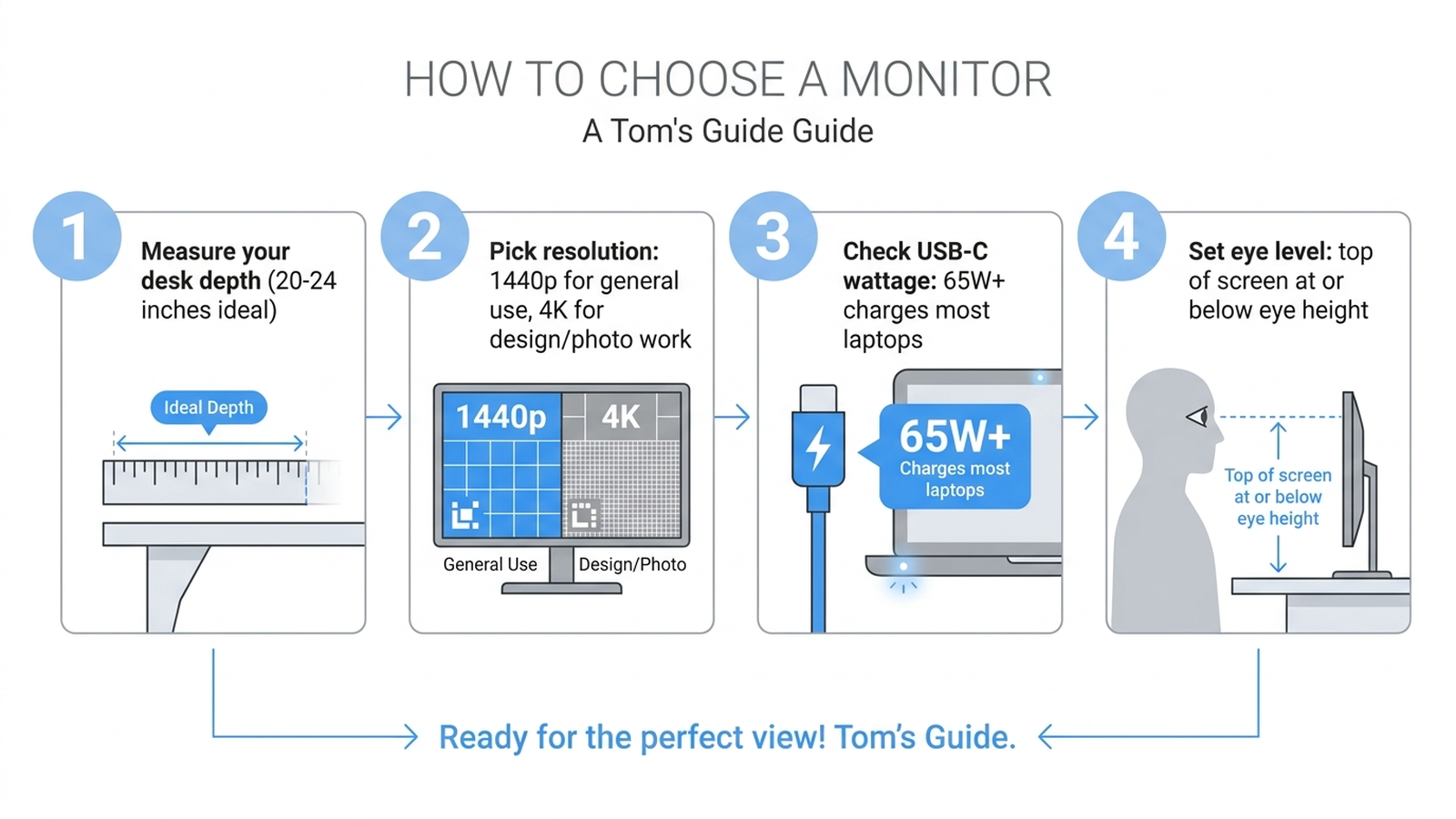
- Measure your desk depth first. A 27-inch monitor typically needs 20–24 inches of desk depth to sit at a comfortable arm’s-length viewing distance; a shallower desk may call for a 24-inch model instead.
- Match resolution to your actual work. 1440p (the Dell here) is plenty sharp for email, browsers, and most office software. 4K (the LG and Samsung here) earns its keep for design, photo or video editing, or fitting more windows on screen at once — but requires a capable GPU to drive comfortably at higher refresh rates.
- Check the USB-C wattage against your laptop’s charging needs. All three monitors here deliver 90W (manufacturer figure), enough for the large majority of 13- to 16-inch laptops; a thin ultrabook may only need 65W, while some 16-inch workstation laptops require 100W or more and won’t fully charge from any of these three while under heavy load.
- Set the correct eye level. The top of the screen should sit at or slightly below eye level when sitting upright, which is why all three models’ height-adjustable stands matter more in daily comfort than any spec on this list.
6. Which One Should You Buy? A Decision Flow
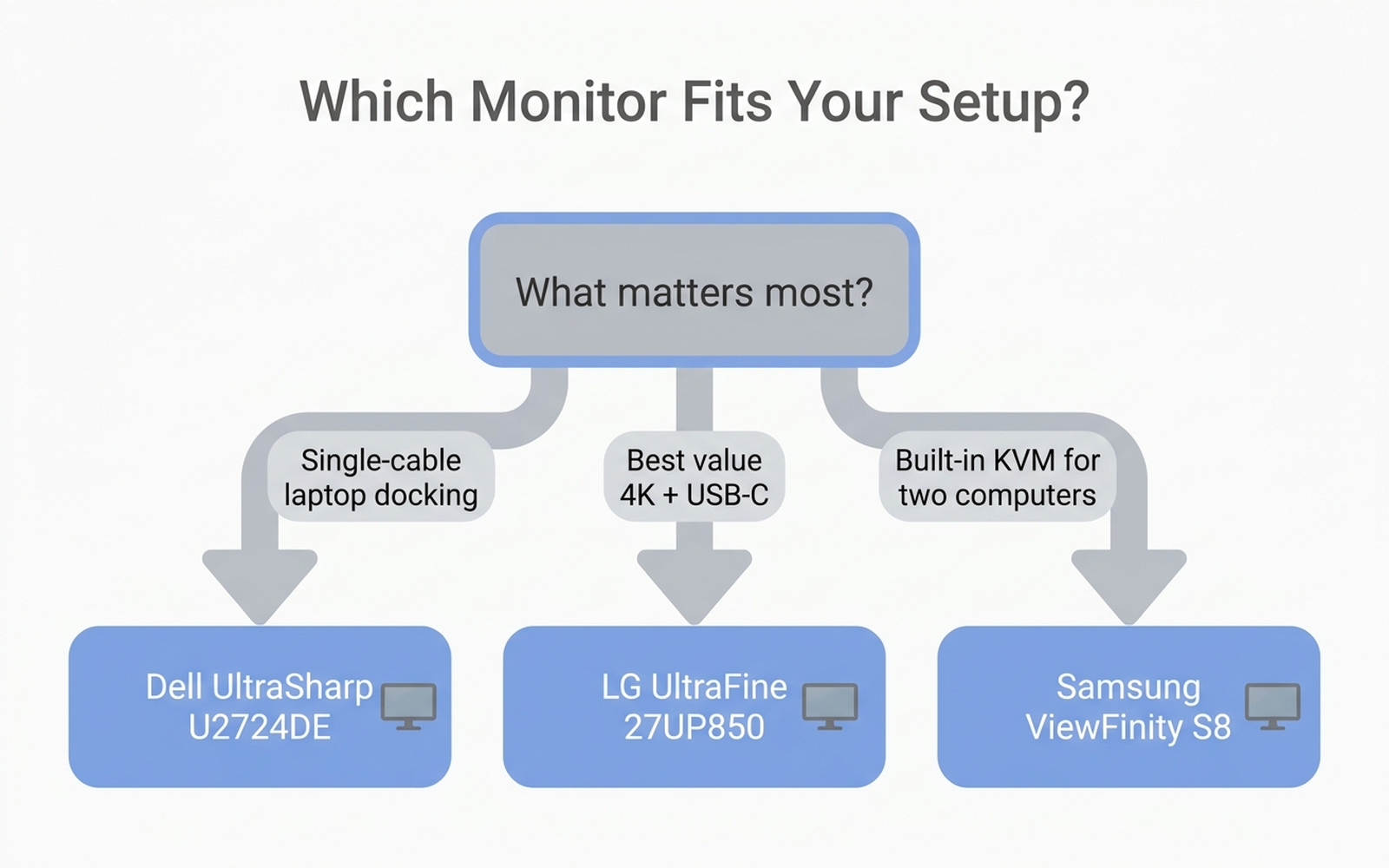
- You want one cable to fully replace a docking station → Dell UltraSharp U2724DE. Thunderbolt 4 hub, RJ45 Ethernet on most configurations, and 90W charging make it the closest thing to a docking station in monitor form.
- You want the most 4K resolution for the least money → LG UltraFine 27UP850-W. The lowest price of the three here while still offering 4K, USB-C 90W, and DisplayHDR 400.
- You regularly switch between two computers on one desk → Samsung ViewFinity S8. The built-in KVM switch is the one feature the other two lack entirely.
- You do color-sensitive photo or video work → LG UltraFine or Samsung ViewFinity S8, both 4K with DCI-P3/sRGB coverage in the high-90% range by manufacturer claim; verify calibration before color-critical work regardless of model.
- You mostly use office software and browsers → any of the three overshoots your needs slightly; the LG UltraFine’s price makes it the easiest one to justify if resolution alone isn’t the deciding factor.
7. Warranty and Support
Warranty terms are broadly similar across the category and mostly reflect standard practice for premium monitors:
- Dell: typically a 3-year limited warranty, consistent with Dell’s UltraSharp line and generally longer than budget monitor brands.
- LG: typically a 1-year limited warranty, standard for LG’s UltraFine/monitor lineup.
- Samsung: typically a 1-year limited warranty for the ViewFinity S8 line, in line with most Samsung monitor products.
The Dell’s longer standard warranty is a meaningful factor if a monitor is expected to anchor a home-office setup for several years; buyers of the LG or Samsung should weigh the shorter coverage against the lower purchase price.
8. Editorial Recommendation by Use Case
- Best overall for a laptop-centric home office: Dell UltraSharp U2724DE — the Thunderbolt hub and 3-year warranty justify the premium for buyers who dock a laptop daily.
- Best value: LG UltraFine 27UP850-W — 4K resolution and USB-C power delivery at the lowest price of the three.
- Best for dual-computer workflows: Samsung ViewFinity S8 (S80UD) — the only one of the three with a built-in KVM switch.
- Best for color-sensitive creative work: LG UltraFine 27UP850-W or Samsung ViewFinity S8 — both 4K with high color-gamut coverage, verified against independent test data rather than manufacturer claims alone where available.
- Best for a shallow or small desk: none of these three are ideal at 27 inches; buyers with under 20 inches of desk depth should look at 24-inch alternatives from the same brands instead.
9. Limitations of This Analysis
This analysis relies on publicly available reviews, third-party tests, and manufacturer specifications rather than our own hands-on testing. Individual experience may vary based on GPU capability, desk setup, ambient lighting, and unit-to-unit panel variance, which independent color-accuracy testing suggests is real even within the same model line. Power-delivery wattage, color-gamut percentages, and contrast-ratio figures are manufacturer or review-platform claims rather than measurements we independently verified. Monitor lineups change frequently and manufacturers often sell closely related SKUs (for example, multiple U2724D variants from Dell) with different port configurations at different prices — always confirm the exact model, ASIN, and current price on the product page before purchasing.
10. Verify Before You Buy
A spec sheet full of impressive numbers only tells part of the story. Before you buy a monitor you’ll look at for eight hours a day, it pays to read past the five-star reviews into the one- and two-star ones — that’s where dead pixels, stand wobble, and KVM setup headaches surface.
That’s exactly what Arekore is built for. Paste a product URL and our AI shopping assistant checks review authenticity, surfaces the substance of low-star feedback, and compares prices across retailers — turning an afternoon of research into about five minutes. Deciding between the LG UltraFine and the Samsung ViewFinity S8? Let the aggregated data, not the marketing copy, make the call.
Products mentioned in this article
- Dell UltraSharp U2724DE 27” QHD Thunderbolt Hub Monitor — view on Amazon
- LG UltraFine 27UP850-W 27” 4K UHD USB-C Monitor — view on Amazon
- Samsung ViewFinity S8 (S80UD) 27” 4K UHD KVM Monitor — view on Amazon
Product links go to amazon.com. Prices and availability were accurate at the time of writing and are subject to change.